Capture Screenshots by Website Category
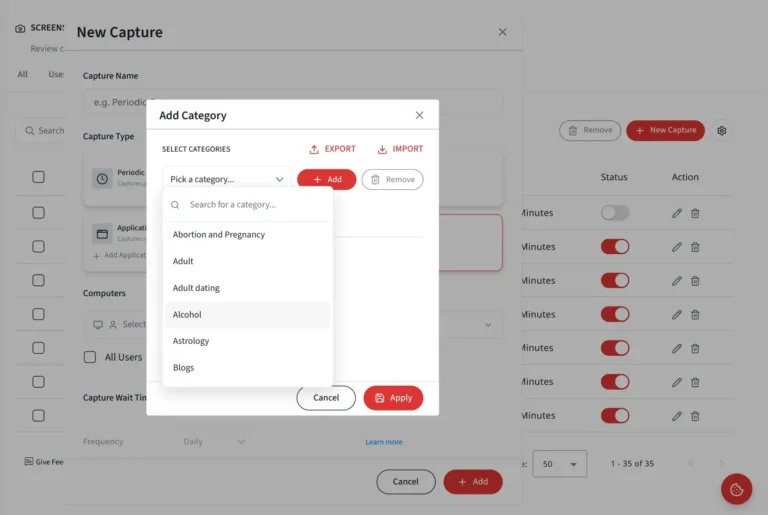
Set up screenshot capture rules using predefined website categories, instead of adding websites one at a time. Apply monitoring policies across entire groups of websites, with a single configuration.
Trusted by 100,000+ professionals in 55 countries
*No credit card required · 14-day free trial · Easy setup
Trusted by enterprises, healthcare organizations, financial and professional services firms, and government agencies at every level.
How BrowseReporter captures screenshots by website category
Managing screenshots at the category level makes monitoring much easier. Rather than creating rules for individual websites, you can apply screenshot policies to predefined website categories and extend your existing screenshot monitoring setup.
One rule, a whole category
Apply a screenshot capture policy to a complete category of websites with a single configuration.
Less setup and maintenance
Reduce setup and maintenance effort as the number of monitored websites grows. There’s no need to manage long lists of URLs.
Aligned to your taxonomy
Reuse the same category model used in BrowseControl, so there is no separate taxonomy to maintain.
Better Context for Reviews
Each screenshot includes category information, making it easier to search, filter, and review captured activity.
Why per-URL Screenshot Configuration Doesn’t Scale
As the number of websites to monitor scales, creating screenshot rules for individual URLs becomes harder to maintain. The process takes more time, increases the risk of errors, and provides limited context during reviews.
Manual setup doesn't scale
Adding and maintaining rules for every website becomes increasingly difficult as monitoring requirements expand.
Repetition across related sites
Teams often need identical rules across related websites. Configuring each URL individually creates unnecessary work.
No category context in review
Screenshots are harder to analyze when there is no clear indication of the type of website being captured.
Built to Make Screenshot Capture Rules Scalable
Reduce repetitive work
Manage screenshot policies using reusable website categories instead of creating rules for individual websites.
Scale coverage, not overhead
Monitor more websites without significantly increasing configuration and maintenance efforts.
Consistent policy design
Use a shared category structure across the organization to keep screenshot policies consistent and avoid overlaps or gaps.
Faster operator ramp-up
Category-based rules are easier to understand than long lists of domains, helping new operators become productive faster.
So, What’s Included?
A new capture type that reuses CurrentWare’s existing category model, with flexible configuration and review capabilities. Users can filter by area below.
Configuration
Website Category capture type
A dedicated screenshot capture option that uses the existing BrowseControl category model. No additional category management is required.
Multi-select with search
Quickly find and select multiple website categories when creating rules for specific PC groups.
Per-PC setup
Assign category-based screenshot rules to the appropriate teams, departments, kiosks, call centers, or shared workstations.
Review & Filter
Category filter on All page
Filter screenshots on the ‘All’ page using website categories to quickly narrow results and focus on specific types of activity.
Category labels on thumbnails
Category labels appear directly on screenshot thumbnails, making it easy for you to identify the type of website captured at a glance.
Editable, removable rules
Update or remove website category rules anytime to keep screenshot policies aligned with changing monitoring requirements.
Screenshots by website category use cases
Monitor groups of related websites without maintaining extensive domain lists. Select the categories you want to monitor, assign them to the appropriate devices, and review screenshots with clear category labels.
Watch high-risk categories
Capture screenshots across entire categories such as social media or file-sharing websites without adding every domain individually.
Target specific machines
Create stricter monitoring policies for kiosks, call centers, shared workstations, or other high-risk environments.
Support compliance coverage
Monitor activity related to sensitive functions such as finance, HR, or other regulated business areas.
Speed up investigations
Use category-based filters to quickly locate screenshots related to a specific type of web activity.
Benefits of Screenshots by Website Category
Searchable category selection and flexible administration make it easier to create, update, and deploy policies across multiple PC groups. Category-aware filtering also helps teams find relevant screenshots faster.
Less repetitive configuration
Manage monitoring policies through reusable website categories instead of maintaining large URL lists.
Scales with coverage
Expand website coverage without creating additional administrative overhead.
Consistent policy design
A shared category framework helps keep monitoring rules aligned across teams and departments.
Faster Onboarding
Clear category names make it easier for new administrators to understand and manage screenshot policies.
Faster compliance response
Update monitoring requirements at the category level instead of modifying individual rules one at a time.
Category-aware review
Category labels and filters help reviewers quickly find and validate relevant screenshots.
Built on the differentiators teams choose CurrentWare for
Every capability ships on the same foundation, flexible deployment, privacy-first oversight, and pricing you can see before you talk to sales.
Deployment
On-premises or cloud
Keep monitoring inside your own network or run it in the cloud. Your data stays where your policy requires.
Privacy-first
Proportionate by design
Role-based access, granular controls, and configurable retention keep oversight transparent and defensible.
Transparent pricing
Published up front
Pricing is public. See plans and pricing without waiting on a quote.
Built to support compliance across regions
USA · ECPA & state laws (CCPA/CPRA, BIPA)
Canada · PIPEDA
UK · UK GDPR & ICO guidance
Audit-Ready, With Data Governance built in
Screenshot only the website categories that matter to your organization while maintaining control over how captured data is stored and accessed. Configure retention periods, manage permissions through role-based access controls, and maintain detailed audit logs for accountability and reporting. BrowseReporter can be configured to support compliance initiatives aligned with frameworks such as HIPAA, SOC 2, PCI DSS, and GDPR.
Configurable to support
HIPAA
SOC 2
PCI DSS
GDPR / UK GDPR
How Customers Use Currentware
Discover how organizations use CurrentWare to improve visibility, strengthen compliance efforts, and manage employee activity more effectively.
Trusted by teams across the United States, Canada & the United Kingdom
Featured resources
Helpful guides, templates, checklists, and planning resources to support your monitoring strategy and rollout.
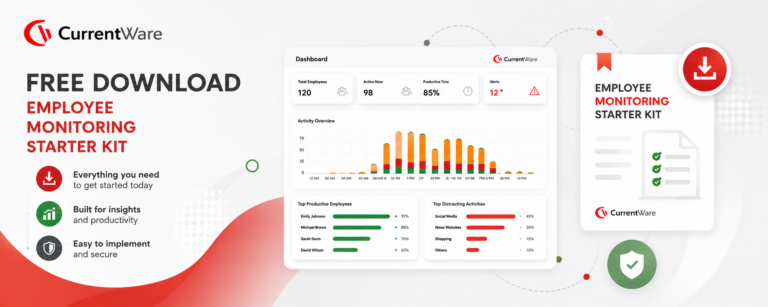
Get Your Free Employee Monitoring Starter Kit
Download →How to Keep Data Safe When Offboarding Employees

Download →Internet Acceptable Use Policy Template
Download →Download the Removable Media Policy Template
Download →Workplace Monitoring Policy Template
Download →Stop Guessing. Start Saving. Calculate Your True ROI on Software Costs
Download →Learn More About Employee Screenshot Monitoring
Activity, web, and application monitoring, screenshots, idle-time tracking, and reporting – every BrowseReporter capability in one place.
How to Monitor Employees’ Computer Activity
Learn different ways to review computer activity, from built-in operating system tools to enterprise monitoring solutions, and understand what separates basic tracking from enterprise-grade visibility.

Employee Internet Management
Discover practical ways to reduce workplace internet misuse through clear policies, category-based controls, and activity monitoring.

Workforce Productivity Analytics Guide
Understand how productivity analytics helps teams move beyond activity tracking and gain insights into how work gets done.
Popular Support Articles
Capture Screenshots
Learn how to configure the website, application, and scheduled screenshot captures, review screenshots in different views, and manage storage with automatic cleanup settings.
How Do I Find Which Category a Site Belongs To?
Look up website categories to ensure your screenshot policies are applied correctly.
Reclassify Categories for Reports
Adjust website classifications to keep reports and category-based screenshot monitoring accurate and relevant.
Frequently asked
Frequently Asked Questions
-
Instead of entering individual websites, operators choose one or more predefined Website Categories, and the rule automatically covers the sites in those categories.
-
This release is for cloud. Website category setup for on-premise is out of scope.
-
No, it leverages the existing BrowseControl category model, so there’s no separate taxonomy to maintain.
-
Yes, category-based rules support multi-select with search, configured per PC group.
-
Yes, a Website Category rule can be edited or removed after it’s created.
-
Yes, Website Category can be used as a filter on the Screenshots “All” page, and category labels appear on thumbnail cards.
-
They’re covered automatically, without changing each screenshot rule by hand.
-
No, configuration by User mode is out of scope for this release.
-
No, PII redaction from screenshots is out of scope for this release.
Roll out screenshot policies by category
Start a free trial or book a demo to apply screenshot rules across whole categories of sites in a single configuration.