
AI Governance for the Workplace: From Policy to Enforcement
You can write an AI governance policy, but it won’t help if you can’t see how people use AI at work. CurrentWare gives you that visibility.
It helps you understand how your employees actually use AI, what tools they use and how, enforce rules by department, and prove the policy works.
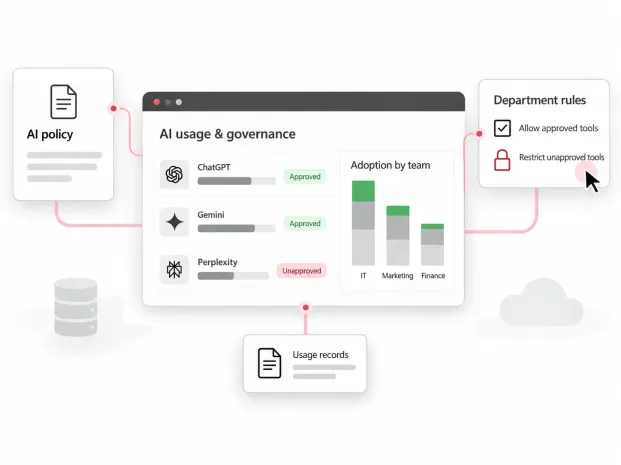

AI governance in the workplace
AI governance in the workplace refers to a written set of policies, controls, and regulations that decide which AI tools employees can use, what they can use them for, and what data they can enter into AI platforms.
It is not the same as model governance, which applies to teams building AI systems. This page is about the people using them.
The AI Blind Spot
Most organisations run two AI strategies at once, one written by the board and another employees work out for themselves. Most IT leaders can only see the first one.
On paper
The approved AI plan
- One standard tool bought for everyone
- A policy written once and signed off
- Assumed usage across all departments
In practice
What employees actually use
- Developers on coding assistants
- Marketing on ChatGPT or Gemini, legal on Perplexity
- Personal accounts and devices besides work machines
The AI governance framework: Discover, Evaluate, Control, Measure
AI governance in the workplace starts with visibility, not blocking. Each phase creates outcomes for the next, and the cycle repeats as new tools appear.
1 Discover
Find which AI tools employees already use, by department, including ones nobody approved.
2 Evaluate
Decide which tools add value to the workflows, and which create risk. Tag them authorized or unauthorized.
3 Control
Allow, restrict or block tools by group to match your security and compliance needs.
4 Measure
Track AI adoption over time, check that the policy is working, and adjust as tools change.
Ownership
Who owns AI governance? Roles and responsibilities
No one owns AI governance, but IT and security usually lead; it works only when legal, HR, and department heads each own their part. Here is how responsibility typically splits.
The shared foundation
Every role makes better decisions with the same facts: which AI tools are in use, who uses them, and how that is changing.
| Role | Owns | Decides | CurrentWare gives them |
|---|---|---|---|
| Executive sponsor CEO, COO | The AI strategy, budget and risk appetite | Which AI investments go ahead, and how much risk is acceptable | Adoption and license utilization reports |
| IT and security CISO, IT admins, sysadmins | Tool approval, access controls and enforcement | Which tools are authorized, restricted or blocked, and for which groups | AI tool inventory, usage by tool and user, group-based rules |
| Legal and compliance Counsel, compliance, privacy | Regulatory mapping and policy wording | What data may enter AI tools under EU AI Act, HIPAA or GDPR | Usage records as audit evidence |
| HR HR business partners | Training, policy sign-off and handling violations | How employees are coached and what happens when rules are broken | User-level activity for fair, fact-based conversations |
| Department heads Team and function leads | Their team’s AI needs and adoption | Which tools their team needs to do its work | Adoption by department, power users and non-users |
Policy
Choosing your AI policy approach
Organizations tend to take one of three approaches. The right one depends on your size, industry and risk tolerance.
| Approach | How it works | Best for | Main risk |
|---|---|---|---|
| Observe first | No restrictions yet. Understand how teams use and benefit from AI, then build the policy from what you learn. | Organizations early in AI adoption | Exposure while the policy is still forming |
| Allow and block lists | Approved tools only. Everything else is blocked for everyone. | Highly regulated teams with clear requirements | Workarounds on personal devices; slower teams |
| Open, then tighten | Broad access at first, with usage watched closely and restrictions added based on findings. | Fast-moving teams that experiment | Sensitive data entering unvetted tools |
Why blocking all AI tools backfires
A single-tool policy looks safe on paper, but every department uses AI differently. Often, employees use certain AI tools because they increase efficiency, so blocking all tools can slow them down, even when they still have deliverables. When you block a useful tool, they’ll find another way, like using a personal device next to their work machine, and that moves the activity somewhere you have no visibility.
The workable answer sits in the middle: enough freedom to experiment, and enough visibility and control to know what enters your environment.
Give kids paint and walk away, and the walls will be covered in paint within five minutes. Give them paper and direction, and they still need someone watching. AI governance policy works the same way.
Herman, Customer Success Manager, CurrentWare
5 common AI governance mistakes, and what to do instead
Patterns CurrentWare’s sales, customer success and support teams see every day, shared in our AI Blind Spot webinar.
01
Mistake:
Writing the policy once and filing it away
Do this instead:
Treat it as a living document. Review it at least quarterly against real usage data.
2
Mistake:
Choosing AI tools before seeing what teams use
Do this instead:
Run a discovery phase first, then license tools based on behaviour, not assumption.
3
Mistake:
Blocking every AI tool
Do this instead:
Allow approved tools by group. Blanket bans push people to personal devices you can’t see.
4
Mistake:
One policy for every department
Do this instead:
Set rules by group. Developers, finance and legal need different tools and limits.
5
Mistake:
Assuming employees will follow the rules
Do this instead:
Pair the policy with visibility and coaching, so issues are caught and corrected early.
What to include in an AI acceptable use policy
Use this checklist as the backbone of your policy, then adjust it for each department.
- Approved AI tools list
- Prohibited tools and categories
- Data that must never enter AI tools
- Department-specific rules
- Personal accounts and devices
- Exception and review process
- Training requirements
- Monitoring disclosure
- Enforcement and consequences
- Policy review cadence
Get the AI governance toolkit
One policy rarely fits every team
Developers may legitimately need tools finance never should. Marketing and legal have different requirements again. Industry adds its own layer.
Technology
The risk comes from the speed of experimentation and large data sets moving into new tools quickly.
Focus: Visibility into new tools as they appear.
Healthcare
HIPAA obligations make PHI exposure the central concern, so rollouts tend to be more conservative.
Focus: Keeping PHI out of unapproved tools.
Legal and finance
Client data, PII and confidentiality obligations raise the stakes of every prompt.
Focus: Approved tools per practice area or team.
Public sector
Departments adopt workflow tools at different speeds, creating uneven usage.
Focus: Consistent rules across departments.
Regulations and frameworks to know
What these mean for IT teams governing employee AI use.
EU AI Act
A risk-based EU law that also expects organizations to ensure staff using AI have adequate AI literacy.
NIST AI RMF
A voluntary US framework built on four functions: Govern, Map, Measure and Manage.
ISO/IEC 42001
An international standard for running an AI management system, useful as an audit target.
HIPAA
Protected health information should not enter AI tools that are not covered by the right agreements.
GDPR
Personal data entered into AI tools still needs a lawful basis and appropriate safeguards.
How CurrentWare helps
From policy to enforcement
CurrentWare doesn’t write your governance plan. It gives you the visibility to write a realistic one and the controls to enforce it.
| Discover | BrowseReporter AI Insights See every AI website and app in use, users per tool, and time in the app versus the website. |
|---|---|
| Evaluate | Authorized and unauthorized tags Tag each tool and review the activity log by user and department. |
| Control | BrowseControl Block by URL or page, block the whole AI category with allow-list exceptions, or block apps, group by group. |
| Measure | AI trends and adoption views Track how usage changes over time and whether approved tools are being adopted. |
| Protect | AccessPatrol Audit trails for device use and file transfers support investigations and data protection. |
Watch: The AI Blind Spot
How IT leaders are finding, governing and measuring employee AI use, with a live look at CurrentWare AI Insights.
Built to Support Your Compliance Program
Discover how organizations use CurrentWare’s employee monitoring software to improve visibility, strengthen compliance efforts, and manage employee activity more effectively.
- CMMC Compliance →

CMMC
Endpoint Restriction to Protect CUI & FCI
- NIST 800-171 Compliance →

NIST 800-171/53
Protect Controlled Unclassified Information
- ISO 27001 Compliance →

ISO 27001
Increase the Maturity of Your ISO27K ISMS
- HIPAA Compliance →

HIPAA
HIPAA protects sensitive patient data
- Cyber Essentials Compliance →

Cyber Essentials
Critical Security Controls For Your Assessment
- GDPR Compliance →

GDPR
EU’s data protection and privacy law
- NERC CIP Compliance →

NERC CIP
Protect TCAs & BCSI From Insider Threats
- CIPA Compliance for Education →

CIPA for Education
Qualify for the FCC’s E-Rate Program
Pick & Plug Into Your Existing Stack
CurrentWare works alongside the identity, security, and directory tools you already use, including support for SAML, OIDC, and CEF standards. Cloud connectors are on the way.
- Tested & supported
- Generic standards (SAML, OIDC, CEF)
- On the roadmap (Cloud)


Keep reading
Articles
- AI Monitoring
AI Usage Tracking Guide: How to monitor employee AI usage
AI tools are now part of daily work for most teams. People use ChatGPT to draft emails, Copilot to write…
- AI Monitoring
Shadow AI Security Risks Governance
You locked down USB ports. You deployed web filtering. You trained your users on phishing. Then someone on the finance…
- AI Monitoring
AI Acceptable Use Policy Guide
Learn what to include in an AI acceptable use policy, why it matters, and how monitoring tools like BrowseReporter help…
- AI Monitoring
AI Workplace Policy
Corporate investment in generative AI is soaring, with average budgets expected to grow by nearly 60% over the next three…
- AI Monitoring
How to Monitor AI in the Workplace Risks and Solutions
AI monitoring in the workplace means tracking which AI tools staff use, what data they share with them and whether…


