
In-Product AI Assistance: Answers Without Leaving the Console
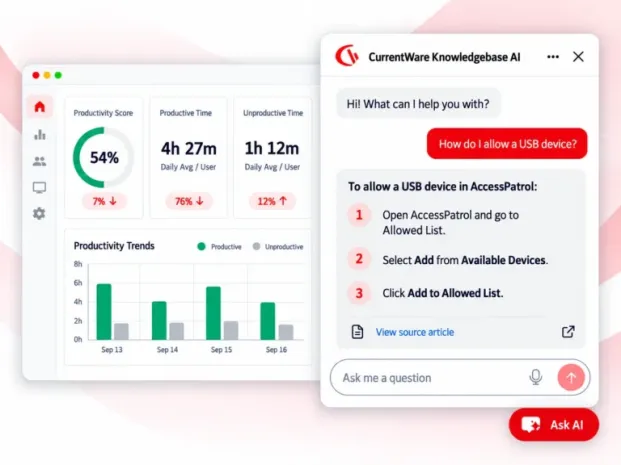
Ask any question within the console and get the right answer delivered from our curated support documents, a link to the source article, and a one-stop handoff to live support when documentation isn’t enough.
- Answers delivered from approved CurrentWare knowledge base only
- Your activity data, reports, and configurations stay untouched
No credit card required · Cloud console · On & off toggle

Most support tickets are findable answers
Yes! They’re not hard problems but questions that were faster to ask than to search for – and that pattern costs both sides time.
- “Stop someone using a USB stick” and “device permissions” are the same task in different vocabulary.
- The right article exists but shows up at the wrong moment, or gets split across several pages.
- Switching between the console and a support portal breaks momentum mid-configuration.
- Support engineers spend cycles on documented questions instead of the complex cases that need them.

How it works
Retrieval, not invention. The assistant searches approved documentation and shows you where the answer came from.
- Ask in the console
Type your question in plain language, or start from a suggested topic – getting started, productivity, DLP, or website and application access. - AI Chatbot searches the product knowledge base
It retrieves the most relevant approved content rather than answering from general knowledge. - You get an answer plus the source
Responses can include a link to the related article when you need full step-by-step guidance. - Clarify with follow-ups
Continue the same conversation to narrow the answer to your version, module, or deployment. - Escalate when needed
For questions beyond the available documentation, you’ll receive clear guidance and an easy option to connect with live support.
What it does
- Answers from the documentation
Responses come from approved knowledge-base articles, so guidance matches what our support team and docs already say. - Plain-language questions
Describe the outcome you want rather than the feature name, and the assistant maps it to the right article. - Conversational follow-ups
Ask for clarification or more detail in the same thread instead of starting a new search. - Multilingual questions
The assistant understands multiple languages, with knowledge-base content maintained in English. - Clear fallback behaviour
When there’s no documented answer, it says so rather than improvising something that sounds plausible. - Live-support handoff
Unresolved questions route into the existing support workflow with conversation context passed along.
Self-service that doesn’t trap you
A chatbot that can’t admit defeat is worse than no chatbot. This one is built to fail gracefully: when a question falls outside documented content, it initiates a handoff to the existing live-support workflow, and agents receive the available conversation context with it.
You don’t re-type the problem for a human after explaining it to a bot. The agent picks up from what you already said.
For anything account-specific, technical, security, legal, or compliance-related, that handoff is the intended path – not a failure state.
What it won’t do
The first release is deliberately scoped to authenticated, in-product FAQ and knowledge-base assistance. Stating the limits plainly matters more than an impressive feature list.
| Out of scope | Where it’s handled instead |
|---|---|
| Answering with customer-specific, tenant-specific, or sensitive operational data | Your own BrowseReporter reports and dashboards |
| Changing configuration or completing transactional actions via chat | The console, by an authorized administrator |
| Account-specific, technical, security, legal, or compliance matters | CurrentWare support |
| Sales conversations, lead capture, or booking sales calls | Pricing and Contact Sales |
| Deployment on the public corporate or marketing website | Not planned for this release |
| Training on unapproved content or internal documents | Approved product knowledge base only |
| AI analysis, recommendations, or coaching on usage trends, productivity, or individual employee behaviour | Operator-controlled reporting in BrowseReporter |
Data handling and privacy
Three design decisions cover what security reviewers ask first.
| No access to monitored data | Approved content only | Sensitive-data notice in-product |
|---|---|---|
| The assistant cannot read tracked activity, reports, or configurations, so it cannot expose employee activity through chat. | It answers from the designated product knowledge base – not internal documents or unvetted sources. | The chat panel asks customers not to enter sensitive data, and support remains the route for account or regulated information. |
For UK, US, and Canadian security reviews
Because the assistant is limited to published documentation and holds no tenant data, it stays outside the scope of your employee-monitoring data flows. For processing detail, see the privacy policy and data processing addendum.
It makes our documentation better too
The assistant is also a feedback loop. Internally, our teams review common question topics, answer engagement, unresolved inquiries, and live-support handoffs – which tells us exactly where the knowledge base is thin.
A question asked fifty times with no good documented answer stops being invisible. It becomes a documentation ticket, and often a signal that the product guidance itself needs work.
Where to find it
If you’re an existing cloud customer
Sign in to the CurrentWare console and open the chat panel. No setup required – ask your first question straight away. It is not HIPAA compliant, so for those customers they should disable it.
If you’re new to CurrentWare
Start a 14-day free trial or run the self-guided demo to see the console and in-product help together.
If you prefer to read first
Browse the knowledge base or follow the onboarding guide – the same content the assistant answers from.
If you need feedback on an answer
Email support@currentware.com. Answer quality feedback feeds directly into documentation priorities.
Built to Support Your Compliance Program
Discover how organizations use CurrentWare’s employee monitoring software to improve visibility, strengthen compliance efforts, and manage employee activity more effectively.
- CMMC Compliance →

CMMC
Endpoint Restriction to Protect CUI & FCI
- NIST 800-171 Compliance →

NIST 800-171/53
Protect Controlled Unclassified Information
- ISO 27001 Compliance →

ISO 27001
Increase the Maturity of Your ISO27K ISMS
- HIPAA Compliance →

HIPAA
HIPAA protects sensitive patient data
- Cyber Essentials Compliance →

Cyber Essentials
Critical Security Controls For Your Assessment
- GDPR Compliance →

GDPR
EU’s data protection and privacy law
- NERC CIP Compliance →

NERC CIP
Protect TCAs & BCSI From Insider Threats
- CIPA Compliance for Education →

CIPA for Education
Qualify for the FCC’s E-Rate Program
Pick & Plug Into Your Existing Stack
CurrentWare works alongside the identity, security, and directory tools you already use, including support for SAML, OIDC, and CEF standards. Cloud connectors are on the way.
- Tested & supported
- Generic standards (SAML, OIDC, CEF)
- On the roadmap (Cloud)


Keep reading
Articles
- AI Monitoring
AI Usage Tracking Guide: How to monitor employee AI usage
Why AI Usage Monitoring Is Now Mission-Critical AI tools are now part of daily work for most teams. People use…
- AI Monitoring
Shadow AI Security Risks Governance
You locked down USB ports. You deployed web filtering. You trained your users on phishing. Then someone on the finance…
- AI Monitoring
AI Acceptable Use Policy Guide
Learn what to include in an AI acceptable use policy, why it matters, and how monitoring tools like BrowseReporter help…
- AI Monitoring
AI Workplace Policy
Corporate investment in generative AI is soaring, with average budgets expected to grow by nearly 60% over the next three…
- AI Monitoring
How to Monitor AI in the Workplace Risks and Solutions
The rise of AI tools like ChatGPT, Gemini, Midjourney, and Copilot is reshaping workplaces, with employees adopting these tools to…


