


Product Comparisons
Track and control employee AI use
See every AI tool your team uses, govern what’s allowed, and stop sensitive data from leaking into ChatGPT, Copilot, and beyond without any guesswork.
*No credit card required · 14-day free trial · Cloud and on-premise available
700+ organizations trust CurrentWare's employee monitoring software for visibility & control
Get Full Visibility and Control Over AI Use Across Your Organization
Your employees are already using AI- ChatGPT, Copilot, Gemini, and dozens more. Without monitoring, you’re flying blind: shadow AI tools go undetected, sensitive data flows into public models, and there’s no way to enforce policy or measure impact.
- Shadow AI spreading silently
- Zero visibility into AI activity
- Sensitive data leaking into public AI
- No way to enforce AI policy
AI Usage Visibility
See which AI tools your employees are using.
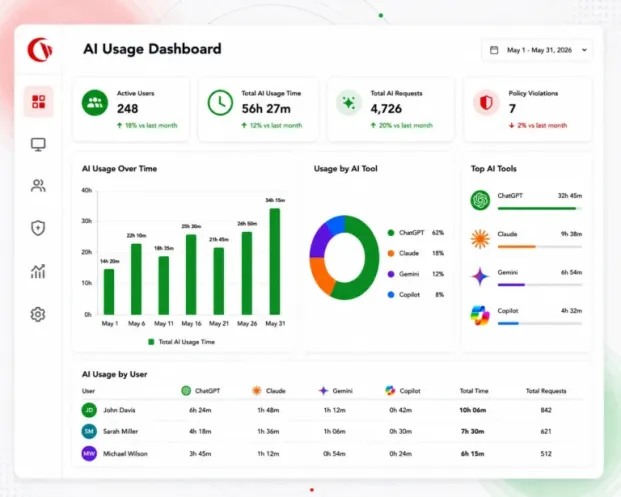
Get a complete picture of AI tool usage across your organization- which tools are being accessed, by whom, how often, and for how long.
- Monitor ChatGPT, Microsoft Copilot, Claude, Gemini, and 50+ AI platforms
- Track usage by user, department, or device
- View session durations, visit frequency, and usage trends over time
- Identify which teams are leaning on AI most, and which tools they prefer
- Export detailed usage logs for audits and compliance reviews
Productivity Impact
Measure how AI tools affect employee productivity
Don’t just track AI use, comprehend its impact. See how time in AI tools correlates with focused work, task completion, and productive output.
- Compare time spent in AI tools against overall productive hours
- Identify departments where AI is driving the most efficiency gains
- Flag excessive or unproductive AI sessions that may warrant review
- Build the evidence base for AI investment decisions and ROI reports
Shadow AI Discovery
Uncover unsanctioned AI tools across your network
Employees don’t wait for IT approval. New AI tools appear constantly, and many carry real data, security, and compliance risk. CurrentWare surfaces them automatically.
- Detect AI tools your organization never approved or knows about
- Categorize discoveries by risk level; from low-risk utilities to high-risk data processors
- Get instant alerts when a new AI tool is accessed for the first time
- Build a complete inventory of AI tool usage to close governance gaps
Data Loss Prevention
Stop sensitive data from leaking into AI tools
ChatGPT doesn’t forget what you paste into it. CurrentWare’s DLP capabilities intercept sensitive data before it leaves your environment, whether via a browser, file upload, or USB device.
- Block uploads of confidential documents into public AI platforms
- Intercept copy-paste of sensitive data into AI chat interfaces
- Control USB and removable media to prevent offline data leakage
- Enforce DLP rules by user group, tool category, or data classification
- Get live alerts when high-risk uploads are attempted
AI Policy & Control
Block or allow AI tools and enforce usage policies
Move beyond monitoring to active governance. Set granular policies that automatically enforce your AI acceptable-use standards, without relying on employees to self-police.
- Block specific AI tools (e.g. ChatGPT, DeepSeek) across all users or by group
- Allow approved tools while restricting everything else by default
- Set time-of-day or quota-based restrictions on AI platform access
- Deploy AI acceptable-use policies that are technically enforced, not just PDF documents
- Override and audit policy exceptions through a central dashboard
Reporting & Alerts
Get scheduled reports and live alerts on AI activity
Stay ahead of risky AI behavior without having to actively watch a dashboard. CurrentWare delivers the intelligence to your inbox, or your SIEM.
- Schedule weekly or monthly AI usage summaries by team or user
- Set live alerts for policy violations, unsanctioned tool access, or DLP triggers
- Export logs to your SIEM, compliance tools, or data warehouse
- Build custom reports for HR, legal, compliance, or executive stakeholders
- Role-based report access
Who Can Use CurrentWare for AI Monitoring
Whether you need visibility, governance, or accountability, CurrentWare gives every stakeholder the AI intelligence they need.
| IT & security teams | Compliance & risk | Managers & leadership | Human resources |
|---|---|---|---|
| Close the shadow AI gap and enforce your security posture before a breach occurs. | Demonstrate AI governance with auditable logs and enforced acceptable-use policies. | Understand how AI is changing the way your teams work, and where to invest next. | Support fair, consistent AI policy and ensure workforce AI use aligns with company values. |
| Detect and block unsanctioned AI tools | Maintain AI usage audit trails | See AI tool adoption by team and role | Enforce AI acceptable-use standards |
| Prevent sensitive data uploads to public AI | Enforce AI acceptable-use policies technically | Measure productivity impact of AI tools | Identify employees who may need AI guidance |
| Integrate with your SIEM and existing toolchain | Document data handling for regulatory reviews | Identify where AI training is needed | Support investigations with usage evidence |
| Maintain device-level DLP controls | Flag policy violations automatically | Report AI ROI to the executive team | Document usage for performance context |
Compare CurrentWare AI Usage Insights with Other Monitoring Tools
See how BrowseReporter and the CurrentWare Suite compare with other monitoring tools for tracking AI tool use across your team.
- Product Comparisons
Zscaler Alternative
- Product Comparisons
WebTitan Alternatives
- Product Comparisons
Veriato Alternatives
- Product Comparisons
Teramind Alternatives
- Product Comparisons
SafeConsole Alternative
- Product Comparisons
ManageEngine Alternative
- Product Comparisons
InterGuard Alternative

How CurrentWare Enables AI Monitoring
From deployment to your first report in under an hour- no complex infrastructure required.
Deploy the CurrentWare agent
Install the CurrentWare agent on employee devices like Windows, Mac, or via your MDM. Cloud or on-premises, your choice. Most teams go live in under 30 minutes.
Capture AI tool usage and activity
The agent silently monitors web activity, app usage, file transfers, and USB connections. AI tool visits are automatically detected, categorized, and logged in real time.
Report, control, and protect your data
View usage insights in the dashboard, enforce blocking and allow-list policies, set up alerts, and schedule reports- all from a single, central interface.
Compatibility
Works with your existing tech stack
CurrentWare runs on Windows and Mac, integrates with leading SIEM platforms, and fits into your current security and IT infrastructure without friction.
CurrentWare vs. ActivTrak: A Quick Comparison
Both products- CurrentWare & ActivTrak show you what your employees are doing. But only one gives you the controls to act on it, and the flexibility to run it your way.
| Capability | CurrentWare | ActivTrak |
|---|---|---|
| AI usage monitoring & reporting | ✅ | ✅ |
| Block or allow specific AI tools | ✅ | ❌ |
| Shadow AI discovery | ✅ | Limited |
| Data loss prevention (AI + USB + uploads) | ✅ | ❌ |
| AI acceptable-use policy enforcement | ✅ | ❌ |
| On-premises deployment option | ✅ | Cloud only |
| Web filtering & app control | ✅ | Add-on |
| USB & removable media control | ✅ | ❌ |
| SMB-friendly pricing (per seat) | ✅ | Enterprise tiers |
| Monitoring + governance in one platform | ✅ | Analytics only |
Solutions That Work Across Industries
Tailored controls that help you meet industry standards, boost efficiency, and protect sensitive data across remote and in-office teams.
Healthcare
HIPAA-ready controls to protect PHI with USB management and insider-threat visibility.
Government
Cybersecurity and policy enforcement aligned to NIST 800-171 and CMMC.
Legal Services
Keep client data protected, billable hours productive, and software costs in check.
Manufacturing
Productivity monitoring and internet visibility for both the shop floor and back office.
Financial Services
Enforce access policies and protect sensitive financial data with audit-ready trails.
Schools & Libraries
CIPA-compliant web filtering to qualify for E-Rate and keep students safe online.
Small Business Employee Productivity
Track unproductive web browsing and idle time to detect time-wasting
Managed Service Providers
Oversee productivity, filtering, and data protection for multiple clients from one place.
Built to Support Your Compliance Program
Discover how organizations use CurrentWare’s employee monitoring software to improve visibility, strengthen compliance efforts, and manage employee activity more effectively.
- CMMC Compliance →

CMMC
Endpoint Restriction to Protect CUI & FCI
- NIST 800-171 Compliance →

NIST 800-171/53
Protect Controlled Unclassified Information
- ISO 27001 Compliance →

ISO 27001
Increase the Maturity of Your ISO27K ISMS
- HIPAA Compliance →

HIPAA
HIPAA protects sensitive patient data
- Cyber Essentials Compliance →

Cyber Essentials
Critical Security Controls For Your Assessment
- GDPR Compliance →

GDPR
EU’s data protection and privacy law
- NERC CIP Compliance →

NERC CIP
Protect TCAs & BCSI From Insider Threats
- CIPA Compliance for Education →

CIPA for Education
Qualify for the FCC’s E-Rate Program
Pick & Plug Into Your Existing Stack
CurrentWare works alongside the identity, security, and directory tools you already use, including support for SAML, OIDC, and CEF standards. Cloud connectors are on the way.
- Tested & supported
- Generic standards (SAML, OIDC, CEF)
- On the roadmap (Cloud)


Trusted by teams across the United States, Canada & the United Kingdom
Join 100,000+ professionals across 55 countries.


What customers say about CurrentWare
4.8 / 5
Across the whole CurrentWare Suite.
4.7 / 5
90% of reviewers would recommend BrowseReporter (average likelihood to recommend: 9 out of 10).
Begin AI Monitoring Today
Know what AI your team is using. Control what they can access. Secure what matters.
Start your free trial in minutes. No credit card. No lengthy setup. Full visibility from day one.
Frequently asked
Frequently Asked Questions (FAQs)
-
AI usage monitoring refers to tracking which AI tools employees use, how often, for how long, and what data they interact with. AI insights turn that raw tracking data into useful intelligence, showing you usage trends, productivity impact, policy violations, as well as shadow AI risks across your organization. CurrentWare’s AI Workforce Insights module delivers both.
-
Yes. CurrentWare monitors web activity and application usage at the device level. Once the agent is installed, it automatically detects and logs visits to AI platforms including ChatGPT, Microsoft Copilot, Claude, Gemini, Perplexity, DeepSeek, and many more. You can view usage by individual user, department, device, or time period, all from a single dashboard.
-
Yes. CurrentWare’s web filtering module lets you block any AI tool by URL or category. You can block ChatGPT entirely, restrict it to specific user groups, or allow only approved AI platforms while blocking everything else. Blocking policies are enforced at the device level and apply whether the employee is on your corporate network or working remotely.
-
CurrentWare’s DLP capabilities intercept data transfer attempts before they reach public AI platforms. This includes blocking file uploads to AI websites, detecting and alerting on copy-paste of sensitive content, and controlling USB and removable media to prevent offline exfiltration. You can configure DLP rules by data type, tool category, or user group.
-
Yes. The CurrentWare agent operates at the device level, meaning monitoring and policy enforcement work regardless of where an employee is working in the office, at home, or traveling. Employees don’t need to be connected to your corporate network for their activity to be logged and policies to be enforced.
-
CurrentWare can track any web-based AI tool, including ChatGPT, Microsoft Copilot, Google Gemini, Claude (Anthropic), Perplexity AI, DeepSeek, Grok, Midjourney, Adobe Firefly, Grammarly AI, and many more. Because monitoring is based on URLs and web activity, any new AI tool an employee accesses will be detected and logged automatically, even tools your team hasn’t heard of yet.
-
That’s a policy decision for your organization, not a technical constraint. CurrentWare can function transparently (employees are informed via policy and an on-screen notice) or silently in the background. Most organizations using CurrentWare for AI monitoring inform employees as part of their AI acceptable-use policy rollout. This itself tends to improve compliance without needing active enforcement.
-
In most jurisdictions, monitoring employee activity on company-owned devices and networks is lawful, particularly when employees have been informed and have consented through an acceptable-use or IT policy agreement. However, legal requirements vary by country, state, and sector. CurrentWare recommends working with your legal counsel to establish a compliant monitoring policy before deployment. We provide policy templates to help you get started.
-
CurrentWare’s agent logs website and application activity on each computer and automatically identifies visits to AI platforms like ChatGPT, Claude, Gemini, Copilot, and DeepSeek. You can view AI usage by user, department, or device in the AI Usage Dashboard, with quick setup of the most popular AI tools & platforms.
-
Yes, at the website level. BrowseControl can block AI tools by URL or category and allow approved ones, so you can block consumer chatbots while allowing the AI services your company pays for. Rules can differ by user group. Some consumer and enterprise AI services share domains, so use full-URL filtering and test before rollout. If you need to restrict an AI service to your company’s own accounts, pair CurrentWare with your identity provider’s tenant controls.
Still have questions?
Talk to a CurrentWare specialist who has deployed monitoring at 200+ law firms.