
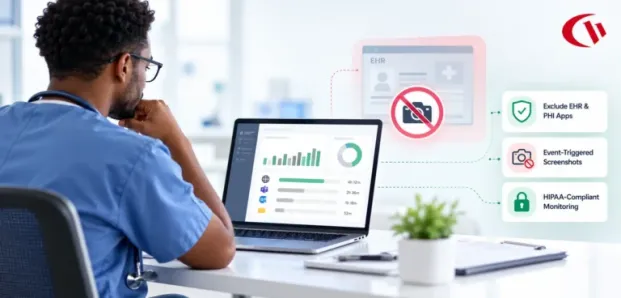

Healthcare organizations in 2026 will be increasingly challenged to monitor employee computer activity without risking showing sensitive patient information. In a data-driven healthcare model, medical billing teams, clinical documentation specialists, and remote administrators will view electronic protected health information (ePHI) across hybrid workplaces.
While some employee monitoring software reveals app usage, flags potential security issues, and supports accountability, overly broad screen recording can capture patient charts, diagnoses, and billing records, creating data security risks. Instead, focus on privacy-conscious solutions that monitor relevant activity without collecting sensitive health data.
This article discusses how healthcare providers can employ activity monitoring approaches that protect the HIPAA Minimum Necessary Standard, minimize the exposure of ePHI and bolster security without violating the confidentiality of the patient. If your organization has wider regulatory requirements, our regulatory compliance guide and specific healthcare DLP and HIPAA solutions can help further safeguard sensitive information.
Key Takeaways
- Prevent accidental capture of sensitive patient information displayed in EHR systems.
- Exclude protected clinical applications from visual monitoring.
- Capture screens only when predefined policy violations occur.
- Store screenshots and activity logs in a secure, controlled environment.
- Restrict access to sensitive monitoring records and maintain audit logs.
- Establish retention schedules and securely purge outdated screenshots.
- Monitor application usage, website visits, and idle time without continuous video or keystroke logging.
- Use application allowlisting, web filtering, and USB device controls to reduce the risk of ePHI leakage.
- Maintain HIPAA compliance with appropriate Security Rule safeguards, conduct risk analyses, and protect captured ePHI.
- Communicate monitoring policies and comply with applicable state electronic monitoring notice laws.
- Determine whether a Business Associate Agreement (BAA) is required based on how the vendor handles ePHI.
- Use targeted monitoring to gain workforce insights while protecting patient confidentiality.
How to Monitor Employee Activity Without Recording Patient Data
Healthcare IT teams can safeguard workforce visibility by implementing privacy-first monitoring techniques that minimize viewing of protected health information (PHI). By turning off power screens, excluding an Electronic Health Record (EHR) system from visual capture, and utilizing event-triggered screenshots, IT can flag suspicious behaviors without exposing PHI.
1. Implement Selective Application Auditing
Configure monitoring software to avoid capturing visual recordings from electronic health record (EHR) systems like Epic, Cerner, and Meditech, as well as telehealth software. This will help prevent sensitive patient data from being stored on a secondary monitoring database and enable organizations to monitor application and workforce use.
2. Utilize Event-Triggered Screenshots
Do not take continuous employee screen captures. Instead, take screenshots only when certain policy violations (like accessing unapproved websites or opening unauthorized applications) are detected. Use special DLP audit logs to review file transfers and device activity, instead of on-screen captures.
3. Keep Monitoring Data Within Your Security Perimeter
If you deploy it on-premises or in a self-managed private cloud, you can maintain access to logs and screenshots for monitoring. For vendor-hosted cloud deployment, confirm encryption, data residency, and Business Associate Agreement (BAA) needs prior to enabling visual monitoring. Discuss with legal counsel whether the vendor has a duty to support your deployment model.
4. Apply Role-Based Access Control (RBAC)
As required by the HIPAA Security Rule, grant access to recorded activity based on job responsibilities. Aggregated statistics are accessible by the department manager, while designated IT personnel and compliance officers have authorized access to screenshots.
5. Automate Retention and Scheduled Purging
Define retention schedules to bring deleting screenshots when they are no longer needed. For instance, organizations could implement a 30- or 60-day retention plan depending on their risk assessment and desired necessities. Keep usage stats at the aggregate level, rather than for each person, over longer timeframes when important.
What are the Regulatory Risks of Improper Screen Monitoring in 2026?
Without properly configured monitoring, healthcare organizations face unmitigated financial and operational disaster. The HHS Office for Civil Rights (OCR) stresses ongoing monitoring and auditing, and organizations with weak technical safeguards are now in the federal crosshairs.
According to the IBM Cost of a Data Breach Report 2025, healthcare data breach costs average $7.42 million – the highest of any industry for the 14th consecutive year. Furthermore, regulatory enforcement continues to escalate. The HHS Office for Civil Rights (OCR) levied over $6.6 million in HIPAA fines in 2025 alone, while OCR compliance audits actively scrutinize Security Rule safeguards, risk analyses, and vulnerability management.
Under 45 CFR § 160.404 and 45 CFR Part 102, statutory annual penalty caps can reach up to $2,190,294 per violation category per year for Tier 4 violations involving uncorrected willful neglect, though tier-specific annual caps under OCR enforcement discretion are substantially lower for lower tiers. Capturing ePHI in an unencrypted or loosely restricted screenshot repository exposes organizations to critical violations of technical safeguards for access controls (45 CFR § 164.312(a)(1)) and encryption at rest (an addressable implementation specification under 45 CFR § 164.312(a)(2)(iv)).
How Can Organizations Architect a Compliant Solution?
Healthcare organizations must keep workforce analytics distinct from the clinical information to prevent excessive exposure to electronic protected health information (ePHI). CurrentWare offers a flexible workforce analytics platform that can be installed on-premises, in your self-managed private cloud, or in a cloud hosting environment.
In a self-hosted deployment, monitoring data stays on the customer’s infrastructure, giving IT teams complete oversight of sensitive data, and CurrentWare cannot access your employees’ data. The platform meets the needs of health security in three ways:
1. PII/PHI Redaction Detects Sensitive Information
CurrentWare’s PII/PHI redaction identifies credit card numbers, health numbers, personal identifiers and other sensitive data copied to the clipboard and replaces them with Xs before pasting data into supported software. This enables healthcare teams to limit accidental disclosure of patient information while working efficiently.
2. File Blocking Seizes Upload of Sensitive Files
With File Blocking, PDFs, spreadsheets and documents cannot be uploaded to unauthorized apps, websites, cloud applications or personal email. For healthcare providers, administrators have the ability to set rules by user groups and file type, allowing you to restrict the chances of patient information leaving your organization.
3. Privacy-First Activity Tracking
BrowseReporter records web visits, application usage and idle time without recording video, keystrokes, mouse clicks, or recording every image. By default, it does not collect screenshots, but IT administrators can optionally set up smart triggers to capture screens only when staff visit pre-set “risky” URL categories or open banned applications, reducing the risk of accidentally ingesting patient data during clinicians’ usual workflows.
“The user-friendly interface meant we were able to get the software up and running extremely quickly. It worked perfectly and provided all of the functionality we were looking for while also helping us comply with HIPAA.”
— Nicholas Scheetz,
IT Service Desk Supervisor & System Administrator,
First Choice Health
4. Zero-Trust Application Allowlisting
This feature is used to help healthcare IT teams comply with a zero-trust endpoint environment. BrowseControl allows only approved clinical and administrative applications to run by default, effectively blocking shadow IT, shadow AI tool bypasses, and malware. It also requires category-based web filtering to prevent uploads to cloud storage providers.
5. Comprehensive Data Loss Prevention (DLP)
Unmanaged removable media is another significant pathway for ePHI exfiltration. AccessPatrol lets users block access to all unapproved storage media and whitelist approved drives by Vendor ID, Product ID, and Serial Number. In CurrentWare v11.0.2, you can selectively block Bluetooth file transfer and still leave all your clinical peripherals (wireless headsets, mice) enabled. Access Patrol provides an auditable record of all file creation, copy, and delete activity.
Workforce Transparency: Establishing Compliant Monitoring Policies
Technical safeguards cannot replace open workplace policies and open communication with employees. Hidden workplace monitoring can erode trust and leave an employer vulnerable to lawsuits under state electronic monitoring laws.
Healthcare companies should establish appropriate use policies that describe the goals, scope, and methods of employee monitoring. They also need to adhere to any state-specific notification rules that apply, such as:
New York (N.Y. Civ. Rights Law § 52-c)
Employers that electronically monitor employees are required to give written notice and obtain acknowledgement of the notice from employees hired to be subject to electronic monitoring, and post the notice in a conspicuous spot where notices to employees are generally posted.
Connecticut (Conn. Gen. Stat. § 31-48d)
Employers shall disclose to the employee in writing, before any electronic monitoring takes place, the types of electronic monitoring to be used (except in applicable statutory situations).
Delaware (Del. Code Ann. Tit. 19, § 705)
In Delaware, employers can make the required disclosure available to workers each day they sign in to a company system or issue a one-time written or electronic notice that the worker acknowledges.
In addition to notifying employees of monitoring requirements, healthcare organizations should include methods for monitoring, control measures for limiting employee access to the collected data, and process reviews in their policies to make sure they are always consistent with security and privacy obligations. Clear communication shows employees how monitoring helps safeguard patient information, cybersecurity, and operational accountability without infringing on their privacy.
Conclusion: Monitor Employee Activity Without Compromising Patient Privacy
Healthcare organizations require employee monitoring solutions that can improve security and visibility into the workforce without risking the exposure of protected patient health information (ePHI). For example, screen recording can passively monitor every employee’s device, including ePHI. But by enabling selective application auditing, event-driven screenshots, role-based access controls and automatic data retention policies, healthcare IT teams can safeguard employee actions while also reducing the volume of patient data captured.
Paired with endpoint application controls, DLP, and clear monitoring policies, these safeguards can help strengthen privacy focus while complying with HIPAA. With the right technical architecture, healthcare providers can improve operational oversight, reduce the risk of unauthorized data exposure, and protect patient confidentiality without resorting to intrusive employee surveillance.
Frequently asked
Frequently Asked Questions:
-
Yes. HIPAA places no restrictions on employee monitoring. The audit control standard for the HIPAA Security Rule (45 CFR § 164.312(b)) requires covered entities and business associates to have logs and tools to record and review activity related to any system that stores electronic protected health information (ePHI).
These monitoring tools should be set up to preserve patient confidentiality and minimize collection, storage, or dissemination of personally identifiable health information.
-
Yes. If EHR screens capture personally identifiable information (e.g., a patient’s name or date of birth, diagnosis, or billing information), then the capture is considered to be a transmission or storage of electronic protected health information (ePHI). Accordingly, screen capture-monitoring solutions must safeguard the resulting image files using the general HIPAA safeguards that apply to the transmission and storage of ePHI.
Those safeguards include access controls in 45 CFR § 164.312(a)(1) and data encryption at rest, if appropriate, based on the addressable implementation specification at 45 CFR § 164.312(a)(2)(iv).
-
A business associate agreement (BAA) would be necessary in cases where the monitoring vendor creates, receives, maintains, or transmits ePHI on behalf of the HIPAA covered entity or another business associate. That is why, if you use a cloud-hosted monitoring service that stores logs or screenshots containing ePHI, you will need to sign a BAA. Or, if you’re using an on-premises or privately hosted deployment, it depends on whether the vendor accesses or handles ePHI.
For example, you can keep the monitoring data local by deploying CurrentWare on-premises. Be sure to ask your monitoring vendor about how they deploy the system, whether they access and store ePHI, and if there are any contractual measures to protect the ePHI stored on the platform.
Disclaimer: This article is provided for informational purposes only and does not constitute formal legal or regulatory compliance advice. Healthcare organizations should consult qualified legal counsel and compliance officers to review their specific technical safeguards and statutory obligations.
Ready to protect patient privacy while gaining actionable productivity insights?
Schedule a personalized CurrentWare demo or start your free trial today.


