
Advanced mouse jiggler detection software
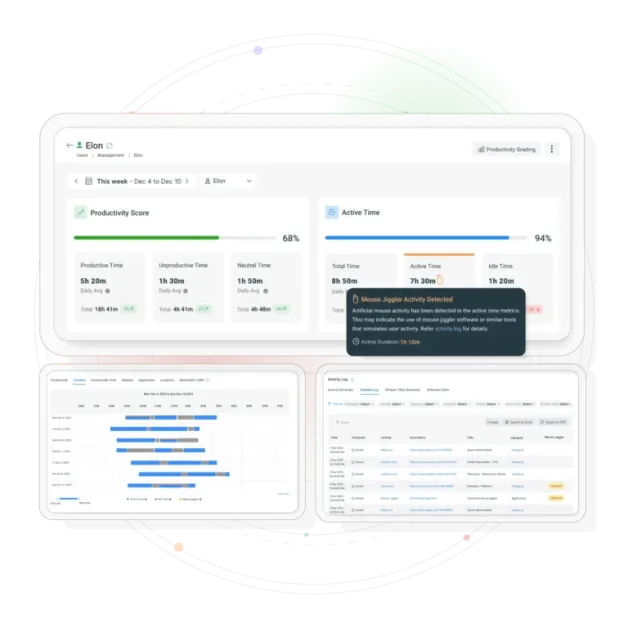
CurrentWare’s Advanced Mouse Jiggler Detection System (v12.0.0) protects your organization by identifying non-human activity patterns, detecting unauthorized automation tools, and ensuring your productivity data reflects real work not artificial inputs.
*No credit card required · 14-day free trial · Easy setup

What Is a Mouse Jiggler & Why It Threatens Workforce Analytics
A mouse jiggler is a device or application that simulates mouse movement to prevent idle time, keep screens active, or appear constantly “online.”
Types Include:
- USB hardware mouse jiggler devices
- Software mouse mover apps
- Browser extensions
- Desktop mouse jiggler applications
- Physical mouse movement platforms
What They Distort:
- Idle time tracking
- Productivity scores
- Activity logs
- Collaboration status indicators
- Online/available status in Teams, Slack, etc.
Why Detecting Mouse Jigglers Is Critical
A mouse jiggler is a device or application that simulates mouse movement to prevent idle time, keep screens active, or appear constantly “online.”
Mouse Jigglers Artificially Inflate:
- Active hours
- Engagement metrics
- App usage patterns
- Improved Decision-Making
- Online/available status
This Leads To:
- Inaccurate performance evaluations
- Misleading team comparisons
- Unfair accountability standards
- Increased risk of policy violations
- Declining trust across remote teams
Detect Fake Activity With CurrentWare’s Advanced Monitoring System
Key capabilities designed to maintain accurate workforce productivity insights in remote and hybrid environments.
Detect Fake Activity (Hardware & Software)
Identify mouse jiggler apps, USB devices, and unauthorized tools generating artificial movement.
Activity Correlation
Spot suspicious periods of mouse activity when keyboard usage and app interactions remain low or nonexistent.
Behavioral Pattern Analysis
Flag repetitive, robotic, or timed cursor movement patterns that do not match natural human behavior.
Accurate, Trustworthy Productivity Metrics
Ensure your workforce analytics, dashboards, and executive reports represent real engagement.
Verification Prompts
Trigger on-screen prompts asking the user to confirm interaction when suspicious patterns occur.
Real-Time Alerts & Reports
Receive instant notifications and access investigation-ready reports with contextual data.
How Mouse Jiggler Detection Works
CurrentWare uses multi-layered detection techniques to differentiate genuine human activity from artificial inputs.
Input Pattern Analysis
Human mouse use is irregular, automation is not. The system identifies repetitive, directionally consistent, evenly-timed movements.
Mouse vs Keyboard Ratio
Unusually high mouse activity with extremely low keyboard input triggers alerts.
3 Extended ‘Active’ Period Flags
Continuous activity without app usage or keyboard interactions is marked for review
USB & Software Monitoring
Detects connected hardware jigglers or installed mouse mover apps.
Trend Mapping for Suspicious Behavior
Trend Mapping for Suspicious Behavior
Verification Screens
Prompts users to confirm they are present when suspicious activity levels spike

Key Benefits of Mouse Jiggler Detection
Remote and hybrid teams rely on accurate activity insights to stay productive. Our monitoring system ensures your productivity data reflects real work.
Accurate Productivity Metrics
No inflated ‘active’ hours from automated tools.
Fair Performance Evaluations
Managers get clear, trustworthy data.
Saves Time With Automated Detection
Reduces manual auditing or investigative work.
Prevents Productivity Manipulation
Detects both software and hardware jigglers instantly.
Enhanced Compliance & Policy Enforcement
Supports IT, HR, and leadership in enforcing acceptable-use policies.
Strengthens Trust in Remote Work
Employees know productivity metrics are measured consistently and fairly.
Why CurrentWare Is Different
Remote and hybrid teams rely on accurate activity insights to stay productive. Our monitoring system ensures your productivity data reflects real work.
Behavioral Analytics
Advanced pattern recognition identifies non-human activity
USB Monitoring
Detects hardware jiggler devices connected to workstations
Verification Prompts
Interactive confirmations ensure genuine user presence
Multi-Signal Detection
Correlates multiple data points for accurate identification
Protect Sleep Mode & Idle Time Integrity
Mouse jigglers prevent systems from entering sleep mode or showing idle events, disrupting energy management and productivity tracking. CurrentWare prevents this manipulation by:
- Monitoring system idle states
- Flagging unauthorized USB activity
- Identifying irregular wake patterns
- Reviewing app and browser activity correlation
- Detecting artificially extended active periods
Considerations
Understanding potential considerations helps you configure the system optimally.
- New jiggler tools may require continuous signature updates
- Natural deep-work sessions can resemble low keyboard activity
- Excessive verification prompts may disrupt workflow if not tuned
- Hardware jigglers require USB monitoring visibility on macOS & Windows
Solution:
CurrentWare accounts for these challenges with adjustable thresholds and machine-assisted pattern insights.
Trusted by teams across the United States, Canada & the United Kingdom
Join 100,000+ professionals across 55 countries.


What verified reviewers say
90% of reviewers would recommend BrowseReporter (average likelihood to recommend: 9 out of 10).
Read all BrowseReporter reviews on Capterra- ★★★★★
“CurrentWare then and now is still my favorite product, and I’ve been in this business for over 26 years.We have all the data we need.”
- ★★★★★
“The reports are very easy to understand and the fact that they can be emailed to you on a schedule is amazing, and have made finding productivity killers VERY easy. Customer support has been fantastic every time I’ve had to reach out to them; I highly recommend them!.”
Solutions That Work Across Industries
Tailored controls that help you meet industry standards, boost efficiency, and protect sensitive data across remote and in-office teams.
Healthcare
HIPAA-ready controls to protect PHI with USB management and insider-threat visibility.
Government
Cybersecurity and policy enforcement aligned to NIST 800-171 and CMMC.
Legal Services
Keep client data protected, billable hours productive, and software costs in check.
Manufacturing
Productivity monitoring and internet visibility for both the shop floor and back office.
Financial Services
Enforce access policies and protect sensitive financial data with audit-ready trails.
Schools & Libraries
CIPA-compliant web filtering to qualify for E-Rate and keep students safe online.
Small Business Employee Productivity
Track unproductive web browsing and idle time to detect time-wasting
Built to Support Your Compliance Program
Discover how organizations use CurrentWare’s employee monitoring software to improve visibility, strengthen compliance efforts, and manage employee activity more effectively.
- CMMC Compliance →

CMMC
Endpoint Restriction to Protect CUI & FCI
- NIST 800-171 Compliance →

NIST 800-171/53
Protect Controlled Unclassified Information
- ISO 27001 Compliance →

ISO 27001
Increase the Maturity of Your ISO27K ISMS
- HIPAA Compliance →

HIPAA
HIPAA protects sensitive patient data
- Cyber Essentials Compliance →

Cyber Essentials
Critical Security Controls For Your Assessment
- GDPR Compliance →

GDPR
EU’s data protection and privacy law
- NERC CIP Compliance →

NERC CIP
Protect TCAs & BCSI From Insider Threats
- CIPA Compliance for Education →

CIPA for Education
Qualify for the FCC’s E-Rate Program
Pick & Plug Into Your Existing Stack
CurrentWare works alongside the identity, security, and directory tools you already use, including support for SAML, OIDC, and CEF standards. Cloud connectors are on the way.
- Tested & supported
- Generic standards (SAML, OIDC, CEF)
- On the roadmap (Cloud)


Keep reading
Articles
- Employee Monitoring
Best Workforce Analytics Software
According to a workforce analytics industry report published by Fortune Business Insights, the global workforce analytics market was valued at…
- Employee Monitoring
What Is Goldbricking
Companies are heavily reliant on the quality and volume of work that their employees produce. From that reliance comes a…
- Employee Monitoring
Replacing Time Logs with Productivity Visibility
On paper, your professional services team appears to be running smoothly — billable hours are logged, tasks are checked off,…
- Employee Management
Tips for Preventing Employee Burnout and Increase Productivity
Employee burnout has officially been recognized by the World Health Organization (WHO) and has become the responsibility of employers. The…
- Workforce Productivity
Time Management Tips For Professionals
In this article I’ll give you my top 6 time management tips for professionals. These important tips will help you…
- Employee Management
Tips for Improving Performance at Work
Looking for personal areas of improvement at work? The effective accomplishment of professional objectives requires continuous commitment, determination, and enthusiasm…


Ready to Ensure Accurate Workforce Data?
No Credit Card Required
All subscriptions include ongoing updates and direct support from our team.