
★★★★★ Capterra · Nov 2025
Productivity Monitoring Feedback
“Easy tracking of employee productivity. Seamless transition from person to person on the back end. Easy to update.”
We’ve updated our Subprocessor List, effective October 6, 2026. Please review the update to our Data Processing Addendum
Monitor activity across every Windows and Mac endpoint, on or off the network.

 4.8/5 avg.
 Trusted by 100,000+ professionals in 55 countries
No credit card required · 14-day free trial · For on-prem pricing
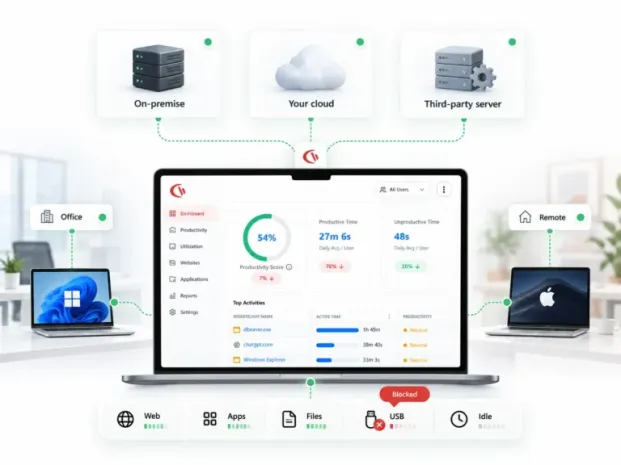

Endpoint monitoring software enables IT and security personnel to track and receive alerts about user and device activity on laptops, desktops, and macOS systems, including application use, web browsing, and file and USB activity.
This is different from single-focus point solutions. In the usual situation, IT ends up looking only at web traffic, USB activity, and a few other items, since a comprehensive endpoint monitoring solution combines monitoring, controls, and reporting into one interface, so there is no need to correlate and collect information across five separate dashboards.
All four are different categories, serving different purposes, and facing a lot of overlapping vendor marketing.
| Category | The question it answers | Primary data | Typical buyer |
|---|---|---|---|
| Endpoint monitoring software | What are people doing on our endpoints, and is any of it risky or wasteful? | Web and app usage, active/idle time, file and USB events, screenshots, logon events | IT, security, operations, HR |
| EDR / XDR | Is malicious code executing on this endpoint right now? | Process trees, memory, kernel telemetry, IOCs, threat intel matches | SOC and security engineering |
| Endpoint management (UEM / RMM) | Is this device patched, configured, encrypted and healthy? | Device inventory, OS build, patch state, disk and hardware health | IT operations and MSPs |
| User activity monitoring (UAM) | Which user did what, across every system they touch? | Session recording, user-scoped audit trails, privileged access | Security, audit, compliance |
The categories in the table above are complementary, not competing. Most tech stacks run on EDR for malware, UEM for device health, and endpoint monitoring for the human behaviour monitoring that neither of the other two tools record. CurrentWare sits in the endpoint monitoring and exports to your SIEM.
Current offers four modules in one console, and one agent. Each of these modules are configurable per user, per group, or per device, and everyone can be turned on and off.
Every website visited and application used, with active, idle, and total time by endpoint and user. Works across Chrome, Edge, and Firefox, including incognito sessions.

A clear view of genuine device use versus sessions left open, based on keyboard and mouse input and a configurable inactivity threshold.
Optional desktop screenshots captured on a schedule or triggered by keywords. OCR makes captured text searchable for faster investigations.
Logon history combined with endpoint power events for a complete view of device usage.
Endpoint activity rolled up by team, department, or work location to show usage patterns across the organization.
Endpoint monitoring combined with device and web controls through the same agent, without requiring a separate security tool.
Endpoint Monitoring deployment requires a console, an agent on each of your endpoints, and policies that are mapped to groups in your Active Directory.
STEP 01. Set up the console
Install CurrentWare on-premises devices, in your own cloud server, or go for the hosted cloud option. You decide where your data lives.
STEP 02. Deploy the agent
Push the client through Active Directory Group Policy, your RMM, or the built-in remote installer. Choose a visible or silent deployment.
STEP 03. Apply policies by group
Sync AD organizational units or security groups, then define what each group can monitor, block, or exempt.
STEP 04. Report, alert, act
Use dashboards to review activity, schedule reports for stakeholders, and set alerts for risky endpoint behavior.
What the agent needs
Windows 10, Windows 11 and Windows Server · macOS endpoints · Citrix, Terminal Server and RDS, including persistent and non-persistent VDI · an outbound connection to your CurrentWare Server, with local caching when offline.
What you keep control of
Which data types are collected for each group · whether the agent is visible or silent · how long data is retained and where the database is stored · which console operators can access each team’s data.
Every row in the table below is a switch, not default. You can turn on only the telemetry that your policy & jurisdiction support.
| Endpoint data | Module | What teams do with it | Optional |
|---|---|---|---|
| URLs and time on site | BrowseReporter | Acceptable-use enforcement, shadow SaaS discovery, bandwidth investigation | Yes |
| Application usage and duration | BrowseReporter | License reclamation at renewal, unapproved software discovery | Yes |
| Active vs. idle time | BrowseReporter | Workload balancing, remote-work policy evidence, capacity planning | Yes |
| Screenshots and OCR text | BrowseReporter | Incident investigation, keyword-triggered evidence capture | Yes — off by default |
| USB and peripheral connections | AccessPatrol | Removable-media policy enforcement, insider-risk detection | Yes |
| File transfers to external media | AccessPatrol | Data-exfiltration audit trail, offboarding checks | Yes |
| Blocked site and app attempts | BrowseControl | Policy tuning, repeat-offender coaching, awareness targeting | Yes |
| Logon, logoff and power events | enPowerManager | Attendance context, after-hours access review, energy cost reduction | Yes |
CurrentWare doesn’t record input from microphone or camera, and also doesn’t monitor personal devices that don’t have the agent installed on them.
A lot of endpoint monitoring software can be deployed only on the cloud. However, if your legal team, your regulator, or your customer contracts insist that the activity data can’t leave your infrastructure, then you might want to look for options beyond cloud-deployment.
Install the server on your own hardware. Endpoint activity data stays within your network, while you control the SQL database, backups, and retention.
No server to build or maintain. CurrentWare hosts the console while you deploy the endpoint agents, giving you a faster path to your first report.
Deploy the server on AWS, Azure, or a private VPS you control. Get cloud infrastructure while keeping control of your tenancy, data, and residency.
Agents cache activity offline and sync when reconnected. Blocking policies remain enforced even when devices are off-network.
| Security & IT | Operations & HR | Compliance & Legal | Finance & IT Cost |
|---|---|---|---|
| Detect insider risk, uncover shadow IT and shadow AI, and verify offboarding by reviewing recent file transfers and USB activity before a device is wiped. | Support remote-work policy checks, spot workload imbalances before they contribute to attrition, and compare onboarding progress with tenured employees. | Demonstrate acceptable-use enforcement, export timestamped evidence for investigations and legal holds, and manage retention with scheduled data purges. | Identify unused software licenses before renewal, reduce endpoint energy costs with scheduled power-downs, and trace bandwidth usage before adding capacity. |
Discover how organizations use CurrentWare’s employee monitoring software to improve visibility, strengthen compliance efforts, and manage employee activity more effectively.

Endpoint Restriction to Protect CUI & FCI

Protect Controlled Unclassified Information

Increase the Maturity of Your ISO27K ISMS

HIPAA protects sensitive patient data

Critical Security Controls For Your Assessment

EU’s data protection and privacy law

Protect TCAs & BCSI From Insider Threats

Qualify for the FCC’s E-Rate Program
Endpoint monitoring is permitted in the US, UK and Canada, but the requirements vary by jurisdiction, purpose and the data that can be collected.
Federal ECPA rules apply along-side state-specific requirements. Some states require employee notice, while sector-specific rules such as HIPAA, PCI DSS, SOX, and FINRA requirements can add obligations around access, security, and retention.
The UK GDPR and Data Protection Act 2018 require employers to establish a lawful basis and ensure monitoring is necessary, proportionate and fair.
Employee privacy requirements in Canada include PIPEDA at the federal level alongside provincial privacy regimes. In Ontario, employers with 25 or more employees are required to maintain a written electronic monitoring policy.
The controls that make it defensible
Collect only the data you need · scope monitoring to work devices, accounts, and appropriate working periods · set retention periods and automate purging · restrict console access by role or team · use visible agent mode to support transparent monitoring.
The questions that actually eliminate vendors from an endpoint monitoring shortlist. Verify every cell against current competitor documentation before publishing.
| Evaluation factor | CurrentWare | Typical cloud-only monitoring platform | EDR / RMM tooling |
|---|---|---|---|
| True on-premises deployment | ✓ Full server on your hardware | Rare, usually cloud-only | Not for activity data |
| Web, app and idle-time reporting | ✓ Included | ✓ Included | Not the product’s purpose |
| USB and device control, same agent | ✓ AccessPatrol | Often a separate DLP purchase | Limited or add-on |
| Web and app blocking, same agent | ✓ BrowseControl | Usually monitoring only | No |
| Granular opt-out of data types | ✓ Per user, group and data type | Often all-or-nothing modules | Not applicable |
| Published pricing | ✓ From $12/user/month* | Quote on request | Quote on request |
| Citrix, RDS and non-persistent VDI | ✓ Supported | Varies | Varies |
Join 100,000+ professionals across 55 countries.


Across the whole CurrentWare Suite.
90% of reviewers would recommend BrowseReporter (average likelihood to recommend: 9 out of 10).
90% of reviewers would recommend BrowseControl (average likelihood to recommend: 9 out of 10).
90% of reviewers would recommend AccessPatrol (average likelihood to recommend: 9 out of 10).
Frequently asked
If activity data must stay in your environment, cloud-only ends the conversation.
Caching and offline policy enforcement, or you lose every remote-work day.
All-or-nothing collection makes proportionality impossible to argue.
You need a defensible answer for auditors and for data subject requests.
Managers seeing other departments’ data is a fast route to a complaint.
Many agents silently fail in virtual sessions. Test before you buy.
Ask for measured CPU and memory figures on your standard image.
Finding a USB transfer after the fact is worth less than preventing it.
Endpoint behavior data is far more useful correlated with security events.
Including modules, support tier and the annual versus monthly difference. Transparent Per-Endpoint Pricing No hidden fees, no vendor lock-in, and volume discounts of up to 30% for teams of 100 or more.
14-day free trial · From $12/user/month* · On-premises, cloud or hybrid