


Product Comparisons
Wake-on-LAN software
enPowerManager is a no fuss utility that lets you remotely boot computers using a Wake-on-LAN packet (WoL Packet).
Use enPowerManager to monitor and manage power states of a large number of remote computers running the Windows operating system from a single interface.
enPowerManager can optionally sync to your Active Directory domain, allowing you to manage the PC power events of your existing OUs in just a few clicks.
*No credit card required · 14-day free trial · For on-prem pricing, contact Sales
700+ organizations trust CurrentWare's employee monitoring software for visibility & control

- Remotely Start Devices: Use the WoL tool for remotely sending WoL packets to boot up Windows domain computers
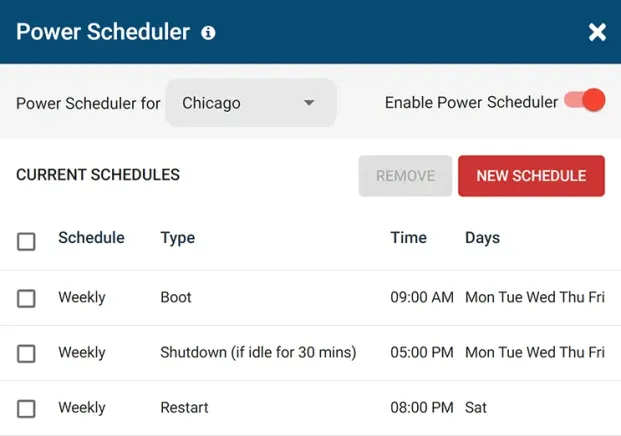
- Scheduled Tasks: Schedule automatic shutdown, boot, standby, hibernate and restart
- Boot/Shutdown at Certain Times: Prevent automatic shutdown when users are still active or using specified programs

What is Wake-on-LAN?
Wake-on-LAN (WoL) is an Ethernet networking standard that allows a shut down computer to be turned on remotely. Wake-on-LAN listens for a “magic packet” that turns on computers on the same local area network or from another location via the internet.
enPowerManager is a Wake-on-LAN tool that allows administrators to manage the power states of remote devices from a convenient central console. It supports Wake-on-LAN transmission through both Subnet Directed Broadcast and Unicast.

System Startup Event Logs
- Windows Logs: Maintain auditable records of a computer’s startup events with reports that include the system shutdown date and time, computer name, and user
- Verify System Startup Event: Shutdown logs help a system administrator remotely verify that computers have shutdown or startup as expected
- Last Shutdown Time: Use the startup and shutdown times to track the last known user for each endpoint

User Logon History Report
- Meet Compliance Regulations: Meet compliance requirements with a convenient and auditable record of user activity
- Detect Security Threats: Monitor logins for Active Directory domain accounts to see if user accounts or computers are being logged into after hours
- Boost Productivity: Monitor login and logoff times to spot users that are starting work late or taking excessively long breaks
Try enPowerManager for Free
Fully functional. Easy to use. $6 USD user/month
The Benefits of Remote Power Management
Save on energy costs
The average workstation uses 200 Wh of electricity. If employees forget to shut down their computers at the end of the workday it will consume 4800 watts (4.8 kW) per computer for every day they are left on at full power.
Easily restart all of the computers in your network
Use enPowerManager’s remote power control features to restart workstations after an unexpected shutdown, restart PCs after updates, and turn off computers at the end of the day.
Reduce server downtime from outages
Use enPowerManager to recycle power to non-responsive servers. Avoid costly in-person visits by providing your IT department with the tools they need to restart Windows servers remotely.
Try enPowerManager for Free
Fully functional. Easy to use. $6 USD user/month
enPowerManager’s Key Features
Start, Restart & Shutdown
Remotely control the power state of your computers
Wake on LAN
Automatically boot up computers at the beginning of a work day
Track Startup/Shutdown
Track when your users startup and shutdown their computers
Audit Logon Events
Track when your users logon or logoff their computers
Power Scheduler
Automatically trigger computer power states on a set schedule and turn off idle computers
Delayed Shutdown
Shutdown the computer only if it is idle to prevent work interruption and lost progress
Advanced Policies
Control power status of laptops when when they are plugged in vs. running on batteries
Hibernate and Standby
Turn off the monitor, power down the hard drive, hibernate and go into standby mode
Central Web Console
Save time with a central admin console; optionally integrate Active
Directory OUs or security groups
Platform Security
Protect your CurrentWare console with 2FA, passwords, privilege management, and more
Offsite Management
Extend onsite security policies to computers running outside the corporate network
SQL Server Supported
Database scaled for enterprise and large business operations using Microsoft SQL Server
Solutions That Work Across Industries
Tailored controls that help you meet industry standards, boost efficiency, and protect sensitive data across remote and in-office teams.
Healthcare
HIPAA-ready controls to protect PHI with USB management and insider-threat visibility.
Government
Cybersecurity and policy enforcement aligned to NIST 800-171 and CMMC.
Legal Services
Keep client data protected, billable hours productive, and software costs in check.
Manufacturing
Productivity monitoring and internet visibility for both the shop floor and back office.
Financial Services
Enforce access policies and protect sensitive financial data with audit-ready trails.
Schools & Libraries
CIPA-compliant web filtering to qualify for E-Rate and keep students safe online.
Small Business Employee Productivity
Track unproductive web browsing and idle time to detect time-wasting
enPowerManager
Compare enPowerManager with Other Endpoint Management Tools
enPowerManager handles remote shutdown, power schedules and logon and logoff tracking. If you are weighing a wider endpoint platform, start with these comparisons.
- Product Comparisons
Zscaler Alternative
- Product Comparisons
WebTitan Alternatives
- Product Comparisons
Veriato Alternatives
- Product Comparisons
Teramind Alternatives
- Product Comparisons
SafeConsole Alternative
- Product Comparisons
ManageEngine Alternative
- Product Comparisons
InterGuard Alternative

Built to Support Your Compliance Program
Discover how organizations use CurrentWare’s employee monitoring software to improve visibility, strengthen compliance efforts, and manage employee activity more effectively.
- CMMC Compliance →

CMMC
Endpoint Restriction to Protect CUI & FCI
- NIST 800-171 Compliance →

NIST 800-171/53
Protect Controlled Unclassified Information
- ISO 27001 Compliance →

ISO 27001
Increase the Maturity of Your ISO27K ISMS
- HIPAA Compliance →

HIPAA
HIPAA protects sensitive patient data
- Cyber Essentials Compliance →

Cyber Essentials
Critical Security Controls For Your Assessment
- GDPR Compliance →

GDPR
EU’s data protection and privacy law
- NERC CIP Compliance →

NERC CIP
Protect TCAs & BCSI From Insider Threats
- CIPA Compliance for Education →

CIPA for Education
Qualify for the FCC’s E-Rate Program
Pick & Plug Into Your Existing Stack
CurrentWare works alongside the identity, security, and directory tools you already use, including support for SAML, OIDC, and CEF standards. Cloud connectors are on the way.
- Tested & supported
- Generic standards (SAML, OIDC, CEF)
- On the roadmap (Cloud)


Keep reading
Articles
- Employee Management
Monitor Remote Workers Without- Micromanagement
One remote worker might spend 3 productive hours working non-stop without ever touching their keyboard, while another might trigger hundreds…
- Employee Management
Software Metering
Discover how software metering cuts tech waste and optimizes spend.See how IT leaders,governments track usage to reduce license and app…
- Employee Management
Internet Usage Statistics
Are you curious about internet usage statistics? This article will highlight interesting research, surveys, and data about business internet usage,…
- Employee Management
Tips for Preventing Employee Burnout and Increase Productivity
Employee burnout has officially been recognized by the World Health Organization (WHO) and has become the responsibility of employers. The…
- Employee Management
How to Increase Productivity
Want to learn how to increase productivity? In this article I will share tips on how you and your employees…
- Employee Management
Software Asset Management
Did you know that underutilized software cost businesses a staggering $34 billion per year? With a properly executed Software Asset…

Try enPowerManager for Free
Fully functional. Easy to use. $6 USD user/month