


Product Comparisons
How to prevent files from being copied to USB devices
With AccessPatrol’s USB drive file transfer blocker you can prevent files from being transferred to a USB flash drive based on filename, extension, or removable device type.
- Block Unauthorized Portable Storage
- Audit File Transfer Activity
- USB Activity Alerts
- $12 user/month
*No credit card required · 14-day free trial · For on-prem pricing, contact Sales
700+ organizations trust CurrentWare's employee monitoring software for visibility & control

Block File Transfers to Portable Storage Devices
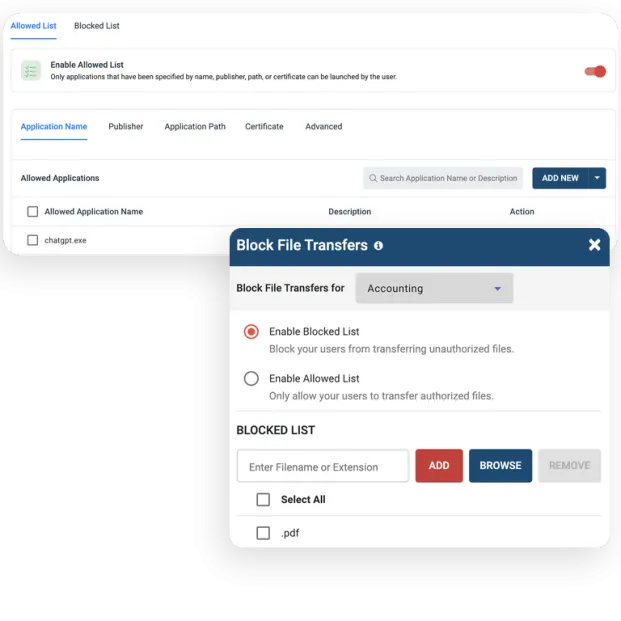
AccessPatrol is a USB locker tool that prevents data theft via USB ports by restricting removable storage access and limiting the file types that can be copied to removable disks.
- Prevent copying files that are high-risk based on their filename, keywords in the filename, or file extension
- Restrict file transfers to external storage devices
- Manage custom file blocking policies for each department and endpoint device
- Enable the Allowed List to limit data transfers to storage devices to a set list of filetypes and filename keywords

Why Use a USB blocker ?
- USB Security: Enforce the exclusive use of authorized USB drives. Combine AccessPatrol’s software-based policies with existing administrative safeguards to prevent employees from using personal USB drives.
- Prevent Data Breaches: A flash drive is portable and easy to hide. AccessPatrol’s technical safeguards stop insider threats from transferring sensitive data to all forms of removable media.

The Types of Devices You Can Control With AccessPatrol
As part of a multi-layered data loss prevention strategy you need to protect against any storage devices and peripherals that are capable of transmitting data such as a USB drive, Bluetooth, SD/MM cards, and Infrared ports.
AccessPatrol allows you to apply access rules for multiple classes of removable devices to prevent data loss and other security threats.
Click here for a full list of the devices you can control with AccessPatrol

AccessPatrol’s USB Drive Device Permission Settings
AccessPatrol includes various permission settings that a system administrator can use to improve data security without the need to use administrative templates in the local group policy editor.
- Full Access: The computer or user with this access permission has read and write access to the specified removable device that is connected to the computer.
- Read Only: USB copy protection will ensure that the user will not be able to copy any information to the specified storage devices; they will only have read access.
- No Access: AccessPatrol will prevent the users/PC from copying files to the storage devices and restrict access

Prevent Data Loss to Cloud Storage Services
Having sensitive data stored on unmanaged cloud services is a significant risk. Control access to cloud apps and websites with CurrentWare.
- Prevent malicious insiders from accessing cloud storage websites and apps
- Block the downloading and uploading of specific file types
- Track file transfers to/from cloud storage services for evidence of insider threats
Try AccessPatrol for Free
Fully functional. Easy to use. Install in minutes.
AccessPatrol’s USB Control & Data Loss Prevention Features
Block USB & Other Devices
Set full access, read only or no access on storage devices
Whitelist USB Devices
Allow only authorized storage devices to be used
Block File Transfers
Prevent files from being transferred to portable storage
Access Code Generator
Provide temporary access to peripheral devices
DLP Activity Reports
Track file transfers, storage device use, file operations, and more
File Transfer Monitoring
Monitor files that are copied to USBs, cloud storage, and more
Alerts & Reports
Automatically send USB activity reports to designated inboxes
Transparent & Stealth Modes
Run silently in the background or provide notice of monitoring
Centralized Console
Manage all your users from the centralized console with Active Directory import or syncing
Platform Security
Protect your CurrentWare console with 2FA, passwords, privilege management, and more
Offsite Management
Extend onsite security policies to computers running outside the corporate network
SQL Server Supported
Database scaled for enterprise and large business operations using Microsoft SQL Server
AccessPatrol
Compare AccessPatrol with Other Device Control and DLP Tools
See how AccessPatrol compares on USB device control, file transfer tracking, deployment options and price, including where another tool is the better fit.
- Product Comparisons
Zscaler Alternative
- Product Comparisons
WebTitan Alternatives
- Product Comparisons
Veriato Alternatives
- Product Comparisons
Teramind Alternatives
- Product Comparisons
SafeConsole Alternative
- Product Comparisons
ManageEngine Alternative
- Product Comparisons
InterGuard Alternative
Trusted by teams across the United States, Canada & the United Kingdom
Join 100,000+ professionals across 55 countries.


What customers say about CurrentWare
4.9 / 5
90% of reviewers would recommend AccessPatrol (average likelihood to recommend: 9 out of 10).
Solutions That Work Across Industries
Tailored controls that help you meet industry standards, boost efficiency, and protect sensitive data across remote and in-office teams.
Healthcare
HIPAA-ready controls to protect PHI with USB management and insider-threat visibility.
Government
Cybersecurity and policy enforcement aligned to NIST 800-171 and CMMC.
Legal Services
Keep client data protected, billable hours productive, and software costs in check.
Manufacturing
Productivity monitoring and internet visibility for both the shop floor and back office.
Financial Services
Enforce access policies and protect sensitive financial data with audit-ready trails.
Schools & Libraries
CIPA-compliant web filtering to qualify for E-Rate and keep students safe online.
Small Business Employee Productivity
Track unproductive web browsing and idle time to detect time-wasting
Built to Support Your Compliance Program
Discover how organizations use CurrentWare’s employee monitoring software to improve visibility, strengthen compliance efforts, and manage employee activity more effectively.
- CMMC Compliance →

CMMC
Endpoint Restriction to Protect CUI & FCI
- NIST 800-171 Compliance →

NIST 800-171/53
Protect Controlled Unclassified Information
- ISO 27001 Compliance →

ISO 27001
Increase the Maturity of Your ISO27K ISMS
- HIPAA Compliance →

HIPAA
HIPAA protects sensitive patient data
- Cyber Essentials Compliance →

Cyber Essentials
Critical Security Controls For Your Assessment
- GDPR Compliance →

GDPR
EU’s data protection and privacy law
- NERC CIP Compliance →

NERC CIP
Protect TCAs & BCSI From Insider Threats
- CIPA Compliance for Education →

CIPA for Education
Qualify for the FCC’s E-Rate Program
Pick & Plug Into Your Existing Stack
CurrentWare works alongside the identity, security, and directory tools you already use, including support for SAML, OIDC, and CEF standards. Cloud connectors are on the way.
- Tested & supported
- Generic standards (SAML, OIDC, CEF)
- On the roadmap (Cloud)


Keep reading
Articles
- Data Loss Prevention
How to Prevent Sensitive Data Pasting into AI Tools
Learn how endpoint DLP, web filtering, and application controls help prevent employees from pasting sensitive data into ChatGPT and other…
- Data Loss Prevention
Prevent Data Exfiltration Remote Laptops
The corporate security perimeter has changed. An employee's company laptop could easily arrive at work on a Monday morning connected…
- Data Loss Prevention
What is Data Leakage
In this article, I will answer the question “What is data leakage?”. I will also explain the difference between data…
- Data Loss Prevention
Top Data Exfiltration Risks
Protecting sensitive data must be a top priority for any business. Unfortunately, the multitude of techniques available to threat actors…
- Data Loss Prevention
Need for Data Loss Prevention Software DLP
Data theft from inside a company is a growing challenge in the modern world. We now have an abundance of…
- Data Loss Prevention
Windows XP USB Blocker
Does your business rely on legacy operating systems such as Windows XP, Windows 7, and Windows 8/8.1? If so, you…


Try AccessPatrol for Free
Fully functional. Easy to use. $12 USD user/month (*For on-prem pricing, contact Sales)