
★★★★★ Capterra · Nov 2025
Productivity Monitoring Feedback
“Easy tracking of employee productivity. Seamless transition from person to person on the back end. Easy to update.”
We’ve updated our Subprocessor List, effective October 6, 2026. Please review the update to our Data Processing Addendum
*No credit card required · 14-day free trial · Easy setup
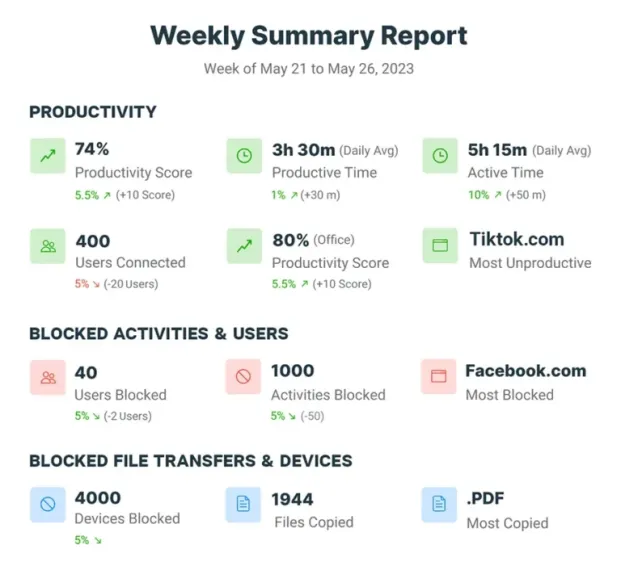

CurrentWare provides granular insights into employee activity, enabling organizations to understand real-time workforce utilization.
By tracking employee productivity, idle time, and application usage, businesses can identify bottlenecks, optimize resource allocation, and improve operational efficiency.

CurrentWare offers valuable data for performance management and coaching.
By tracking employee activity and productivity, managers can identify areas for improvement, set realistic goals, and provide targeted coaching.

Integrate CurrentWare into your software asset management practices.
By monitoring and managing software usage, you will understand which technology is being used efficiently and effectively, which tools staff may need more support to learn, and what tools are redundant or underutilized.

Ensure adequate staffing levels and scheduling by reviewing who has logged in for the day, who has stepped away, and who has not yet started work.
By identifying peak workload periods and employee availability, businesses can optimize schedules, reduce overtime, and improve employee satisfaction.

Get visibility into workload distribution and productivity through expected work hours to improve efficiency, reduce costs, and foster a healthier workforce.
81% of companies that implemented monitoring software saw an increase in their employees’ productivity
36% of desktop software & 29% of SaaS spend is underutilized or wasted, according to Flexera’s State of ITAM 2023 report
52% of employers have caught an employee working a second job while on the clock thanks to monitoring software
Join 100,000+ professionals across 55 countries.


Across the whole CurrentWare Suite.
90% of reviewers would recommend BrowseReporter (average likelihood to recommend: 9 out of 10).

The HR department suddenly gained the ability to present tangible evidence of disinclination to employees who had been underperforming! We have become an extremely efficient workforce.
Track web browsing, software use, search queries, and more
Take automatic screenshots or remotely view desktops
Get insights into software usage trends in your organization
Run silently in the background or provide notice of monitoring
Set full access, read only or no access on storage devices
Allow only authorized storage devices to be used
Prevent files from being transferred to portable storage
Track file transfers, storage device use, file operations, and more
Block websites based on URLs & content categories
Prevent uploading and downloading based on file type
Block specific Windows applications from launching
Remotely track and control PC power states
Save time with a central admin console; optionally integrate Active Directory OUs or security groups
Protect your CurrentWare console with 2FA, passwords, privilege management, and more
Extend onsite security policies to computers running outside the corporate network
Database scaled for enterprise and large business operations using Microsoft SQL Server
Keep reading
Successful executive leadership goes beyond monitoring employees' every move; it also needs a clear, factual picture of digital workflows, which…
According to a workforce analytics industry report published by Fortune Business Insights, the global workforce analytics market was valued at…
Companies are heavily reliant on the quality and volume of work that their employees produce. From that reliance comes a…
On paper, your professional services team appears to be running smoothly — billable hours are logged, tasks are checked off,…
Employee burnout has officially been recognized by the World Health Organization (WHO) and has become the responsibility of employers. The…
In this article I’ll give you my top 6 time management tips for professionals. These important tips will help you…
Frequently asked
No, CurrentWare cannot access the data you collect with its workforce optimization software. CurrentWare’s software does not send your user’s computer usage data to CurrentWare. They are installed and managed by your organization.
All of the data collected by CurrentWare’s software is stored on a database that is installed in your organization’s data center or cloud service provider.
With CurrentWare’s on-premises & self-managed cloud deployment options, you’re in complete control of your data.
For more information, please refer to our software privacy policy.
Yes. CurrentWare’s workforce monitoring software allows you to monitor remote workers through a variety of deployment options such as an offsite mode that works without access to the internet, connecting through a VPN, port forwarding, or by installing it on a cloud platform of your choice.
Learn More: How to monitor WFH employes
CurrentWare collects data on application usage, website activity, productive time, idle time, and workload trends. A lightweight agent runs on employee devices and sends activity insights to centralized dashboards—without invasive tracking methods like keylogging, webcam access, or stealth recording.
The free trial for all of CurrentWare’s computer monitoring software solutions are fully functional. You can deploy it on up to 10 computers for 14 days. If you need more time or more computers to properly evaluate CurrentWare in your organization, reach out to our sales team.
CurrentWare is committed to the security of its platform, its users and their data.
For a complete overview of the security measures that CurrentWare has in place, check out the CurrentWare platform security overview page.
Yes! Since CurrentWare runs on your own server, and doesn’t ping back to a remote server elsewhere, CurrentWare can run on air-gapped networks without access to the outside internet. This means it an excellent fit in research facilities or other high security environments.
To deploy CurrentWare without internet access you can do a Standalone Setup with all components on the same PC, or you can install the central management software within your intranet to centrally manage PCs within an air-gapped network.
When your employees disconnect from your network the client agent will store their activity data locally on their computer. Once they reconnect to your network their data will be synced to the CurrentWare server.
Note: If you wish to get activity data from employee computers that are outside of the network, they will need to be able to communicate with the CurrentWare Server. Once a connection is reestablished you will receive your employee’s computer usage data and any CurrentWare policy updates will take effect.
Learn More: Will CurrentWare work if someone is not connected to our network or the internet?
Workforce Optimization (WFO) is a business strategy that aims to maximize the efficiency and effectiveness of an organization’s workforce. It involves using technology and data-driven insights to optimize various aspects of employee management, including:
Workforce Optimization offers a multitude of advantages for organizations.
In essence, WFO helps organizations balance meeting customer needs, optimizing operational costs, and maximizing employee performance. Workforce optimization tools are an essential part of WFO initiatives, providing critical information for data-driven decision-making.


