


Product Comparisons
The Currentware Suite: Monitoring, web filtering, DLP & power management
Four modules, one console to help you monitor employee activity, protect sensitive data, control web access, and reduce energy costs.
No credit card required · Deploy in minutes · Cloud or on-premise
700+ organizations trust CurrentWare's employee monitoring software for visibility & control
Workforce Analytics That Actually Work for Your Business
Many businesses spend hundreds of dollars buying separate tools that help them track employee productivity, filter web, monitor device usage, and manage power, respectively.
Each of these tools comes with its own login, reports, and even blind spots, causing inefficient visibility and fragmentation, leaving room for a single source of truth.
Don’t be like those businesses; instead, choose CurrentWare, which combines all four capabilities in a single platform.
No more juggling between multiple monitoring & tracking tools- simply deploy the modules you need now, add the rest later, and manage everything in a single platform instead of four disconnected ones.
CurrentWare Suite — The Complete Workforce Platform
One integrated console for productivity analytics, web filtering, device control, and power management. Run the full suite, or start with just the modules you need.
BrowseReporter
For Employee Activity & Productivity Tracking
Know where your employees’ time goes by tracking activity across all apps, websites, and devices.

BrowseControl
For Web Filtering & Internet Management
Increase employee productivity by blocking distracting websites and controlling internet access.

AccessPatrol
For Data Loss Prevention & Device Control
Prevent data loss with USB device control, file-transfer monitoring, and DLP enforcement on every endpoint.

enPowerManager
For Power Management & IT Cost Savings
Cut energy costs with remotely managed automated PC shutdowns, startup scheduling, and idle-PC sleep policies for green IT.

One Suite, Many Use Cases
Because the CurrentWare Suite combines all four modules, it powers a wide range of monitoring, security, and productivity solutions, deployed on-premise or in the cloud.
Data Loss Prevention
Prevent data theft and leakage to cloud services and portable storage
Endpoint Security
Protect endpoint devices against high-risk USB devices, websites, and apps
Insider Threats
Protect sensitive data against negligent and malicious insiders
Internet Management
Restrict and monitor internet access to enforce acceptable use policies
AI Usage Insights
See every AI tool your team uses, govern what’s allowed, and stop sensitive data from leaking into ChatGPT, Copilot, and beyond without any guesswork.
Computer Monitoring
Get the insights you need to ensure computers are used safely and productively
Employee Investigations
CurrentWare is the digital witness you need to gather proof of misconduct
Employee Monitoring Software
Take complete control of how work gets done across every device.
Email Monitoring
Get full visibility into how your team uses webmail- without reading the conversations.
Types of Employee Monitoring
A Complete Guide to 13 Methods and How They Work.
What Is
Employee monitoring tracks how staff use company resources at work.
Employee Productivity
Track unproductive computer activity and idle time to detect time-wasting
Office Attendance Tracking
Improve Presence & Productivity with Office Attendance Tracking.
Remote Employee Management Software
Improve productivity & security—no matter where team members work
Software License Optimization
Track what’s actually being used, find what isn’t, and stop paying for tools that collect dust.
User Activity Monitoring
Monitor user activity in Citrix, Terminal Server, and RDS—including persistent and non-persistent VDIs!
Workforce Optimization Software
CurrentWare provides valuable operational metrics for data-driven decision-making
Everything You Need in One Console
One agent and one web console bring all four modules together – BrowseReporter, BrowseControl, AccessPatrol, and enPowerManager – covering activity insight, web and device control, data-loss prevention, and IT cost savings across every endpoint.
Currentware Suite
Privacy
Use these optional privacy-enhancing features to improve transparency and minimize data collection
Remote Client Install
CurrentWare’s software agent can be installed locally or deployed using Active Directory, the command line, or with CurrentWare’s built-in Remote Client Install tool.
Security Features
Every layer of the CurrentWare Suite- deployment, storage, transmission, and access is designed so the data it collects never has to leave your control.
SQL Server Support
All of the solutions in the CurrentWare Suite are compatible with SQL Server 2012 R2, 2014, 2016, 2017, 2019, 2022 (Express, Standard and Enterprise).
Stealth Mode
CurrentWare’s employee computer activity monitoring programs can run in stealth mode to function as invisible stealth computer monitoring software.
Web Console
CurrentWare’s centralized management console makes managing your in-house and remote workforce simple and convenient.
BrowseReporter
Bandwidth Tracking
BrowseReporter is a valuable bandwidth monitoring tool for Windows endpoints.
Capture Screenshots by Website Category
Set up screenshot capture rules using predefined website categories, instead of adding websites one at a time.
Computer Activity Reports
BrowseReporter’s computer and internet activity reports, alerts, and dashboards provide detailed real-time user activity data—even on Terminal Server and Remote Desktop Services!
Employee Monitoring Reports To Email
BrowseReporter’s computer activity reports can be sent to email inboxes for convenient employee monitoring.
Idle Exclusion List
Ensure accurate productivity analytics by excluding approved communication and upskilling apps and websites (e.g., Teams, Zoom, Meet, Coursera for training) from idle detection.
Idle Time Tracking
Track idle time and real-time productivity of your employees in remote, hybrid, or on-site offices.
Internet Monitoring
BrowseReporter is easy-to-use web activity monitoring software for tracking the web pages visited throughout an entire network—even on Terminal Server and Remote Desktop Services!
Mac Employee Monitoring Software
Get Apple Silicon-native monitoring with privacy-first, OS-compliant visibility.
Mouse Jiggler Detection Software
CurrentWare’s Advanced Mouse Jiggler Detection System (v12.0.0) protects your organization by identifying non-human activity patterns, detecting unauthorized automation tools, and ensuring your productivity data reflects real work not artificial inputs.
Schedule Adherence
Know who starts on time, who finishes early, and where schedules drift. Track expected vs. actual in real-time.
Screenshot Monitoring
BrowseReporter is a versatile employee screenshot monitoring software for capturing screenshots of remote and on-premises desktops—even on Terminal Server and Remote Desktop Services!
Search Your Screenshots With AI-assisted OCR Text Extraction
BrowseReporter extracts and indexes text from every screenshot, transforming captured screen activity into searchable, exportable records instead of static image files.
Track Application Usage
Underutilized software costs businesses a staggering $34 billion per year!
Workforce Cost Summary
Translate wasted workforce time into financial impact. Convert unproductive hours into dollar costs so leaders can see where inefficiencies live and what to do about them.
BrowseControl
Application Blocker
How to block certain programs with BrowseControl.
Block Downloads From Internet
With BrowseControl’s file download blocker you can prevent users from downloading or uploading files from the internet, software apps, and more!
Block Network Ports
BrowseControl is a host-based web filtering and port blocking software for restricting internet access and filtering TCP/UDP ports on endpoint devices.
Category Filtering
Use BrowseControl’s web content categorization database to block millions of websites across 100+ URL categories.
Control Internet Access
BrowseControl’s is an easy-to-use internet access control software for businesses. Block access to the internet on an employee’s or student’s computer in just a few clicks.
Customized Message
BrowseControl’s web filter displays a blocked website message when users attempt to access blocked websites.
Reclassify Categories
Found a URL that’s miscategorized in BrowseControl’s or BrowseReporter’s website categorization feature? Let us know by filling out the form!
Safe Search
BrowseControl’s safe search lock feature ensures that Google SafeSearch is always enabled.
Schedule Internet Restrictions
Schedule internet access for your employees with a variety of time-based internet access control features.
Application Control
Allow only approved applications are allowed to run. Enforce strict compliance across high-regulation industries. Improve workforce productivity by blocking non-work applications.
URL Filter
Control internet access based on individual URLs, entire domains, web content category, and IP address.
AccessPatrol
Block Usb
USB blocking software to protect endpoints & sensitive data against insider threats.
Disable Usb File Transfer
With AccessPatrol’s USB drive file transfer blocker you can prevent files from being transferred to a USB flash drive based on filename, extension, or removable device type.
Grant Temporary Access User Bypass
AccessPatrol can grant temporary access to blocked USB devices with the access code generator.
USB Access Control
AccessPatrol is a convenient removable media control software for blocking and restricting portable storage devices.
Usb Device Reports
Monitor and restrict transfers of sensitive files to cloud storage services such as Google Drive.
Whitelist USB Devices
AccessPatrol’s USB whitelisting feature allows administrators to grant access to authorized USB devices while restricting access to all other devices.
enPowerManager
Advanced Power Options
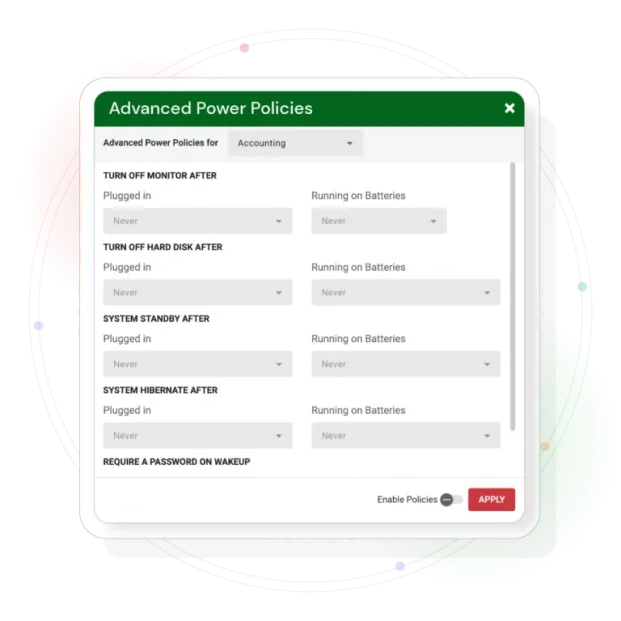
enPowerManager’s advanced power policies lets you remotely configure advanced power options for all of your laptops.
Computer Power Scheduler
Schedule automatic shutdown, boot, and restart in windows.
Computer Startup & Shutdown History
Use enPowerManager’s PC power reports to see PC startup and shutdown history in Windows, all without needing to sort through event logs in the Windows event viewer.
Remote PC Power Manager
enPowerManager is a computer power manager for controlling the power states of local and remote computers.
Track Logon Logoff Audit
Tracking account logon activity one system at a time for an entire Active Directory network is tedious and time consuming.
Wake on LAN
enPowerManager is a no fuss utility that lets you remotely boot computers using a Wake-on-LAN packet (WoL Packet).
Productivity, Protection & Cost Control
Productivity Intelligence
- Measure app and website usage
- Detect time-wasting patterns
- Optimize workflows with real data
Insider Threat Protection
- Prevent USB data leaks with AccessPatrol
- Block risky cloud and email transfers
- Stop shadow IT and reduce attack surface
Cost Optimization
- Identify unused software licenses
- Right-size IT budgets at renewal
- Reduce SaaS sprawl
Fast, Non-Disruptive Deployment
Actionable insights are available within days of setup – no professional services required.
Step 1
Capture activity at the source
Securely capture application usage, website activity, active vs idle time, and device interactions in real time on employee endpoints.
Step 2
Transform into intelligence
Raw data becomes clear patterns: productivity trends, workflow inefficiencies, policy risks, and cost leaks.
Step 3
Visualize what matters
Dashboards translate complex data into decision-ready insights, from underutilized SaaS to shadow IT and risky behavior.
The Latest in CurrentWare
Recently shipped capabilities that give you deeper visibility and faster, simpler deployment.
Screenshot OCR & text extraction New
BrowseReporter now extracts and indexes the text inside every captured screenshot, turning screen activity into searchable, exportable evidence. Search by keyword – with exact, partial, fuzzy, and regex matching – and filter by user, group, and date instead of opening images one by one.
Screenshots by website category New
Configure screenshot rules using predefined website category groups instead of entering sites one at a time. Apply a single policy across an entire category – social media, webmail, AI tools, and more – so screenshot coverage scales without per-URL maintenance.
Cloud deploymentNew
Run CurrentWare entirely in the cloud, with no on-premise server to maintain. Deploy in minutes and manage every endpoint from anywhere, alongside the existing on-premise option.
AI usage trackingNew
See which generative-AI tools your team uses, how often, and where data may be exposed, so you can govern AI adoption with real usage data.
Workforce Intelligence for AI Usage at the Workplace
Short section on tracking which generative-AI tools are used, how often, and where data may be exposed.
Measurable Impact Where It Matters
0%
less software spend by reclaiming unused and redundant licenses.
0%
productivity increases after putting activity insights to work.
0%
compliance confidence with audit-ready reporting and policy enforcement.
See what all four modules return in a year
Price the full Suite against recovered productivity, unused software licences, insider risk and energy — using your own numbers, not ours.
Turn Daily Activity Into Measurable Outcomes
CurrentWare converts everyday endpoint activity into results leaders can see, prove, and act on.
Lower software spend
Surface unused licenses and SaaS sprawl to right-size IT budgets, customers see up to 48% less software spend.
Higher productivity
Reduce distractions and idle time to lift output, with productivity gains reported up to 81%.
Audit-ready compliance
Maintain audit trails and enforced policies that map to HIPAA, NIST, ISO 27001, CMMC, and more.
Fewer data incidents
Cut insider-threat and exfiltration risk with device control, DLP, and download blocking.
Faster investigations
Give HR and security objective, defensible activity evidence instead of guesswork.
Proven ROI
Make data-driven renewal and resourcing decisions and demonstrate impact with hard numbers.
Why CurrentWare Outperforms Other Monitoring Tools
Trusted where risk is highest. Proven where it matters most. For over 20 years, CurrentWare has helped organizations move beyond basic monitoring to true workforce intelligence, control, and compliance.
| Feature | CurrentWare | Other Solutions |
|---|---|---|
| Productivity Insights & Analytics | ✓ Yes – BrowseReporter | Limited – ActivTrak alternative |
| Data Loss Prevention (DLP) | ✓ Yes – AccessPatrol | ✗ Rarely included – DeviceLock alternative |
| Web Filtering & App Control | ✓ Yes – BrowseControl | Separate tool required – Zscaler alternative |
| Insider Threat Detection | ✓ Yes | Limited – Veriato alternative |
| Compliance Reporting (HIPAA, NIST, SOC 2) | ✓ Yes | Limited – Forcepoint alternative |
| On-Premise Deployment Option | ✓ Yes | ✗ Rarely available – Cisco Umbrella alternative |
| Software License Optimization | ✓ Yes | ✗ No – Insightful alternative |
CurrentWare Suite
Compare the CurrentWare Suite with Other All-in-One Platforms
The Suite combines activity monitoring, web filtering, USB device control and PC power management in one platform. These comparisons show what it can replace.
- Product Comparisons
Zscaler Alternative
- Product Comparisons
WebTitan Alternatives
- Product Comparisons
Veriato Alternatives
- Product Comparisons
Teramind Alternatives
- Product Comparisons
SafeConsole Alternative
- Product Comparisons
ManageEngine Alternative
- Product Comparisons
InterGuard Alternative
Built for the Teams & Organizations That Run Modern Workplaces
From IT, security, HR, compliance, finance, and operations leaders to small businesses, enterprises, government, healthcare, schools, and MSPs – one platform gives every team the visibility and control they need.
IT & Security Teams
Enforce web, app, and device policy and spot risky activity across every endpoint.
HR & People Ops
Use objective activity data for fair performance reviews and investigations.
Compliance & Legal
Produce audit-ready trails and demonstrate due diligence for regulators.
Finance & IT Cost Owners
Cut software waste and right-size renewals with real usage data.
Operations & Team Leads
Find bottlenecks and reclaim focus time to streamline how work gets done.
Managed Service Providers
Manage productivity, filtering, and DLP for multiple clients from one console.
Remote & Hybrid Teams
Keep visibility and policy consistent whether staff are in-office, at home, or on the move.
Medium to Large Enterprises
Manage complex environments and enforce security policy across thousands of computers.
Small Businesses
Establish foundational security and productivity controls quickly, without a big IT team.
Government & Public Sector
Meet strict cybersecurity and data-protection mandates with on-premise control.
Healthcare & Regulated Industries
Protect sensitive data and maintain HIPAA-, NIST-, and CMMC-conscious controls.
Schools & Libraries
Filter content and meet CIPA requirements to qualify for E-Rate funding.
Solutions for Every Industry
Tailored controls that help you meet industry standards, boost efficiency, and protect sensitive data, across remote and in-office teams.
Legal Services
Ensure billable hours are used appropriately and keep client data safe
Schools & Libraries
Meet CIPA compliance, ensure student safety, and prevent misuse of PCs
Healthcare
Protect ePHI and meet HIPAA compliance with technical safeguards
Small Business
Save money with our fairly priced security and productivity software
Manufacturing
Create a more efficient and secure environment to ensure compliance
Government
Manage cyber risk, reduce software waste, and keep employees engaged
Financial Services
Fulfill your duty of care to protect the sensitive data in your custody
Managed Service Providers
Deliver the monitoring, data-loss prevention, and web filtering your clients need, now with faster deployment, and easier management.
Built to Support Your Compliance Program
Discover how organizations use CurrentWare’s employee monitoring software to improve visibility, strengthen compliance efforts, and manage employee activity more effectively.
- CMMC Compliance →

CMMC
Endpoint Restriction to Protect CUI & FCI
- NIST 800-171 Compliance →

NIST 800-171/53
Protect Controlled Unclassified Information
- ISO 27001 Compliance →

ISO 27001
Increase the Maturity of Your ISO27K ISMS
- HIPAA Compliance →

HIPAA
HIPAA protects sensitive patient data
- Cyber Essentials Compliance →

Cyber Essentials
Critical Security Controls For Your Assessment
- GDPR Compliance →

GDPR
EU’s data protection and privacy law
- NERC CIP Compliance →

NERC CIP
Protect TCAs & BCSI From Insider Threats
- CIPA Compliance for Education →

CIPA for Education
Qualify for the FCC’s E-Rate Program
Pick & Plug Into Your Existing Stack
CurrentWare works alongside the identity, security, and directory tools you already use, including support for SAML, OIDC, and CEF standards. Cloud connectors are on the way.
- Tested & supported
- Generic standards (SAML, OIDC, CEF)
- On the roadmap (Cloud)


What Customers Do With CurrentWare


Trusted by teams across the United States, Canada & the United Kingdom
Join 100,000+ professionals across 55 countries.


What customers say about CurrentWare
4.8 / 5
Across the whole CurrentWare Suite.
4.7 / 5
90% of reviewers would recommend BrowseReporter (average likelihood to recommend: 9 out of 10).
4.7 / 5
90% of reviewers would recommend BrowseControl (average likelihood to recommend: 9 out of 10).
4.9 / 5
90% of reviewers would recommend AccessPatrol (average likelihood to recommend: 9 out of 10).
Featured resources
Helpful guides, templates, checklists, and planning resources to support your monitoring strategy and rollout.
-

Download free AI Usage Governance Policy template
Download → -

Get Your Free Employee Monitoring Starter Kit
Download → -

How to Keep Data Safe When Offboarding Employees
Download → -

Internet Acceptable Use Policy Template
Download → -

Download the Removable Media Policy Template
Download → -
Workplace Monitoring Policy Template
Download → -
Stop Guessing. Start Saving. Calculate Your True ROI on Software Costs
Download →
Guides & Insights From CurrentWare
Explore expert guidance on productivity, AI usage, data security, and managing modern workplaces.
How to Track AI Usage at Work
Monitor employee AI tool usage to improve visibility, ensure compliance, and reduce security risks.
Productivity Improvement Strategies
Discover practical strategies to boost employee productivity and improve team performance.
How to Check Activity on a Computer
Learn how to monitor computer activity to improve security, accountability, and productivity.
Best Data Loss Prevention Software
Compare the best data loss prevention (DLP) software to prevent sensitive data leaks and insider threats.
Best USB Control Software
Explore the best USB control software to block unauthorized devices and protect sensitive data.
Best Internet Filters
Find the best internet filtering software to control web access, improve productivity, and enhance security.
Related Knowledge Base Articles
Find step-by-step guides, deployment instructions, and troubleshooting resources to get the most out of CurrentWare.
System Requirements
Supported OS, hardware, and network prerequisites.
Cloud Deployment
Stand up CurrentWare in a cloud environment.
Upgrade Deployment
Upgrade your console and clients safely.
Release Notes
What’s new in the latest CurrentWare versions.
Find a Reseller
Purchase CurrentWare through a local partner.
Knowledge Base Home
Search the full library of help articles.
Keep reading
Articles
- Employee Monitoring
Screenshot Monitoring in Healthcare
Healthcare organizations in 2026 will be increasingly challenged to monitor employee computer activity without risking showing sensitive patient information. In…
- Employee Monitoring
Citrix & AVD Multi-Session User Tracking Guide
Learn why Session-ID mapping matters in Citrix, Azure Virtual Desktop, and RDS separating user activity, idle time, policies, and audit…
- Employee Monitoring
Scalable Employee Monitoring for Growing Teams
The fast-growing company does not have a large IT team, resources dedicated to security, or weeks to deploy an enterprise…
- Compliance
GDPR Compliance Employee Monitoring and DPIA Guide
When using employee computer monitoring software across the European Union (EU), companies have to find a balance between two legitimate,…
- Compliance
US Employee Monitoring Laws by State
The location from which employees log in remained the same with the introduction of hybrid working; instead, it was the…
- Employee Monitoring
Keystroke Logging vs. Application Tracking
As hybrid and distributed work matures into 2026, enterprises' visibility challenges become more nuanced than whether an employee is logged…

Try CurrentWare today
Get started with affordable per-user pricing and volume discounts. Protect your business and boost productivity, today.
No credit card required · USD, CAD & GBP pricing
Join thousands of businesses using CurrentWare