We’ve updated our Subprocessor List, effective October 6, 2026. Please review the update to our Data Processing Addendum

Schedule adherence built for real results

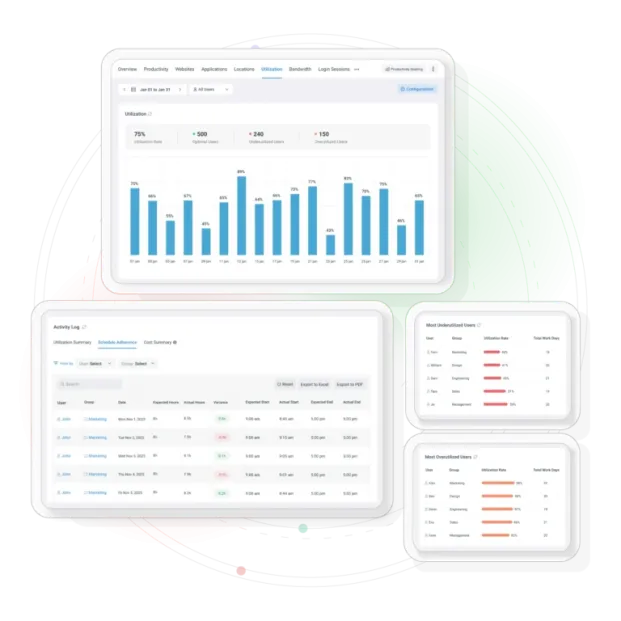
Know who starts on time, who finishes early, and where schedules drift. Track expected vs. actual in real-time.

*No credit card required · 14-day free trial · For on-prem pricing, contact Sales
qlyaqvt7zslcgwum6opt
700+ organizations trust CurrentWare's employee monitoring software for visibility & control
  • cushing
  • Mendota
  • nebf
  • idaho
  • viking
  • VES
  • Bristol-logo

The visibility gap that costs you every week

When you don’t have a clear view of schedule compliance, you’re stuck with guesswork, manual tracking, and reactive conversations.

No visibility into schedule compliance

You’re stuck with guesswork about who’s actually working their assigned hours.

Hard to catch repeated late logins

Patterns of early logouts slip through the cracks until they become major issues.

Too much manual tracking

Hours wasted comparing expected vs. actual hours in spreadsheets.

Limited workforce insights

Data exists but lacks the context to drive real management decisions.

What Schedule Adherence Does

Let managers monitor employee compliance with assigned work schedules, detect late starts, and analyze attendance patterns

Track Individuals & Teams

Monitor both individual users and entire groups with configurable schedules.

Flexible Hours Support

Configure schedules per user or group, including flexible working hours.

Visual Variance Charts

See variance clearly with intuitive visual charts at a glance.

Trend Analysis

Review attendance patterns and identify repeat patterns over time.

Multiple Time Views

Daily, weekly, and monthly views for comprehensive analysis.

Advanced Filtering

Filter by user, group, and date range for focused insights.

enl6lht3f3mfrbq8fb3g

Turn schedule data into action

Outcomes you can drive in your first week of using Schedule Adherence.

enl6lht3f3mfrbq8fb3g

Real-time adherence tracking at the individual and group level

Automated variance calculations + visual charts for quick analysis

Insights into late starts, early finishes, and attendance patterns

Daily / weekly / monthly views with filtering by user, group, and date range

bwwipoayaoylrwukxvjz

How It Works

Get started in minutes and see results immediately.

bwwipoayaoylrwukxvjz

Set Expected Schedules

Configure schedules per user or group, including support for flexible hours.

Automatic Tracking

CurrentWare tracks expected vs. actual start/end times and working hours.

See Variance Instantly

View variance in visual charts and review trends over any time period.

Drill Down Deep

Filter by user, group, or date range to identify repeat patterns.

Take Action

Use insights to coach, correct, and improve operational efficiency.

Reporting that drives decisions

Not debates. Get actionable insights that lead to real operational improvements

Spot deviations quickly

Real-time visibility into who is on schedule and who is drifting.

Identify repeat patterns

Find repeat offenders per user or group before small issues become big problems.

Support timely corrective actions

Take action fast with data-driven insights and clear documentation.

Improve decision-making

Enhanced reporting that drives decisions, not debates.

currentware v12.0.0

What’s Included in v12.0.0

Clear Expectations

currentware v12.0.0

Included

  • Expected vs. actual tracking (start/end + working hours)
  • Individual + group support
  • Visual variance chart
  • Daily/weekly/monthly views + filters

Trusted by teams across the United States, Canada & the United Kingdom

Join 100,000+ professionals across 55 countries.

currentware-comes-with-citrix-compatibility Capterra awarded CurrentWare as Best Ease of Use software 2026 CurrentWare Named a top choice by Forbes Advisor for best employee monitoring software 2025 Top Rated Employee monitoring software by SoftwareWorld CurrentWare recognized as trusted vendor of epmloyee monitoring software by Crozdesk in 2026 GetApp recognized Currentware as software with best functionality & features 2025 G2 selected CurrentWare as High Performer (Fall 2024) in employee monitoring software category GetApp recognized Currentware as employee monitoring software Category Leaders in 2024 G2 selected CurrentWare as Easiest To Do Business With (Fall 2024) in user monitoring category CurrentWare recognized by Crozdesk as a Quality Choice Solution in 2026 SoftwareAdvice rated CurrentWare as Front Runners in 2024 CurrentWare recognized by SoftwareSuggest for Best Support in 2024 CurrentWare recognized as a FinancesOnline Rising Star CurrentWare recognized by Capterra for Best Value Award in 2022 CurrentWare recognized by SoftwareSuggest for Best Support in 2024 Crozdesk recognized CurrentWare as Leader in Employee Monitoring Software 2021

What customers say about CurrentWare

4.7 / 5 116 verified reviews on Capterra
  • Ease of use 4.8
  • Customer service 4.6
  • Features 4.6
  • Value for money 4.5

90% of reviewers would recommend BrowseReporter (average likelihood to recommend: 9 out of 10).

★★★★★ Capterra · Nov 2025

Productivity Monitoring Feedback

“Easy tracking of employee productivity. Seamless transition from person to person on the back end. Easy to update.”

Sean M Office Manager Marketing and advertising · 11-50 employees
★★★★★ Capterra · Sep 2025

Self hosted Workforce insight software

“The agent is pretty efficient, and the reports provides are very helpful to the HR. We implemented this when most of our employees transition to work from home or hybrid. We compared few other softwares, and this was one which was cost efficient, and helped us implement without much overhead.”

Shibu B CTO Computer software · 51-200 employees
★★★★☆ Capterra · Sep 2025

Great Tool for Remote Work Management

“I love having this available as most of our staff works remote. I typically only use it when there is an issue but having it available is great.”

Stormie P SVP – Director of Operations Insurance · 51-200 employees
★★★★☆ Capterra · Jul 2023

Reliable employee performance monitoring software

“This product has efficient database that collects data of all the organization employees. It enhances excellent management of time by sending alerts to the management on work processes.”

Gerald W Senior Backend Engineer Computer software · 51-200 employees
★★★★☆ Capterra · Jan 2023

Uncovering Insights to Streamline HR Processes.

“I like that BrowseReporter software is easy to use and provides comprehensive reporting on user activity. It provides detailed analytics on user activity, so I can easily track and monitor user behavior on my network. I also appreciate the alerts feature, which allows me to stay informed on user activities and take action when necessary.”

Tasha M Senior Human Resources Professional Public relations and communications · 11-50 employees
★★★★★ Capterra · Jan 2023

Program for effective control and optimization of daily tasks.

“By utilizing this application, our business has been able to increase employee productivity during work hours and, as a result, profitability.Support is prompt and precise.”

Jane D Human Resources Manager Financial services · More than 10000 employees
★★★★☆ Capterra · Dec 2022

The product is incredibly functional.

“The BrowseReporter advantage is that it provides comprehensive reporting capabilities to help businesses make informed decisions. It provides detailed reports on browsing activity and user behaviour, allowing businesses to see how their websites are being used and uncover trends or behaviours that can be addressed in order to improve the customer experience. It also provides real time monitoring, allowing businesses to quickly spot and address any issues before they become a problem. Finally, BrowseReporter provides a range of visualisations to help make data easier to understand and interpret.”

Luca T Senior Software Engineer Information services · 51-200 employees
★★★★★ Capterra · Dec 2022

A Comprehensive Tool to Improve Online Browsing Safety

“BrowseReporter is an incredibly useful tool to ensure online safety. It provides a comprehensive set of features such as website blocking, browser tracking, and more. The user interface is intuitive, making it easy to set up and use. It also has excellent customer support, which is always helpful when you need assistance.”

Cansu G Performance Marketing Manager Marketing and advertising · 5001-10000 employees
★★★★★ Capterra · Nov 2022

The praiseworthy and Performing Remote work monitoring tool.

“Easily captures the workers computer giving very detailed information on the employee's internet activity. It makes it so easy to customize reports individually or by departments. Has a very reliable customer service.”

Denis N Head of Production Higher education · 11-50 employees
★★★★★ Capterra · Nov 2022

Glorious,magnificent and truly unprecedented Employees Monitoring tool.

“This tool is secure,fast and easy to work with.Likewise,with BrowseReporter,I can easily monitor and track employees internet browsing and computer applications activities more efficiently.It's easy to generate employees activities reports with BrowseReporter.”

Bernice M HR Director Staffing and recruiting · 11-50 employees
★★★★☆ Capterra · Sep 2022

My experiences.

“The mobility of functions are very special.This effect of this software submit to you a lot of alternative.”

Nedret B Information Technology Manager Information technology and services · 11-50 employees
★★★★★ Capterra · Aug 2022

Great Software

“Generally I like it and had no issues, I think it's a useful software, Customer support was very quick to respond :)”

Ünal K Senior Software Engineer Machinery · More than 10000 employees

Solutions That Work Across Industries

Tailored controls that help you meet industry standards, boost efficiency, and protect sensitive data across remote and in-office teams.

Healthcare

HIPAA-ready controls to protect PHI with USB management and insider-threat visibility.

Government

Cybersecurity and policy enforcement aligned to NIST 800-171 and CMMC.

Legal Services

Keep client data protected, billable hours productive, and software costs in check.

Manufacturing

Productivity monitoring and internet visibility for both the shop floor and back office.

Financial Services

Enforce access policies and protect sensitive financial data with audit-ready trails.

Schools & Libraries

CIPA-compliant web filtering to qualify for E-Rate and keep students safe online.

Small Business Employee Productivity

Track unproductive web browsing and idle time to detect time-wasting

Built to Support Your Compliance Program

Discover how organizations use CurrentWare’s employee monitoring software to improve visibility, strengthen compliance efforts, and manage employee activity more effectively.

Pick & Plug Into Your Existing Stack

CurrentWare works alongside the identity, security, and directory tools you already use, including support for SAML, OIDC, and CEF standards. Cloud connectors are on the way.

  • Tested & supported
  • Generic standards (SAML, OIDC, CEF)
  • On the roadmap (Cloud)

  • Splunk
  • Ping Indentity.
  • Onelogin Logo
  • Microsoft-Active-Directory
  • Logrhythm
  • IBM-QRadar
  • Jumpcloud
  • Elastic
  • ManageEngine
  • Microsoft Entra ID
  • Okta
  • auth0

Keep reading

Articles

View All Blogs

Ready to Ensure Accurate Workforce Data?

Track accurate data and stop distorting your productivity metrics. Get comprehensive employee monitoring that puts you in control.

No Credit Card Required

All subscriptions include ongoing updates and direct support from our team.

Start Free Trial Book a Demo
Watch Demos