★★★★★
Capterra · Jan 2025
Making every files safe using AccessPatrol.
“It has been the most secure platform for me in keeping my files safe and secure from external threats and unauthorized storage devices. It is less costly. Its data protection feature has made me to confidently send or upload large data to others without having loosing any. Simple to set up for me and to use. Easy to block and track threats trying to gain access to my files since using this software. It also keep me up to date on various activities done on my files. It offers good customer care services.”
FS
Folasola S
Public Relation Specialist
Management consulting · 51-200 employees
★★★★★
Capterra · Jan 2025
Managing access to my files using AccessPatrol.
“I have been able to control the access to my files effectively since using this software which has made my files secure and safe from external threats and devices. I get notified of any external threats which allows me to easily block and track it down easily. Its very easy for me to use and made affordable for me. Its interface is so simple and it shows the detailed log activities on my files.”
RO
Richard O
Graphic Designer
Marketing and advertising · 11-50 employees
★★★★★
Capterra · Jan 2025
A secure platform for keeping my gaming files.
“I can effectively keep my game files safe and secure using this software without the fear of loosing it to hackers or other storage devices that i did not authorized. I can also get to manage the users i wish to gain access to my gaming files and also block or track suspicious threats or access to my files. Uploading and transfer of large files has also been made easy for me to do using this software when am developing various games. Simple to use and not costly to acquire.”
CO
Chuks O
Game Developer
Computer games · 11-50 employees
★★★★★
Capterra · Jan 2025
My Review On Accesspatrol
“It is a Unique Software that entails various features which helps to prevent Data breaches, it is able to protect our inventories from being copied from unauthorized users, attempt to access confidential Data it sends warning instantly to the admin, its customer service has been really supportive incase of any challenges, This software help protect our sensitive information and provide comprehensive activity log.”
FA
Folarin A
Sport Officer
Sports · 11-50 employees
★★★★★
Capterra · Dec 2024
Avoid data loss using AccessPatrol.
“I have used this software to monitor and keep my data safe which has made me good at what i do. Simple to use for me. I can also manage the external devices that can have access to my computer since i have been using this software. It has also allow me to easily track and block devices trying to gain access to my data easily. Its notification feature has also been helpful in allowing me to monitor my data safely. No glitch since using this software.”
DD
Davis D
Cybersecurity Analyst
Security and investigations · 51-200 employees
★★★★★
Capterra · Dec 2024
Securing my personal data with AccessPatrol.
“This has been the perfect and secured platform have used to protect my personal files from external and unauthorized access. I can track and block unwanted devices trying to gain access through USB devices to my personal computer. I can also manage the number of individuals that can have access to my data. All these has been possible for me to do since i have been using this software. It is made affordable with al what it does and easily accessible for me.”
MO
Mary O
Customer service representative
Apparel and fashion · 51-200 employees
★★★★★
Capterra · Dec 2024
Safekeeping my files using AccessPatrol.
“I have been able to keep my files safe since using this software. Easy to use and less costly. I can track and block suspicious access to my files. I can easily transfer large files without experiencing any form of glitch. I can also manage the number of people that can have access to my computer. Easy to use for me. Good customer care service they render to its users.”
AO
Arthur O
Software Developer
Information technology and services · 11-50 employees
★★★★★
Capterra · Nov 2024
Immediate alert for unauthorized access.
“The interface is user-friendly, and understanding all the features is very simple.
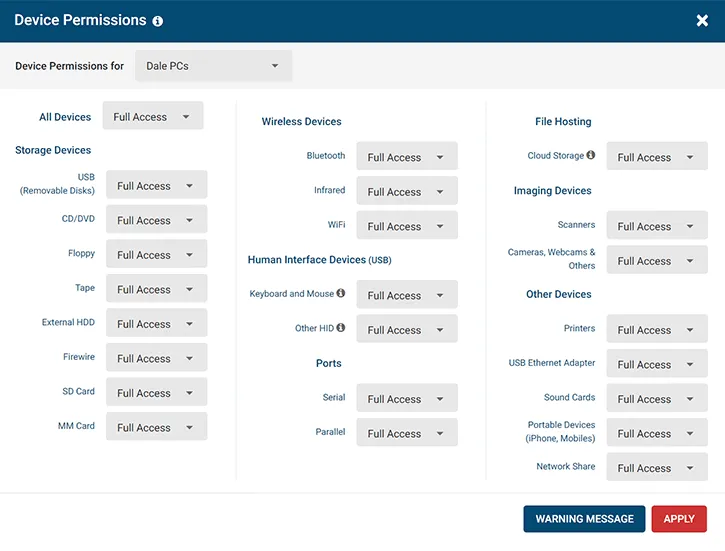
The software prevents connections through Bluetooth and Wi-Fi networks.
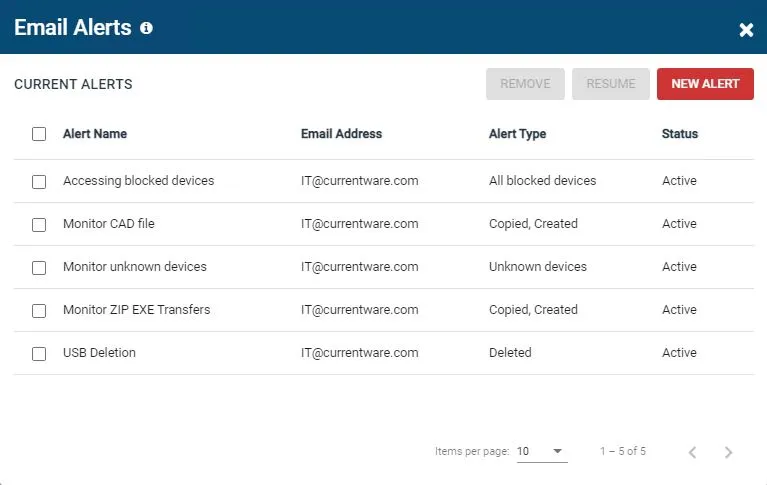
This provide unauthorized access real time alert notifications via email.
We can easily get detailed reports, so we can track and fix issues quickly.
The customer support team is very good and always available to assist if we faced any challenges.”
VL
Vikash L
Application Engineer
Computer networking · 51-200 employees
★★★★★
Capterra · Nov 2024
Keeping my files safe with AccessPatrol.
“If you are looking for a software to protect your important files from getting accessed by an unauthorized person through USB devices then this is the perfect software for one. I have been able to achieve that with the use of this software. It got a detailed dashboard activities which makes it simple to use. Its customer care services has been really supportive incase of any issue encountered. I have also been able to track and block devices trying to gain access to my files using this software.”
BE
Barry E
Operation Manager
Financial services · 2-10 employees
★★★★★
Capterra · Nov 2024
Accesspatrol review
“It blocks unauthorised USB devices. it immediately warn you of any violation of security policies.”
IS
Ishant S
It consultant
Information technology and services · 501-1000 employees
★★★★★
Capterra · Nov 2024
Maximize Endpoint Security
“The interface is easy to use. You get instant email alerts about file transfers and device usage, which helps take quick actions to stop security risks.
We can set 'Read-Only' access for USB devices to prevent data transfer to outside places.
The customer support team is excellent and always available to assist us whenever we faced any challenges.”
VV
VISHAL V
Data Analyst
Computer and network security · 51-200 employees
★★★★★
Capterra · Oct 2024
Secure your endpoint device
“AccessPatrol helps to prevent data loss and keeps our information safe. It also shows a detail log of activities.
The interface is simple and user-friendly, making daily tasks easier. It shows who viewed the files and what changes they made.
This software has an option to allow only specific USB storage devices to connect to our computer, blocking all others device.”
SS
Shahed S
Technical Support Specialist
Computer networking · 51-200 employees