
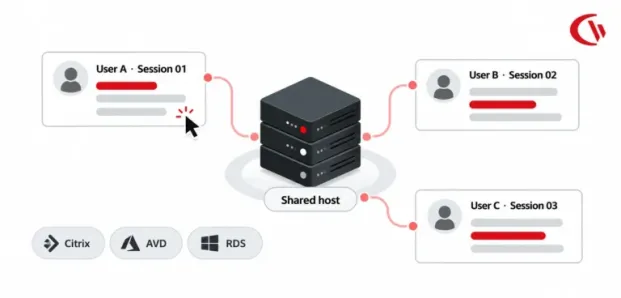

In 2026, enterprise computing will be largely consolidated and centralized, and organizations will be shifting away from the one-user-per-PC model towards shared, multi-user virtualization technologies like AVD, Citrix Virtual Apps and Desktops, and Microsoft Remote Desktop Services (RDS). This approach still offers superior scale, management, and resource use, but it creates a core dilemma for tracking employee activity: how do you tell which user accomplished something when many employees share a single virtual machine?
Industry projections reflect growth in Desktop-as-a-Service (DaaS), with Gartner already indicating a rise in global spending from at least $4.3 billion to $6.0 billion by 2029, at a CAGR of 7.9%. As more DaaS devices are implemented, workforce management, security, compliance, and IT operations need monitoring systems that can distinguish between the device and the session.
This is where Session-ID Mapping becomes critical. Instead of applying context by device identifier, session-aware monitoring ties the activity back to the Windows or virtual desktop session in which it occurred. This provides better correlation between the end user, their login session, the virtual host, and the activity that took place while they logged in. For Citrix or AVD customers, this difference can mean the difference between actionable, user-based insight and a distorted view of device-level activity.
This article explores Session-ID Mapping Vs. Device Logging In A Virtual Multi-Session Setting: why traditional endpoint monitoring tools can give you the wrong numbers, and how session-aware monitoring can better inform your reporting, security investigations, compliance audits, and privacy-aware employee analytics.
Key Takeaways:
- Device-based monitoring fails in multi-session environments because multiple users share the same host and IP.
- Session-ID Mapping accurately attributes activity to the correct user and desktop session.
- Session-aware tracking prevents blended telemetry, improving productivity and security reporting.
- Per-session idle tracking provides more accurate active-time and productivity metrics.
- Session-aware policies enable user-level controls for web access, applications, and USB devices.
- Active Directory and Entra ID integration supports automated, role-based policy assignment.
- Golden-image preparation is essential to avoid duplicate or ghost virtual-machine records.
- Lightweight host-level monitoring helps minimize CPU and memory impact on shared session hosts.
- Privacy improves when monitoring data stays within each user’s individual session.
- VDI monitoring tools should prioritize session isolation, identity integration, resource efficiency, modularity, and data ownership.
- Session-ID Mapping is the key distinction between simply monitoring a shared device and accurately monitoring individual users.
What Is Session-ID Mapping?
Session-ID Mapping is a session-aware monitoring method that tracks and distinguishes different users’ activity within a multi-user shared virtual desktop (VDI) environment. Rather than gathering user activity based on the hostname or IP address of the VDI, it utilises the Windows Session ID, employee user Security Identifier (SID), and employee username to map applications, websites, processes, and security events to that employee.
Using a combination of these approaches, multiple workers can simultaneously collaborate on the same session host within Azure Virtual Desktop, Citrix Virtual Apps and Desktops, and Microsoft RDS. Session-ID Mapping prevents these actions from coalescing into a single device-level record.
To simplify, Device logging answers “Which virtual machine generated this activity?” while Session-ID Mapping answers “Which specific user session generated this activity?” This distinction is essential for accurate productivity analytics, security investigations, policy enforcement, and compliance in multi-user VDI environments.
Why Device-Level Monitoring Fails on Multi-Session Hosts
Conventional Endpoint Monitors rely on 1 Endpoint = 1 Operating System = 1 Active User. These can do well on laptops as a single device; however, an employee may work on a computer in 2-3 shifts a day.
In other words, in pooled VDI deployments like Windows 10/11 Enterprise multi-session on AVD, Citrix VDA session hosts, even if there are several employees using the same server, device-level monitoring cannot differentiate between sessions – leading to four key issues:
- Conflated Telemetry: Sessions, websites, and system activity from different individuals are combined on a single host, which distorts user-level data.
- False Active-Time Metrics: These are incorrect because activity from one session can make the shared host appear active and may be perceived as a job by other users on the same host.
- Failed Policy Enforcement: Host-based policies can’t dynamically assign different permissions or restrictions based on user or department.
- Compromised Auditing: Admins may see an event on a host, but without session context, they can’t be sure who caused it.
Session-aware monitoring is the solution. It correlates activity to the user, session ID, host, application and time. Even when hundreds of workers share a virtual desktop, each one can be held responsible.
Session-ID Mapping vs. Device Logging
The following table outlines how session-ID mapping addresses the structural shortcomings of legacy device logging:
| Architecture Attribute | Device-Level Logging (Traditional) | Session-ID Mapping (Session-Aware) |
| Telemetry Attribution | Relies on Hostname, MAC address, or IP address | Uses User SID, Username, and Windows Session ID |
| Multi-User Tracking | Blends all simultaneous users into one aggregated profile | Isolates each user session into dedicated, distinct data streams |
| Process Isolation | Captures a global process tree without session context | Maps specific Process IDs (PIDs) to distinct Session IDs |
| Input State Handling | Global (any single user typing marks the entire host active) | Reads last-input timestamps per session to isolate idle time |
| Audit Validity | Ambiguous: cannot reliably attribute actions to a specific user | Defensible, user-attributed forensic evidence for compliance |
| Policy Granularity | Host-wide lockdown or unrestricted access | Dynamic enforcement mapped to user groups and OUs |
How Session-Aware Tracking Works
Session-aware tracking distinguishes activity by employee session rather than the server, since the shared VDI host was originally defined as a single endpoint. This ensures that the monitoring data is still attributed to the specific employee.
1. Identifying Sessions with Windows APIs
When connecting through Citrix HDX, Microsoft RDP, or Azure Virtual Desktop, the Windows operating system creates a different SessionId for each session. When Windows Terminal Services APIs such as WTSEnumerateSessions and WTSQuerySessionInformation are used, the agent can register callbacks for session notifications to monitor logon, logoff, lock, and disconnect events.
2. Mapping Processes to Users
Every app process is allocated a Process ID (PID) and can be associated with the session it belongs to (ProcessIdToSessionId). The agent can therefore detect activity when multiple employees are using apps such as Chrome or Edge.
3. Tracking Active and Idle Time per Session
Instead of tracking activity at a host level, session-aware monitoring tracks user activity within each user’s session. This stops one employee’s keyboard or mouse movements from activating another user’s session. An Idle Exclusion List can prevent legal use cases, such as Teams or Zoom meetings, from being erroneously identified as an idle session.
Where to Install the Monitoring Agent
The placement of client agents is determined by the type of virtualization and the architecture of the operating system:
| Environment | Users per OS | Install Agent On | Deployment Notes |
| Physical PC or Laptop | 1 | The physical device | Basic endpoint installed monitors activity on the local machine’s hardware and operating system. |
| Persistent VDI (1:1) | 1 | Each virtual desktop | Behaves as a dedicated physical PC, with a fixed user. |
| Pooled Multi-Session (AVD, Win 10/11 Multi-Session) | Many | Session host or master golden image | Will exhibit the same behaviour as a dedicated physical PC with a fixed user. |
| Citrix Virtual Apps or RDS Published Apps | Many | Session host (VDA or RDSH) | Captures published application usage per session without requiring local client deployment. |
| Thin Client or BYOD Endpoint | n/a | Usually not needed | Corporate workflows remain protected inside the virtual session, keeping personal devices unmonitored. |
How to Deploy Monitoring in Citrix, AVD, and RDS
Deploying monitoring in pooled VDI environments requires the agent to account for non-persistent hosts, shared sessions, and centralized identity management.
1. Preparing the Golden Image
Install and configure the agent on the golden image, then regenerate its client ID before cloning it. Fully follow all steps of the vendor-published image creation and Sysprep process to avoid duplicate host identities. For FSLogix, have the agent config stored in machine-level storage, not roaming user profiles.
2. Non-Persistent and Auto-Scaling Host Pools
Make sure hosts are capable of shutting down or being reset by providing a telemetry buffer on the agent to send reports when the host exits. Graceful scale-in is necessary to avoid losing session data.
3. Synchronization for Active Directory and Entra ID Users
Microsoft EntraID or Active Directory integration allows you to correlate session activity to authenticated users and groups. Administrators can then apply differing policies to each department, role or security group.
4. Applying Per-User Web Filtering and Policies
Using device-level filtering, every person on a host machine gets the same filtering. You can configure session-aware filtering to implement web access policies by individual sessions-for example, enabling finance sites for accounting staff but not other users.
5. Controlling USB Redirection
Citrix, AVD, and RDS can redirect local drives and USB devices into virtual sessions. AccessPatrol can provide controls over user access to the redirected storage, such as allowing, restricting, and blocking, with logs.
Native Platform Controls vs. Session-Aware Monitoring
Native controls (at the Citrix or AVD level) must-know security blueprints. Native security controls in Citrix and AVD provide a good starting point for a security baseline. These controls include limiting drive mapping, clipboards, USB devices, and other session features at the host or pool level.
- Limited Visibility: While a platform policy might prevent USB device redirection, it generally does not provide user-level documentation of attempted file transfers, file activity, or policy violations.
- Limited Workforce Analytics: Infrastructure indicators of CPU, bandwidth, and session duration can’t tell which applications staff are using, what sites they are visiting, or how particular sessions are being employed.
- Limited User Granularity: At the host level, the controls are more applied to the generic pool than to individual users or departments.
Session-aware monitoring interacts with the native controls, associating activity with a user and a session. This provides the detailed information required for auditing, productivity measurement, and user-based policy, with native virtualization controls as the base layer of security.
Evaluating Licensing Models for Virtual Environments
Licensing can significantly affect the Total Cost of Ownership (TCO) of VDI monitoring, particularly when hosts are dynamically created and removed.
- Per-Device/Host: Simple for static environments but can become costly or difficult to manage as auto-scaling hosts frequently change.
- Per-Named-User: Licenses follow individual users across virtual desktops, published applications, or physical devices, making costs more predictable for roaming users.
- Per-Concurrent-Session: Based on simultaneous sessions, this can suit shift-based environments but requires careful capacity planning during peak usage.
Before choosing a licensing model, ensure your IT team can determine how the platform manages auto-scaled hosts, session sharing, and a mix of physical and virtual device access. With the VDI setup in mind, licensing can help avoid surplus licenses and unexpected TCO increases.
Troubleshooting Multi-Session Monitoring
Multi-session VDI monitoring can produce misleading results when the monitoring architecture is not designed for shared hosts. Common issues include:
- All activity appears under one user: The agent is device-centric rather than session-aware.
Fix: Use an agent that maps activity to Windows Session IDs and directory identities. - Identical or inaccurate active/idle times: Global input detection causes one user’s activity to affect others.
Fix: Track input and idle status independently for each session and use an idle exclusion list for legitimate conferencing activity. - Duplicate or ghost host records: Cloned hosts retain the same agent identifier from the golden image.
Fix: Generalise the agent before Sysprep and template sealing. - High CPU or memory usage: Heavy agents may create separate processes for every user session.
Fix: Prefer a lightweight architecture that uses a unified host service to monitor multiple sessions efficiently.
How to Evaluate Monitoring Tools for Virtual Desktops
When evaluating monitoring tools for VMware Horizon, Citrix DaaS, Microsoft RDS, or Azure Virtual Desktop, focus on how well the solution handles shared sessions and resource constraints:
- Session-ID Isolation: Ensure activity is accurately separated by user session without cross-session data leakage.
- Directory Integration: Look for Active Directory and Microsoft Entra ID integration to support automated, role-based policies.
- Resource Efficiency: Prefer lightweight architectures that monitor multiple sessions without launching resource-heavy processes for every user.
- Modular Deployment: Choose only the features required, such as productivity analytics, web filtering, or device control, to minimize system overhead.
- Data Ownership: Verify whether the platform supports self-hosted or private-cloud deployment when retaining control over employee telemetry is a priority.
How CurrentWare Handles Multi-Session Environments
CurrentWare is capable of perimeter monitoring and security in a physical, remote and virtualized environment. Utilising a modular architecture, it is appropriate for a shared-session deployment:
- Citrix Ready Verified: CurrentWare is Citrix Ready. CurrentWare is compatible with Citrix Virtual Apps and Desktops.
- Modular Architecture: Organizations may choose which features they require, such as BrowseReporter, which provides productivity reports, BrowseControl, which enables web filtering, or AccessPatrol, which manages USB or port device access.
- Identity Enablement: Active Directory with Microsoft Entra ID synchronisation enables alignment of policies to be set for users and groups.
- Data Control: Deployments that are managed by the organization itself, such as on-premises or private-cloud deployments, enable organizations to maintain control of workforce data.
- Predictable Licensing: Plans from $6 USD per users/month have an easy-to-understand per-user licensing model that does not explicitly depend on the number of dynamically provisioned VDI hosts.
Conclusion
For enterprise computing moving toward multi-session environments on Citrix, AVD, or Microsoft RDS, relying on a one-size-fits-all device monitoring model is no longer feasible. In a device hosting millions of users, a single session host may host dozens of users at a time; then host activity itself is not enough to figure out application usage, website access, idle time, policy penetration hours, or user activities.
Session-ID mapping introduces identity to contextual information. Activity associated with a session, rather than just a host, allows organisations to distinguish multiple concurrent users, improve productivity metrics, implement user-level policies, and minimize audit noise. For data-loss prevention, this feature allows organizations to narrow the scope of redirected USB drives and devices, folders, and other files to a specific session, instead of across the host.
The outcome is a more precise and scalable solution for VDI observation that automatically correlates user identity, session activity, security policies, and audit trails directly to the user without considering the entire shared server a huge employee endpoint.
Frequently asked
Frequently Asked Questions:
-
Yes, if the software can handle session-ID mapping. Session-aware agents identify every user’s apps, surf, and active time through Windows session APIs, and then they charge their individual directory identity rather than the shared server.
-
Yes. Windows 11 Enterprise multi-session runs on Windows’ typical session-based architecture. The session-aware agent, either installed on the session host or baked into the golden master image, tracks and segregates multiple user sessions.
-
The best monitoring agents will have no performance impact on the operation of shared session hosts. Because lightweight agents won’t use the presence of the existing host-level service to capture session activity, the complete, dedicated, and more resource-hungry monitor agent doesn‘t have to run from each user’s desktop, which is vital when dozens of sessions are sharing the VM simultaneously.
-
Session-aware monitoring finds the CPU idle time for each user’s virtual session separately (not the host level). The agent looks at the key-mouse input, the current active window session, and the previous last-input time of the session.
For instance, if User A goes idle on their virtual desktop for 10 minutes, only User A’s session would increment. User B, who is in the middle of the day still actively working on the same back-end server, would not have their Idle counter influenced by User A’s inputs. The impact is now correctly isolated at the per-session level rather than a one-size-fits-all approach; for larger sample sizes, this has direct implications for measuring productivity. -
For pooled or non-persistent VDI, install the monitoring agent into the master golden image after capture, before provisioning session hosts, and ensure the agent is generalized to ensure each VM installed from the golden image has a unique identity and does not match the rest.
-
The VDI monitoring software has a licensing model based on device/host, user name and concurrency. The optimal licensing model depends on the virtual environment and users’ access modes. Before signing a licensing plan, the IT staff must make sure whether their users switch between physical devices and virtual users and how the vendor deals with temporary or auto-provisioned session hosts.


