
Search your screenshots with AI-assisted OCR text extraction
BrowseReporter extracts and indexes text from every screenshot, transforming captured screen activity into searchable, exportable records instead of static image files.
*No credit card required · 14-day free trial · Easy setup
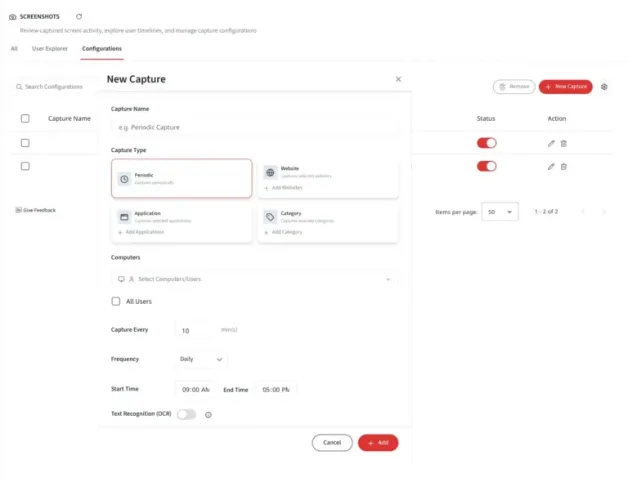

How screenshot OCR text extraction works in BrowseReporter
Screenshot OCR (Optical Character Recognition) is a BrowseReporter capability that identifies and indexes text that shows within screenshots. This makes it possible to search, review, and act on information that would otherwise remain locked inside image files.
Searchable screenshots
Extract and index text from every screenshot, so captured screen activity becomes searchable and easier to work with.
Find content fast
Locate relevant screenshots using keywords, users, groups, or date ranges instead of opening captures one at a time.
Built for review
Speed up investigations, productivity reviews, and compliance checks with fast and accurate search results.
AI-assisted foundation
An OCR-enabled framework that delivers text extraction today while supporting future capabilities such as sensitive data detection and redaction.
Why Screenshots Are Hard to Search Without OCR
Without OCR, screenshots function primarily as visual records. Finding specific information across thousands of screenshots can be slow and time-consuming, limiting the value of the data you’ve captured.
Text trapped in images
Text remains inaccessible to search when it exists only within screenshot images.
Slow manual review
Reviewers often need to open and inspect screenshots individually to find relevant information.
Hard to scope at scale
Compliance, security, and operations teams need a faster way to search content across users, groups, and time periods.
An exact match isn't enough
Text extraction can vary slightly between screenshots. Flexible search options help surface relevant results even when exact matches aren’t available.
Built to Make Screenshot Text Searchable
Make screenshots searchable
Turn screenshot content into searchable records instead of depending solely on visual reviews.
Speed up investigations
Help reviewers find relevant screenshots through extracted text rather than manually scanning images.
Extend screenshot value
Unlock more value from screenshot data across compliance, productivity, security, and business workflows.
So, What’s Included?
AI-assisted OCR extracts and indexes screenshot text within real time while providing the search flexibility and administrative controls teams need. Filter by area below.
Search & Review
AI-assisted text extraction
Extracts and indexes text from screenshots, creating a foundation for future sensitive information workflows.
Indexed, searchable content
Transforms screenshots into searchable records so users can find evidence through keywords instead of manually reviewing images.
Flexible match modes
Support exact matches, contains all, contains any, partial matches, fuzzy search, and regex patterns for more accurate results.
Operations
Real-time cloud processing
Processes screenshots in real time through a dedicated cloud-based service designed to handle scale while maintaining performance and reliability.
Admin configuration & toggles
Manage OCR through configurable settings, feature toggles, and group-level controls to guarantee it aligns with your monitoring requirements.
Less manual data entry
Extract text directly from screenshots to reduce manual copy-paste and minimize human error.
Collaboration
Tag, comment & deep-link
Teams tag, comment on, and deep-link to specific extracted text segments instead of sharing whole images.
Pattern & anomaly discovery
Makes screenshot content searchable and easier to analyze, helping teams identify trends, patterns, and unusual activity across large volumes of captured data.
Screenshot OCR Search Use Cases
Find text within captured screen activity using keywords, users, groups, and date filters, then review and export matching results when needed.
Find a known phrase or identifier
Search for customer names, account numbers, internal references, or other text captured in screenshots.
Scope to a team or population
Combine OCR search with user and group filters to investigate activity across departments, teams, or specific employee groups.
Confirm why a result matched
Review extracted text alongside the original screenshot to quickly validate search results before taking action.
Export for the record
Export screenshots and search results to PDF for compliance reviews, audits, investigations, or case documentation.
Benefits of OCR Screenshot Text Extraction
OCR search turns image content into searchable, filterable data, while administrators keep control over when and where it runs.
Faster search & review
Indexed text helps users find relevant screenshots in seconds instead of manually reviewing large volumes of images.
More relevant results
Multiple search methods, including exact, partial, fuzzy, and regex matching, support the way people naturally search for information.
Cloud availability
Cloud deployment makes OCR accessible across more environments devoid of requiring additional infrastructure.
Operational control
Enable OCR through administrative settings and group-level controls whilst maintaining dependency on screenshot capture policies.
Governance alignment
OCR data follows configured retention policies to help organizations support compliance and data governance requirements.
Better collaboration
Teams can work from searchable evidence instead of sharing and reviewing screenshots manually.
Built on the differentiators teams choose CurrentWare for
Every capability ships on the same foundation, flexible deployment, privacy-first oversight, and pricing you can see before you talk to sales.
On-premises or cloud Deployment
Keep monitoring inside your own network or run it in the cloud. Your data stays where your policy requires.
Proportionate by design Privacy-first
Role-based access, granular controls, and configurable retention keep oversight transparent and defensible.
Published up front Transparent pricing
Pricing is public. See plans and pricing without waiting on a quote.
Built to support compliance across regions
USA · ECPA & state laws (CCPA/CPRA, BIPA)
Canada · PIPEDA
UK · UK GDPR & ICO guidance
Searchable evidence, with compliance built in
Convert screenshots into searchable, exportable evidence for investigations, audits, and compliance reviews. Role-based permissions, configurable retention settings, and detailed activity records help organizations control who can access captured data and how long it is retained.
Configure monitoring to support frameworks such as HIPAA, SOC 2, PCI DSS, and GDPR while continuing the documentation necessary for audits and regulatory reviews.
Configurable to support:
HIPAA
(Health Insurance Portability and Accountability Act)
SOC 2
(System and Organization Controls 2)
PCI DSS
(Payment Card Industry – Data Security Standard)
GDPR / UK GDPR
(General Data Protection Regulation)
How Customers Use Currentware
Discover how organizations use CurrentWare to improve visibility, strengthen compliance efforts, and manage employee activity more effectively.


Solutions That Work Across Industries
Tailored controls that help you meet industry standards, boost efficiency, and protect sensitive data across remote and in-office teams.
Healthcare
HIPAA-ready controls to protect PHI with USB management and insider-threat visibility.
Government
Cybersecurity and policy enforcement aligned to NIST 800-171 and CMMC.
Legal Services
Keep client data protected, billable hours productive, and software costs in check.
Manufacturing
Productivity monitoring and internet visibility for both the shop floor and back office.
Financial Services
Enforce access policies and protect sensitive financial data with audit-ready trails.
Schools & Libraries
CIPA-compliant web filtering to qualify for E-Rate and keep students safe online.
Small Business Employee Productivity
Track unproductive web browsing and idle time to detect time-wasting
Built to Support Your Compliance Program
Discover how organizations use CurrentWare’s employee monitoring software to improve visibility, strengthen compliance efforts, and manage employee activity more effectively.
- CMMC Compliance →

CMMC
Endpoint Restriction to Protect CUI & FCI
- NIST 800-171 Compliance →

NIST 800-171/53
Protect Controlled Unclassified Information
- ISO 27001 Compliance →

ISO 27001
Increase the Maturity of Your ISO27K ISMS
- HIPAA Compliance →

HIPAA
HIPAA protects sensitive patient data
- Cyber Essentials Compliance →

Cyber Essentials
Critical Security Controls For Your Assessment
- GDPR Compliance →

GDPR
EU’s data protection and privacy law
- NERC CIP Compliance →

NERC CIP
Protect TCAs & BCSI From Insider Threats
- CIPA Compliance for Education →

CIPA for Education
Qualify for the FCC’s E-Rate Program
Pick & Plug Into Your Existing Stack
CurrentWare works alongside the identity, security, and directory tools you already use, including support for SAML, OIDC, and CEF standards. Cloud connectors are on the way.
- Tested & supported
- Generic standards (SAML, OIDC, CEF)
- On the roadmap (Cloud)


Trusted by teams across the United States, Canada & the United Kingdom
Join 100,000+ professionals across 55 countries.


What verified reviewers say
90% of reviewers would recommend BrowseReporter (average likelihood to recommend: 9 out of 10).
Read all BrowseReporter reviews on Capterra- ★★★★★
““CurrentWare is a gamechanger! We use it nearly every day to get insights into things like software adoption rates, employee productivity, and proof of work for our clients.””

- ★★★★★
““Since we’ve let employees work from home we’ve had to have them connect remotely to the office. Thanks to BrowseReporter we know exactly what they’re doing during work hours.””

- ★★★★★
““It was going onto the employee’s machine and hoping that they didn’t clear out their history, things of that nature. The more requests I got from our HR department requesting to know what the user was doing at a particular point in time, it became apparent that we needed to get a central management system in place for monitoring web activity.””

Featured resources
Helpful guides, templates, checklists, and planning resources to support your monitoring strategy and rollout.
-

Get Your Free Employee Monitoring Starter Kit
Download → -

How to Keep Data Safe When Offboarding Employees
Download → -

Internet Acceptable Use Policy Template
Download → -

Download the Removable Media Policy Template
Download → -
Workplace Monitoring Policy Template
Download → -
Stop Guessing. Start Saving. Calculate Your True ROI on Software Costs
Download →
Learn More About Screenshot Monitoring and OCR
Explore guides and articles on reviewing screen activity, detecting insider threats, and building a defensible monitoring strategy.
How to Check Activity on a Computer
Learn different ways to review computer activity, from built-in operating system tools to enterprise monitoring solutions, and understand what separates basic tracking from enterprise-grade visibility.
Examples of Data Theft by Employees
Explore real-world insider data breach examples and learn how monitoring and device control strategies can help reduce risk.
Insider Threat Program Guide
A workable framework covering program structure, stakeholder responsibilities, monitoring practices, and legal considerations.
Popular Support Articles
Capture Screenshots
Configure website, application, and scheduled screenshot captures, review screenshots in different views, and manage storage with automatic cleanup settings.
Live Capture
View user screens on demand in near real time and save images for later review.
How Much Data Does BrowseReporter Keep?
Learn how retention settings work and how captured data, including OCR text, is stored and managed over time.
Keep reading
Articles
-
- Employee Monitoring
Scalable Employee Monitoring for Growing Teams
The fast-growing company does not have a large IT team, resources dedicated to security, or weeks to deploy an enterprise…
- Compliance
GDPR Compliance Employee Monitoring and DPIA Guide
When using employee computer monitoring software across the European Union (EU), companies have to find a balance between two legitimate,…
- Compliance
US Employee Monitoring Laws by State
The location from which employees log in remained the same with the introduction of hybrid working; instead, it was the…
- Employee Monitoring
Keystroke Logging vs. Application Tracking
As hybrid and distributed work matures into 2026, enterprises' visibility challenges become more nuanced than whether an employee is logged…
- Employee Monitoring
Introduce Employee Monitoring Without Losing Trust
Some workplace innovations can seem like a good idea in a management meeting and take a completely different shape when…


Frequently asked
Frequently Asked Questions
-
It uses AI-assisted OCR to extract and index the text inside screenshots, so captured screen activity becomes searchable and filterable rather than static image evidence.
-
This release is cloud-specific.
-
Exact, contains all, contains any, partial, fuzzy, and regex-based matching.
-
Yes, results and screenshots can be exported to PDF for audit, compliance, or case documentation.
-
Yes, OCR search can be combined with group and user filters and narrowed by date range.
-
Yes, OCR is governed by feature toggles, admin configuration, and group-level enablement, and depends on screenshot capture being enabled.
-
No, PII redaction is a separate future initiative; current screenshot functionality does not redact any PII.
-
No, OCR of past screenshots is out of scope for this release.
-
OCR text and related artifacts follow your configured retention periods, keeping the feature aligned with data governance.