


Product Comparisons
AccessPatrol: Stop USB data leaks before they start
CurrentWare’s AccessPatrol is a USB device control software that allows you to block unauthorized devices, control file transfers, and monitor every move on your employees’ devices, so your organization’s data stays within your network.
- Get real protection without a six-figure DLP rollout.
- Control every USB port, external drive, and removable storage device on your network.
- Block the devices you don’t trust, allow the ones you do
- Plans start at $12 per user/ month.
*No credit card required · 14-day free trial · For on-prem pricing, contact Sales
700+ organizations trust CurrentWare's employee monitoring software for visibility & control
USB Device Control and Endpoint DLP in One Agent
AccessPatrol is USB device control and data loss prevention (DLP) software. It locks down removable media across every endpoint – on-premise or in your own cloud – so sensitive data can’t walk out the door.
Why removable media is still a leading data-loss risk
The exit route
Every USB port on your company device is a potential exit door for your data. Even a single flash drive can carry gigabytes of sensitive files out the building in seconds.
The entry route
While that remains true for removable media, it is also the most common entry point for malware: plug in an infected drive, and you’ve bypassed your firewall entirely.
The insider angle
8% of breaches involved an insider, and that misuse of legitimate access remains a persistent cause of data loss.
The fix
The solution isn’t banning USB drives but ensuring the right people use the right devices, and blocking everyone else.
Block rogue devices before they cause damage
Unsupervised USB drives and peripherals are one of the easiest ways for data to walk out the door. AccessPatrol makes USB access control precise instead of all-or-nothing.
Block Unauthorized Devices
Stop data leaks, insider theft, and malware by blocking USB flash drives, external hard drives, smartphones, tablets, cameras, and Bluetooth or Wi-Fi adapters the moment they connect.
Granular Permissions
Set Full Access, Read-Only, or No Access by device type, user, group, or endpoint. Give people exactly the access their role needs, nothing more.
Approve Only Trusted Devices
Whitelist USB devices by Vendor ID, Product ID, and serial number so only company-issued drives work. Personal drives stay locked out automatically.
Control What Leaves Your Network
Block USB file transfers by file extension, with signature-based scanning that catches files renamed to dodge a filter.
Full Activity Logging
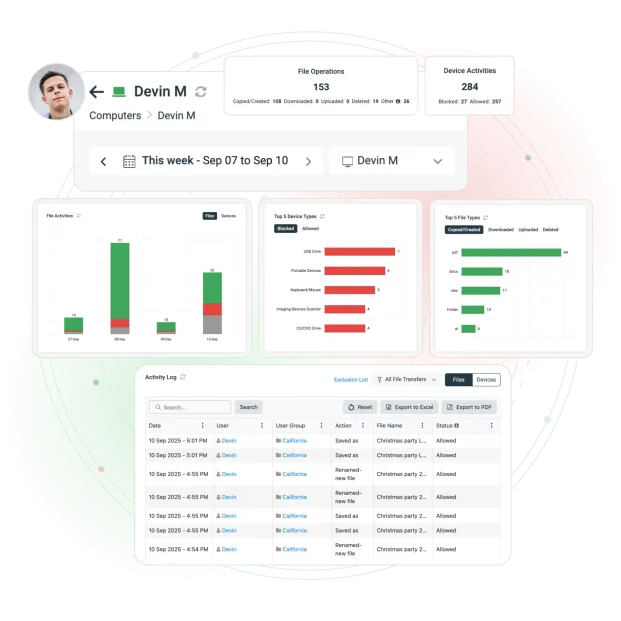
Every copy, rename, and delete action is logged with a timestamp, user, and device ID, giving you an audit trail you can actually use.
Real-Time Alerts
Get notified the moment a blocked device is used or a suspicious file transfer is attempted, so your team can act before it becomes a bigger problem.
Take Control Before a Breach Happens
Stop USB Data Leaks. Prove Compliance. Stay Audit-Ready
No Credit Card Required
All subscriptions include ongoing updates and direct support from our team.
Every AccessPatrol device-control feature
AccessPatrol’s USB access control tools cover the full lifecycle: block what’s risky, approve what’s trusted, and track what happens in between.
Block USB Devices:
Set Full Access, Read-Only, or No Access on flash drives, external storage, and peripherals in a few clicks.
Whitelist USB Devices:
Approve specific devices by serial number so only company-issued hardware connects.
USB Access Control:
Apply policies by department, user group, or individual endpoint without locking down the whole company at once.
Disable USB File Transfer:
Block file transfers by extension or file signature, even when someone renames the file to slip past a filter.
USB Device Reports:
Pull detailed USB activity reports on device use, file transfers, and blocked attempts whenever you need them.
Grant Temporary Access User Bypass
AccessPatrol can grant temporary access to blocked USB devices with the access code generator.
Flexible USB device control without losing control
Locking everything down isn’t always the right call. AccessPatrol lets you set different rules for different teams, so engineering can use approved USB tools while finance and HR stay restricted, no all-or-nothing policy required.
Need to make an exception for a day? Generate a single-use access code with an expiry time for a vendor, auditor, or visiting contractor. It works even if the device is offline at the time.
For BYOD and remote teams, you can approve trusted personal devices for specific people without weakening the policy for everyone else. Control and flexibility aren’t a trade-off here, you get both.
Onsite or remote
Whether you’re managing 50 endpoints or 5,000, AccessPatrol enforces your USB device control policy consistently across hybrid, remote, and on-premises environments.
Centralized Web Console
Manage every endpoint from a single dashboard.
Active Directory Integration
Apply rules automatically by organizational unit or security group.
Transparent & Stealth Modes
Run visibly with on-screen notices, or silently in the background, your call.
Always-On Protection
Policies stay active even when a device is offline or off the network.
Enterprise-Ready Architecture
Built with SQL Server support, two-factor authentication, and role-based access control.
Fast Deployment
Get policies live across remote, hybrid, or on-premises teams in minutes, not weeks.
Deployment & data control
You decide where your data lives.
Install AccessPatrol on-premise and keep everything inside your own infrastructure, or run it through your self-managed cloud or VDI setup, including Citrix, Azure, AWS, and GCP. Either way, your employee data never passes through CurrentWare’s servers.
On-premise
Your servers, your rules
Best for regulated industries – government, healthcare, legal, finance, manufacturing. Device and file logs never leave your control.
Cloud
Fast to stand up
Lower infrastructure overhead with automatic updates, while keeping full visibility over device activity.
Self-managed cloud & VDI
Citrix, Azure, AWS, GCP
Combine cloud scalability with control over hosting and retention across enterprise and virtual desktop environments.
Built to Support Your Compliance Program
Discover how organizations use CurrentWare’s employee monitoring software to improve visibility, strengthen compliance efforts, and manage employee activity more effectively.
- CMMC Compliance →

CMMC
Endpoint Restriction to Protect CUI & FCI
- NIST 800-171 Compliance →

NIST 800-171/53
Protect Controlled Unclassified Information
- ISO 27001 Compliance →

ISO 27001
Increase the Maturity of Your ISO27K ISMS
- HIPAA Compliance →

HIPAA
HIPAA protects sensitive patient data
- Cyber Essentials Compliance →

Cyber Essentials
Critical Security Controls For Your Assessment
- GDPR Compliance →

GDPR
EU’s data protection and privacy law
- NERC CIP Compliance →

NERC CIP
Protect TCAs & BCSI From Insider Threats
- CIPA Compliance for Education →

CIPA for Education
Qualify for the FCC’s E-Rate Program
Why teams choose AccessPatrol
Enterprise DLP suites are built for enterprise budgets and enterprise IT teams. AccessPatrol is built for teams that need real USB device control without months of setup or six-figure contracts.
- Get transparent per-user pricing instead of a quote you have to chase down,
- Measure deployment in hours instead of weeks
- Run entirely on-premise if that’s what your compliance team requires.
AccessPatrol focuses specifically on device control and file transfer security, so you’re not paying for a sprawling platform to get the one piece you actually need. Here’s a comparison table to give you more context:
| Feature / Vendor | AccessPatrol | Symantec DLP | Endpoint Protector | Teramind DLP |
|---|---|---|---|---|
| Price | $12 /user/month (transparent) | opaque pricing | opaque pricing | $32 /user/month |
| Setup Time | Hours | Weeks–months | Days–weeks | Weeks+ |
| Device Control | Granular USB & peripherals | Yes (part of suite) | Yes | Yes |
| File Transfer Control | By extension, signature, policy | Advanced (overkill for SMBs) | Yes | Yes |
| Privacy & Compliance | Policy-based, audit-ready | Broad but complex | Moderate | Surveillance-heavy |
| Best For | SMBs, compliance-driven orgs, hybrid teams | Large enterprises | Mid-market & SMBs | Monitoring-heavy environments |
AccessPatrol
Compare AccessPatrol with Other Device Control and DLP Tools
See how AccessPatrol compares on USB device control, file transfer tracking, deployment options and price, including where another tool is the better fit.
- Product Comparisons
Zscaler Alternative
- Product Comparisons
WebTitan Alternatives
- Product Comparisons
Veriato Alternatives
- Product Comparisons
Teramind Alternatives
- Product Comparisons
SafeConsole Alternative
- Product Comparisons
ManageEngine Alternative
- Product Comparisons
InterGuard Alternative
What customers do with AccessPatrol device control


Trusted by teams across the United States, Canada & the United Kingdom
Join 100,000+ professionals across 55 countries.


What customers say about CurrentWare
4.9 / 5
90% of reviewers would recommend AccessPatrol (average likelihood to recommend: 9 out of 10).
Affordable pricing Transparent Terms
No hidden fees, no vendor lock-in. Start protecting your organization today.
AccessPatrol (Standalone)
$12 /user/month (annual)
USB/device control + DLP
- USB and device control
- Data loss prevention
- Granular permissions
- Device whitelisting
- File transfer control
- Real-time monitoring
- Compliance reporting
Most Popular
Full CurrentWare Suite
From $20 /user/month
AccessPatrol + BrowseReporter + BrowseControl + enPowerManager
- Everything in BrowseReporter
- Web browsing monitoring
- Website blocking
- Bandwidth management
- Power management
- Comprehensive reporting
- Multi-tool integration
Volume Discounts Available: Save up to 30% for teams of 100+ users
Contract & Payment
- Minimum annual contract ~$1,440 (≈10 users)
- Discounts for 100+ users, non-profits, education, MSPs
- Multi-year prepayment discounts available
- Pay by credit card, wire transfer, or ACH
What’s Included
- Software upgrades included
- 24/5 support from our team
- Currencies: USD, CAD, AUD, GBP, EUR, INR
- Ongoing updates and maintenance
Put a number on the risk you're carrying
Model device-control savings alongside your own single-incident cost and probability. No benchmark is assumed for risk — you supply the exposure figure, so the result stays defensible.
Featured resources
Helpful guides, templates, checklists, and planning resources to support your monitoring strategy and rollout.
-

Download free AI Usage Governance Policy template
Download → -

Get Your Free Employee Monitoring Starter Kit
Download → -

How to Keep Data Safe When Offboarding Employees
Download → -

Internet Acceptable Use Policy Template
Download → -

Download the Removable Media Policy Template
Download → -
Workplace Monitoring Policy Template
Download → -
Stop Guessing. Start Saving. Calculate Your True ROI on Software Costs
Download →
Solutions That Work Across Industries
Tailored controls that help you meet industry standards, boost efficiency, and protect sensitive data across remote and in-office teams.
Healthcare
HIPAA-ready controls to protect PHI with USB management and insider-threat visibility.
Government
Cybersecurity and policy enforcement aligned to NIST 800-171 and CMMC.
Legal Services
Keep client data protected, billable hours productive, and software costs in check.
Manufacturing
Productivity monitoring and internet visibility for both the shop floor and back office.
Financial Services
Enforce access policies and protect sensitive financial data with audit-ready trails.
Schools & Libraries
CIPA-compliant web filtering to qualify for E-Rate and keep students safe online.
Small Business Employee Productivity
Track unproductive web browsing and idle time to detect time-wasting
Managed Service Providers
Deliver the monitoring, data-loss prevention, and web filtering your clients need, now with faster deployment, and easier management.
Pick & Plug Into Your Existing Stack
CurrentWare works alongside the identity, security, and directory tools you already use, including support for SAML, OIDC, and CEF standards. Cloud connectors are on the way.
- Tested & supported
- Generic standards (SAML, OIDC, CEF)
- On the roadmap (Cloud)


Keep reading
Articles
- Data Loss Prevention
How to Prevent Sensitive Data Pasting into AI Tools
Learn how endpoint DLP, web filtering, and application controls help prevent employees from pasting sensitive data into ChatGPT and other…
- Data Loss Prevention
Prevent Data Exfiltration Remote Laptops
The corporate security perimeter has changed. An employee's company laptop could easily arrive at work on a Monday morning connected…
- Data Loss Prevention
What is Data Leakage
In this article, I will answer the question “What is data leakage?”. I will also explain the difference between data…
- Data Loss Prevention
Top Data Exfiltration Risks
Protecting sensitive data must be a top priority for any business. Unfortunately, the multitude of techniques available to threat actors…
- Data Loss Prevention
Need for Data Loss Prevention Software DLP
Data theft from inside a company is a growing challenge in the modern world. We now have an abundance of…
- Data Loss Prevention
Windows XP USB Blocker
Does your business rely on legacy operating systems such as Windows XP, Windows 7, and Windows 8/8.1? If so, you…


Popular support articles
Already using CurrentWare? Step-by-step help from our knowledge base.
What Is AccessPatrol?
An overview of CurrentWare’s USB device control and DLP software.
Which Devices Can I Control?
The full list of USB and peripheral device types AccessPatrol manages.
Set Up Device Blocking
Step-by-step setup for blocking USB and peripheral devices.
Can I Whitelist Devices?
How to approve trusted devices by Vendor ID, Product ID, and Serial Number.
Temporarily Allow Device Access
Grant single-use, time-limited device access for vendors or staff.
Audit Device Activity
Review device and file-transfer history for investigations and audits.
Take control before a breach happens
Stop USB data leaks, prove compliance, and stay audit-ready – on-premise or in your own cloud.
No credit card required · 14-day free trial
Frequently asked
USB Device Control Software FAQs
-
AccessPatrol is USB device control software that blocks unauthorized USB drives and removable storage, controls what files can be transferred, and logs device activity. Teams use it to prevent data theft, stop malware introduced through infected drives, and produce the audit trail compliance frameworks require.
-
Yes. AccessPatrol is built for SMBs and mid-market teams that need real device control without the cost or complexity of an enterprise DLP suite. It deploys in hours, has transparent per-user pricing, and doesn’t require a dedicated security team to manage day to day.
-
AccessPatrol is built for faster setup and simpler management at a lower, transparent price point. Symantec DLP is a broader enterprise platform with more complexity than most SMBs need. Endpoint Protector targets a similar mid-market audience with comparable device control features. AccessPatrol’s advantage is affordability and setup speed.
-
Yes. AccessPatrol blocks unauthorized devices, tracks every file transfer with a timestamp and user ID, and generates reports you can hand directly to an auditor. Instead of scrambling before an audit, you have a continuous record of device and file activity already in place.
-
Yes. AccessPatrol enforces your USB device control policy on remote, hybrid, and on-premises machines alike. Policies stay active even when a device is offline or disconnected from the corporate network, so remote employees get the same level of protection as people working onsite.
-
AccessPatrol controls USB flash drives, external hard drives, smartphones, tablets, cameras, printers, Bluetooth adapters, and Wi-Fi dongles. You can block a device type entirely, allow it with read-only access, or whitelist specific approved devices by serial number.
-
AccessPatrol starts at $12 per user per month, billed annually, with transparent pricing and no hidden fees. Volume, nonprofit, and education discounts are available. A 14-day free trial is included.
-
Yes. AccessPatrol typically deploys in hours rather than the weeks some enterprise DLP tools require. Policies are managed from a central web console, with optional Active Directory integration so you can apply rules by organizational unit instead of configuring every machine by hand.
-
Yes. By blocking unauthorized devices, restricting risky file types, and logging every file transfer, AccessPatrol reduces the most common ways insider data loss happens. It won’t stop every possible scenario, but it closes off the easiest and most common exit point for sensitive data.
-
Yes. Admins can add approved devices to the Allowed List by Vendor ID, serial number, or PnP Device ID. Allowed devices work even when that device type is set to No Access.
-
Yes. With read-only permission, users can open files from external storage but can’t copy anything to it. Read-only is available for storage devices, including USB drives, external hard drives, CD/DVD, and SD cards.
-
Yes. Policies can be set per device type, including Bluetooth, Wi-Fi, SD cards, CD/DVD, external hard drives, smartphones and other portable devices, printers, USB Ethernet adapters, and network shares. Bluetooth can be limited to audio only, or to blocking file transfers while keeping connections.
-
AccessPatrol can send email alerts when unauthorized devices are connected or restricted file activity occurs. With the SIEM integration add-on, events can also be forwarded to your SIEM in CEF or JSON format.
Still have questions?
Talk to a CurrentWare specialist who has deployed monitoring at 200+ law firms.