


★★★★★ Capterra · Nov 2025
Productivity Monitoring Feedback
“Easy tracking of employee productivity. Seamless transition from person to person on the back end. Easy to update.”
We’ve updated our Subprocessor List, effective October 6, 2026. Please review the update to our Data Processing Addendum
CurrentWare’s BrowsReporter gives you full visibility into your employees’ activity, shows productivity gaps, and allows you to enforce policies across remote, hybrid, and in-office teams, without micromanagement.
Plans start at $12 per user/ month.
*No credit card required · 14-day free trial · For on-prem pricing, contact Sales
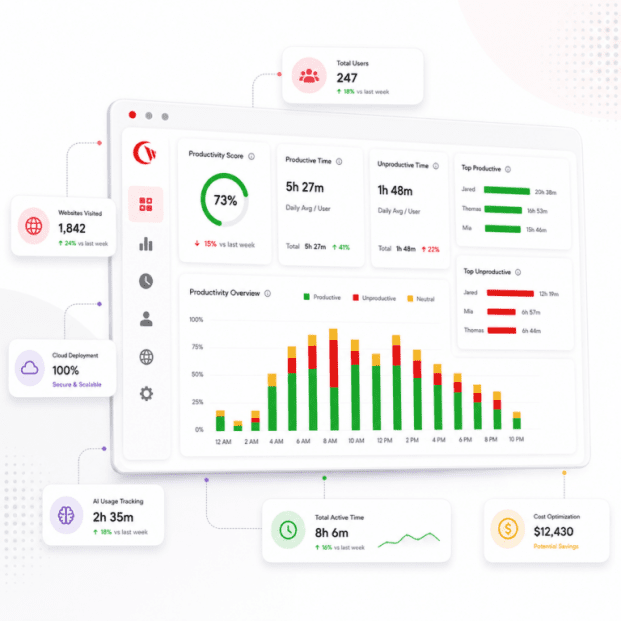

See which websites distract your employees. You can easily compare website usage by individual or team, and use the data from these reports to back your decision-making.
Track when your employees are working and when they’re not. BrowseReporter tracks active, idle, and total work time using keyboard and mouse activity, and lets you set idle thresholds that fit your teams’ workflows.
BrowseReporter allows you to compare how employee productivity looks across remote, hybrid, and in-office setups. You can gauge where your employees’ focus time is the strongest, where it’s not, and use that to build flexible work policies that hold up.
Know when your employees start and finish their day, including startup, sleep, and shutdown events, making it easy to verify working hours and break patterns, so you know what they are really doing
One lightweight agent. One web console.
Full visibility into activity, reporting, and AI tool usage across every endpoint.
See which websites employees visit, how long they use them for, and how their usage stacks up across teams, live.
Capture device screenshots for audits and investigations, with OCR search across captures.
Pinpoint bandwidth-heavy apps and users to control network load and catch suspicious data activity.
Set up automated emails for sharing productivity, usage, and risk reports with HR, IT, and managers on a schedule you prefer.
Ensure your idle and active time data stays clean by detecting fake activity from mouse jigglers and auto-clickers.
Monitor endpoints across remote desktops and terminal servers, from one console.
Recently shipped capabilities that give you deeper visibility and faster, simpler deployment.
BrowseReporter can now read the text inside captured screenshots. Search for sensitive data, policy keywords, or risky terms, not just URLs and app names.
No on-premise server to manage. Deploy CurrentWare in the cloud in minutes and manage every endpoint from anywhere, while keeping the on-prem option if you need it.
See which AI tools your team is using, how often, and where company data might be slipping out. Make AI governance decisions based on what’s actually happening, not assumptions.
of companies that implemented monitoring software saw an increase in employee productivity.
of employers have found an employee working a second job while on the clock, thanks to monitoring software.
of desktop software and 29% of SaaS spend is underutilized or wasted.
BrowseReporter converts everyday endpoint activity into results leaders can see, prove, and act on.
Once you know where time is going, you can have real conversations with employees about where it should go instead.
Location insights let you refine remote and hybrid policies without taking an all-or-nothing approach to accountability.
Unused licenses and redundant tools drain budgets quietly. Clear usage reports make the waste visible and easy to act on.
Monitoring done transparently builds trust, not resentment. When people see data used to support their success rather than to punish them, the dynamic shifts.
Automated reports go straight to HR, IT, and compliance teams, with risk alerts included. When issues come up, your audit trails are already there.
Cost Insights connects actual usage to licensing costs, so you can spot inactive accounts, underused apps, and overlapping tools before the next renewal.
AI tools have become part of how work gets done, but most organizations have very little visibility into how they’re being used, leaving room for productivity blind spots, data leakage, and shadow IT that grows quietly in the background.
See which tools like ChatGPT, Copilot, and others are being used, by which teams, and how often.
Spot behavior tied to AI and web activity that could indicate a problem before it becomes one.
Let approved tools through and block the rest, without disrupting legitimate work.
Combine filtering with device control to keep sensitive data from reaching AI platforms it shouldn’t.
No Credit Card Required
All subscriptions include ongoing updates and direct support from our team.
A lot of employee monitoring tools go too far in one direction: they’re either surveillance-heavy with little regard for privacy, or they’re analytics-only with no way to act on what they find. BrowseReporter sits in a different spot. It combines real-time activity monitoring, policy enforcement, and cost insights with privacy controls you can actually configure, and tracking that’s transparent to employees.
| Feature | BrowseReporter | Other Solutions |
|---|---|---|
| App & Web Productivity Insights | ✓ Yes | Limited |
| Active vs Idle Time Tracking | ✓ Yes | Limited |
| Privacy-First Controls (screenshots off by default) | ✓ Yes | ✗ Rarely |
| Software Cost / License Optimization | ✓ Yes | ✗ No |
| AI Tool Usage Tracking | ✓ Yes | Limited |
| On-Premises Deployment Option | ✓ Yes | ✗ Rarely available |
| Compliance Reporting (GDPR, CCPA, NIST, ISO 27001) | ✓ Yes | Limited |
From IT to HR to operations, BrowseReporter gives each team the productivity visibility they need to monitor employee internet usage, track employee behaviour and productivity, and act on real data, all from one console.
Monitor internet usage and app activity across every endpoint. Flag risky or non-compliant behavior before it becomes a bigger problem.
Bring objective data into performance reviews, attendance tracking, and investigations. Fair, defensible, and grounded in what actually happened.
Maintain audit-ready activity trails and demonstrate due diligence when regulators come asking.
Cut software waste and make smarter renewal decisions using real usage data, not estimates.
See where focus time is being spent, where idle time is creeping in, and where the bottlenecks are.
Deliver productivity monitoring and internet usage visibility to multiple clients from a single console.
Explore tailored controls that help you meet industry standards, boost efficiency, and protect sensitive data across remote and in-office teams.
HIPAA-ready controls to protect PHI with USB management and insider-threat visibility.
Cybersecurity and policy enforcement aligned to NIST 800-171 and CMMC.
Keep client data protected, billable hours productive, and software costs in check.
Productivity monitoring and internet visibility for both the shop floor and back office.
Enforce access policies and protect sensitive financial data with audit-ready trails.
CIPA-compliant web filtering to qualify for E-Rate and keep students safe online.
Track unproductive web browsing and idle time to detect time-wasting.
Deliver the monitoring, data-loss prevention, and web filtering your clients need, now with faster deployment, and easier management.
SaaS Offering
Employee Monitoring & Analytics
AccessPatrol + BrowseReporter + BrowseControl + enPowerManager
Volume Discounts Available: Save up to 30% for teams of 100+ users
BrowseReporter’s usage data drives two of the calculator’s levers: recovered productivity and unused software licences. Estimate both against your own headcount and software spend.
From small teams setting up their first employee monitoring program to regulated enterprises that need productivity visibility and the ability to monitor employee internet usage across thousands of endpoints.
Keep visibility consistent across home, office, and everywhere in between.
Track productivity and app usage across thousands of computers from one place.
Get employee monitoring up and running fast, without needing a large IT team.
Meet strict data-protection requirements with on-premise deployment.
Stay audit-ready with HIPAA-, NIST-, and CMMC-aligned privacy controls.
Monitor internet usage and report on activity to support acceptable-use and CIPA-aligned policies.
Run BrowseReporter in the cloud or fully on-premises – same features, your choice of infrastructure.
Fastest to launch · fully managed
Your network · your data residency
Discover how organizations use CurrentWare’s employee monitoring software to improve visibility, strengthen compliance efforts, and manage employee activity more effectively.

Endpoint Restriction to Protect CUI & FCI

Protect Controlled Unclassified Information

Increase the Maturity of Your ISO27K ISMS

HIPAA protects sensitive patient data

Critical Security Controls For Your Assessment

EU’s data protection and privacy law

Protect TCAs & BCSI From Insider Threats

Qualify for the FCC’s E-Rate Program
CurrentWare works alongside the identity, security, and directory tools you already use, including support for SAML, OIDC, and CEF standards. Cloud connectors are on the way.


Join 100,000+ professionals across 55 countries.


90% of reviewers would recommend BrowseReporter (average likelihood to recommend: 9 out of 10).
Helpful guides, templates, checklists, and planning resources to support your monitoring strategy and rollout.


Feature guides, comparisons, blog reads, and solutions to help you get the most from employee productivity monitoring.
BrowseReporter is a valuable bandwidth monitoring tool for Windows endpoints.
Set up screenshot capture rules using predefined website categories, instead of adding websites one at a time.
BrowseReporter’s computer and internet activity reports, alerts, and dashboards provide detailed real-time user activity data—even on Terminal Server and Remote Desktop Services!
BrowseReporter’s computer activity reports can be sent to email inboxes for convenient employee monitoring.
Ensure accurate productivity analytics by excluding approved communication and upskilling apps and websites (e.g., Teams, Zoom, Meet, Coursera for training) from idle detection.
Separate genuine work time from inactivity, and set thresholds that match how your team operates.
See which websites employees visit, how long they spend there, and how those patterns shift over time.
Bring macOS endpoints into the same productivity view as the rest of your team.
Detect non-human activity patterns & unauthorized automation tools
Check when employees log in and out, and confirm that working hours and breaks line up with expectations.
Turn on optional screenshot capture when you need a closer look during audits or investigations.
BrowseReporter extracts and indexes text from every screenshot, transforming captured screen activity into searchable, exportable records instead of static image files.
Find out which apps your team actually relies on and how much time goes into each one.
Connect real software usage to what you’re paying for licenses, and cut the tools nobody is using.
See every AI tool your team uses, govern what’s allowed, and stop sensitive data from leaking into ChatGPT, Copilot, and beyond without any guesswork.
Wondering how your team’s computers are being used? With CurrentWare’s Computer Monitoring Software, you can.
CurrentWare is the digital witness you need to gather proof of employee misconduct—whether they’re working from home or in the office.
Get a clear picture of how work actually happens across every team, location, and device.
Get full visibility into how your team uses webmail- without reading the conversations.
A Complete Guide to 13 Methods and How They Work.
Employee monitoring tracks how staff use company resources at work.
Spot what’s pulling focus away from real work and give your team what they need to perform better.
Improve Presence & Productivity with Office Attendance Tracking.
Keep your distributed team on the same page without hovering over anyone’s shoulder.
Track what’s actually being used, find what isn’t, and stop paying for tools that collect dust.
Gain Real-Time Visibility & Control with User Activity Monitoring.
Take what you learn from usage data and use it to remove friction from how your team works day to day.
Set up, configuration, reporting, and troubleshooting help from the CurrentWare Knowledge Base.
Get familiar with what BrowseReporter tracks and how it fits into your team’s workflow.
Get BrowseReporter installed and configured the right way, one step at a time.
Build the reports you need and schedule them to land in the right inboxes automatically.
Read your productivity data at a glance and shape the dashboards to show what matters most to you.
Understand exactly how BrowseReporter measures the time your employees spend at work.
Run into a problem? Start here to find answers to the most common questions and issues.
Keep reading
The fast-growing company does not have a large IT team, resources dedicated to security, or weeks to deploy an enterprise…
When using employee computer monitoring software across the European Union (EU), companies have to find a balance between two legitimate,…
The location from which employees log in remained the same with the introduction of hybrid working; instead, it was the…
As hybrid and distributed work matures into 2026, enterprises' visibility challenges become more nuanced than whether an employee is logged…
Some workplace innovations can seem like a good idea in a management meeting and take a completely different shape when…
Frequently asked
BrowseReporter tracks employee activity such as websites visited, applications used, and active vs idle time in real time. It generates detailed reports showing how time is spent across tasks, helping identify productivity gaps, software usage patterns, and policy violations. Optional features like screenshots and bandwidth tracking provide additional context when needed.
Yes, BrowseReporter can monitor employees regardless of location, including remote and hybrid teams. It tracks activity across distributed environments, including remote desktops and terminal servers, giving managers consistent visibility into workforce productivity from anywhere.
BrowseReporter is commonly used by IT, HR, compliance, and operations teams. IT teams use it for visibility and policy enforcement, HR for productivity and attendance insights, compliance teams for audit-ready reporting, and leadership for workforce analytics and cost optimization decisions.
Yes, BrowseReporter is legal when used in accordance with local labor laws and with proper employee transparency and consent. It includes privacy-first controls that allow organizations to define what is tracked, limit monitoring scope, and align with internal policies and regulations.
BrowseReporter is deployed via a lightweight agent installed on employee devices, managed through a central console. Setup is typically straightforward and can be completed within hours for smaller teams, with scalability for larger enterprise deployments.
Yes, BrowseReporter supports GDPR and CCPA compliance through policy-driven monitoring and configurable data collection controls. Organizations can define what data is collected, restrict monitoring to work hours, and ensure transparency to meet regulatory and internal compliance requirements.
Yes, BrowseReporter tracks both active and idle time to provide accurate productivity insights. This helps distinguish between engaged work and inactivity, enabling more precise reporting and workforce utilization analysis.
BrowseReporter supports optional screenshot monitoring for audits or investigations, but it does not rely on invasive practices like continuous keystroke logging. Organizations can enable or disable screenshots based on their privacy and compliance requirements.
BrowseReporter starts at approximately $12 per user per month* (For on-prem pricing, contact Sales), with a fully functional free trial available. The trial typically allows deployment on a limited number of devices for a set period, enabling teams to evaluate the software before purchase.
BrowseReporter focuses on balancing workforce visibility with privacy and compliance. Unlike surveillance-heavy tools like Teramind or analytics-only platforms like ActivTrak, it combines real-time activity monitoring, policy enforcement, and cost insights with configurable privacy controls and transparent tracking.
Yes, BrowseReporter can detect unusual or risky behavior by tracking visits to unauthorized or high-risk websites, monitoring software usage, and generating alerts based on predefined policies. This helps identify insider threats, shadow IT usage, and non-compliant activity early.
Yes, BrowseReporter allows organizations to restrict monitoring to defined work hours, shifts, or specific teams. This ensures monitoring aligns with company policies while maintaining employee privacy outside working hours.
“BrowseReporter is deployed via a lightweight agent installed on employee devices and managed through a central console. It supports both on-premises and cloud environments, giving your IT team the flexibility to deploy within your existing infrastructure or security requirements. Most organizations are up and running within hours.”
Yes. BrowseReporter tracks the application or website the employee is actively using, whichever display it’s on. Active and idle time come from keyboard and mouse input, not from what happens to be open on screen. Live Capture can also view a user’s second monitor.
BrowseReporter does not track any background activity as the user is not interacting with the background process. The majority of user activity is done on the foreground application/window so only those are considered by BrowseReporter.
Yes. You can create operator accounts for managers and limit each one to specific groups of computers or users, and to specific CurrentWare features. With Active Directory sync, users can be grouped by AD attributes, such as manager, so each manager’s access mirrors their team. Read-only operator permissions are also available.
The CurrentWare client keeps tracking and enforcing policies when the computer is disconnected. Data is stored locally and uploaded automatically once the client can reach the CurrentWare server again.
BrowseReporter does not log keystroke content. We never record what a user types. We do detect keyboard/mouse activity to measure active time, but not the content of it. The one place sensitive data could theoretically appear is in an optional screenshot, if something like a password happens to be on-screen at capture time; screenshots are fully opt-in and configurable to your privacy policy. We’re actively building automated PII detection and redaction for screenshots, so sensitive content like passwords gets blocked out before anyone views it.
Talk to a CurrentWare specialist who has deployed monitoring at 200+ law firms.


