


Product Comparisons
Email monitoring that watches the boundary, not the conversation
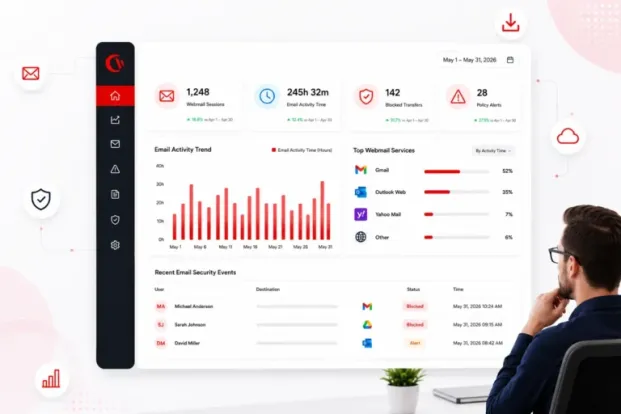
Get full visibility into how your team uses webmail- without reading the conversations.
- See usage patterns
- Stop data leaks at exits
- Control risky access
No credit card required · 14-day free trial · Cloud and on-premise available
700+ organizations trust CurrentWare's employee monitoring software for visibility & control
Email monitoring without reading employee email
One wrong email address, cc, or a file sent to a personal inbox, a mistakenly clicked phishing link is all that it takes to put your company data at risk.
CurrentWare prevents that risk at the email exit- monitoring how your webmail is being used, what data is sent across, and to whom, without peeking into the email content.
Monitor the usage, not the content
Get visibility into your employees’ webmail and web-app activity, time on tab, and search terms with BrowseReporter.
Stop risky transfers
Block sensitive files from leaving via personal email and cloud with AccessPatrol.
Control the leak paths
Filter personal webmail and file-hosting with BrowseControl.
Stay defensible
Ensure transparent, proportionate monitoring you can stand behind
The challenge
The challenge Why email is the hardest exit to monitor
It looks like normal work
Most data leaks aren’t attacks, they’re routine-looking attachments and uploads no one flags until it’s too late.
Webmail bypasses controls
Personal Gmail or Yahoo in a browser sidesteps corporate mail rules entirely unless you can see and filter it.
Reading email breaks trust
Capturing email bodies invites legal risk and employee resistance, and still misses cloud and USB exfiltration.
Remote work widens the gap
Off-network devices and personal accounts blur the line, leaving blind spots traditional tools never see.
Capabilities
Three Controls That Meet Email Risk at the Boundary
See · Webmail visibility
Track time on Gmail, Outlook web and other inboxes, search terms, and bandwidth spikes with BrowseReporter.
Stop · Block risky transfers
Prevent uploads of sensitive files to personal email and cloud, and block by file type with AccessPatrol.
Control · Access management
Block personal webmail and file-hosting categories and allow-list sanctioned services with BrowseControl.
Real-time alerts
Get notified the moment a policy is crossed high-risk keywords, blocked transfers, or bandwidth anomalies straight to your inbox.
Renamed-file detection
Signature-based scanning catches files renamed to slip past policy, and logs every transfer attempt for evidence.
Audit-ready logs
Keep file-transfer records and activity logs with retention controls to support audits and investigations.
Monitoring you can defend
What Currentware Does, and Deliberately Doesn’t
What it does
- Shows which inboxes and web apps, for how long
- Blocks risky transfers to personal email, cloud, and USB
- Controls access to personal webmail and file-hosting
- Logs events & destinations for audit-ready evidence
- Supports transparency with notify mode & employee self-reports
What it doesn’t
- Read the bodies of employees’ private messages
- Logs keystrokes (to avoid invasive surveillance)
- Access personal accounts without consent or company policy
- Monitor off the clock scope tracking to work hours & teams
- Disclose scope in policy & onboarding
Why it matters
Email Is How Data Quietly Walks out the Door
100K+
professionals across 55 countries rely on CurrentWare for visibility and control.
Email reports & alerts
Get the Right Activity in the Right Inbox
CurrentWare doesn’t just monitor email risks, it uses email to keep you informed. Schedule activity and productivity reports to managers, IT, and HR, and trigger real-time alerts the moment a policy is crossed. Set it up in minutes with Gmail or Microsoft 365.
Email reports & alerts in BrowseReporter
Schedule activity and productivity reports and send real-time alerts straight to the right inbox.
Set up CurrentWare to send emails
Configure the SMTP sending account once so every report and alert goes out reliably.
Use Gmail to send emails
Learn a step-by-step process for sending CurrentWare reports through a Gmail or Google Workspace account.
Use Outlook / Office 365
Connect Microsoft 365 as your sending mailbox in a few guided steps.
Set up an email report
Choose the data, recipients, and schedule for an automated activity report.
Get email reports
Turn on recurring reports so managers and HR get the numbers without logging in.
Summary emails
Send digest-style overviews that roll activity up into a quick, scannable summary.
Email alerts
Trigger an email the moment a policy, keyword, or threshold is crossed.
Idle-time email alerts
Get notified when monitored devices sit idle beyond your defined limit.
Subscribe to dashboard emails
Have key dashboards delivered to your inbox on a recurring cadence.
Email report not sending
Fix the most common SMTP and delivery issues when a report fails to arrive.
Best email service providers
Compare providers to choose a reliable backbone for your reports and alerts.
Compare CurrentWare with Other Employee Monitoring Tools
See how CurrentWare compares with other monitoring tools on scope, transparency and price before you choose an approach to email monitoring.
- Product Comparisons
Zscaler Alternative
- Product Comparisons
WebTitan Alternatives
- Product Comparisons
Veriato Alternatives
- Product Comparisons
Teramind Alternatives
- Product Comparisons
SafeConsole Alternative
- Product Comparisons
ManageEngine Alternative
- Product Comparisons
InterGuard Alternative

Trusted by teams across the United States, Canada & the United Kingdom
Join 100,000+ professionals across 55 countries.


What customers say about CurrentWare
4.8 / 5
Across the whole CurrentWare Suite.
4.7 / 5
90% of reviewers would recommend BrowseReporter (average likelihood to recommend: 9 out of 10).
Fits Your Stack. Deploys in Minutes.
Deployment On-premise or cloud
Ensure your data stays where your policy requires by keeping monitoring inside your own network, or on the cloud.
Privacy-first Proportionate by design
Explore role-based access, granular controls, notify mode, and configurable retention keep oversight transparent and defensible.
Integration SIEM-ready
Forward activity and security events to your SIEM so email-related signals sit beside the rest of your telemetry.
Explore the Employee Monitoring Cluster
Email monitoring is one part of a complete employee monitoring software strategy.
Go deeper on the topics that surround it.
Employee Monitoring Software
Get a pillar overview of how CurrentWare monitors activity for security, productivity, and compliance.
What is employee monitoring?
Explained in the simplest way- what employee monitoring covers and how it works.
Is employee monitoring legal?
Discover where monitoring stands legally and learn how you can keep it compliant and transparent.
Employee monitoring ethics
Learn how to monitor your employees responsibly without eroding their trust, and inviting a lawsuit.
Types of employee monitoring
Compare the many approaches of employee monitoring, from web and app tracking to DLP.
How to monitor employees
Get a practical, step-by-step guide to implement employee monitoring.
On-premise vs cloud monitoring
Weigh the trade-offs of on-prem control versus cloud convenience.
How to choose best monitoring software
Get in on the criteria that matters when shortlisting a monitoring platform.
Employee monitoring policy template
Grab a ready-to-adapt policy to disclose monitoring and set expectations.
Solutions That Work Across Industries
Tailored controls that help you meet industry standards, boost efficiency, and protect sensitive data across remote and in-office teams.
Healthcare
HIPAA-ready controls to protect PHI with USB management and insider-threat visibility.
Government
Cybersecurity and policy enforcement aligned to NIST 800-171 and CMMC.
Legal Services
Keep client data protected, billable hours productive, and software costs in check.
Manufacturing
Productivity monitoring and internet visibility for both the shop floor and back office.
Financial Services
Enforce access policies and protect sensitive financial data with audit-ready trails.
Schools & Libraries
CIPA-compliant web filtering to qualify for E-Rate and keep students safe online.
Small Business Employee Productivity
Track unproductive web browsing and idle time to detect time-wasting
Built to Support Your Compliance Program
Discover how organizations use CurrentWare’s employee monitoring software to improve visibility, strengthen compliance efforts, and manage employee activity more effectively.
- CMMC Compliance →

CMMC
Endpoint Restriction to Protect CUI & FCI
- NIST 800-171 Compliance →

NIST 800-171/53
Protect Controlled Unclassified Information
- ISO 27001 Compliance →

ISO 27001
Increase the Maturity of Your ISO27K ISMS
- HIPAA Compliance →

HIPAA
HIPAA protects sensitive patient data
- Cyber Essentials Compliance →

Cyber Essentials
Critical Security Controls For Your Assessment
- GDPR Compliance →

GDPR
EU’s data protection and privacy law
- NERC CIP Compliance →

NERC CIP
Protect TCAs & BCSI From Insider Threats
- CIPA Compliance for Education →

CIPA for Education
Qualify for the FCC’s E-Rate Program
Pick & Plug Into Your Existing Stack
CurrentWare works alongside the identity, security, and directory tools you already use, including support for SAML, OIDC, and CEF standards. Cloud connectors are on the way.
- Tested & supported
- Generic standards (SAML, OIDC, CEF)
- On the roadmap (Cloud)


Watch the Boundary, Not the Conversation
Start a free trial or book a demo to see exactly what CurrentWare sees, prevents, controls, and what it intentionally leaves private.
Frequently asked
Frequently Asked Questions:
-
Email Monitoring Software is an employee productivity & data prevention tool that enables you to see how your team uses webmail, stop sensitive files from leaving through personal email and cloud, and control access to risky inboxes, without reading private messages or logging a single keystroke.
-
No. CurrentWare doesn’t capture or read the bodies of private messages. It focuses on usage and destinations, which inboxes and web apps are used, and what files are moving to personal email, cloud, or USB.
-
Yes. AccessPatrol can block uploads to personal email accounts and risky cloud storage, restrict specific file types, and detect renamed files while logging each attempt as audit evidence.
-
Generally yes, on company-owned devices and accounts with a legitimate business purpose and proper disclosure. Requirements vary by region and industry, so pair CurrentWare with a clear, acknowledged monitoring policy and legal review.
-
In the UK, monitoring must comply with UK GDPR, the Data Protection Act 2018, and ICO guidance: rely on a lawful basis such as legitimate interest, be transparent, keep it proportionate, and complete a DPIA for higher-risk monitoring.
-
Under PIPEDA, monitoring must be reasonable, necessary, and disclosed, and individuals can request access to their data. Provinces such as BC, Alberta, and Quebec add requirements, and Ontario requires a written electronic-monitoring policy for covered employers.
-
The ECPA generally permits monitoring of company systems for a legitimate business purpose or with consent; the Stored Communications Act restricts access to private accounts, and state laws like CCPA/CPRA and BIPA add requirements. A written, acknowledged policy is best practice.
-
Yes. CurrentWare supports a notify mode and optional employee self-reports, so monitoring can be transparent rather than covert.
-
Yes. Policies and tracking continue to apply when endpoints are off the corporate network, giving consistent visibility and control wherever your team works.
-
Both. Deploy CurrentWare in the cloud or fully on-premises with the same feature set, and your choice of infrastructure.
-
Yes. BrowseReporter emails scheduled activity reports and sends real-time alerts when policies are triggered; AccessPatrol can email notifications for blocked or suspicious file activity.
-
CurrentWare sends over SMTP. Follow the guides to set up email sending, or use Gmail or Outlook / Office 365.
-
Yes. BrowseControl blocks personal webmail and file-hosting categories, and AccessPatrol restricts uploads and downloads to cloud apps while allowinglisting sanctioned services.
-
Yes. AccessPatrol records file operations with timestamp, user, device, and action, and keeps an activity log of blocked and allowed transfers.
-
CurrentWare uses a lightweight background agent designed to provide visibility and control without disrupting work, and it avoids invasive techniques such as keystroke logging.
-
Yes. Activity and security data can be forwarded to your SIEM so email-related events sit alongside the rest of your security telemetry.
Still have questions?
Talk to a CurrentWare specialist who has deployed monitoring at 200+ law firms.