

Some workplace innovations can seem like a good idea in a management meeting and take a completely different shape when rolled out to employees. Inform a group of employees that you will be implementing “workforce analytics”, and some may hear increased insight into workload; let that group know you will be “monitoring employee activity”, and they might begin imagining someone observing their screen, logging their keystrokes, documenting their restroom breaks, or evaluating how many minutes they are logged out of their computer.
Discussed in terms of productivity, data security and compliance, and operations in hybrid work, employee monitoring has risen as a topic of discussion and deployment in 2026. Gartner published a full paper in 2025, claiming it should be used only to “Gain an understanding,” not to “Monitor and manage behaviour.”
Meanwhile, research has indeed shown statistically significant relationships between electronic monitoring and employee stress. Results from the American Psychological Association’s (APA) 2023 Work in America survey showed that 56% of monitored employees generally reported feeling tense or stressed during the day, compared with 40% of non-monitored employees.
The message to employers is clear: “technology” is only one factor in employees’ acceptance of monitoring. How you communicate it will either create or limit employees’ feelings of workplace tool vs workplace surveillance.
This guide details how to provide transparent implementation of employee monitoring, how to deal with employee monitoring privacy issues, how to convey clear communication as to the intended purpose, and how to develop a policy that safeguards both the organization and employees.
What Is Employee Monitoring in 2026?
Employee monitoring refers to technology businesses use to capture, interpret, or report on employees’ activities on business computers and equipment. This monitoring may include:
- Website and internet activity
- Application usag
- Active and inactive periods
- Login and logout activity
- File or data access
- Bandwidth consumption
- Security events
- Productivity trends
- Screenshots
- Device or endpoint activity
Modern monitoring should ideally answer questions such as:
- Where are our operational bottlenecks?
- Are employees struggling with inefficient applications?
- Are workloads distributed fairly?
- Are corporate systems being used safely?
- Are there unusual patterns that require investigation?
It should not automatically become:
Is XYZ employee online every minute?
Did ABC employee move his mouse enough today?
Why did someone take a 15-minute break?
This distinction between observing work conditions and continuously observing people is really key to what an ethical monitoring strategy would look like.
A similar theme emerges in Gartner’s September 2025 report, Employee Monitoring should Be Used for Insight, Not Oversight, which also suggests using monitoring for organizational insight, instead of solely to exert managerial controls.
The State of Workplace Privacy and Employee Monitoring
The debate surrounding employee monitoring has become more intricate and layered as remote and hybrid work becomes an established fixture. Companies argue that distributed systems, cybersecurity threats, application use, and workload require increased oversight, while employees want more transparency about what data is collected, where it comes from, and for what purpose.
One example of this dilemma is ExpressVPN’s 2025 survey of 1,500 US workers and employers. 74% of employers surveyed said they had purchased monitoring software and 67% said they used biometric-monitoring technologies. 50% of employees suspected they were being monitored, and 56% worried about privacy violations or misuse of their personal data. Neither number should be seen as representative of the entire American workforce (the study was commissioned by ExpressVPN and used their own survey), but it clearly shows a communication gap and different understandings between employees and employers about monitoring.
Transparency Changes the Conversation
Employees are also more accepting of monitoring when they perceive a positive outcome. Gartner wrote in 2023 that “96% of highly trusting employees were open to monitoring if it helped employees in some useful ways”. Gartner also focused heavily on the concept of “radical transparency”: transparency into where data is taken, what it is taken for, how it is stored, how long it is stored for and who can see it.
Tell employees monitoring is happening for a reason:
- Monitoring identifies teams over capacity.
- App data show that the software isn’t efficient.
- Security monitoring can identify threats that employees face through compromised accounts.
- Website analytics can identify meaningless workflow bottlenecks.
- Aggregated data can guide managers on allocating workforce and resources.
The only practical lesson learned here is that organizations should avoid creating an atmosphere where every worker is under continuous supervision.
Navigating Employee Monitoring Laws in the U.S.
No single federal law will cover all workplace monitoring by employers. The rules can change based on what kind of information is collected, what technology is used, the state, and whether the company monitors a personal device or provides the device. The size and industry type can also make a big difference. Given this, consult adequate legal counsel and review the employment monitoring policy.
California: employee privacy and data requirements
As the California Consumer Privacy Act (CCPA) was amended by the California Privacy Rights Act (CPRA), regulations on employee data continue to develop through an active policy process led by the California Privacy Protection Agency (CPPA). Current CPPA rulemaking documentation indicates employee data and notice/disclosures remain subjects of active regulation in 2026. Employers should therefore not blindly duplicate a pre-drafted standard “employee monitoring policy.
Determine:
- What employee information is collected?
- Why is it collected?
- How is it used?
- How long is it retained?
- Who can access it?
- Is it shared with third parties?
- What rights or notices apply?
New York: written notice requirements
New York State-specific requirements focus on notice when monitoring telephone conversations or transmissions, electronic mail or transmissions, or internet access or use. In the New York State legislative materials, you’ll see mention of notice given in writing and annually, except under certain limited circumstances. This is simply not the case: a nationwide employee monitoring policy that might cover a business operating across every state doesn’t necessarily cover every other state.
Step-by-Step Guide: How to Introduce Employee Monitoring Without Losing Trust
Implementation should focus on improving a workplace process, not installing a surveillance system.

Step 1: Define the “Why” in Positive Terms
Before announcing the technology, scribble down exactly why you need it. Do not use reasons like: “Management needs to know how productive the employees are.”
Because immediately, that leads to a question like: “Why do you need to see what I am doing?”
In contrast, write down the functional needs. For example: “The workforce analytics tool will help us pinpoint those repeated bottlenecks we are experiencing with technology, grasp how the workload is spread and optimize the employees’ usage of business applications. ”
Emphasise positive outcomes leading to balanced workloads, improved workflows, strengthened cybersecurity, technological advancements, and support for remote employees.
Step 2: Involve Employees Before the Rollout
Do not wait until installation day to explain the program. Bring employees into the discussion before implementation through:
- Town halls
- Team meetings
- Anonymous surveys
- HR Q&A sessions
- Manager briefings
- Written FAQs
- Pilot programs
Ask employees:
- What privacy concerns do you have?
- Which types of monitoring feel excessive?
- What information would help you understand your own workload?
- What questions should managers answer before implementation?
- What data should have restricted access?
Step 3: Explain Exactly What Is Being Tracked
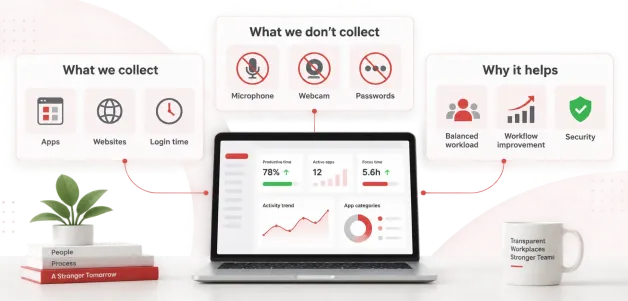
Never use the phrase “we’ll monitor your activity” without explaining what that means. Create a simple What We Collect / What We Don’t Collect table.
| What We Collect | What We Don't Collect |
|---|---|
| Business application usage | Personal passwords |
| Website categories | Private account credentials |
| Login/logoff activity | Webcam recordings, unless specifically and lawfully configured |
| Work-related internet activity | Microphone recordings |
| Security events | Personal information unrelated to the stated purpose |
| Configured endpoint activity | Keystrokes, if the organization does not use keylogging |
Step 4: Explain How the Collected Data Will Be Managed
This critical phase builds employee trust and clearly explains what happens after the company collects monitored information.
Establish rules such as:
- Monitoring data will not automatically determine performance ratings.
- Managers will investigate unusual trends rather than treating one metric as proof of poor performance.
- Data will be interpreted alongside actual work outcomes.
- Access will be limited to authorized personnel.
- Personal information unrelated to business purposes will not be intentionally collected.
- Data will be retained only as long as necessary.
- Employees can ask questions about the monitoring program.
Step 5: Give Employees Visibility Into Their Own Data
A good transparency-first scheme should address: “If the employer can see my data, can I see what the employer sees?” As data becomes more visible, employee-facing dashboards will let the workforce shift from monitoring to self-management, wherever technically and operationally feasible. Employees will be able to view their data related to:
- Excessive application switching
- Meeting overload
- Long periods of fragmented work
- Repetitive workflows
- Frequently used applications
- Distraction patterns
- Technology bottlenecks
The objective is not to push them to increase active minutes. The objective is to make them aware that their workplace can help or hinder their productivity.
Step 6: Train Managers Before Employees
Even an organization with an excellent privacy policy would be in trouble if managers mishandled data gathered by its monitoring system.
Managers should receive training on issues such as:
- Rank employees solely by activity time.
- Treat idle time as automatic evidence of inactivity.
- Publicly compare individual monitoring scores.
- Demand constant online availability.
- Use screenshots to embarrass employees.
- Investigate harmless anomalies without context.
- Expand monitoring beyond the stated purpose.
Employee Monitoring Policy and Communication Templates
Clear documentation is one of the most effective ways to reduce uncertainty. Your employee monitoring policy should explain:
- Purpose of monitoring
- Systems and devices covered
- Types of data collected
- When monitoring occurs
- Who can access information
- How information is used
- Data retention period
- Employee privacy protections
- Applicable legal notices
- How employees can ask questions or raise concerns
Here is an Email Communication Template: Introducing Workforce Analytics
Hi Team,As we continue to evolve our hybrid work model, we want to make sure everyone has the support, resources, and technology needed to succeed.
To help us better understand operational bottlenecks, improve workflows, and balance workloads across teams, we are introducing [Software Name] on [Date].
What this is for:
The tool will help us identify processes that may be slowing teams down, understand technology usage, and make better decisions about workload and resources. It is intended to provide operational insight, not to micromanage employees.
What is being tracked:
The software will track [application usage, website categories, active hours, security events, etc.]. It will not collect [private passwords, personal messages, webcam or microphone data, etc., as applicable to your configuration].
How the information will be used:
We will consider monitoring data alongside work outcomes and business context. A single activity metric will not automatically determine an employee’s performance.
Your privacy:
We take employee privacy seriously. Access to monitoring information will be limited to authorized personnel, and data will be handled according to our company policy and applicable privacy requirements.
Where available, employees will also have access to information about their own activity so that the data can support self-management and workflow improvement.
We will hold a Q&A session on [Date] to explain the program and answer your questions.
Thank you for your feedback and cooperation as we introduce this change.
Employee Monitoring Policy Language Snippet
“Employees will be subject to monitoring by the company.” The policy should be more specific than this!
The Company uses [Software Name] to support legitimate business purposes, including information security, operational analysis, technology optimization, and workforce planning. Monitoring applies only to the systems, devices, users, activities, and time periods identified in this policy.
The Company will collect only the categories of information necessary for the stated purposes and will limit access to authorized personnel based on business need. Monitoring information will not automatically be treated as a measure of individual performance and will be considered in the appropriate business context.
Where required by applicable law, the Company will provide employees with prior notice and other required disclosures concerning electronic monitoring. The Company will maintain appropriate safeguards, retention controls, and access restrictions for monitoring information.
Employees may contact [HR/Privacy/IT Contact] with questions regarding the monitoring program, the information collected, or applicable privacy practices.
Choosing the Right Tool: The CurrentWare Approach
Choosing the best employee monitoring software will reflect the workplace culture you are trying to build. If you want transparent workforce analytics, not invasive workforce surveillance, investigate features that let you control collection, access, and retention, and define when monitoring occurs.
Privacy-first deployment options
CurrentWare has two deployment choices. One is a cloud-based SaaS offering, and the other is an on-premises, or self-hosted, solution. In the self-hosted version of Current Ware, the customer states that all information tracked within this program or software is and always will be stored within their own networks that they control, and CurrentWare does not have access.
Non-invasive monitoring options
BrowseReporter is a reporting solution for internet and application usage, which does not force an organization to deploy all available monitoring mechanisms. The documentation clearly states that CurrentWare’s solution does not offer keystroke logging, webcam or microphone recording, screen video capture, or screenshots; these were only taken when enabled. This enables an organization to implement a reporting strategy for only the desired information.
Control over employee monitoring data
The term privacy should also consider not only what data is gathered, but who can access it once gathered. CurrentWare offers controls such as role-based access control, administrator/operator privileges, controls over how long data is retained, and the option to limit monitoring to certain employees and work hours.
For instance, a company can set its regulations on rules that:
- Managers only view data that is related to their specific department/team
- Monitoring occurs only during the hours a specific employee usually works.
- Old data will be deleted after a certain time.
- Only particular users will be allowed to see the monitoring logs.
- Certain employees or specific behaviors cannot be monitored.
Conclusion
Monitoring doesn’t have to build a trust gap. The real trouble usually starts when employees learn employee monitoring technology exists before they understand its purpose. When the message starts with ‘we are monitoring you,’ employees can’t help but jump to thoughts of surveillance, private data and their employment being on the line.
Conversely, when the message reads ‘we are deploying a tool designed to help us identify system workflow roadblocks, secure our systems, balance the workload and to give you a greater understanding of how you actually spend your working day,’ the debate feels quite different.’
These differences matter more than ever in 2026, when every organization is grappling with balancing the integration of hybrid work, cybersecurity, expectations of output and the application of AI and advanced analytics.
The most effective method is not promising that monitoring will always feel entirely comfortable; instead organizations need to demonstrate that the systems are transparent, proportional, secure and auditable. Ultimately, effective employee monitoring is less concerned with verifying every working minute and more concerned with building enough information for the organization to operate with greater insight while fostering trust so good work can happen.


