
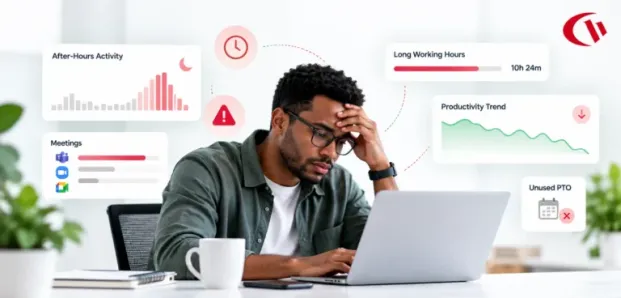

Overwork is one of the most costly problems in the modern workplace and one of the easiest to ignore. The Eagle Hill Consulting Workforce Burnout Survey, carried out by Ipsos in November 2025, found that 55% of employees in the United States reported that they were suffering from burnout; 61% of those who work fully from home said they were experiencing burnout; and 57% of hybrid workers said they were experiencing burnout.
It is also difficult to ignore that financial impact. The American Journal of Preventive Medicine study estimated that burnout costs each employee between $3,999 and $20,683 per year, depending on the role. Fortune quoted the study and said about 89% of the cost comes from presenteeism (employees who are present but not really there) rather than absenteeism.
Most employers opt for intensive surveillance, and research indicates this approach leads to disaster. A meta-analysis of electronic performance monitoring found that employees consistently found the practice stressful, regardless of the method used; when monitoring had no clear purpose, it negatively affected performance, while open, less intrusive methods received better ratings for promoting the right attitude. The ideal solution is workforce analytics that respect privacy by focusing on workload problems without recording keystrokes or reading messages.
Key Takeaways
- 55% of workers in the United States say they are experiencing burnout, with the figure higher among those who work from home or on a hybrid basis.
- Each employee causes employers losses of $3,999 to $20,683 per year, mainly due to presenteeism.
- Overwork is evident in normal work patterns through things such as working after hours, having a high number of meetings, making irregular logons, and experiencing a decrease in active time.
- When the data is combined and made transparent, you can identify patterns without having to monitor the work content.
- Do not use the data to discipline, but rather to start a supportive conversation.
What is an Overworked Employee?
An employee is overworked when the amount of work exceeds the energy and time they have available to complete it, with no opportunity for rest between workdays.
This situation may manifest as longer working hours, work continuing beyond normal working hours, reduced work quality, and withdrawal. The World Health Organization’s ICD-11 states that if overwork is not dealt with it can result in burnout.
The True Cost of Overwork: Insights from Industry Benchmarks
Employee burnout is not a sign of personal weakness; it is the result of a failure in the way workloads are managed, and the standards show just how severe it is.
The widespread nature of stress
According to Gallup’s 2024 State of the Global Workplace report, 41% of workers worldwide stated that they had experienced a lot of stress the day before. Earlier Gallup research showed that employees who are frequently burned out are 2.6 times more likely to be actively looking for a new job.
The managerial bottleneck
As has already been mentioned, this Gallup study found the manager to be the direct cause of 70 per cent of the variation in team engagement. This is because managers cannot get a clear view of what is happening within their team unless they make appropriate resource decisions.
The expense of losing top employees
Gallup has estimated that the cost of hiring a replacement for an employee ranges from one-half to twice the employee’s annual salary. You can save money by detecting overwork early.
10 Critical Signs of Overworked Employees
Stressed employees are likely to hide the extent of their workload in order to seem reliable, and objective activity data is able to show this early on without having to read private messages or keep an eye on keystrokes.
1. Chronic After-Hours & Weekend Digital Footprint
If a user logs in frequently in the early evenings and on weekends, they are working considerably above their usual level; while occasional spikes are reasonable, a regular pattern indicates the job is not 40 hours.
2. Meeting Overload & Fragmented Focus Time
Because calendars are used back to back there is seldom a dedicated period of time for deep work; the main outputs are left until the evening since Zoom, Teams or Google Meet take up so much of the day. Reports on app usage show how many hours people spend in meeting apps as compared to productivity tools each week.
3. Unpredictable Sign-in & Sign-out Behaviour
When you are tired, the times at which you start and finish work are the first things to change. Exhausted workers usually log in late, take irregular, spread-out breaks to recover from working late, or work in irregular blocks. This behaviour is shown in the logon and logoff records without any need to examine the actual work done.
4. Tool Overload & Multitasking Exhaustion
Changing among dozens of cloud applications and chat tools wears out one’s ability to concentrate. The fact that someone has a high score for app switching and low stickiness means that they are always dealing with emergencies.
5. Calendar Compression & Unused PTO
Avoiding going on leave is a more subtle sign. Those who have a full range of operational duties often fail to take their well-earned time off for the fear that there will be a pile-up of work when they return or because they do not have a team member who has been cross-trained to take over.
6. Long-term Presenteeism & Significant Idle State Instability
If a person is logged in for more than 10 hours a day and is generally not working hard but instead merely strolling around outside of meetings, then you can conclude that they are suffering from mental fatigue and will not make much progress while at their desk.
7. Sudden Drop in Responsiveness & Engagement
Workers who are under a great deal of strain save up their left-over energy by withdrawing from conversations, by refusing to take part in any optional brainstorming sessions, and by reducing the amount that they write. This is similar to the mental detachment and cynicism that the WHO describes as one of the features of burnout.
8. A “Hero Syndrome” Bottleneck
Many activity reports indicate that a team spends a reasonable number of sustainable active hours, but one member, referred to as ‘point one,’ manages to put in considerably more every week. That team member is a single point of failure.
9. Increasing Hours, Stable Production
A human’s cognitive capacity declines. When someone works 50 or 60 hours a week, and neither the number of closed tickets nor the number of code reviews completed goes up, it means they are not replenishing their hour bank by drawing on unused brain capacity.
10. Increasing Error Rates & Unanticipated Sick Leave
Cognitive overload harms working memory; an employee who is normally reliable begins to act unreliably, makes errors, overlooks simple procedures, becomes tired, and has to be removed from production after quitting right away.
How to Spot Each Sign in Your Data
| Sign | Data signal | Where to see it in CurrentWare | Manager action |
|---|---|---|---|
| After-hours & weekend work | Activity outside scheduled hours | BrowseReporter activity reports; enPowerManager logon/logoff | Reset expectations, redistribute tasks |
| Meeting overload | High share of time in meeting apps | BrowseReporter application usage | Protect focus blocks, cut recurring meetings |
| Erratic schedules | Shifting login/logoff times | enPowerManager logon/logoff reports | Check in privately about workload |
| Tool overload | Time spread thin across many apps | BrowseReporter application usage | Consolidate tools, clarify priorities |
| Presenteeism | Long logged-in hours, falling active time | BrowseReporter active vs. idle time | Reduce load, encourage time off |
| Hero syndrome | One person far above team active hours | BrowseReporter user comparison reports | Cross-train, reassign work |
| Plateauing output | Hours up, output metrics flat | Activity reports + your ticket/PM system | Reprioritize, add resources |
What Causes Employees to Become Overworked?
Workaholism is typically a structural problem, rather than an individual one. The top three causes of chronic workplace overwork:
- Understaffing: Teams will be asked to maintain their current output following attrition or hiring freezes.
- Always-on hybrid work: Laptops and chat apps make the distinction between work and home less clear, especially for remote employees.
- Tool and AI sprawl: New tools and new AI apps keep getting added, but old ones aren’t eliminated – increasing context switching.
- The workload keeps flowing to the trusty few because no one else is multi-skilled.
- Unclear priorities: If we’re not making trade-offs in our minds, everything is urgent and to be done by mindful employees.
Actionable Tips for Managers: Rebalancing Workloads Objectively
Only have early warning signs of any value if managers have the means to take action on them. Workforce analytics software can support this shift from invasive micromanagement to data-driven, supportive management.
1. Audit Baseline Capacity
Before you reassign the work order, find out how work is actually allocated. Computer activity reports show which groups spend significant time on overhead rather than the jobs they are supposed to be doing. The impersonal metrics will show if a poorly performed project is due to a lack of skill or to a lack of process.
2. Eliminate Digital Presenteeism
Set limits on working hours so that disengagement becomes the norm: in CurrentWare establish working hour schedules that stop monitoring outside of normal working shifts, ensure that work carried out after hours remains private, and make it clear that evenings and weekends are off-limits.
Put the policy into practice by getting rid of requests for replies to messages received after hours, avoiding any encouragement of superficial busyness, and viewing availability at any time as a warning sign rather than as a source of pride. Once teams realise that evenings and weekends are actually off-limits, they will recover more quickly and be more productive when it counts.
3. Protect Cognitive Recovery
It is difficult to measure reading, thinking and brainstorming, which is why these activities are usually given a “zero” in the first assessment of your monitors. This problem can be solved by means of an Idle Exclusion List: time spent in Zoom, in Microsoft Teams or in traditional design tools counts as work.
The measure can be improved even more by setting aside the mornings for “brains-down” work, free from chat sessions and meetings, so that workers can keep the long, quiet periods needed for deep thinking.
4. Reallocate Workloads Objectively
If project managers assign work simply on the basis of voluntary availability, it is the most conscientious employees who end up taking on the greatest amount of work. They agree to meet the deadlines, stay at their desks for the final 30 minutes, choose to put in ‘voluntary’ overtime, and fail to mention that the client had just requested a 10 per cent increase in the deliverables, and so on, causing the workload to become unbalanced until someone eventually burns out or resigns.
Leaders can establish a more reasonable process by looking at the utilization summaries before anyone reaches a burnout level. They should compare each person’s weekly hours worked with the team average, identify anyone who consistently works below that figure, and reschedule some of this month’s work to colleagues with the bandwidth and skills. They should review the situation on a monthly basis and make the adjustments transparent so that the team realizes that the reallocation does not mean anyone is underperforming.
How CurrentWare Supports Privacy-First Analytics
If you are looking for a solution that helps you monitor employees securely without breaching privacy, then CurrentWare is the answer. We help mid-market businesses, healthcare networks, and government agencies find overworked employees anonymously.
Instead of tracking webcam activity or collecting keystrokes, CurrentWare gathers high-level reports on application activity, idle vs active time, and URL categories. You can host CurrentWare on your own infrastructure, private cloud, or hosted cloud, with all data stored within environments you own and operate. Transparent Mode and Idle Exclusion List (additionally, in CurrentWare v11.0.2) allow managers to monitor activity levels without including work hours while reading or out in meetings. Pricing begins at $6 per user/month.
Conclusion
In 2026, organizations need to go beyond the dilemma of either ignoring staff fatigue or implementing intrusive surveillance. Although the 10 indicators mentioned above (such as late-night logins and higher accident rates) are rarely noteworthy on their own, collectively they indicate that a team is working well beyond its capacity.
With a privacy-first approach to workforce analytics, managers can detect when employees are being pushed too hard, balance workloads, and promote a culture of trust and sustainable productivity. Start small by selecting two or three indicators, reviewing them monthly, and responding with a conversation before making any workload changes.
Frequently asked
-
No single threshold can be identified, but a joint analysis by the WHO and ILO found that people who work 55 hours or more per week have an estimated 35% higher risk of having a stroke and a 17% higher risk of dying from ischemic heart disease when compared with those who work a typical 35 to 40 hours per week. (It should also be noted that consistently working chronic weeks exceeding 50 hours, together with regular days off after work and on weekends, is a cause for concern.) One should not immediately conclude that burnout is occurring; instead, the data should signal a need to evaluate the workload and talk to the worker.
-
Overwork is a state in which the amount and intensity of work exceed the time and energy available. Burnout is the result. According to the WHO, burnout is characterised by exhaustion, mental detachment or cynicism about one’s job, and a reduced professional effectiveness.
The two conditions are closely linked but not identical, and the gap between them is where action can be taken. A person can be overworked for months on end and still meet all their deadlines.
-
In remote teams, it’s not possible to see the physical signs of fatigue, so you should look at work patterns such as increased activity after normal working hours, longer days spent logged in while the amount of active work decreases, irregular start and end times, and a growing amount of time spent in meeting apps.
No single signal can prove someone is overworking, but any pattern that continues for weeks should get attention. Rather than acting on the data alone, combine these indications with regular one-on-one meetings. Ask what obstacles there are and listen for things the numbers cannot reveal.
-
Burnout isn’t due to issues with monitoring software; however, privacy-first workforce analytics is able to identify workload patterns that come before burnout, for example, working long hours over a period or one individual putting in much more time than all the others.
Workforce analytics can show whether a team’s workload is changing over time, enabling you to act before exhaustion sets in. It should initiate a healthy discussion rather than serve as a reason for punishment. Ensure that your employees are made aware of what is being monitored and of how the insights will be used.


