We’ve updated our Subprocessor List, effective October 6, 2026. Please review the update to our Data Processing Addendum

CMMC compliance software

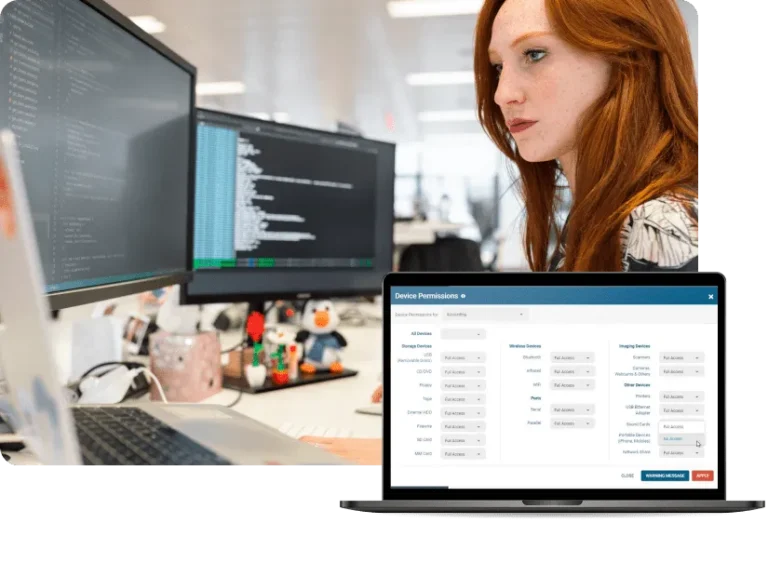
Protect CUI and elevate your cybersecurity maturity with CurrentWare’s security controls for the Cybersecurity Maturity Model Certification.

  • Control Removable Media & Other Peripherals
    Prevent the unauthorized use of high-risk portable storage devices and track allowed devices
  • Protect Controlled Unclassified Information
    Minimize the attack surface of in-scope endpoints
  • Auditable User Activity Logs
    Collect logs of user activity for signs of insider threats, account compromise, and other security risks

*No credit card required · 14-day free trial · Easy setup

CW_Finance_Hero-1
700+ organizations trust CurrentWare's employee monitoring software for visibility & control
  • cushing
  • Mendota
  • nebf
  • idaho
  • viking
  • VES
  • Bristol-logo

CurrentWare’s Security Solutions for CMMC Compliance

WEB_AP-Device-Permissions-Mockup-v902

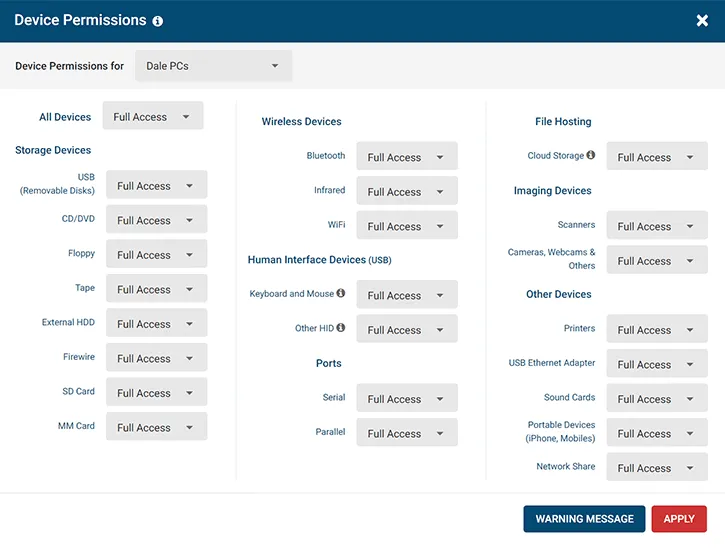
Control the Use of Removable Media On System Components

  • Ensure only approved portable storage devices can be used on systems that interface with FCI & CUI
  • Disable wireless connections through Bluetooth devices, infrared, and WiFi
  • Block employees from using mobile devices, printers, and cameras to steal sensitive data

Related CMMC & NIST 800-171 Controls
CMMC MP.L2-3.8.7 Removable Media
CMMC AC.L2-3.1.18 Mobile Device Connection
CMMC CM.L2-3.4.6 Least Functionality
CMMC CM.L2-3.4.7 Nonessential Functionality

NIST SP 800-171 Rev 2 3.1.18
NIST SP 800-171 Rev 2 3.4.6 – 3.4.7
NIST SP 800-171 Rev 2 3.8.7

WEB_AP-v902-File
WEB_AP-v902-File

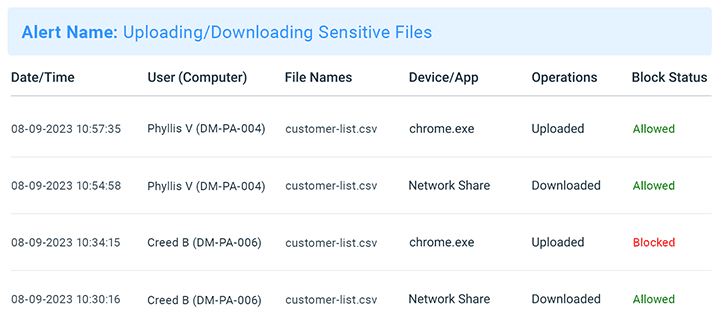
Detect and Prevent High-Risk Data Transfers

  • Receive real time email alerts when employees violate your data security policies
  • Track the data flow of CUI for non-compliant behavior that needs to be addressed
  • Block file downloads/uploads based on file type to limit vectors for data egress

Related Controls
CMMC AC.L2-3.1.3 Control CUI Flow
CMMC AC.L1-3.1.2 Transaction & Function Control
CMMC AU.L2-3.3.1 System Auditing
CMMC AU.L2-3.3.2 User Accountability
CMMC AU.L2-3.3.6 Reduction & Reporting
CMMC CM.L2-3.4.6 Least Functionality

NIST SP 800-171 Rev 2 3.1.2 – 3.1.3
NIST SP 800-171 Rev 2 3.3.1 – 3.3.2
NIST SP 800-171 Rev 2 3.3.6
NIST SP 800-171 Rev 2 3.4.6

FAR Clause 52.204-21 b.1.ii

browsecontrol-block-website-request-access-message

Monitor & Restrict the Resources Employees Access

  • Control access to websites, applications, TCP/UDP ports, and intranet portals to enforce the principle of least privilege
  • Apply deny-by-exception (blacklisting) policies to prevent the use of unauthorized software
  • Control and monitor user-installed software to detect shadow IT and other high-risk programs

Related Controls
CMMC AC.L2-3.1.5 Least Privilege
CMMC AC.L1-3.1.20 External Connections
CMMC AC.L1-3.1.2 Transaction & Function Control
CMMC CM.L2-3.4.6 Least Functionality
CMMC CM.L2-3.4.7 Nonessential Functionality
CMMC CM.L2-3.4.8 Application Execution Policy
CMMC CM.L2-3.4.9 User-Installed Software
CMMC SC.L2-3.13.6 Network Communication by Exception

NIST SP 800-171 Rev 2 3.1.2
NIST SP 800-171 Rev 2 3.1.5
NIST SP 800-171 Rev 2 3.1.20
NIST SP 800-171 Rev 2 3.4.6-3.4.9
NIST SP 800-171 Rev 2 3.13.6

FAR Clause 52.204-21 b.1.ii-iii

2_BrowseReporter-v801-Blocked-Status-Websites-and-Applications

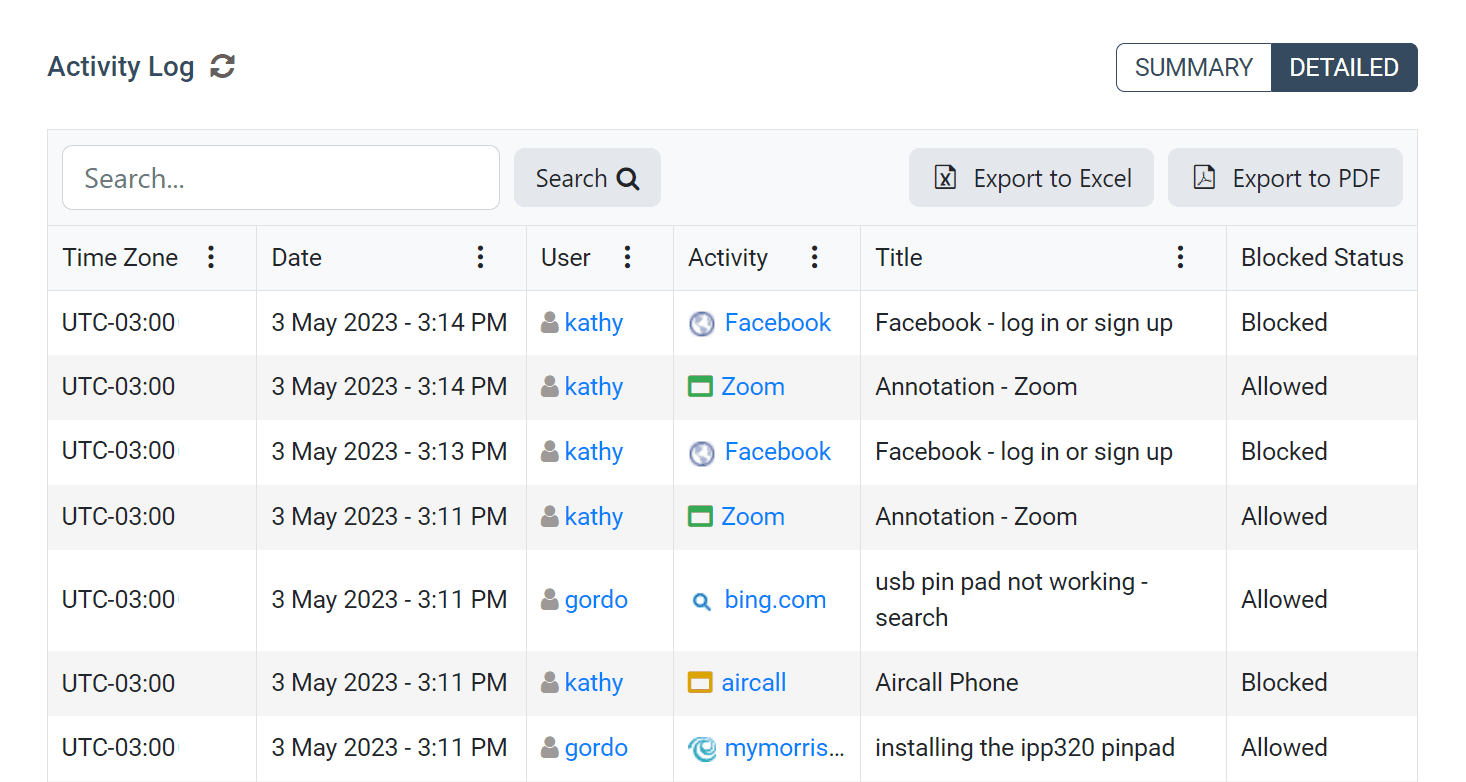
Retain Logs of User Activity

  • Monitor privileged accounts to ensure they are not being used to access nonsecurity functions
  • Track web browsing, application usage, and file transfers to detect high-risk behavior
  • Create and retain audit logs to enable the monitoring, analysis, investigation, and reporting of unlawful or unauthorized system activity

Related Controls
CMMC AC.L2-3.1.6 Non-Privileged Account Use
CMMC AU.L2-3.3.1 System Auditing
CMMC AU.L2-3.3.2 User Accountability
CMMC AU.L2-3.3.6 Reduction & Reporting
CMMC CM.L2-3.4.9 User-Installed Software

NIST SP 800-171 Rev 2 3.1.6
NIST SP 800-171 Rev 2 3.3.1-3.3.2
NIST SP 800-171 Rev 2 3.3.6
NIST SP 800-171 Rev 2 3.4.9

QUOTE_VY_Stopped-Data-Theft_FB-LI-TW-2

CASE STUDY

Viking Yachts Stops Departing Employee From Stealing Intellectual Property

QUOTE_VY_Stopped-Data-Theft_FB-LI-TW-2

CurrentWare saved us a lot of time and money. If we didn’t have them we would have never known what was going on. I cannot thank them enough for this software; being able to audit removable drives is invaluable.

CMMC Compliance Requirements You Can Address With CurrentWare

Controls CurrentWare Modules & Features
AC.L2-3.1.3 Control CUI Flow – Control the flow of CUI in accordance with approved authorizations.

NIST SP 800-171 Rev 2 3.1.3

AccessPatrol | Data Loss Prevention
  • Prevent the use of unauthorized removable media devices
  • Monitor and restrict file transfers to removable media, websites, cloud storage, and applications
BrowseControl | Web Filter
  • Control data egress points by restricting the use of websites, TCP/UDP ports, and specific applications
  • Block file downloads/uploads based on file type
AC.L2-3.1.5 Least Privilege – Employ the principle of least privilege, including for specific security functions and privileged accounts. NIST SP 800-171 Rev 2 3.1.5 AccessPatrol | Data Loss Prevention
  • Prevent the use of unauthorized removable media devices
BrowseControl | Web Filter
  • Restrict access to websites and intranet portals
AC.L2-3.1.6 Non-Privileged Account Use – Use non-privileged accounts or roles when accessing nonsecurity functions. NIST SP 800-171 Rev 2 3.1.6
AC.L2-3.1.9 Privacy & Security Notices – Provide privacy and security notices consistent with applicable CUI rules. NIST SP 800-171 Rev 2 3.1.9 AccessPatrol | Data Loss Prevention
  • Provide warning messages to users every time a removable media device is inserted
AC.L2-3.1.18 Mobile Device Connection – Control connection of mobile devices. NIST SP 800-171 Rev 2 3.1.18 AccessPatrol | Data Loss Prevention
  • Prevent mobile devices from connecting to computers via USB
  • Block the use of Bluetooth connections on computers
AC.L1-3.1.2 Transaction & Function Control – Limit information system access to the types of transactions and functions that authorized users are permitted to execute. FAR Clause 52.204-21 b.1.ii

NIST SP 800-171 Rev 2 3.1.2

BrowseControl | Web Filter
  • Restrict access to websites and intranet portals
AC.L1-3.1.20 External Connections – Verify and control/limit connections to and use of external information systems. FAR Clause 52.204-21 b.1.iii

NIST SP 800-171 Rev 2 3.1.20

BrowseControl | Web Filter
  • Restrict access to websites and intranet portals
QUOTE_BC-DLP

CASE STUDY

Boston Centerless Scales Production & Secures Their Remote Workforce

QUOTE_BC-DLP

CurrentWare has been nothing but supportive of us since we started. This is probably one of the best systems that we’ve ever invested in.

Once we got CurrentWare installed it opened the door for remote work for us; we could control the equipment and make sure our people were being productive and safe.

Trusted by teams across the United States, Canada & the United Kingdom

Join 100,000+ professionals across 55 countries.

currentware-comes-with-citrix-compatibility Capterra awarded CurrentWare as Best Ease of Use software 2026 CurrentWare Named a top choice by Forbes Advisor for best employee monitoring software 2025 Top Rated Employee monitoring software by SoftwareWorld CurrentWare recognized as trusted vendor of epmloyee monitoring software by Crozdesk in 2026 GetApp recognized Currentware as software with best functionality & features 2025 G2 selected CurrentWare as High Performer (Fall 2024) in employee monitoring software category GetApp recognized Currentware as employee monitoring software Category Leaders in 2024 G2 selected CurrentWare as Easiest To Do Business With (Fall 2024) in user monitoring category CurrentWare recognized by Crozdesk as a Quality Choice Solution in 2026 SoftwareAdvice rated CurrentWare as Front Runners in 2024 CurrentWare recognized by SoftwareSuggest for Best Support in 2024 CurrentWare recognized as a FinancesOnline Rising Star CurrentWare recognized by Capterra for Best Value Award in 2022 CurrentWare recognized by SoftwareSuggest for Best Support in 2024 Crozdesk recognized CurrentWare as Leader in Employee Monitoring Software 2021

What customers say about CurrentWare

4.8 / 5 306 verified reviews on Capterra
  • Ease of use 4.7
  • Customer service 4.6
  • Features 4.6
  • Value for money 4.6

Across the whole CurrentWare Suite.

★★★★★ Capterra · Nov 2025

Productivity Monitoring Feedback

“Easy tracking of employee productivity. Seamless transition from person to person on the back end. Easy to update.”

Sean M Office Manager Marketing and advertising · 11-50 employees
★★★★★ Capterra · Nov 2023

BC is terrific.

“BC is fast and easy to deploy on different platforms. I also love the fact that it is open source and compatible with devices. The support team is incredible and responsive. The hardware is fast with up to date robust features.”

Pauline K Human Resources Manager Information technology and services · 11-50 employees
★★★★★ Capterra · Jan 2025

Making every files safe using AccessPatrol.

“It has been the most secure platform for me in keeping my files safe and secure from external threats and unauthorized storage devices. It is less costly. Its data protection feature has made me to confidently send or upload large data to others without having loosing any. Simple to set up for me and to use. Easy to block and track threats trying to gain access to my files since using this software. It also keep me up to date on various activities done on my files. It offers good customer care services.”

Folasola S Public Relation Specialist Management consulting · 51-200 employees
★★★★★ Capterra · Sep 2025

Self hosted Workforce insight software

“The agent is pretty efficient, and the reports provides are very helpful to the HR. We implemented this when most of our employees transition to work from home or hybrid. We compared few other softwares, and this was one which was cost efficient, and helped us implement without much overhead.”

Shibu B CTO Computer software · 51-200 employees
★★★★★ Capterra · Nov 2023

Enhancing Security and Productivity with BrowseControl

“BrowseControl has been a great tool for our organisation due to the enhanced security that it provides because of which we are protected from the phishing, the online threats by blocking access to potentially harmful websites. We can prioritise business-critical applications and control the bandwidth usage, which ensures that essential tasks are not affected by excessive non-work-related web traffic. The tool is very user-friendly and the filtering rules are highly customisable which is something that I really like.”

Verified Reviewer Not Displayed Insurance · 5001-10000 employees
★★★★★ Capterra · Jan 2025

Managing access to my files using AccessPatrol.

“I have been able to control the access to my files effectively since using this software which has made my files secure and safe from external threats and devices. I get notified of any external threats which allows me to easily block and track it down easily. Its very easy for me to use and made affordable for me. Its interface is so simple and it shows the detailed log activities on my files.”

Richard O Graphic Designer Marketing and advertising · 11-50 employees
★★★★☆ Capterra · Sep 2025

Great Tool for Remote Work Management

“I love having this available as most of our staff works remote. I typically only use it when there is an issue but having it available is great.”

Stormie P SVP – Director of Operations Insurance · 51-200 employees

★★★★☆ Capterra · Aug 2023

Threat free browsing environment facilitation tool

“The cyber attack response automated system safeguards our data from malware attacks. BrowseControl provides real-time insights on security situation from workloads. It has simple configuration procedure with other applications that saves time and resources for entire implementation process.”

James R Marketing Specialist Marketing and advertising · 11-50 employees

★★★★★ Capterra · Jan 2025

A secure platform for keeping my gaming files.

“I can effectively keep my game files safe and secure using this software without the fear of loosing it to hackers or other storage devices that i did not authorized. I can also get to manage the users i wish to gain access to my gaming files and also block or track suspicious threats or access to my files. Uploading and transfer of large files has also been made easy for me to do using this software when am developing various games. Simple to use and not costly to acquire.”

Chuks O Game Developer Computer games · 11-50 employees

★★★★☆ Capterra · Jul 2023

Reliable employee performance monitoring software

“This product has efficient database that collects data of all the organization employees. It enhances excellent management of time by sending alerts to the management on work processes.”

Gerald W Senior Backend Engineer Computer software · 51-200 employees
★★★★☆ Capterra · Aug 2023

Powerful network security control application

“It prevents members in the organization from visiting vulnerable areas in the internet. Browse control tests authenticity of browsers before operations. It provides alerts when there are data threats that can affect workflows.”

Bryson H Data Engineer Financial services · 5001-10000 employees

★★★★★ Capterra · Jan 2025

My Review On Accesspatrol

“It is a Unique Software that entails various features which helps to prevent Data breaches, it is able to protect our inventories from being copied from unauthorized users, attempt to access confidential Data it sends warning instantly to the admin, its customer service has been really supportive incase of any challenges, This software help protect our sensitive information and provide comprehensive activity log.”

Folarin A Sport Officer Sports · 11-50 employees
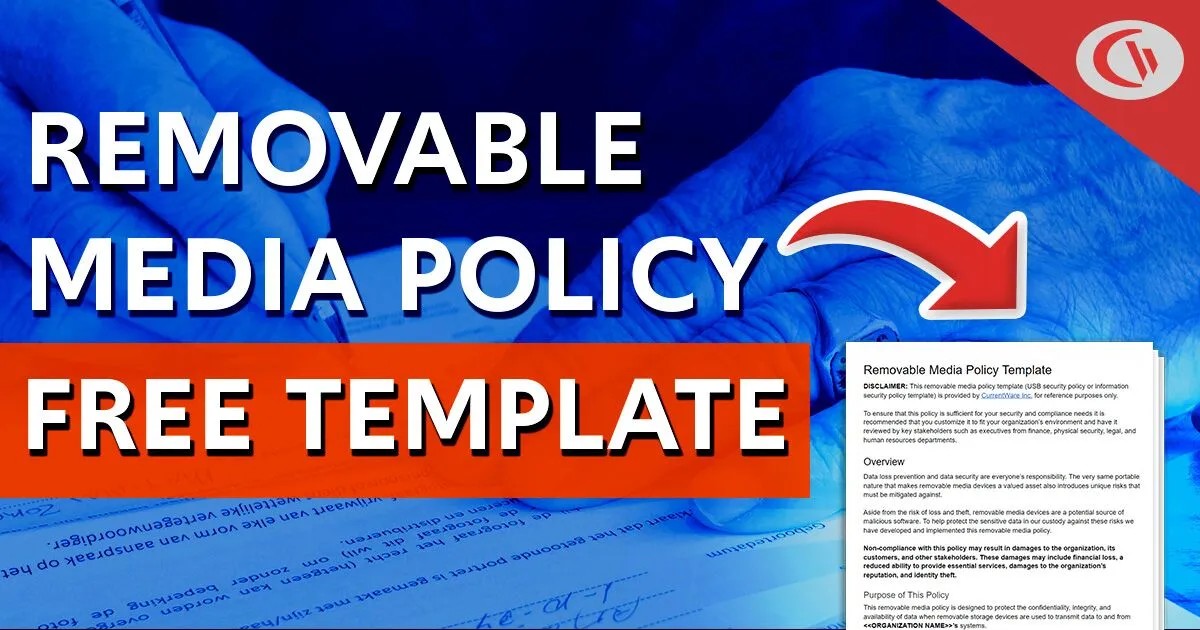
Removable Media Policy Template
Free Download

Removable Media Policy Template

Download this data security policy template to prevent data leakage to USB flash drives and other removable storage devices.
  • Set data security standards for portable storage

  • Define the acceptable use of removable media
  • Inform your users about their security responsibilities
Get Your FREE Template

CurrentWare’s Key Features

User Activity Monitoring

Track web browsing, software use, search queries, and more

Screenshot Monitoring

Take automatic screenshots or remotely view desktops

Track Software Usage

Get insights into software usage trends in your organization

Transparent & Stealth Modes

Run silently in the background or provide notice of monitoring

Block USB & Other Devices

Set full access, read only or no access on storage devices

Allowed List Device Whitelist

Allow only authorized storage devices to be used

Block File Transfers

Prevent files from being transferred to portable storage

Reports DLP Activity Reports

Track file transfers, storage device use, file operations, and more

Block Websites

Block websites based on URLs & content categories

Block Downloads/Uploads

Prevent uploading and downloading based on file type

Application Blacklisting

Block specific Windows applications from launching


PC Power Management

Remotely track and control PC power states

Central Web Console

Save time with a central admin console; optionally integrate Active
Directory OUs or security groups

Platform Security

Protect your CurrentWare console with 2FA, passwords, privilege management, and more

Offsite Management

Extend onsite security policies to computers running outside the corporate network

SQL Server Supported

Database scaled for enterprise and large business operations using
Microsoft SQL Server

Get Started Today With a Free Trial

Fully functional. Easy to use. Install in minutes.

Solutions That Work Across Industries

Tailored controls that help you meet industry standards, boost efficiency, and protect sensitive data across remote and in-office teams.

Healthcare

HIPAA-ready controls to protect PHI with USB management and insider-threat visibility.

Government

Cybersecurity and policy enforcement aligned to NIST 800-171 and CMMC.

Legal Services

Keep client data protected, billable hours productive, and software costs in check.

Manufacturing

Productivity monitoring and internet visibility for both the shop floor and back office.

Financial Services

Enforce access policies and protect sensitive financial data with audit-ready trails.

Schools & Libraries

CIPA-compliant web filtering to qualify for E-Rate and keep students safe online.

Small Business Employee Productivity

Track unproductive web browsing and idle time to detect time-wasting

Managed Service Providers

Deliver the monitoring, data-loss prevention, and web filtering your clients need, now with faster deployment, and easier management.

Built to Support Your Compliance Program

Discover how organizations use CurrentWare’s employee monitoring software to improve visibility, strengthen compliance efforts, and manage employee activity more effectively.

Pick & Plug Into Your Existing Stack

CurrentWare works alongside the identity, security, and directory tools you already use, including support for SAML, OIDC, and CEF standards. Cloud connectors are on the way.

  • Tested & supported
  • Generic standards (SAML, OIDC, CEF)
  • On the roadmap (Cloud)

  • Splunk
  • Ping Indentity.
  • Onelogin Logo
  • Microsoft-Active-Directory
  • Logrhythm
  • IBM-QRadar
  • Jumpcloud
  • Elastic
  • ManageEngine
  • Microsoft Entra ID
  • Okta
  • auth0
  • Unnamed

Try CurrentWare for Free

Fully Functional. Easy to use. Install in minutes

Keep reading

Blogs

View All Blogs

Frequently asked

Frequently Asked Questions:

CMMC compliance software helps U.S. Department of Defense (DoD) contractors meet cybersecurity requirements by enforcing access control policies, logging user activity, and securing Controlled Unclassified Information (CUI).

CurrentWare supports CMMC Level 1 and Level 2 compliance by providing endpoint monitoring, USB control, internet restriction, and audit-ready reporting tools essential for meeting cybersecurity practices derived from NIST SP 800‑171.

Yes. CurrentWare provides tools that support key CMMC Level 2 technical controls, including:

  • Access Control (AC): Enforce least privilege through device and internet restrictions
  • Audit & Accountability (AU): Maintain audit-ready logs of user behavior
  • Media Protection (MP): Control the use of USB and removable media
  • Incident Response (IR): Enable detection and investigation of suspicious activity

This makes CurrentWare a practical solution for organizations preparing for Level 2 assessments.

The Cybersecurity Maturity Model Certification (CMMC) includes practices across 17 domains, such as Access Control (AC), Audit and Accountability (AU), and Media Protection (MP).
For Level 2 compliance, organizations must implement controls such as

  • Role-based access and least privilege enforcement
  • Endpoint activity logging
  • Media and removable device control
  • Incident detection and response capabilities

CurrentWare enforces these controls through solutions like

To prepare for a CMMC audit:

  • Enforce user and device policies across the IT environment
  • Log all user activity (web, apps, logins, USB usage)
  • Generate compliance reports that align with CMMC practices

CurrentWare equips organizations with the evidence needed to demonstrate compliance, helping streamline the third-party audit process and meet CMMC readiness milestones.

Activity monitoring supports multiple Level 2 CMMC practices, including:

  • AU.L2-3.3.1 (Create and retain audit logs)
  • AU.L2-3.3.2 (Protect audit log integrity)
  • IR.L2-3.6.1 (Establish incident handling capability)

CurrentWare’s BrowseReporter logs web activity, app usage, logon events, and idle time to provide a detailed audit trail for internal and external assessments, enhancing accountability and incident response readiness.

Yes. CMMC compliance applies regardless of employee location.
CurrentWare enables secure compliance for hybrid and remote workforces by

  • Remotely enforcing security policies (web filtering, USB blocking)
  • Logging endpoint activity outside the corporate network
  • Centrally managing compliance configurations across all devices

This ensures consistent application of CMMC controls across all work environments.

CMMC requires strict control over removable media to prevent data leaks and unauthorized transfers, specifically under:

  • MP.L2-3.8.7 – “Restrict the use of removable media…”
  • MP.L2-3.8.8 – “Prohibit the use of portable storage devices when necessary.”

AccessPatrol, CurrentWare’s device control solution, allows administrators to block unauthorized USB devices, monitor file transfers, and apply granular access rules based on user, device type, or organizational policy.

CurrentWare doesn’t make an organization compliant by itself. Assessors evaluate your whole program. It does provide technical capabilities that support many CMMC Level 2 practices.

Yes, the on-premises edition can run entirely inside your own network. The CurrentWare server, database, and console are hosted on your infrastructure, and CurrentWare has no access to your data. Policies are enforced locally on each computer.

A few optional features rely on outside connectivity, such as web category database updates and CurrentWare’s built-in email delivery (you can use your own mail server instead). Contact our team to plan licensing and updates for fully isolated environments. CurrentWare Cloud is not suitable for air-gapped networks.

Still have questions?

Talk to a CurrentWare specialist who has deployed monitoring at 200+ law firms.

Book a call →
Start Free Trial Book a Demo
Watch Demos