
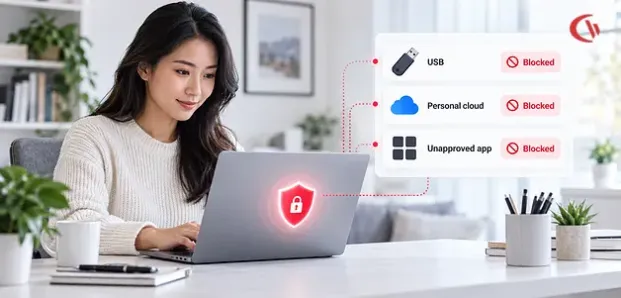

The corporate security perimeter has changed. An employee’s company laptop could easily arrive at work on a Monday morning connected to a home Wi-Fi network, then land in a hotel or workspace at noon on a Tuesday and work away from a hotspot on Wednesday. That leaves corporate data outside the reach of traditional IT and security controls.
Remote and hybrid work makes endpoint security a key element of data loss prevention (DLP). Firewalls, secure web gateways, VPNs, and network intrusion detection are essential, but they fall short of full visibility when a managed laptop is used away from the corporate network, or data leaves via a physical USB. Here is where endpoint DLP helps. Rather than letting the network decide what data is leaving the organization, endpoint controls put policies in place directly on the device. You can control data copied, pasted, uploaded, and transferred from the endpoint.
DeepStrike Remote Work Cybersecurity Statistics 2026 states that, in a remote work environment, the endpoint is the employee’s office. Laptops, desktops, mobile devices and browsers host SaaS sessions, files, credentials, VPN connections and local caches. Attackers go after endpoints because compromising a remote device can evade most network defences. Critical endpoint risks include infostealer malware, malicious downloads, browser credential theft, malicious browser extensions, local administrator privileges, unpatched devices, unmanaged BYOD devices, vulnerable home Wi-Fi networks, exposed remote desktop and VPN clients. Endpoint security needs to assess device posture and browser session security.
The real-world goal is not to track every step an employee takes; it is to deploy context-sensitive, policy-based controls on high-risk data movement that puts the business at risk: removable media, personal storage clouds, unapproved apps, and suspicious file transfers.
What Is Endpoint Data Exfiltration on Distributed Laptops?
Endpoint Data Exfiltration Implicates malicious transfer, copying or transmission of information from a managed computer to a destination, device, application or account outside the security perimeter of the organization. In a distributed laptop, the destination may include:
- A personal USB flash driv
- A smartphone connected through USB
- A personal Google Drive or Dropbox account
- An unauthorized file-sharing service
- A personal email account
- An unsanctioned AI application
- A cloud synchronization client
- Another unmanaged computer
- An external network share
What makes this unique is that it goes from a secured corporate end point to an unprotected or less than protected destination. This creates a fundamental challenge for traditional network security. A firewall can analyze the data moving through its network, but it cannot analyze a document written from C:\Projects to an external USB drive.
Exfiltration is a rapidly changing battlefield. This field guide from Offensivebytes focuses on Data Exfiltration in Modern Environments and gives security teams everything they need to know about how data can be exfiltrated from their systems. It encourages defenders to move beyond basic detection and suggests augmented telemetry (DNS, proxy, EDR logs), enabling DLP on every channel (including cloud apps), running exfiltration red-team exercises, and updating policies to block non-essential egress channels. Understanding each technique’s details and staying one step ahead of the bad guys can significantly strengthen detection and prevent data exfiltration.
Key Egress Vectors and Vulnerabilities in 2026
Distributed laptops have several potential egress channels. Three deserve particular attention because they can bypass conventional perimeter-focused controls.
1. Unmonitored Home Networks and Split-Tunnel VPNs
A distraction for employees who are working remotely involves connecting their work laptops to their home Wi-Fi. Unlike the security available to enterprise networks, home Wi-Fi and routers are limited in the level of visibility they provide. This is especially true for split-tunnel VPNs. A full-tunnel VPN requires all traffic from an endpoint to traverse the enterprise security stack, but a split-tunnel VPN allows some to be directed to the VPN, while some bypasses it.
Consider an employee working from home:
- The laptop connects to the corporate VPN.
- Access to internal applications travels through the enterprise tunnel.
- A personal cloud service opens directly over the public internet.
- A sensitive document is uploaded to that personal account.
- The corporate network may have no opportunity to inspect the transaction.
A strong remote-work architecture should therefore combine:
- VPN or zero-trust access controls
- Endpoint DLP
- Endpoint detection and response
- Secure web filtering
- Identity and access management
- Application control
- Device encryption
- Centralized logging
2. Shadow IT and Unmanaged Cloud Storage
Cloud applications are yet another massive egress method. With cloud-storage and file-sharing applications, users can create their own accounts within seconds. In addition, users may also be installing sync applications that replicate files from a work-owned computer to a user-managed third-party cloud account.
Here are two security issues:
– The application may be unknown to IT.
– If the application is known to IT, the company’s typical controls on the network don’t give enough context on what specific files are being transferred from which end-point, and under what circumstances.
The supplied Venn research reference discusses the security implications of Shadow IT and unauthorized cloud applications. Venn’s Shadow IT and DLP research
For organizations, the answer does not necessarily have to be “block the entire cloud.” Instead, policies can distinguish between:
- Approved corporate cloud storage
- Approved external collaboration
- Personal cloud accounts
- High-risk file-sharing services
- Unsanctioned synchronization applications
- Approved versus prohibited file types
This allows IT teams to apply more precise controls without unnecessarily interrupting legitimate remote work.
3. Removable Media and USB Peripherals
The USB device is still one of the easiest ways to get large amounts of data out of a laptop without transmitting that data via a corporate network. A user plunks down a USB storage device, pulls up a folder, highlights a few files, and copies them. Seconds later, the data may never have traversed a corporate firewall.
MITRE ATT&CK categorizes Exfiltration Over USB as T1052.001, under Exfiltration Over Physical Medium.
MITRE ATT&CK — Exfiltration Over USB (T1052.001)
The challenge for IT is finding the right balance. A blanket USB ban may disrupt legitimate workflows involving:
- Approved encrypted drives
- Hardware diagnostics
- Engineering equipment
- Authorized backup devices
- Accessibility equipment
- Mobile-device connectivity
A more practical strategy is device allowlisting and permission-based control.
Organizations can allow approved devices while restricting unknown removable media. Depending on business requirements, a device may receive:
- Full access
- Read-only access
- No access
This creates a much more granular security model than simply disabling every USB port.
Research Insights: Why Native OS Controls Fall Short
Contemporary operating systems offer numerous strong security features, but their native controls can’t replace a complete DLP strategy. The CMU/SEI USB device auditing research describes the value of visibility: how you can log USB usage in one place and then connect the dots to determine whether or not sensitive information was extracted.
The research is especially significant because it illustrates the difference between listing a device that was attached and the investigation that took place following the connection of that device.
To conduct incident investigations, security teams may need to correlate:
- Which device was connected
- Which user was logged in
- When the device was connected
- What files were accessed
- What files were copied
- Which endpoint performed the action
- Whether the behavior violated policy
- Whether related web or application activity occurred
How to Prevent Data Exfiltration on Remote PCs
A robust remote-work DLP strategy should operate as a layered control system.
1. Implement Granular Device Allowlisting
Start by identifying which removable devices genuinely need access to corporate laptops. Instead of banning every USB device, create an allowlist based on trusted device attributes and business requirements.
Controls can include:
- Approved device identifiers
- Vendor and product information
- Device serial numbers
- Read-only permissions
- Full-access permissions
- No-access policies
- User or department-specific rules
CurrentWare’s AccessPatrol supports full-access, read-only, and no-access device permissions and can continue enforcing USB policies when managed devices lose connection to the CurrentWare server.
2. Enforce File-Transfer Restrictions
Device control answers the question, “Can this device be used?” DLP must also answer, “What can be transferred to it?” File-transfer policies can restrict sensitive or high-risk categories such as:
- Documents
- PDFs
- CAD files
- Source-code archives
- Databases
- Compressed files
- Financial records
- Customer exports
Filtering by extension will work as a part of a multi-layered DLP strategy. However, file extension rules are not sufficient on their own for classifying a file. Someone may change the extension of a file, spool the contents of a file into a zip or tiff, or archive the files. To do this properly, a nuanced DLP rule would have to combine extension rules with other inspection and contextual controls.
CurrentWare’s documentation also describes file filtering that can control uploads and downloads by file-extension categories when users browse websites or cloud storage services.
3. Control Personal Cloud Storage
Cloud storage is convenient for employees—and convenient for attackers or negligent users attempting to move information outside approved systems.
Organizations should define clear rules for:
- Approved cloud providers
- Personal accounts
- External sharing
- File uploads
- Cloud synchronization clients
- Large-volume transfers
- Sensitive file categories
CurrentWare’s AccessPatrol documentation describes a Cloud Storage Blocker designed to prevent unauthorized transfers of confidential files to supported cloud-storage services.
CurrentWare Cloud Storage Blocker documentation
The important principle is policy-based restriction rather than indiscriminate internet blocking.
An employee may legitimately need access to a cloud collaboration platform while still being prohibited from uploading confidential source code or customer records to a personal account.
4. Deploy Web and Application Filtering
Web filtering and application control offer yet another safeguard against Shadow IT. If a company blocks personal cloud-storage apps, it can impose that restriction across managed endpoints. CurrentWare’s Browse Control application blocker can block specific Windows applications, even cloud-storage apps.
BrowseControl application blocker
Web filtering can similarly block specific domains or categories. BrowseControl supports both URL-based and category-based filtering approaches. This is particularly useful when employees install an unauthorized application that communicates directly with an external service.
5. Use Behavioral Monitoring as a Detection Layer
Detection should supplement controls that prevent. The moment an employee dramatically shifts behavior-suddenly searching through hundreds of files, copying new volumes of data, traveling to risky storage services and connecting unknown removable devices-raises suspicion. Behavior monitoring can set a benchmark for:
- Application usage
- Web activity
- Bandwidth consumption
- Active and idle periods
- File-transfer activity
- USB activity
- Policy violations
The goal is not to produce a score based on each individual employee action, but rather security teams can leverage activity data as context for risk investigation. When designing privacy-aware deployments, organizations should specify the reason for monitoring, collect only the information that is needed, set retention policies, and communicate it all to employees. Current Ware’s Browse Reporter offers web and application activity reporting, idle-time monitoring, bandwidth consumption analysis, screenshots, and real-time alerts.
Securing Remote Laptops with CurrentWare
For organizations looking for a centralized approach to endpoint visibility, web filtering, device control, and employee activity monitoring, CurrentWare offers several complementary capabilities.
AccessPatrol USB and Peripheral Control:
AccessPatrol focuses on removable-media and peripheral control. Organizations can use device permissions and allowlisting to restrict unauthorized USB devices.
Its capabilities include:
- USB device control
- Device allowlisting
- Read-only permissions
- USB file-transfer restrictions
- File-transfer auditing
- Alerts for policy violations
- Offline policy enforcement
BrowseControl Web and Application Enforcement:
BrowseControl provides web filtering and application blocking capabilities that can help organizations reduce Shadow IT exposure.
Security teams can use it to:
- Restrict unauthorized websites
- Block high-risk categories
- Control access to cloud services
- Prevent selected applications from launching
- Create allowlists for approved resources
- Apply policies to groups of endpoints
For distributed workers, these policies are useful because they can be enforced at the managed device rather than depending entirely on a corporate office network.
BrowseReporter Activity and Investigation Context:
BrowseReporter offers insight into web and application activity, active versus idle time, bandwidth, screenshots and reporting. Current Ware characterizes its own activity-monitoring features as beneficial to remote, hybrid and in-office workers.
CurrentWare says its activity monitoring feature can even be used in an investigation. For example, security staff could look at previous activity around an incident of concern or compare unusual bandwidth activity with associated applications. It can also give context to investigations.
For instance, administrators might look at file-transfer or USB activity in terms of its employee activity and data-security capabilities. The activity can be monitored with a specific security purpose in mind.
Conclusion
When employees log in remotely, laptops become crucial enforcement points for security. Sensitive data can travel through USB drives, personal cloud accounts, rogue apps, browsers, and other channels without ever touching the network. That makes endpoint DLP one of the most important additions to network security today. But far from trying to monitor everything that every employee does, the goal of remote-work security is to see and control those activities that are possible-and potentially dangerous-to prevent data exfiltration.
Through fine-grained device allowlisting, prohibiting unauthorized cloud and app access, tracking risky file movement, and maintaining locally enforceable endpoint policies, organizations can play a strong role in preventing and investigating data exfiltration from any location, including when a corporate laptop is connected to the internet.


