One remote worker might spend 3 productive hours working non-stop without ever touching their keyboard, while another might trigger hundreds of thousands of mouse movements with no meaningful output; that is the problem with monitoring remote work through surveillance: activity and productivity are not always synonymous.
As the remote workforce shifts by 2026, IT leaders must walk a tightrope. An organization needs to see enough to protect its systems, control software expenditures, investigate security events, and understand how it’s utilizing technology. At the same time, employees need more personal freedom and a clearer understanding of what workplace data is being recorded. This creates a gap: how to monitor remote employee productivity without micromanagement.
Research from the Harvard Business Review points to the trust-eroding potential of employees under surveillance, while another HBR study on workplace monitoring concludes that it can sometimes increase rule-breaking behavior through a diminished sense of personal responsibility. However, that does not mean you don’t need to see what employees are doing.
IT departments can use non-intrusive employee monitoring approaches and focus instead on operational data: application use, visited sites, uptime, idle time, bandwidth, software used, use within working hours, etc. When you collect this data transparently and within a well-defined framework, you can derive useful operational insights without turning every employee’s machine into a surveillance device.
What Is Non-Invasive Employee Monitoring?
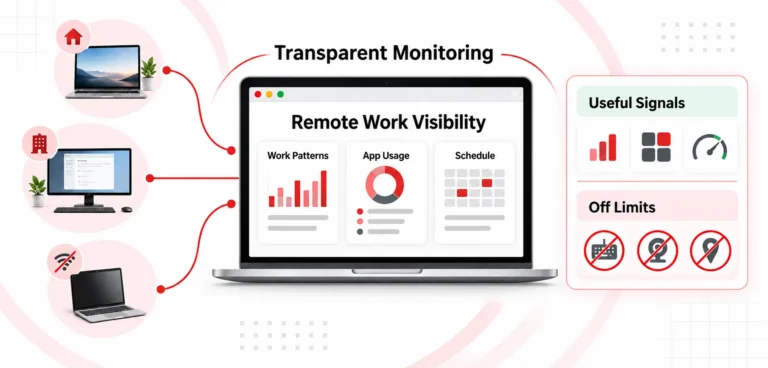
IT governance through non-intrusive employee monitoring focuses on technology usage patterns rather than employee content. Instead of recording every key pressed or watching an employee’s screen constantly, IT teams can monitor things such as:
- How long an application is actively being use
- Which business applications and websites are accessed
- When a device is active or idle
- How much bandwidth an application or device consumes
- Whether employees are active during scheduled working periods
- Which software applications are being used frequently or rarely
- Whether unusual activity patterns indicate a potential security or policy issue
The intrusive system will be tempted to answer, “At 10:42 AM, what did employee-type actually do?”
Whereas the non-intrusive system attempts to answer, “At what times during the working period was the employee actively running sanctioned business applications, and are there any technology/workflow problems IT needs to resolve?”
The Trust Paradox: Why Invasive Surveillance Can Fail
Employee monitoring has legitimate purposes: remote companies need to ensure data security, comply with regulations, investigate incidents, and control technology costs. They also need to ensure employees use their systems not only efficiently but also properly. The problem arises when employees interpret monitoring as electronic surveillance.
This problem is especially acute in remote settings because physical visibility is limited. A manager unable to “see” an employee working at their desk may feel pressure to receive ever more granular digital data points.
Independent HBR research in 2022 suggested that employees monitored in experiments are more likely to break rules. The researchers attribute this phenomenon to a change in employees’ agency and personal responsibility. This creates the “trust paradox”: organizations use surveillance to promote accountability, but inefficient monitoring may inadvertently encourage employees to look busy rather than get things done.
A Tactical Non-Invasive Framework for IT Departments
Four fundamental principles underpin a workable framework: collect activity signals, understand technology use, set strict collection limits, and monitor transparently.
1. Monitoring Active and Idle Computer Time. Not Keystrokes
One of the most common mistakes in employee monitoring software is to assume that if employee keystrokes can be recorded, you know what is going on in terms of productivity. Keystrokes do not indicate an employee’s productivity. Keystroke logging can also create privacy and security risks because it may capture sensitive data such as user passwords, confidential financial or personal information, and sensitive messages.
A preferable idea is to monitoractive/idle time. Active-time analysis can detect periods when an employee is using certain business applications, websites, or other systems permitted by the business. CurrentWare’s BrowseReporter feature monitors users’ idle time by providing active, idle, and total time reports to businesses and allowing the company to configure idle time.
You can offset artificial activity with non-intrusive monitoring. Both mouse jiggers and automated inputs could cause an inaccurate reading for an employee’s activity report, without requiring IT to know the actual contents of the entry.
2. Manage Bandwidth and Application Use
When hundreds or thousands of individuals work remotely, their application use and bandwidth consumption affect network performance, cloud spending, and security. Instead of continually recording screens, a business can monitor how much network resources applications and websites take up.
In general, legitimate business usage of bandwidth includes video conferencing, synchronization of cloud storage contents, software upgrades and the sending/receiving of large files. Non-business bandwidth usage may also occur due to excessive media streaming, unauthorized downloads. Bandwidth analysis gives IT insight into unusual traffic without needing to scan content.
For instance, CurrentWare’s bandwidth monitoring offers reports about bandwidth usage by users, computers, groups and websites. This can help administrators identify high usage by some users and trace network problems.
3. Establish Schedule Boundaries and Scope Restrictions
Privacy protection should not rely solely on employees trusting the employer. Enforcement of limitations should come from the monitoring architecture. If it is only to collect information regarding activity during “work periods” that may have been scheduled, there seems little justification in collecting identical information at all times during the evening, on a Saturday or Sunday, or when someone is on legitimate leave.
This means that IT administrators should schedule the monitoring. Systems could theoretically be set to log activity only during certain period(s), and not outside this time. If application usage answers the business question, there may be no reason to capture screenshots. Collecting less data reduces both privacy exposure and the amount of information IT teams must secure.
4. Build Transparent Policies and Audit-Ready Governance
Another key aspect of building trust relates to transparency. Employers should ensure employees know whether a program is being monitored, what data is collected, why it is collected, who can see it, and how long it is kept. Consequently, a workplace monitoring policy should define what types of data is monitored by the program. Inform Employees What Is Being Monitored:
- What data is collected
- Why the organization collects it
- When monitoring is active
- Which devices are covered
- Who can access reports
- How long information is retained
- When screenshots or additional investigation tools may be used
- How employees can raise privacy concerns
Evaluating Employee Computer Monitoring Software
When IT buyers compare employee computer monitoring software, they need to look beyond raw feature lists. ” Fifty features does not automatically mean the solution is superior to a solution with only 10 monitoring features.” They should ask whether the product lets administrators set the intensity and scope of monitoring.
A responsible evaluation should consider:
| Evaluation Area | What IT Should Seek |
|---|---|
| Data Collection | Does the platform avoid capturing unnecessary content? |
| Keystroke Logging | Can it operate without recording actual keystrokes? |
| Idle Tracking | Can IT configure appropriate inactivity thresholds? |
| Application monitoring | Can IT understand software usage without screen surveillance? |
| Bandwidth | Can administrators identify network-heavy activity? |
| Scheduling | Can monitoring be restricted to defined working hours? |
| Screenshots | Are screenshots optional and controllable? |
| Transparency | Can employees be informed when monitoring is active? |
| Access controls | Can sensitive monitoring reports be restricted? |
| Reporting | Can managers receive aggregate, actionable insights? |
| License optimization | Can usage data help identify unused software? |
| Remote environments | Can the solution support distributed and virtual desktop environments? |
This shifts the sales conversation from “what product will monitor my employees most effectively?” to “what platform will give the IT department the required visibility while collecting the minimum of irrelevant data?”
How CurrentWare Fits the Non-Invasive Employee Monitoring Model
CurrentWare’s employee monitoring platform emphasizes on a concept called workforce visibility, and its features are framed in terms of productivity data, application and web tracking, bandwidth controls and IT-oriented management functions.
BrowseReporter’s reports give insight into website and application utilization, active/idle time, adherence to schedules, bandwidth consumption, and other activities on endpoints. The product website emphasizes that taking screenshots is optional, and that administrators can rely on privacy and time-setting features to control when data is collected.
Several features support the non-invasive monitoring approach discussed here:
No Need for Continuous Keystroke Surveillance
The passive approach does not record exactly what the user is typing. Instead, IT can view higher-level activity data that shows what the endpoint is doing, whether it is dormant, idle or running applications. That distinction is of value to organizations focused on employee productivity tracking and not the creation of repositories of their sensitive typed data.
Built-In Idle Time Tracking
With the BrowseReporter idle-time feature, IT managers can distinguish between active, idle and offline and can set a value for how long someone should be inactive before they are regarded as idle. That, of course, makes the result far more meaningful than a simple online/offline statistic. It will also let IT managers consider any application the user might be using legitimately, rather than interpreting all idle time as lost productivity.
Application and Website Visibility
The BrowseReporter app usage reporting can illustrate the kinds of applications people really use within an organization, analyze adoption of new technologies, and locate areas of wasted software. This is especially useful in environments where employees use many SaaS applications, collaboration software, AI services, and business applications. The information can support technology decisions, not just worker evaluations.
Bandwidth and Optional Screenshot Monitoring
BrowseReporter’s Bandwidth Monitoring can help show what users, computers, groups or websites are consuming and how much data is being used over the network. This can help IT staff pinpoint which users, networks, or machines generate a large portion of traffic in a distributed environment, troubleshoot network slowness, or plan required infrastructure resources.
Conclusion
Visibility or trust – remote working does not mean choosing one over the other. A non-invasive, well-designed monitoring system has the potential to offer both. By collecting information on active/idle time, application use, data usage, on-time arrival at the desktop, the applications being used, and discrete security indicators, the IT department can achieve usable operational intelligence without unnecessary constant keystroke logging, visual confirmation via webcams, or invasive screen recording.
Instead of closely monitoring employees through technology, the business model should focus on intelligently monitoring technology use. Instead of invasive employee monitoring, organizations should be working towards a productive employee monitoring strategy that will answer actual business/IT questions, gather only the information needed, have defined boundaries, and have an obvious reason for tracking employee information.