We’ve updated our Subprocessor List, effective October 6, 2026. Please review the update to our Data Processing Addendum

How to check bandwidth usage on computers

Learn how to check bandwidth usage with BrowseReporter, a powerful internet monitoring software for tracking the bandwidth consumption and web browsing habits of employees.

*No credit card required · 14-day free trial · Easy setup
BrowseReporter dashboard showing employee web usage and bandwidth
700+ organizations trust CurrentWare's employee monitoring software for visibility & control
  • cushing
  • Mendota
  • nebf
  • idaho
  • viking
  • VES
  • Bristol-logo

Internet Bandwidth Usage Reports

Streaming videos from Netflix can consume up to 7GB of data per hour. Users that misuse the internet in their workplace aren’t only harming their own productivity, they also strain the available bandwidth and increase network latency.

Reduce Latency

Slow internet speeds caused by bandwidth abuse reduce the effectiveness of your workforce through dropped VoIP/video conferencing connections, longer wait times to access critical resources, and internet connection loss from excessive overload on network hardware.

Save Money

Bandwidth consumption history reports allow you to strategically plan investments in upgrades to networking hardware. With bandwidth consumption insights you have the data you need to determine if upgrades are truly necessary.

Detect Malware

Monitor for bandwidth spikes that are caused by dangerous torrenting websites and malware that turns endpoint devices into botnets or rigs for unauthorized cryptocurrency mining (‘cryptojacking’).

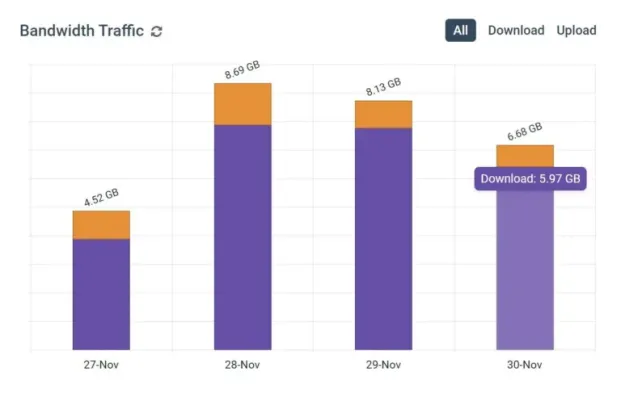
Bandwidth Usage Summaries

  • Review data sent and received each day for groups & individuals
  • Identify abnormal spikes or dips in expected bandwidth usage
  • Discover who is responsible for the greatest bandwidth usage
BrowseReporter dashboard showing employee web usage and bandwidth

Monitor Bandwidth Usage by Website

  • Track websites that may need to be blocked to reduce latency
  • Identify the websites that demand the most bandwidth
  • Track websites that may need to be blocked to reduce latency
BrowseReporter-Bandwidth-Usage-by-Users-Report

Top Users & Groups by Bandwidth Usage

  • Discover which users and departments require the most bandwidth
  • Get early warning signs of anomalous bandwidth usage
  • Easily discover who is responsible for bandwidth abuse in your network
BrowseReporter-top-5-bandwidth-hogging-users
BrowseReporter dashboard showing employee web usage and bandwidth BrowseReporter-Bandwidth-Usage-by-Users-Report BrowseReporter-top-5-bandwidth-hogging-users

Try BrowseReporter for Free

Fully functional. Easy to use. $12 USD user/month*. For on-prem pricing, contact Sales

With BrowseReporter’s client installed on each endpoint, network administrators can easily check bandwidth usage for each user, device, and workgroup in the organization.

  • By User: Track the amount of bandwidth sent and received by each user to discover who is using the most bandwidth.
  • By Computer: BrowseReporter allows you to check bandwidth usage per computer, allowing you to identify computers that may be infected with viruses.
  • By Group: Users can be sorted into groups such as departments, workgroups, and other organizational units. CurrentWare supports Active Directory for easy group management.

BrowseReporter provide insights into both the upstream and downstream data usage within the network.

The bandwidth reports indicate data consumption from specific websites, providing the insights needed for discovering which commonly abused websites can be blocked to improve internet speeds.

BrowseReporter-top-5-bandwidth-hogging-users

Monitor Bandwidth Usage by Website

  • Track websites that may need to be blocked to reduce latency
  • Identify the websites that demand the most bandwidth
  • Track websites that may need to be blocked to reduce latency
BrowseReporter-Daily-Bandwidth-Usage-by-Computers-Report
BrowseReporter-top-5-bandwidth-hogging-users BrowseReporter-Daily-Bandwidth-Usage-by-Computers-Report
QUOTE_SM_Surprised_FB-LI

CASE STUDY

Shady Maple Transforms Their Productivity With Internet Filtering and Monitoring Software

QUOTE_SM_Surprised_FB-LI

Being able to identify negative browsing trends and put a stop to them within a couple of hours has meant that our employees are focused on the job almost all of the time. We have become an extremely efficient workforce.

Trusted by teams across the United States, Canada & the United Kingdom

Join 100,000+ professionals across 55 countries.

currentware-comes-with-citrix-compatibility Capterra awarded CurrentWare as Best Ease of Use software 2026 CurrentWare Named a top choice by Forbes Advisor for best employee monitoring software 2025 Top Rated Employee monitoring software by SoftwareWorld CurrentWare recognized as trusted vendor of epmloyee monitoring software by Crozdesk in 2026 GetApp recognized Currentware as software with best functionality & features 2025 G2 selected CurrentWare as High Performer (Fall 2024) in employee monitoring software category GetApp recognized Currentware as employee monitoring software Category Leaders in 2024 G2 selected CurrentWare as Easiest To Do Business With (Fall 2024) in user monitoring category CurrentWare recognized by Crozdesk as a Quality Choice Solution in 2026 SoftwareAdvice rated CurrentWare as Front Runners in 2024 CurrentWare recognized by SoftwareSuggest for Best Support in 2024 CurrentWare recognized as a FinancesOnline Rising Star CurrentWare recognized by Capterra for Best Value Award in 2022 CurrentWare recognized by SoftwareSuggest for Best Support in 2024 Crozdesk recognized CurrentWare as Leader in Employee Monitoring Software 2021

What customers say about CurrentWare

4.8 / 5 306 verified reviews on Capterra
  • Ease of use 4.7
  • Customer service 4.6
  • Features 4.6
  • Value for money 4.6

Across the whole CurrentWare Suite.

★★★★★ Capterra · Nov 2025

Productivity Monitoring Feedback

“Easy tracking of employee productivity. Seamless transition from person to person on the back end. Easy to update.”

Sean M Office Manager Marketing and advertising · 11-50 employees
★★★★★ Capterra · Nov 2023

BC is terrific.

“BC is fast and easy to deploy on different platforms. I also love the fact that it is open source and compatible with devices. The support team is incredible and responsive. The hardware is fast with up to date robust features.”

Pauline K Human Resources Manager Information technology and services · 11-50 employees
★★★★★ Capterra · Jan 2025

Making every files safe using AccessPatrol.

“It has been the most secure platform for me in keeping my files safe and secure from external threats and unauthorized storage devices. It is less costly. Its data protection feature has made me to confidently send or upload large data to others without having loosing any. Simple to set up for me and to use. Easy to block and track threats trying to gain access to my files since using this software. It also keep me up to date on various activities done on my files. It offers good customer care services.”

Folasola S Public Relation Specialist Management consulting · 51-200 employees
★★★★★ Capterra · Sep 2025

Self hosted Workforce insight software

“The agent is pretty efficient, and the reports provides are very helpful to the HR. We implemented this when most of our employees transition to work from home or hybrid. We compared few other softwares, and this was one which was cost efficient, and helped us implement without much overhead.”

Shibu B CTO Computer software · 51-200 employees
★★★★★ Capterra · Nov 2023

Enhancing Security and Productivity with BrowseControl

“BrowseControl has been a great tool for our organisation due to the enhanced security that it provides because of which we are protected from the phishing, the online threats by blocking access to potentially harmful websites. We can prioritise business-critical applications and control the bandwidth usage, which ensures that essential tasks are not affected by excessive non-work-related web traffic. The tool is very user-friendly and the filtering rules are highly customisable which is something that I really like.”

Verified Reviewer Not Displayed Insurance · 5001-10000 employees
★★★★★ Capterra · Jan 2025

Managing access to my files using AccessPatrol.

“I have been able to control the access to my files effectively since using this software which has made my files secure and safe from external threats and devices. I get notified of any external threats which allows me to easily block and track it down easily. Its very easy for me to use and made affordable for me. Its interface is so simple and it shows the detailed log activities on my files.”

Richard O Graphic Designer Marketing and advertising · 11-50 employees
★★★★☆ Capterra · Sep 2025

Great Tool for Remote Work Management

“I love having this available as most of our staff works remote. I typically only use it when there is an issue but having it available is great.”

Stormie P SVP – Director of Operations Insurance · 51-200 employees
★★★★☆ Capterra · Aug 2023

Threat free browsing environment facilitation tool

“The cyber attack response automated system safeguards our data from malware attacks. BrowseControl provides real-time insights on security situation from workloads. It has simple configuration procedure with other applications that saves time and resources for entire implementation process.”

James R Marketing Specialist Marketing and advertising · 11-50 employees
★★★★★ Capterra · Jan 2025

A secure platform for keeping my gaming files.

“I can effectively keep my game files safe and secure using this software without the fear of loosing it to hackers or other storage devices that i did not authorized. I can also get to manage the users i wish to gain access to my gaming files and also block or track suspicious threats or access to my files. Uploading and transfer of large files has also been made easy for me to do using this software when am developing various games. Simple to use and not costly to acquire.”

Chuks O Game Developer Computer games · 11-50 employees
★★★★☆ Capterra · Jul 2023

Reliable employee performance monitoring software

“This product has efficient database that collects data of all the organization employees. It enhances excellent management of time by sending alerts to the management on work processes.”

Gerald W Senior Backend Engineer Computer software · 51-200 employees
★★★★☆ Capterra · Aug 2023

Powerful network security control application

“It prevents members in the organization from visiting vulnerable areas in the internet. Browse control tests authenticity of browsers before operations. It provides alerts when there are data threats that can affect workflows.”

Bryson H Data Engineer Financial services · 5001-10000 employees
★★★★★ Capterra · Jan 2025

My Review On Accesspatrol

“It is a Unique Software that entails various features which helps to prevent Data breaches, it is able to protect our inventories from being copied from unauthorized users, attempt to access confidential Data it sends warning instantly to the admin, its customer service has been really supportive incase of any challenges, This software help protect our sensitive information and provide comprehensive activity log.”

Folarin A Sport Officer Sports · 11-50 employees

Real-Time Employee and Computer Monitoring Features

Monitor Computer Activity

Get real-time insights into your users’ technology use

Screenshot Monitoring

Take automatic screenshots or remotely view desktops

Track App Use

Get insights into software usage trends in your organization

Idle Time Tracking

Track mouse and keyboard movement to monitor inactivity

Email Reports & Alerts

Automatically send reports to designated inboxes based on events or schedules

Tracking Scheduler

Limit activity tracking to specific days and schedules such as employee work hours

Employee Privacy

Optional privacy-enhancing features improve transparency and minimize data collection

Stealth Mode Option

The software can run silently in the background or be configured to alert users

Central Web Console

Save time with a central admin console; optionally integrate Active
Directory OUs or security groups

Platform Security

Protect your CurrentWare console with 2FA, passwords, privilege management, and more

Offsite Management

Extend onsite security policies to computers running outside the corporate network

SQL Server Supported

Database scaled for enterprise and large business operations using
Microsoft SQL Server

Keep reading

Articles

View All Blogs

Try BrowseControl for Free

Fully functional. Easy to use. $12 USD user/month*. For on-prem pricing, contact Sales
Start Free Trial Book a Demo
Watch Demos