We’ve updated our Subprocessor List, effective October 6, 2026. Please review the update to our Data Processing Addendum

Block websites with BrowseControl’s URL filter

Control internet access based on individual URLs, entire domains, web content category, and IP address

  • Improve Productivity & Network Security
    Restrict employee access to malicious websites, known phishing sites, video streaming sites, and more!
  • Protection on Any Network
    The software agent ensures your security policies remain in effect outside the company network
  • Prevent Access to High-Risk & Inappropriate Sites
    The URL filtering database includes 100+ categories such as porn, social media websites, and cloud services

*No credit card required · 14-day free trial · Easy setup

Safe-search-bar-internet-research-scaled
700+ organizations trust CurrentWare's employee monitoring software for visibility & control
  • cushing
  • Mendota
  • nebf
  • idaho
  • viking
  • VES
  • Bristol-logo
BC-URL-Blocked-List

URL Filtering Software With Blacklists & Whitelists

BC-URL-Blocked-List

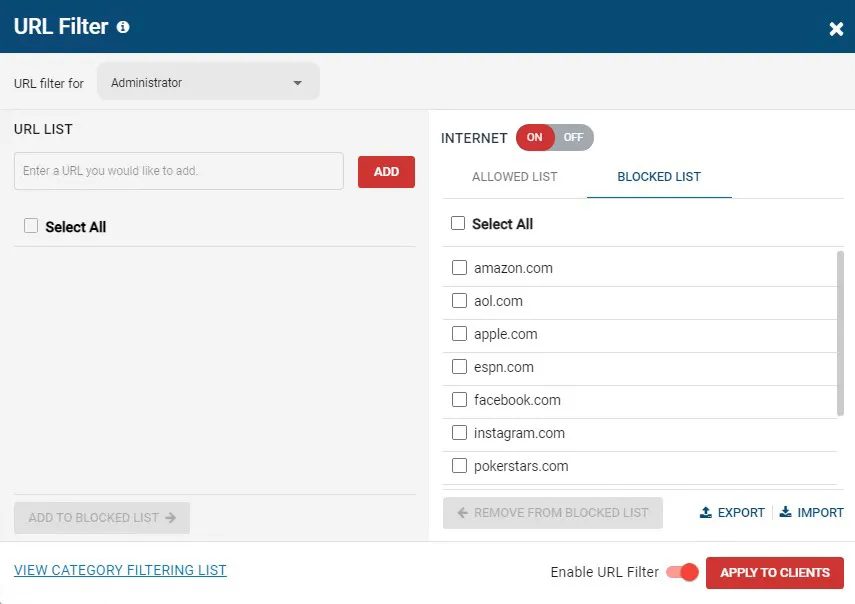
With the Allowed URLs List of the BrowseControl you can restrict internet access to only specific websites or exempt specific websites that are blocked by the Category Filtering feature.


With the Blocked URLs List you can block specific websites while allowing access to the rest of the internet.


  • Block (Blacklist) URLs with the URL filtering block list to block users from accessing websites
  • Allow (Whitelist) URLs with the URL filtering allow list to set exceptions for websites you would like to allow
  • Create unique URL filtering policies for each user/PC group
BrowseControl-Category-Filtering-Mockup

Block Web Content Categories

BrowseControl-Category-Filtering-Mockup

BrowseControl’s category filtering database provides you with a convenient way to blacklist millions of websites across over 100 URL categories.


Start blocking access social media, porn, games, malicious sites such as malware or phishing sites, and more in just a few clicks!


  • Meet CIPA compliance by blocking categories of websites that are not age-appropriate such as porn
  • Effortlessly block millions of websites across 100+ URL categories
  • Customize the website category database locally to suit the needs of your environment
browsecontrol-block-website-request-access-message (1)

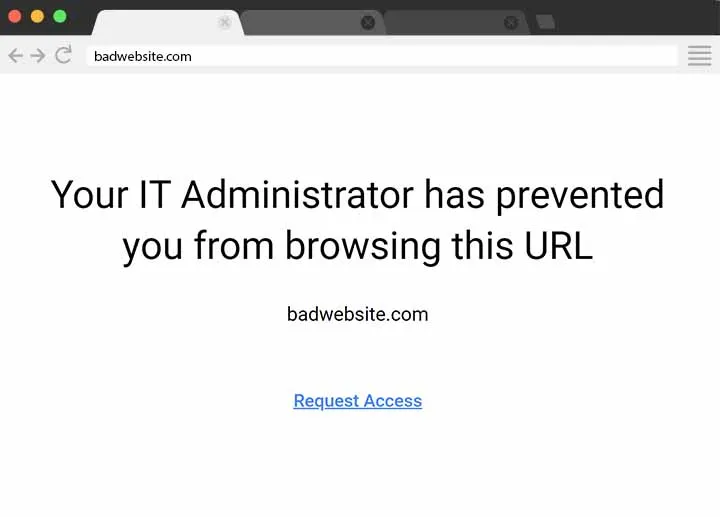
Present a Custom Block Screen Message

browsecontrol-block-website-request-access-message (1)
  • Block Message or Redirect
    Display a message or redirect users to another web page
  • Enforce Internet Use Policies
    Remind your users of your acceptable use policy
  • Request Access to Blocked Websites
    Optionally provide users with an access request link
QUOTE_GA-College_Web-Filtering-for-Safe-Schools (1)

CASE STUDY

QUOTE_GA-College_Web-Filtering-for-Safe-Schools (1)

Web Filtering Software Keeps Students & School Systems Safe From Internet-Based Threats

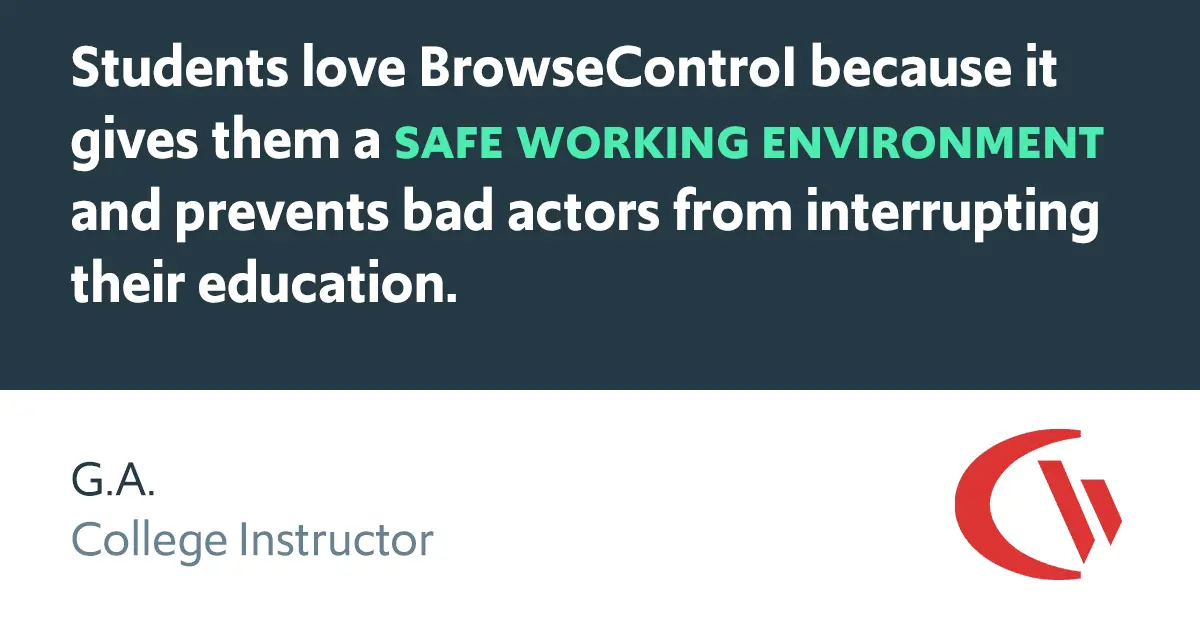
Exposing students to the digital world comes with a responsibility to protect them. Students love BrowseControl because it gives them a safe working environment and prevents potential bad actors from interrupting their educational experience.

Why Use Internet Filtering Software?

Enforce Acceptable Computer Use Policies

  • Policy Reminders: Redirect users from restricted websites to your internet use policy or a custom block page
  • Block Websites: Prevent access to websites that go against your acceptable computer use policies
  • Non-Compliance Alerts: Combine BrowseControl with BrowseReporter internet use monitoring software to get alerts of policy violations
Internet-Usage-Policy-768×307

Block Bandwidth Hogs to Improve Network Availability

  • Block Bandwidth Hogs: Block Netflix, Amazon Prime Video, and other unproductive bandwidth hogs
  • Restrict Unproductive Sites: Reduce unproductive web browsing to ensure bandwidth availability for work tasks
  • Discretionary Access: Selectively allow access to high-bandwidth sites on an as-needed basis
internet-bandwidth-monitoring-768×307

Reduce Distractions to Improve Employee Productivity

  • Improve Focus: Block distracting websites and apps to keep your users focused on their tasks
  • Custom Internet Policies: Apply different policies for group of users or computers to avoid bottlenecks
  • Control Tech Use: Combine with BrowseReporter computer monitoring software for advanced awareness and control over technology usage
productive-in-the-workplace-distraction-768×307

Protect Your Business From Compliance & Liability Risks

  • Prevent Software Piracy: Use the app blocker to prevent employees from launching specific applications
  • Block Inappropriate Content: Prevent users from accessing pornographic, hateful, or crude websites at work or school
  • Meet Compliance Requirements: Control internet use to secure your network against web-based threats and data loss to cloud storage sites/apps
lawyers-768×512

Protect Against Web Security Threats

  • Download Blocker: Block file downloads such as executables, zipped files, and videos from the internet
  • Internet Off: Block the entire internet from being browsed for specific computers or employees
  • Malware Protection: Block malicious and high-risk websites with our frequently updated category filtering database
internet-screen-security-protection-60504-scaled-1-768×512

Prevent Data Theft & Leakage

  • Cloud DLP: Block unsanctioned cloud storage apps and sites to prevent employee data theft
  • Port Filtering: Block ports used for FTP, SCP, SFTP, etc. to prevent data from leaving the network
  • Block High-Risk Sites: Block other potential data egress points such as personal email platforms, torrenting sites, etc
ING_33594_221007-edited-scaled-1-768×432
Internet-Usage-Policy-768×307 internet-bandwidth-monitoring-768×307 productive-in-the-workplace-distraction-768×307 lawyers-768×512 internet-screen-security-protection-60504-scaled-1-768×512 ING_33594_221007-edited-scaled-1-768×432

Try BrowseControl for Free

Fully functional. Easy to use. $6 USD user/month

Trusted by teams across the United States, Canada & the United Kingdom

Join 100,000+ professionals across 55 countries.

currentware-comes-with-citrix-compatibility Capterra awarded CurrentWare as Best Ease of Use software 2026 CurrentWare Named a top choice by Forbes Advisor for best employee monitoring software 2025 Top Rated Employee monitoring software by SoftwareWorld CurrentWare recognized as trusted vendor of epmloyee monitoring software by Crozdesk in 2026 GetApp recognized Currentware as software with best functionality & features 2025 G2 selected CurrentWare as High Performer (Fall 2024) in employee monitoring software category GetApp recognized Currentware as employee monitoring software Category Leaders in 2024 G2 selected CurrentWare as Easiest To Do Business With (Fall 2024) in user monitoring category CurrentWare recognized by Crozdesk as a Quality Choice Solution in 2026 SoftwareAdvice rated CurrentWare as Front Runners in 2024 CurrentWare recognized by SoftwareSuggest for Best Support in 2024 CurrentWare recognized as a FinancesOnline Rising Star CurrentWare recognized by Capterra for Best Value Award in 2022 CurrentWare recognized by SoftwareSuggest for Best Support in 2024 Crozdesk recognized CurrentWare as Leader in Employee Monitoring Software 2021

What verified reviewers say

4.7 / 5 63 verified reviews on Capterra
  • Ease of use 4.6
  • Customer service 4.7
  • Features 4.6
  • Value for money 4.7

90% of reviewers would recommend BrowseControl (average likelihood to recommend: 9 out of 10).

★★★★★ Capterra · Nov 2023

BC is terrific.

“BC is fast and easy to deploy on different platforms. I also love the fact that it is open source and compatible with devices. The support team is incredible and responsive. The hardware is fast with up to date robust features.”

Pauline K Human Resources Manager Information technology and services · 11-50 employees
★★★★★ Capterra · Nov 2023

Enhancing Security and Productivity with BrowseControl

“BrowseControl has been a great tool for our organisation due to the enhanced security that it provides because of which we are protected from the phishing, the online threats by blocking access to potentially harmful websites. We can prioritise business-critical applications and control the bandwidth usage, which ensures that essential tasks are not affected by excessive non-work-related web traffic. The tool is very user-friendly and the filtering rules are highly customisable which is something that I really like.”

Verified Reviewer Not Displayed Insurance · 5001-10000 employees
★★★★☆ Capterra · Aug 2023

Threat free browsing environment facilitation tool

“The cyber attack response automated system safeguards our data from malware attacks. BrowseControl provides real-time insights on security situation from workloads. It has simple configuration procedure with other applications that saves time and resources for entire implementation process.”

James R Marketing Specialist Marketing and advertising · 11-50 employees
★★★★☆ Capterra · Aug 2023

Powerful network security control application

“It prevents members in the organization from visiting vulnerable areas in the internet. Browse control tests authenticity of browsers before operations. It provides alerts when there are data threats that can affect workflows.”

Bryson H Data Engineer Financial services · 5001-10000 employees
★★★★★ Capterra · Jul 2023

Effective Web Access Management Solutions To Ensure Productive Internet Usage

“By limiting access to potentially risky or malicious websites, it can help improve network security and lower the risk of cyberattacks. Even during times of high usage, it guarantees a seamless browsing experience for all users. We can achieve a balance between online activities and other significant factors by imposing time limits on internet use.”

Sakshi C Software Developer Information technology and services · 51-200 employees
★★★★★ Capterra · Jul 2023

Total control access

“I really admire that BrowseControl limits the access of unwanted websites and apps which protects our systems from unwarranted cyber attacks.”

Rick N Area President Food and beverages · More than 10000 employees
★★★★★ Capterra · Jul 2023

Prevent From Accessing Non-Work-Related Websites And Enhance Productivity

“It includes thorough web filtering capabilities that let administrators limit and control who can access which websites based on categories, URLs, keywords, or time constraints. Administrators can use the tool to set up unique browsing guidelines for various user groups or organizational departments. It offers in-depth reports and real-time tracking of web browsing behavior.”

Akash S Senior Business Development Manager Information technology and services · 51-200 employees
★★★★☆ Capterra · Jun 2023

An effective web filtering solution!

“I recently started using BrowseControl to better manage my team's web browsing and it has been a godsend. The software is very user friendly, allowing me to easily customize internet restriction policies for each user or department with granular control. It also allows me to block websites based on URLs and categories which is great for controlling the content my team can access.”

Emma M Business Development Specialist Computer software · 1001-5000 employees
★★★★☆ Capterra · Jun 2023

A great web filtering solution!

“I recently switched to BrowseControl for our company's web filtering and I couldn't be happier. The set up process was fast and easy, the features are comprehensive, and the support team is always available to help with any issues we have. Plus, it's a great value for the money since they offer competitive packages that meet our needs.”

Evana W Sales And Marketing Associate Information technology and services · More than 10000 employees
★★★★★ Capterra · May 2023

All-Inclusive Platform To Limit Access To Dangerous Websites

“It is an all-inclusive platform for managing the organization's devices, security, and network. It can be set up to permit or prohibit Internet access at different times and devices. The detailed reports are incredibly helpful, and the setup is fairly simple. Both updating client settings and importing settings from an older client into a new client are simple processes.”

Rahul K Full Stack Developer Information technology and services · 51-200 employees
★★★★★ Capterra · May 2023

Controlled Internet Access And Help To Focus on What Matters

“It enables businesses to impose time limits on web browsing, avoiding excessive use of the internet for personal use. Businesses can optimize bandwidth usage and guarantee that key apps have enough resources by regulating web browsing. It gives businesses information about how their workers use the internet, enabling them to see and resolve any issues with abuse or compliance. Businesses might design specialized online usage guidelines based on their own requirements and demands.”

Diksha S Business Development Manager Information technology and services · 51-200 employees
★★★★★ Capterra · May 2023

Manage Network security and internet usage with BrowseControl!

“We're using BrowseControl to monitor and control internet usage of all employees real-time allowing my team to keep track of their activities, monitor bandwidth usage and alerts for any suspicious activities that happens internally.”

Emmylou P IT Manaer Telecommunications · 1001-5000 employees

Try BrowseControl for Free

Fully functional. Easy to use. $6 USD user/month

BrowseControl Web Filtering Features

Category Filtering

Block websites based on specific web content categories

URL Filter

Allowed list or Blocked list for specific URLs

Application Blacklisting

Block specific Windows applications from launching

Block Downloads/Uploads

Prevent uploading and downloading based on file type

Port Filter

Close unused and high-risk TCP/UDP ports

Customize Message

Display a customized warning message on blocked websites

Google Safe Search

Search engine filters prevent explicit results in search engines

Time-Based Policies

Schedule internet access and control browsing based on time

Central Web Console

Save time with a central admin console; optionally integrate Active Directory OUs or security groups

Platform Security

Protect your CurrentWare console with 2FA, passwords, privilege management, and more

Offsite Management

Extend onsite security policies to computers running outside the corporate network

SQL Server Supported

Database scaled for enterprise and large business operations using

How to Block a Website With BrowseControl

Learn how to block a website with BrowseControl, CurrentWare’s URL filtering software. Easily restrict access to distracting, inappropriate, or unsafe sites on any web browser.

Keep reading

Articles

View All Blogs

Frequently asked

BrowseControl URL Filtering Software FAQ

No. CurrentWare’s software solutions are designed for businesses, schools, libraries, and other organizations. In other words, they are not suitable for parents that want parental control software for their child.

  • The minimum order quantity is 10 licenses, which may not be feasible for parents with a limited number of devices for their child.
  • BrowseControl starts at $6 USD per license per month; while this is advantageous pricing for a business environment, it may be cost prohibitive for parents who simply want a parental control web filtering service.
  • All of CurrentWare’s solutions are developed with a business or educational environment in mind. As such, our development is not focused on managing child web use in the way a dedicated parental control software would be.For software solutions that are more suited to families, please see the Best Parental Control Software reviews from PCMag.

Yes. The client agent installed on the computers has the ability to block distracting and dangerous websites even if it does not have a connection with the CurrentWare Server.

The client agent stores and enforces BrowseControl’s restriction policies locally on the device.

The last known policies will continue to be enforced even if the endpoint loses connection to your network’s CurrentWare Server. This ensures that your policies remain in effect regardless of the network your employees or students use.

Note: If you wish to update policies or receive reports from client agents outside of the network they will need to be able to communicate with the CurrentWare Server.

Once a connection is reestablished you will receive the CurrentWare Client’s PC usage data and any policy updates will take effect.

Learn More

Yes. Simply set the internet to “off” in BrowseControl and add the authorized intranet sites to the Allow List using their hostname or IP address.

Learn More: Block Internet & Allow Intranet with BrowseControl

Depending on the goals of your company you will block different websites.

To help keep your employees productive you may choose to block any site that could be considered a distraction, such as Facebook or TikTok. To improve security you may use the content category filtering features to proactively block websites that are known to be dangerous.

Need some ideas of what distractions to add to your website block list? Click here for a list of websites to block at work.

Yes. The CurrentWare Suite is supported on desktop computers, virtual machines (VMs), and servers running modern versions of the Windows operating system.

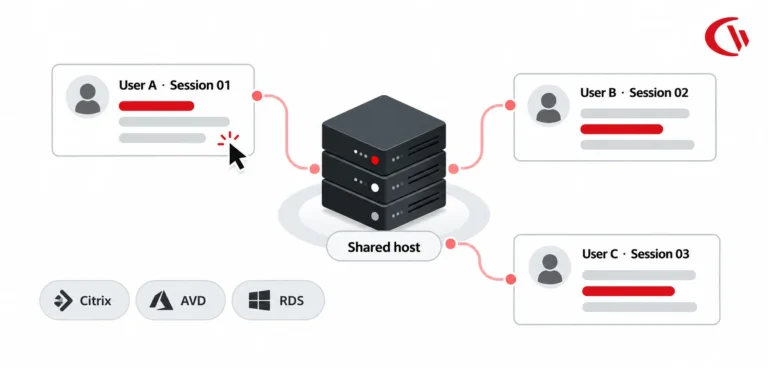
CurrentWare is a Citrix Ready partner; all of our solutions have gone through rigorous testing to ensure it is compatible with Citrix. You can install the CurrentWare Clients on your Citrix Workspace running Windows.

In addition, all CurrentWare components are compatible with Remote Desktop Services (RDS) or Terminal Servers (TS).

When restricting the web in Citrix with CurrentWare you can block a site on PC Mode to control the individual virtual machine or on User Mode to control specific employees across multiple devices and/or virtual machines.

Monitoring and managing employees in a Terminal Services environment works similarly.

The exception is that in a Terminal Server/Terminal Services environment the server will be registered as an individual endpoint; to apply granular policies for each user, department, or Organizational Unit you will need to use User Mode.

Learn More:

CurrentWare for Remote Desktop & Terminal Server

CurrentWare for Citrix Activity Monitoring

CurrentWare System Requirements

The CurrentWare Suite can be deployed on-premises or on a cloud platform of your choice. Both deployment option are compatible with remote workers with a few configuration changes.

Learn More:

Yes, BrowseControl is compatible with other proxy servers on your network.

Learn More: How to Use BrowseControl With a Proxy Server

CurrentWare is committed to the security of its platform, its users and their data.

  • All of the data collected by CurrentWare’s solutions is stored in your organization’s data center or cloud service provider; the data is not sent to CurrentWare.
  • The web console cannot be accessed without a username and password. For an added layer of authentication security you can enable two-factor authentication.
  • You can selectively enable/disable what data is tracked and delete old records automatically.

For a complete overview of the security measures that CurrentWare has in place, check out the CurrentWare platform security overview page.

A URL, or Uniform Resource Locator, is a reference or address used to access resources on the internet. It is a string of characters that provides the means to locate a particular resource, such as a web page, document, image, or file, on the World Wide Web.

A URL typically consists of several components:

  • Scheme: Indicates the protocol used to access the resource, such as “http,” “https,” “ftp,” etc.
  • Host: Specifies the domain name or IP address of the server where the resource is located.
  • Port: Optional, it specifies a port number on the server. If not specified, it usually defaults to the standard port for the chosen scheme (e.g., 80 for HTTP, 443 for HTTPS).
  • Path: Specifies the specific location or directory on the server where the resource is located.
  • Query Parameters: Optional parameters that can be appended to the URL to provide additional information to the server.
  • Fragment: Optional, it identifies a specific section within the resource, often used in web pages.

You can think of a URL as the address of a house on the internet. The scheme is like the street name (e.g., Main Street), the host is like the house number (e.g., 123), and the path is like the specific apartment or room within the house (e.g., Apartment 4B).


Here’s an example of a URL:


Scheme: https
Host: www.currentware.com
Path: /products/browsecontrol/category-filtering/

In this case, there are no specified query parameters or fragments. The URL represents a secure (HTTPS) connection to the host “www.currentware.com,” and the resource is located at the specified path “/products/browsecontrol/category-filtering/.”

URL filtering is a method used to control and manage access to websites based on their URLs (Uniform Resource Locators). It is a component of web filtering that allows administrators to define policies to either allow or block access to specific websites or categories of websites.

URL filtering is commonly employed in various environments, such as businesses, educational institutions, and public Wi-Fi networks, to enforce security, compliance, and productivity policies.

How the URL Filtering Process Works

URL Categorization

URL filtering systems often rely on databases that categorize websites into different groups based on content, purpose, or other criteria. These categories can include topics like social media, gambling, adult content, or specific types of applications.

CurrentWare’s URL categorization tools include a website content category database that sorts domains across 100+ URL categories.

Policy Definition
Administrators define URL filtering policies based on the organization’s requirements. Policies may specify which categories of websites are allowed or blocked for users on the network. These policies can be tailored to meet security, productivity, or compliance goals.

All of BrowseControl’s web filtering tools can be customized based on groups of users or computers, including its URL filtering, web content filtering, and application blacklisting features. Updating policies takes only a few clicks from the central admin console, which can be accessed from the convenience of a web browser.

Real-Time URL Analysis

When a user attempts to access a website, the URL filtering system intercepts the request and checks the URL against the predefined policies and the categorization database. It evaluates whether the requested website falls within a blocked category or URL/domain.

If the website falls within a restricted category or URL/domain, the user is prevented from accessing it and is instead presented with a custom block page or redirected to a different URL, such as the organization’s acceptable use policy. Otherwise, the website loads as usual.

Logging and Reporting

URL filtering systems often log information about user web activity, including details about accessed websites, blocked content, and user behavior. This logging is valuable for compliance monitoring, security analysis, and reporting.

BrowseControl web filtering software operates from the same central console as BrowseReporter employee internet monitoring software. The modules can be purchased together to achieve the advanced control and visibility required to keep your organization safe and compliant.

Updates and Maintenance

As part of the URL filtering process, the URL filtering database needs regular updates to stay current with the evolving nature of the web. These updates may include new website categorizations, changes to existing categories, and additions or removals of specific websites.

CurrentWare’s URL filtering services ensure that its web category database is regularly updated to identify and categorize new websites as they emerge.

While URL filtering is a component of web filtering, the two terms are not entirely synonymous. Web filtering is a broader concept that encompasses various methods and techniques to control and manage access to content on the internet, while URL filtering specifically refers to the process of filtering or controlling access based on the URLs (Uniform Resource Locators) of websites.

Learn More: What’s the Best Way to Block Websites?

SPECIAL NOTE
BrowseControl’s web filtering tools are capable of blocking websites based on domain, URL, IP Address, URL keyword, and web content category.

Its integrated URL filter allows you to either whitelist specific URLs/domains to only allow access to specific websites or you can block specific URLs/Domains/Content categories.

The URL whitelist can also be used to allow access to websites that would otherwise by blocked based on their category (e.g. Block the social media category while allowing access to LinkedIn)


URL filtering and DNS filtering are both methods used to control and manage access to websites on a network, but there are a few key differences.

The traditional URL filtering process operates at the full URL level to block specific web pages (e.g. https://www.currentware.com//products/web-filtering-software/category-filtering/, while DNS filtering operates at the domain level (www.currentware.com) to block an entire website.

Here are the key differences between a URL and a domain: 

  • URL (Uniform Resource Locator):
      • A URL is a complete web address used to access a specific resource on the internet. It includes the protocol (such as HTTP or HTTPS), the domain (or host), the path to the resource, and optionally, query parameters and fragments.
      • Example URL: https://www.example.com/path/to/resource?param=value#section
      • Components of a URL: scheme, domain, path, query parameters, and fragment.
  • Domain:
    • A domain is part of a URL and represents the human-readable address of a specific location on the internet. It’s a hierarchical label system used to identify a group of related resources or an individual entity on the internet.
    • Example Domain: www.example.com
    • Components of a Domain: subdomain (optional), domain name (e.g., example), top-level domain (e.g., .com).

CurrentWare’s internet management solutions include an integrated URL categorization tool that you can use to block access to and identify millions of websites across over 100 URL categories. The URL category database is constantly updated to address new websites as they emerge.
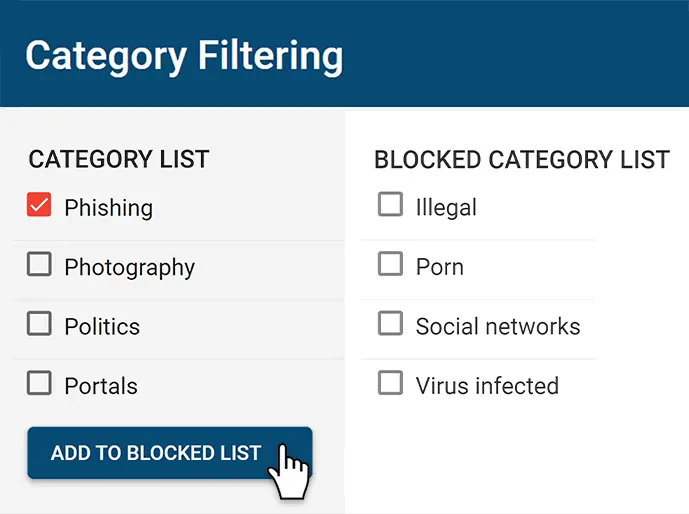
CurrentWare supports local database customization, allowing you to assign custom categories to websites that override the default categorizations provided.

You can also use the URL Category Lookup Tool to identify the content categories a given domain belongs to.

If you believe a website has been categorized incorrectly you can submit a URL for reclassification here.

Try BrowseControl for Free

Fully functional. Easy to use. $6 USD user/month
Start Free Trial Book a Demo