
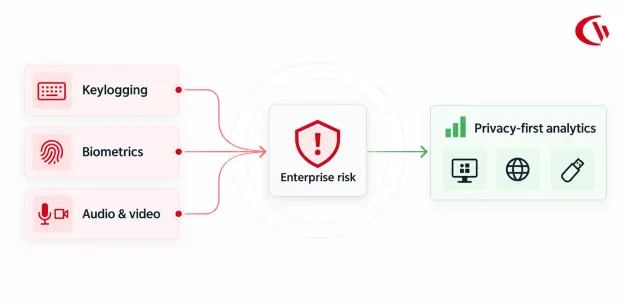

For years, employers assumed that owning the laptop and the network meant unlimited monitoring rights. In 2026, that assumption no longer holds. Federal wiretap law, state biometric statutes, all-party consent requirements and the EU Artificial Intelligence Act each limit what an employer can collect and how.
Most workplace surveillance software must weigh the competing goals of safeguarding corporate resources and respecting employees’ right to privacy. Once this list is working, there is no reason not to monitor your employees’ every keystroke or use a “biometric” login to your computer or watch them via hidden camera.
The guide provides legal counsel, CISOs and HR directors with a risk matrix and a decision-making framework. It compares high-liability surveillance with policy-based, non-biometric analytics, using employee monitoring software as a privacy-first example. This is general information, not legal advice, so verify these requirements with counsel in every jurisdiction where you have workers.
What is Invasive Workplace Monitoring?
Invasive Workplace Monitoring includes electronic surveillance that captures continuous, granular or deeply personal data beyond what business productivity or network security requires. Common examples include continuous keystroke logging, session recording, webcam access, always-on audio capture and biometric tracking – facial geometry or voiceprints.
The dividing line is proportionality. Data collection should be aligned with a business purpose-such as counting how much work someone does, or safeguarding someone’s confidential files-and then end. Software that captures what employees type or say or even look like crosses that line-and it may also intrude on personal activity conducted on company computers-email and home networks, including family members. That’s the point regulators and plaintiff lawyers seize on.
And then there is non-invasive employee computer monitoring software. It provides non-specific data (time spent active vs. time spent idle; websites visited; applications used). It never reads the contents of employee communications.
The Federal Statutory Framework
Surveillance built without a documented business justification creates federal exposure from day one.
Electronic Communications Privacy Act (ECPA) and Wiretap Act
The ECPA prohibits the intentional interception of electronic communications while in transit. In enterprise environments, keyloggers and real-time network packet analyzers that capture employee communications risk violating Title I (the Wiretap Act, 18 U.S.C. §§ 2511. While employers often rely on the “Ordinary Course of Business Exception,” courts construe this narrowly. Monitoring personal webmail, banking sessions, or private messaging on company hardware frequently exceeds this defense.
Furthermore, the Stored Communications Act (SCA, 18 U.S.C. § 2701 protects stored data. Software that scrapes personal account credentials to access off-network, cloud-stored communications is a direct violation of the SCA.
National Labor Relations Act (NLRA) Section 7
7 Sections of the NLRA protect employees working together for “mutual aid or protection,” which extends to private conversations about wages and conditions. The NLRB General Counsel in 2022, GC 23-02, maintained that electronic monitoring and algorithmic management can inhibit those rights. The memorandum is no more: On Feb. 14, 2025, the Acting General Counsel withdrew it.
The statute itself did not change. Employers can continue to monitor union activity and protected conversations as a basis for an unfair labor practice charge. Employers should continue monitoring only for legitimate business purposes and document the disclosure of the tools used.
State Biometric & Wiretapping Laws in 2026
State statutes are where most class-action exposure sits, especially for employers with multistate workforces.
1- Illinois Biometric Information Privacy Act (BIPA)
BIPA is the strictest biometric statute in the U.S. Collecting fingerprints, face geometry or voiceprints without a prior written release can cost $1,000 per negligent violation and $5,000 per reckless or intentional violation. Since SB 2979 took effect on August 2, 2024, repeated collection of the same identifier from the same person by the same method counts as one violation. In April 2026, the Seventh Circuit held in Clay v. Union Pacific that the change applies to cases pending when it took effect. The math is still serious: 5,000 employees at $5,000 each is a $25 million theoretical ceiling, before attorney fees.
2- California Invasion of Privacy Act (CIPA)
Section 631, wiretapping-Statutory damages of $5,000 per violation. California’s SB 690 has been reintroduced numerous times. The version that passed the Legislature is far narrower than the original and limits private enforcement of pen-register claims only. It leaves the wiretap provisions untouched, so always-on keystroke capture remains a live litigation risk.
3- All-Party Consent Laws
Between a dozen and 16 states (depending on how you count certain states with “mixed” rules) demand consent of all parties before a recording can be made. That includes California, Florida, Illinois and Pennsylvania according to the Reporters Committee for Freedom of the Press. Devices that turn on microphones can record other people, including family members, in the home of a remote worker which exposes them to civil and criminal liability.
4- EU AI Act currently restricts 2 Feb 2025 EU AI Act
The Artificial Intelligence Act bans emotion recognition at the workplace (with specific narrow exemptions for medical and safety reasons) from the 2nd of February 2025. The Digital Omnibus 2026 extended that high-risk requirement to 2 Dec 2027, but maintained that ban.
The Psychological Impact of Surveillance
In addition to the legal fines associated with intrusions, the presence of large-scale, invasive surveillance architectures wreaks havoc on the organizations and institutions they inhabit. Higher keystrokes and 24/7 video also have consequences.
Empirical research confirms this organizational toll
- Gartner Workforce Intelligence Data: 53% of employees have a high level of trust in their employer. Gartner reports that invasive digital monitoring is the number one driver for a loss of trust to occur within an organization, contributing to a rise in turnover.
- Occupational Health Research: A 2024 study of 3,508 Canadian workers by Glavin, Bierman and Schieman tied perceived surveillance to higher psychological distress and lower job satisfaction. Less control, and more job demands and privacy violations, explained this association. This is a correlational study, but the proposed mechanism corresponds to what HR teams see.
- Psychological Reactance Theory (PRT): When supervision shifts from aggregate data to fine-grained surveillance (e.g., webcams), employees feel their independence is threatened. This can result in “counterproductive work behavior,” as seen in “ghost working” and the use of mouse jigglers.
Enterprise Risk-Scoring Matrix
Some monitoring methods invite lawsuits, and others barely register with employees. Here’s how the common ones compare on legal exposure and trust:
| Monitoring Method | Primary Legal Exposures | Impact on Employee Trust | Enterprise Risk rating |
|---|---|---|---|
| Continuous Video / Audio Capture | State Two-Party Wiretap Act, NLRA section, EU AI Act(emotion recognition | Can drive immediate attrition and complaints | Extreme |
| Keystroke Logging | ECPA (18 U.S.C. § 2511), SCA, CIPA § 631 | Severe: can trigger reactance and perceived loss of privacy | Critical Risk |
| Biometric Time Clocks | Illinois BIPA (740 ILCS 14), Texas CUBI | High: Fear of permanent identity theft or breaches | High |
| Periodic Trigger-Based Screenshots | ECPA / NLRA Section 7 (if unannounced) | Moderate: Acceptable when policy-driven and tied to security alerts | Moderate |
| App & Web Usage Tracking | Notice and disclosure requirements; state and EU data-protection rules | Low: Perceived as fair when measuring objective engagement | Safest choice |
| USB & Peripheral Endpoint DLP | Low risk; enforces corporate boundary defense | Neutral: Recognized as standard enterprise security practice | Industry Standard |
Privacy-First Compliance: The CurrentWare Architecture
Organizations require data loss prevention and workforce analytics without the overhead of blanket surveillance. The CurrentWare strategy is to completely eliminate keystroke content and biometric collection which effectively eliminates the specific causes of nearly all ECPA, SCA and BIPA lawsuits.
This is not to say that we ignore notice, consent or legal review, but it does mean there is a lot less sensitive data at risk. CurrentWare provides on-premises hosting along with a SaaS option so that organizations with stringent data residency requirements can retain employee telemetry within their infrastructure.
Key capabilities in CurrentWare’s V12.0.0 and V11.0.2 releases directly support compliance and E-E-A-T (Expertise, Experience, Authority, Trust) standards in security:
- BrowseReporter: Tracks application usage, active versus idle time and visited websites without capturing message contents. The Idle Exclusion List stops calls in Zoom or Microsoft Teams from counting against employees.
- Mouse Jiggler Detection: Flags fake input by examining movement usage, do not record anything to any camera what someone types. Disabled by default.
- AccessPatrol: Restricts USB and other peripheral devices and monitors file transfers to stop data leaks, with privacy controls based on HIPAA, NIST and CMMC standards.
- Version 12.0.0: Adds Application Control, which lets only approved applications run, plus macOS support and Entra ID synchronization.
On CurrentWare’s pricing page, BrowseControl starts at $6 per user per month, and BrowseReporter and AccessPatrol start at $12, all billed annually. Confirm current pricing before purchase.
Frequently asked
FAQs: Navigating Surveillance Legality
-
There are 3 Ways to track Employee Computer Usage in a Non-Creepy way: Companies should never monitor what employees’ laptops or webcams see while they are logged on, and should never covertly record conversations through ambient audio and keystrokes.
Unless there are proven business reasons, solutions can be truly objective, transparent, and professional: use a productivity-optimisation approach that captures objective internet and application data, and run the software in a visible mode, so employees can see a system tray icon showing that monitoring is active.
-
Employee monitoring tools that are privacy-compliant capture your employees’ activity without collecting any personal biometric information, intercepting their private communications, or recording keystrokes. They reduce their data collection so it’s in line with GDPR and CCPA privacy standards and it doesn’t set off BIPA and wiretap alarm bells. Discover tools that provide role-specific access controls, flexible settings, and an on-site installation, such as on-premises.
-
These are some of the best ways to track without invading privacy. Install clear, policy-based employee software that objectively logs application use and website access and activates smart security triggers rather than always-on monitoring.
Then publish a detailed Acceptable Use Policy (AUP)-all user tracking must be clearly disclosed along with the justification for it. Security teams should also turn off default always-on screen recording, and only take screenshots when malicious activity is detected (e.g., copying files onto an unknown USB device). This event-based functionality is far better for the enterprise and respects the employee’s right to privacy.
Conclusion
Invasive monitoring is more expensive than it’s worth. Keystroke logging, biometric capture and always-on audio open the door to wiretap and biometric privacy lawsuits and erode the trust that makes employees productive.
Employers do not have to use invasive monitoring tools to monitor performance, but they do need the visibility it provides. An active time tracker, application and website monitoring, file and USB transfer controls and detailed disclosures can be just as effective, and they are less expensive and audit-ready with counsel in every state and country you employ.


