

Without a full IT department, visibility in a remote work scenario can feel less like a necessity and more like a luxury for a small or medium-sized business. For employees scattered across homes, co-working environments, branch offices, and various time zones, small and medium-sized business owners have some basic, burning questions they want answered: “Which applications are being utilized? Where is business time actually spent? Are employees being directed to risky websites or moving sensitive data around? Are the costs of expensive software licenses being leveraged as they should be?”
According to current and 2025 projections, small businesses are spending hundreds of billions of dollars a year on software, cloud infrastructure, cybersecurity and AI. Mid-market companies (250 – 999 employees) spent an average of 4.1% of revenue, and enterprises spent an average of 3.7% of revenue. These are lower in gross dollars but proportionately higher per employee; small businesses and mid-market companies cannot spread large infrastructure expenditures over large employee counts.
For an SMB, this presents another unique monitoring challenge. The goal shouldn’t be to have a microscopic eye on all employees. Instead, aim for enough visibility to uncover workplace inefficiencies that hinder productivity, reduce technology spend, secure the business’s data, and support employees without making them feel monitored.
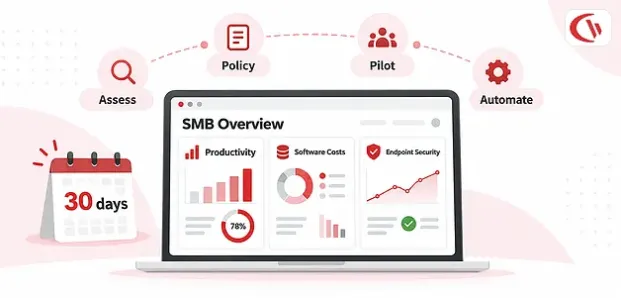
This guide walks you through a practical 30-day plan to implement IT monitoring and employee analytics if you don’t have an IT team readily available.
What Is Remote Employee Monitoring Software?
Remote employee monitoring software is the type of workplace technology that captures and scrutinizes data collected from company-issued computers and different endpoints in the office. Depending on what the software is designed to do, it could show website views, applications accessed, idle versus active time, software use, bandwidth, screenshots, file transfers, and whatever other actions an employee takes.
But no monitoring software today records every little action an employee takes. In its place is workforce analytics, where, instead of asking, “How do we keep a check on employees?”, SMBs must ask, “What do I need to know to manage work effectively?”
For example, a business might use monitoring data to discover that:
- Employees are spending excessive time switching between collaboration applications.
- A costly SaaS application has dozens of unused licenses.
- Employees are accessing websites that create security risks
- Sensitive files are being copied to unauthorized USB devices.
- Certain teams are working significantly longer hours than expected.
- Remote employees are experiencing recurring workflow or application bottlenecks.
- An application purchased for an entire department is barely being used.
A solution such as CurrentWare unites all of the above: employee activity monitoring, web filtering, device control, DLP and other workforce management tools under one unified system. CurrentWare currently provides BrowseReporter for activity and productivity monitoring, BrowseControl for web and application blocking and other services; AccessPatrol for data and device control; and enPowerManager for PC energy consumption management.
The 2026 SMB Productivity Landscape
The old definition of productivity in terms of the number of hours worked, applications opened, or people online is no longer particularly relevant. The contemporary workforce uses numerous cloud-based applications, artificial-intelligence tools, collaborative technologies, multiple browser windows, virtual desktops, project-management software, communication applications, and more.
Cloud migration, investment in artificial intelligence tools and increased investment in cybersecurity were all primary drivers of the acceleration in 2024. The SMB Group’s 2025 Annual SMB Technology Adoption Study found that 71 per cent of SMBs grew their aggregate IT spending in 2024 compared to 2023, while just 8 per cent reduced their IT spend.
The point of employee monitoring, therefore, is not, “Are the employees working?” Rather, it is about the “ways in which they are working.” With a workforce analytics solution, an SMB may address questions like:
| Business Question | Useful Analytics |
|---|---|
| Where are employees spending time? | Website and application usage |
| Are employees focused? | Active/idle and productivity trends |
| Are tools being overused or underused? | Software utilization |
| Are employees accessing risky resources? | Web filtering and activity reports |
| Is company data leaving the network? | USB and file-transfer monitoring |
| Are expensive licenses being wasted? | Software license analytics |
| Are remote policies working? | Group and endpoint reporting |
| Are security controls effective? | DLP and policy-violation reports |
Three areas SMBs should prioritize
SMBs can use a simple approach to IT monitoring, focusing on productivity, technology efficiency, and endpoint security. By targeting these areas, businesses can identify bottlenecks, reduce unnecessary software expenses, and improve protection against data loss without implementing intrusive monitoring.
1. Understanding productivity
Rather than penalizing employees based on fictitious work quotas, set benchmarks on a team level; investigate unnatural trends, considerable idle time, application hang-ups, and over-multitasking.
2. Optimizing the technology stack
Understanding the use of software can inform you of the applications in which your employees find value. Software such as CurrentWare’s Cost Insights is used to target underutilized software licensing. This software can provide up to 48% savings on unused software, as CurrentWare says, “This amount relates to wasted software spending.”
3. Endpoint security
User analytics can also be used to promote security: USB controls and web and application access policies, as well as the monitoring of file transfers, can limit employees’ ability to exfiltrate company data.
The 30-Day Implementation Plan
The objective of a 30-day rollout is not to create a complicated IT infrastructure. It is to establish a manageable system with four foundations:
- Clear objectives
- Transparent policies
- Controlled deployment
- Automated reporting
The plan below divides implementation into four practical weeks.

Week 1: Assessment and Tool Selection
The first week focuses on defining what you actually need to observe. Start by identifying your primary goals, audit your current infrastructure, and choose an easy-to-administer platform such as CurrentWare’s centralized web console. A common mistake among SMBs is investing in a monitoring platform just because it has around 50 features; without clear goals, unnecessary monitoring and excessive data collection can become confusing.
Start with three questions:
- Do we need productivity analytics?
- Do we need endpoint and data-loss protection?
- Do we need web and application controls?
Document:
- Number of employees
- Number of company-owned computers
- Windows and macOS devices
- Remote and office-based users
- Existing directory services
- SaaS applications
- Remote-access systems
- Existing security tools
- Current acceptable-use policies
By the end of Week 1, you should have:
- A list of business objectives
- A list of devices to monitor
- Defined employee groups
- A shortlist of required features
- A monitoring platform selected
- One person assigned to own the system
Week 2: Policy Development and Legal Compliance
Policy should lead to technology. Employees should know what data is being collected, for what purposes, where and how it will be used, and by whom (access rights). This applies especially where uniform monitoring regulations vary by state and/or industry, and depends on factors such as company-owned equipment vs personal equipment and the type of information to be monitored.
SMB’s can get started with templates such as a Free Internet Use Policy Template. Write the policy with simple wording. So employees don’t have to hire an attorney just to explain what you collect.
Your Acceptable Use Policy (AUP) should explain:
- Which devices are company-owned
- What personal use is permitted
- What activity may be monitored
- When monitoring occurs
- What data is retained
- Who can access monitoring reports
- How security incidents are investigated
- What activities are prohibited
- How employees can raise privacy concerns
Transparency is one of the most important elements of ethical monitoring.
Tell employees:
- What is being monitored
- What is not being monitored
- Why monitoring is necessary
- How reports will be used
- Who can see the data
- How long information is retained
Week 3: Technical Setup and Pilot Testing
Do not roll out monitoring software to the whole company all at once. Launch a pilot. A test with a small group will reveal technical glitches, flawed policies, unreported issues, and confusing data. Choose employees from different roles or departments. The purpose is to test whether the system accurately captures the information you need across different work patterns.
Start with the minimum useful configuration. For productivity analytics, this might include:
- Website activity
- Application usage
- Active versus idle time
- Software utilization
- Basic productivity reports
For security, it could include:
- Web filtering
- Application blocking
- USB controls
- File-transfer monitoring
Avoid enabling every available feature simply because it exists. Apply scheduled monitoring when the business only needs activity data during work hours; configure the system accordingly. CurrentWare’s Tracking Scheduler lets administrators schedule when it collects URL and application activity.
If security is part of the rollout, test data-loss controls before company-wide deployment.
Create a test scenario:
- Connect an unauthorized USB device.
- Attempt to copy a test file.
- Confirm that the configured policy works.
- Verify the event appears in the report.
- Confirm that authorized devices still function correctly.
This kind of testing is more valuable than simply checking whether the software installed successfully.
Week 4: Full Rollout and Optimization
The goal is to make the system largely self-managing. Use groups rather than managing individual users wherever possible. For example:
Sales → Sales policies
Finance → Finance policies
Operations → Operations policies
Remote workers → Remote-work policies
This can also be made easier using Active Directory, applying policies by existing organizational units and security groups. CurrentWare Web Console supports Active Directory. This is great for SMB customers; you can now make employee changes through existing directories rather than policies.
Instead of logging in every day to inspect employee activity, schedule recurring reports.
Useful weekly reports might include:
- Top websites
- Application usage
- Active versus idle trends
- Software utilization
- Web-policy violations
- USB activity
- File-transfer events
- Department-level productivity trends
CurrentWare provides automated employee monitoring reports by email, allowing managers to receive scheduled reports without manually extracting data.
Regarding pricing, SMBs must have the vendor confirm the latest pricing, as the price depends on the module and how it is delivered to the client. For example, the CurrentWare web page lists different prices for BrowseReporter, BrowseControl, AccessPatrol, and the complete suite.
What SMBs Should Measure After 30 Days
At the end of the implementation, do not ask only whether the software is installed. Ask whether it produced measurable business value.
Track metrics such as:
| Metric | What to look for |
|---|---|
| Deployment coverage | Percentage of intended endpoints reporting |
| Productivity trends | Changes in productive/active time |
| Focus efficiency | Whether unnecessary interruptions are increasing |
| Software utilization | Unused or underused applications |
| Security events | USB, file-transfer and policy violations |
| Web-policy events | Risky or prohibited browsing |
| License savings | Licenses reclaimed or consolidated |
| Administrative time | Hours saved through automation |
| Employee feedback | Privacy and usability concerns |
Conclusion
The days of IT monitoring and employee analytics being beyond the scope of an SMB lacking full IT support are now in the past. The aim is not to replicate an enterprise security division; the aim of the monitoring of your business needs is to create a well-defined, manageable system that answers the questions your business needs answered.
The 30-day deployment works: one week is spent establishing the needs and tools the business requires, the second creating policies and defining where the employee has no expectation of privacy, the third uses this system in a test-case environment, the fourth rolls this solution out fully, ensuring that reporting can become automated from that point.
It is not about collecting the most data; it is about collecting the right data, using it ethically, and turning it into actions that ultimately benefit the business.


