
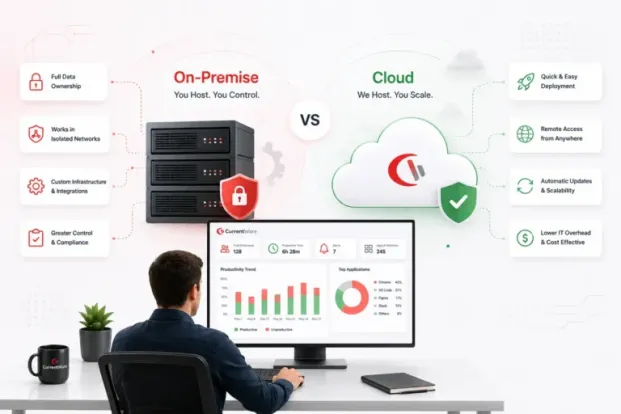

When choosing a software for any purpose, the first thing that comes to mind is features. But, employee monitoring software is one of those few software where the deployment method becomes the deciding factor. The reason is simple- a county organization and a 40-person marketing agency can buy the same tool and still have completely different problems to solve.
The on-premise vs cloud employee monitoring question comes down to a single line on an architecture diagram: where does the boundary sit between systems you control and systems someone else controls? Everything else including cost structure, deployment time, what your auditor asks for, how long you keep data, follows from where you draw it.
Key takeaways
- On-premise, cloud, or hybrid- all three models collect the same data. The only real difference is where you place trust boundaries between systems you control and systems someone else controls. Everything else, including the cost, effort, compliance, retention follows from that one line.
- You have three choices to make, not two. Self-hosting the server in your own AWS/Azure/GCP tenant gives you cloud availability and remote reach while the monitoring vendor still never touches your data.
- Cloud-deployment is low effort, on-premise has better control. Self-hosting is the middle path: you spend effort to buy control back. No model wins every row of the comparison.
- Licence price is the smallest variable cost. Over three years the gap is labour and infrastructure patching hours, backup infrastructure, hardware refresh, none of which appears on a pricing page.
- Per-seat economics flip with scale. Cloud is cheaper under a few hundred seats and for any org without dedicated IT. On-premise cost per seat falls as you grow, because admin effort doesn’t scale linearly.
- “We’re regulated, so we need on-premise” is usually false. GDPR, HIPAA, PCI DSS, FINRA, and FERPA all permit cloud with conditions attached. The genuine exceptions are CMMC/CUI scope, air-gapped networks, and hard sovereignty requirements.
- On-premise doesn’t remove risk, it swaps it. You eliminate third-party breach and lawful-access exposure, and take on unpatched servers, unmonitored databases, and untested backups. Which is safer depends on your IT maturity, not the architecture.
- Remote teams are where the cloud pulls decisively ahead. Agents connect outbound over HTTPS from anywhere with no configuration. On-premise needs VPN, port forwarding, or a DMZ relay, and offsite caching, or you’re measuring VPN usage instead of work.
- Retention is the factor buyers discover too late. Base cloud tiers often hold 30–90 days; insider-threat investigations and employment disputes routinely reach back a year or more. Get the retention figure and its price in writing during evaluation.
- Pick a vendor that supports both, so the decision stays reversible. A new contract can push you on-premise or a shift to remote-first can pull you to the cloud. Cloud-only vendors structurally can’t offer that path.
What Is On-Premise vs Cloud Employee Monitoring?
Both deployment methods gather the same thing. An agent runs on each managed endpoint and records the activities that you have configured, to record application and web usage, active versus idle time, file transfers, USB device events, optional screenshots. What differs is where that data travels, where it comes to rest, and who holds the keys to it.
What is on-premise employee monitoring software?
On premise employee monitoring software runs on hardware or devices that you own and operate, inside your own network. You install the agent on a device in your environment, it writes to a database you administer, and the admin console is served from that same infrastructure. Endpoint agents report in over your LAN, over a VPN, or through a port-forwarding rule if devices sit outside the office.
The defining characteristic of one-premise employee monitoring is that no third party is a data processor. Monitoring data never enters a vendor’s systems. Nobody outside your organisation can be compelled to produce it, breached into it, or accidentally misconfigure access to it. For organisations where that single fact is the whole requirement, the rest of the comparison is academic.
What is a cloud-based employee monitoring solution?
A cloud-based employee monitoring solution is hosted and operated by a third-party server. You create an account, push the agent to your endpoints, and log into a browser console. There is no server for you to build, no database to size, no patch cycle to own. Agents check in over outbound HTTPS, so a laptop in an airport lounge monitors exactly the same way as a desktop in the head office.
The third-party server becomes a data processor in the legal sense. Your employees’ activity data lives in infrastructure the vendor controls, in a region the vendor’s contract specifies, retained for a period the vendor’s plan defines, protected by controls the vendor’s auditors test.
Self-hosted in your own cloud tenant
There is a third option that gets left out of most comparisons, and it is often the right answer.
Self-hosted means you install the same server software the on-premise customers run, but you install it on a virtual device in your own AWS, Azure, or Google Cloud tenant. You get cloud economics and cloud availability snapshots, autoscaling storage, multi-AZ, no hardware refresh while the monitoring vendor still never touches your data.
Your cloud provider is an infrastructure processor, but it is a processor you have probably already vetted, contracted, and included in your compliance scope for a dozen other systems. It is also the cleanest answer for remote-heavy teams that can’t accept vendor-cloud data handling: the server has a public endpoint your agents can reach from anywhere, without the VPN gymnastics an on-premise deployment would require.
How data flows in each model
The three models differ in exactly one structural way where the trust boundary falls between the endpoint and the stored record. On-premise keeps the entire path inside your perimeter. Self-hosted moves the storage into infrastructure you rent but still control. Vendor cloud puts storage and processing on the other side of the line, in systems governed by contract rather than by configuration.
On-Premise vs Cloud Employee Monitoring: Side-by-Side Comparison
| Factor | On-Premise | Self-Hosted (your cloud) | Vendor Cloud | Who typically wins |
|---|---|---|---|---|
| Where data is stored | Your server, your building or colo | A VM in your AWS/Azure/GCP tenant | Vendor-operated infrastructure, region set by contract | On-premise for anyone who has to name the physical location in an audit |
| Who administers the server | Your IT team | Your IT or cloud team | The vendor | Vendor cloud nobody on your payroll owns it |
| Upfront cost | Highest server hardware or VM capacity, OS and DB licensing, IT build time | Moderate no hardware, but build time and tenant setup still apply | Lowest effectively zero beyond agent rollout | Vendor cloud |
| Ongoing cost model | Licence plus internal admin hours, power, hardware refresh | Licence plus cloud consumption plus admin hours | Predictable per-seat subscription, all-in | Vendor cloud for predictability; on-premise can be cheaper at scale |
| Time to deploy | Days to weeks procurement, build, firewall changes, agent rollout | Hours to days VM spin-up, then agent rollout | Minutes to hours account, then agent rollout | Vendor cloud |
| Remote/off-network employee support | Needs VPN, port forwarding, or offsite caching mode | Native agents reach a public endpoint you control | Native outbound 443, works anywhere | Vendor cloud and self-hosted tie |
| Data retention limits | Bounded only by your storage; keep data for years if you choose | Bounded by your cloud storage budget | Bounded by plan tier; longer retention usually costs more | On-premise and self-hosted |
| Update and patch responsibility | Yours OS, database, and application | Yours OS, database, and application | Vendor's, applied continuously | Vendor cloud |
| Scaling method | Add hardware or resize the VM; may require downtime | Resize the instance or expand storage on demand | Add licences; capacity is the vendor's problem | Vendor cloud |
| Uptime responsibility | Yours, with no SLA to point at | Yours, on top of the cloud provider's infrastructure SLA | Vendor's, backed by a contractual SLA | Vendor cloud |
| Disaster recovery | Whatever you build and test often nothing | Snapshots and multi-AZ available, but you configure them | Built in, replicated, tested by the vendor | Vendor cloud |
| Custom integrations / direct DB access | Full query the database directly, join to your own systems | Full same database, cloud-hosted | API and export only; no direct DB access | On-premise and self-hosted |
| Third-party data processor involved | None | Your cloud provider only, not the monitoring vendor | Yes the monitoring vendor and its subprocessors | On-premise |
| Air-gap capable | Yes the primary reason air-gapped environments choose it | No | No | On-premise |
| Typical best-fit org size | 250+ seats with dedicated IT, or any size with a hard sovereignty requirement | 100–2,000 seats with cloud skills in-house | 5–500 seats, and larger orgs without infrastructure appetite | Depends entirely on IT capacity, not headcount |
| Exit / data portability | Total the database is already yours | Total the database is already yours | Depends on export tooling and termination clauses; verify before signing | On-premise and self-hosted |
Here’s a quick summary of on-prem vs. cloud vs. hybrid deployment:
Cloud reduces effort, on-premise gives better control, and self-hosting is the compromise that costs you effort to buy back control. There is no row where one model wins on every aspect, which is why “which is better” is the wrong question and “which constraint is non-negotiable for us” is the right one.
Start a 14-day free trial in the cloud, or talk to our team about an on-premise or self-hosted deployment. No credit card required.
On-Premise vs Cloud Employee Monitoring Solution: What Each Deployment Actually Costs
Licence price is the smallest variable in this comparison. What separates the two models over three years is labour and infrastructure, and those never appear on a pricing page.
On-premise employee monitoring solution cost breakdown
| One-time costs | Recurring costs |
|---|---|
| Server hardware or VM capacity. A monitoring server for a few hundred seats is not demanding, but it is not free either , budget for a device that can handle sustained database writes, plus storage size for your retention target. OS and database licensing, where your existing agreements don't already cover it. | Administration hours , patching, database maintenance, upgrades, troubleshooting agent connectivity. This is the line item most buyers underestimate. Even a few hours a month at a loaded IT rate compound. Storage growth, which is not linear if you enable screenshots. |
| IT builds time. Provisioning, hardening, firewall and port configuration, certificate installation, test deployment. Typically several days of a systems administrator's time, more if change management is formal. Remote access plumbing. VPN capacity or port-forwarding rules for off-network devices, plus the security review that comes with exposing anything. | Backup infrastructure and, critically, restore testing , a backup you have never restored is a hypothesis, not a control. Hardware refreshes every three to five years. Downtime cost when the server fails and there is no vendor on the hook. |
The economics get better as you scale. Administration effort for 1,000 seats is not ten times the effort for 100, so on-premise cost per seat falls as you grow, which is why large enterprises often land there on pure cost grounds even when compliance doesn’t force it.
Cloud employee monitoring cost breakdown
| One-time costs | Recurring costs |
|---|---|
| Agent deployment across endpoints, the same effort in either model, and usually scripted through Active Directory, Intune, or your RMM. Policy configuration and admin training. Hours, not days. Vendor security review, which for regulated buyers can be the longest single item in the whole project. | Per-seat subscription, billed monthly or annually. Predictable, and it moves from capex to opex, which some finance teams prefer and others don't. Retention tier upcharges if you need more history than the base plan includes. Feature tiering, screenshots, longer retention, and advanced reporting are commonly gated to higher plans. Egress or export costs if you regularly pull bulk data out. |
What you do not pay for:
hardware, hypervisor capacity, database licensing, patching hours, backup infrastructure, or the on-call rotation. For an organisation without dedicated IT, that difference is not a cost saving , it is the difference between a project that ships and one that doesn’t.
The costs that both models share:
Neither model lets you skip these, and they are the ones that determine whether the programme actually works:
- Endpoint agent deployment and ongoing lifecycle management across new hires, reimages, and OS upgrades.
- Policy design, deciding what to collect and what deliberately not to collect.
- Employee notification and consent workflows, which in several jurisdictions are a legal precondition rather than a nicety.
- Admin training and access governance , who can see whose data, and how that is reviewed.
- The reporting time someone has to spend turning collected data into decisions. If nobody owns employee productivity tracking as an actual responsibility, both deployments produce an expensive archive nobody reads.
Security and Privacy: Which Deployment Is Actually Safer?
The first thought usually, is that on-premise is safer because the data is “in the building.” That is true in a specific sense and false in a general one.
On-premise removes an entire category of risk , third-party breach and third-party access, and replaces it with a category of risk you now own: unpatched servers, unmonitored databases, and backups nobody has tested. Which is safer depends less on the architecture than on the maturity of whoever ends up responsible.
Where on-premise deployment genuinely wins on security
These are the benefits of on-premise deployment that are structural rather than perceptual:
✅ No third-party breach exposure. A vendor compromise cannot expose data the vendor never held. This is the single strongest argument for on-premise, and it does not depend on how good the vendor’s security team is.
✅ No lawful-access exposure via the vendor. A subpoena, warrant, or foreign government demand served on the vendor cannot reach your data. For organisations concerned about extraterritorial access , the CLOUD Act question that comes up in nearly every EU public sector procurement , this is often the deciding factor.
✅ Air-gap capability. Classified networks, OT segments, and secure facilities can run monitoring with no internet path at all. No cloud product can do this.
✅ Complete key and access control. You choose the encryption, you hold the keys, and you can prove exactly who has database access because you provision it.
✅ Network segmentation you define.The monitoring server can sit in a restricted VLAN, unreachable from user subnets, behind controls of your own design.
✅ Retention on your terms. Data is deleted when your policy says it is deleted, and you can verify it at the storage layer.
Where a cloud-based employee monitoring solution genuinely wins
✅ Patch latency measured in days, not quarters. The most common real-world cause of a monitoring server compromise is an unpatched server. Vendors patch continuously; internal teams patch when the change window allows.
✅ Security staffing you could not justify hiring. A monitoring vendor’s infrastructure is watched by people whose full-time job is watching it. Your monitoring server is watched by someone with eleven other responsibilities.
✅ Independently audited controls. SOC 2 Type II and ISO 27001 mean a third party tested the controls and wrote down what they found. Very few internal deployments have anything equivalent.
✅ Encryption and backup by default, rather than as a configuration step someone might skip.
✅ No exposed on-premise attack surface. Agents connect outbound only. Nothing has to be published to the internet, no port forwarding, no VPN concentrator carrying monitoring traffic.
✅ Tested disaster recovery. The vendor’s DR plan is exercised because their business depends on it. Yours is exercised if someone remembers to schedule it.
Questions to ask before either deployment passes security review
Bring both columns to the review. The cloud column protects you from the vendor; the on-premise column protects you from your own optimism.
| Ask the cloud vendor | Ask your own team, if going on-prem |
|---|---|
| Data residency Which region will our data be stored in, can we specify it, and does that include backups and replicas? | Who patches it? Which named team owns OS, database, and application patching, and what is the SLA? |
| DPA Will you sign a Data Processing Agreement, and what are the standard contractual clauses for cross-border transfer? | Who has DB access Who can query the database directly, how is that provisioned, and how often is it reviewed? |
| Subprocessors Give us the current list, their locations, and how we are notified before you add one. | Is it in the backup rotation Is this server actually covered, or was it built outside the standard image? |
| Retention controls Can we set retention ourselves, and does deletion propagate to backups and logs? | Is it segmented What network segment does it sit in, and who can reach it from where? |
| Uptime SLA What is the committed figure, how is it measured, and what is the remedy when it is missed? | What is the restore test cadence When was the last successful restore drill, and who signed off on it? |
| Breach notification window How many hours from discovery to notifying us, in writing, in the contract? | Who is on call? If it fails on a Saturday, who gets paged, and what is the escalation path? |
| Export on termination What format, what timeframe, what does it cost, and when is our data probably destroyed? | What happens when the owner leaves? Is this documented anywhere other than in one person's head? |
If the vendor cannot answer their column in writing, that is your answer. If your team cannot answer theirs, on-premise is not currently a safer option for you , it is a riskier one that feels safer.
Compliance and Data Residency: What Regulations Actually Require
A recurring misconception is that regulated industries are legally barred from cloud deployment. Almost none are. What regulations actually impose are conditions , contractual, technical, and locational , that cloud deployments must satisfy. The distinction matters, because “we’re regulated, so we need on-premise” often turns out to be a procurement preference wearing a legal costume.
Each entry below follows the same structure: what the regulation requires, whether cloud is permitted, and the condition attached.
GDPR (EU/UK)
| What it requires | Cloud permitted? | The condition |
|---|---|---|
| A lawful basis for processing employee data, data minimisation, transparency to the workforce, and , where a third party processes the data, a Data Processing Agreement under Article 28. | Yes | A signed DPA, a documented transfer mechanism such as standard contractual clauses for any processing outside the EEA, a maintained subprocessor list, and a DPIA completed before rollout rather than after. |
HIPAA (US healthcare)
| What it requires | Cloud permitted? | The condition |
|---|---|---|
| Administrative, physical, and technical safeguards over electronic protected health information, including access controls and audit trails. | Yes | An executed Business Associate Agreement before any data flows, encryption in transit and at rest, role-based access to monitoring reports, and screenshot policies scoped so clinical systems are excluded where capture isn't justified. |
CMMC / NIST SP 800-171 (US defence supply chain)
| What it requires | Cloud permitted? | The condition |
|---|---|---|
| Protection of Controlled Unclassified Information across 110 controls covering access control, audit and accountability, media protection, and system integrity. | Conditionally. | Any cloud service storing or processing CUI must meet FedRAMP Moderate baseline equivalency. Most commercial monitoring clouds do not, which is why on-premise employee monitoring software remains the default in CMMC |
PCI DSS (payment card environments)
| What it requires | Cloud permitted? | The condition |
|---|---|---|
| Protection of the cardholder data environment through segmentation, restricted access, logging, and regular testing. Monitoring tools that touch CDE systems fall within assessment scope. | Yes | The vendor must be documented in your scope with a responsibility matrix, screenshot and keystroke capture must be disabled or masked on CDE endpoints so PAN data is never recorded, and the monitoring server itself must not weaken segmentation. |
SEC Rule 17a-4 / FINRA (US financial services)
| What it requires | Cloud permitted? | The condition |
|---|---|---|
| Retention of specified business records for defined periods , commonly six years for many communications , in a non-rewriteable, non-erasable format, with the ability to produce them promptly on request. | Yes | The retention period must be contractually guaranteed rather than plan-dependent, WORM-compliant storage must be demonstrable, and the vendor must provide an undertaking to furnish records directly to regulators if you become unable to. |
FERPA and CIPA (US education)
| What it requires | Cloud permitted? | The condition |
|---|---|---|
| FERPA restricts disclosure of student education records; CIPA requires content filtering and a documented internet safety policy as a condition of E-Rate funding. Monitoring on student devices sits under both. | Yes | The vendor must qualify under the school official exception with direct institutional control over the data, sign the applicable student privacy agreement, and support the filtering and reporting evidence your E-Rate audit will ask for. |
Data residency and sovereignty
| What it requires | Cloud permitted? | The condition |
|---|---|---|
| A growing set of national rules, from EU member state public sector policy to Canadian provincial legislation, Australian government hosting rules, and India's DPDP framework , that data about residents be stored, and sometimes exclusively accessed, within national borders. | Conditionally | The vendor must offer storage in the required region, including for backups, logs, and support access. Where sovereignty rather than residency is the requirement , meaning immunity from foreign legal process , self-hosting in a domestic cloud region or on-premise deployment is usually the only defensible answer. |
Disclaimer: This section is general guidance, not legal advice. Buyers should confirm their obligations with counsel. Consider adding that as a small-print line to keep legal review happy.
Monitoring Remote and Hybrid Employees Under Each Model
This is where the on-premise vs cloud employee monitoring decision gets practical, because a monitoring deployment that can’t see half your workforce isn’t a monitoring deployment.
How on-premise monitoring reaches devices outside the office
On-premise deployments handle remote employees perfectly well , it just takes deliberate configuration rather than working by default. There are four standard approaches:
1. VPN.
The simplest conceptually: if the device is on the VPN, the agent reaches the server exactly as it would in the office. The catch is that agents only report when the tunnel is up, so a user who connects for an hour a day produces an hour a day of reporting , unless you pair it with offsite caching.
2. Port forwarding.
Publish the server’s agent-communication port through the firewall so remote agents can reach it directly over the internet. Effective and low-friction, but it means exposing a service to the internet, so it needs TLS, IP restrictions where practical, and a security review.
3. Offsite/ caching mode.
The agent continues collecting locally when it cannot reach the server and uploads the backlog on next contact. This is the feature that makes remote on-premise monitoring genuinely viable, and it is worth confirming any shortlisted product supports it before you commit.
4. Reverse proxy or DMZ relay.
A hardened intermediary in the DMZ accepts agent traffic and forwards it inward, so the monitoring server itself is never internet-facing. More work to build, and the option most security teams prefer.
Why cloud is structurally simpler for distributed teams
Cloud deployments do none of the above. The agent makes an outbound HTTPS connection to a public endpoint, which works from a home network, a hotel, a coworking space, or a phone hotspot with no configuration and no user action. There is nothing to publish, nothing to tunnel, and nothing to explain to the employee.
Three secondary effects matter more than they first appear:
Coverage is continuous
so productivity data isn’t skewed by connectivity patterns , you aren’t unintentionally measuring VPN usage instead of work.
Onboarding scales to anywhere
A new hire in a country where you have no office is provisioned identically to one down the hall.
Admins are unbound too
Managers review reports from a browser without needing network access, which matters when the person who reads the reports is a regional director rather than someone in IT.
Deployment, Maintenance, and IT Overhead
What on-premise deployment actually involves
A realistic sequence, with realistic timing:
- Procurement and provisioning (1–10 days). Sourcing the hardware or getting VM capacity approved. In organisations with formal change management, this is often the longest step and it is entirely outside IT’s control.
- Server build and hardening (0.5–1 day). OS install, patching, database setup, service accounts, TLS certificates.
- Application install and configuration (2–4 hours). The software itself is the quick part.
- Network configuration (0.5–2 days).Firewall rules, port forwarding or VPN routing for remote users, DNS, and the security review that accompanies them.
- Agent deployment (hours to days). Scripted via Active Directory Group Policy, Intune, an RMM, or a remote install tool. Scales well once the package is built.
- Policy configuration and pilot (2–5 days). Set collection scope, test on a small group, tune before general rollout.
Realistic total: three days to three weeks, dominated by procurement and change approval rather than by the software.
What cloud deployment involves:
- Account provisioning (minutes).
- Agent deployment (hours to days). Identical effort to on-premise , this is the one step cloud does not remove.
- Policy configuration and pilot (2–5 days). Also identical, because deciding what to collect is a policy problem, not an infrastructure one.
Realistic total: same day to a few days, and the security review of the vendor is usually the longest item , which is worth starting before you need it.
The summary: cloud does not eliminate the work, it eliminates the infrastructure work. Policy, agents, and actually reading the reports remain yours either way.
Scalability, Performance, and Data Retention
Scaling behaves differently in each model in a way that is easy to underestimate at purchase time.
On-premise scaling
is stepwise. The server handles your seat count comfortably until it doesn’t, and then you resize, migrate the database, or split the deployment , usually with a maintenance window and a change ticket. Growth from 200 to 400 seats is generally free; growth from 400 to 1,200 with screenshots enabled is an infrastructure project. Self-hosted deployments soften this considerably, since resizing an instance or expanding a volume is a console operation, but you still have to notice the need and act on it.
Cloud scaling
is a licence transaction. Capacity is the vendor’s problem, which is the entire point.
Performance considerations
differ too. On-premise reporting runs at LAN speed against your own database, which is fast , and if the database is under-provisioned, slow in a way only you can fix. Cloud reporting depends on the vendor’s query infrastructure and your internet connection, which is usually fine and occasionally not, with no lever available to you either way.
Data retention, the factor most buyers discover too late
Retention is the requirement that quietly determines the answer more often than any other, and it almost never appears on the evaluation scorecard.
Ask a simple question early: how far back will someone need to look?
- Insider threat investigations frequently reach back six to twelve months, because suspicious behaviour is identified long after it starts.
- Employment disputes and tribunal claims can surface a year or more after the events, and the monitoring record is often the only contemporaneous evidence.
- Regulatory retention may mandate multi-year periods outright , 17a-4 is the obvious example.
- Productivity trend analysis is meaningless without at least a few quarters of comparison data.
On-premise and self-hosted deployments retain data for as long as your storage allows. There is no tier, no upcharge, and no vendor policy , just disk, which is cheap. If a five-year retention requirement is real, this is close to decisive.
Cloud retention is defined by your plan. Base tiers commonly hold 30, 60, or 90 days; longer periods cost more, sometimes considerably more, and the pricing is rarely visible until you ask. Get the retention figure and its price in writing during evaluation, not at renewal. More than one buyer has discovered the limit at exactly the moment they needed the data.
The inverse risk is real too: indefinite retention is a liability, not an asset. Under GDPR’s storage limitation principle, keeping employee monitoring data forever because storage was cheap is itself a compliance failure. On-premise gives you the freedom to over-retain; a defined policy is what stops you from using it.
Reliability and Disaster Recovery: On-Premise vs Cloud Employee Monitoring
This is the section where honest on-premise advocates concede the point.
Cloud deployments run on redundant infrastructure with automated failover, geographically replicated backups, and a recovery plan the vendor tests because their entire customer base depends on it. You get a contractual uptime commitment with a remedy attached. When something breaks, someone else’s team is already working on it before you notice.
On-premise reliability is exactly as good as what you built. A single server with local backups and no failover is a single point of failure , and monitoring servers are disproportionately likely to be that, because they’re rarely classified as tier-one systems. When it fails you don’t just lose the console, you lose collection continuity, and that gap becomes a hole in the evidentiary record that matters most in precisely the investigations you bought the tool for.
Three questions expose the real posture, and they apply to self-hosted deployments as much as to on-premise:
- What is our actual recovery time objective for this server, and has anyone ever measured it against reality?
- Do agents cache locally during an outage, or is that period permanently blank? This single capability is the difference between an inconvenience and a gap in the record.
- When did we last restore this database from backup successfully? If the answer is “we’ve never tried,” you don’t have a backup , you have a file.
None of this makes on-premise a bad choice. It makes on-premise a choice that requires infrastructure maturity to be safe. Organisations that have that maturity often run on-premise monitoring more reliably than a mid-tier SaaS vendor could. Organisations that don’t should be clear-eyed that they are trading vendor risk for availability risk, not eliminating risk.
Hybrid Deployment: When to Split the Difference
Some organisations don't have one answer because they don't have one environment. A hybrid deployment runs more than one instance under a deliberate split, and it is a legitimate architecture rather than an indecisive one.
Common patterns that work:
1. By data classification
An on-premise instance covers endpoints that touch CUI, PHI, or cardholder data; a cloud instance covers everyone else. This keeps the expensive compliance scope small , which is usually the goal , while letting the majority of the workforce onboard in an afternoon.
2. By geography
A self-hosted instance in an EU region serves European staff under residency rules; the vendor cloud serves North American staff. Cheaper and faster than forcing one model to satisfy the strictest jurisdiction everywhere.
3. By site type
On-premise or air-gapped instances cover manufacturing plants and OT segments; cloud covers corporate and field staff. Plant networks often can’t reach the internet by design, and shouldn’t be re-architected to accommodate a monitoring tool.
4. By transition
Running both during a migration, with a defined cutover date. Temporary by design , see the migration section below.
The costs of hybrid are real and worth stating plainly: two sets of policies to keep aligned, reporting that doesn’t consolidate into one view without export work, two maintenance and update paths, and admin access to govern twice. Reconciling “total hours worked” across two instances is a spreadsheet job, not a dashboard.
The test: hybrid is right when a specific segment has a hard constraint the other segments don’t share. It is wrong when it’s the result of two teams failing to agree, because that version accumulates all the overhead and none of the benefits.
Which Deployment Is Right for Your Organisation?
Choose on-premise employee monitoring software if:
✅ You have a regulatory or contractual requirement that data never reaches a third-party processor , CMMC scope, classified work, or a sovereignty clause in a government contract.
✅ You operate air-gapped or isolated networks with no internet path.
✅ You have dedicated IT staff with server administration capacity, and a patching and backup regime that already works.
✅ You need retention measured in years, or unlimited history.
✅ You need direct database access to join monitoring data with other internal systems.
✅ Your workforce is predominantly office-based, or already on a VPN they use constantly.
✅ Your seat count is high enough that per-seat subscription costs exceed the internal cost of running it yourself.
Choose a cloud-based employee monitoring solution if:
✅ Your workforce is remote or hybrid and rarely touches the corporate network.
✅ You have no dedicated IT team, or your IT team has no capacity for another server.
✅ You need to be operational this week rather than next quarter.
✅ You prefer predictable operating expenditure to capital cost plus internal labour.
✅ You have no residency or sovereignty constraint, or your vendor can meet it with an in-region deployment.
✅ Your organisation is growing or seasonal and seat counts move unpredictably.
✅ You would rather inherit an audited security programme than build one.
What to evaluate in a cloud monitoring vendor , the shortlist, before anything else:
- Independent security attestation , SOC 2 Type II or ISO 27001, with the report available under NDA, not just a badge on the website.
- Data residency optionscovering storage, backups, and support access, in the regions you need.
- A signable DPA and BAA where applicable, plus a published, maintained subprocessor list.
- Retention terms in writing, including what longer retention costs and whether deletion propagates to backups.
- A meaningful uptime SLA with a stated measurement method and a remedy , not an aspiration.
- A breach notification window short enough to let you meet your own regulatory clock.
- Export and termination terms, format, timeframe, cost, and proof of destruction.
- A migration path off cloud, in case a future contract or regulation forces you on-premise. Vendors that support both models can offer this; cloud-only vendors structurally cannot.
Choose self-hosted or hybrid if:
✅ You need cloud-grade availability and remote reach, but the monitoring vendor cannot be a data processor.
✅ You have cloud engineering skills in-house but no appetite for physical hardware.
✅ Your compliance requirement is residency rather than sovereignty , you must keep data in a region, not off the internet.
✅ Different parts of your organisation genuinely have different constraints, and forcing one model on all of them means the strictest requirement sets everyone’s cost.
✅ You are migrating between models and need both running during cutover.
Deployment recommendation by organisation profile
| Profile | Recommended model | Why | Watch out for |
|---|---|---|---|
| SMB under 50 seats, no dedicated IT | Vendor cloud | No server to build, no patching burden, live the same day. On-premise overhead alone would exceed the licence cost. | Base-tier retention may be shorter than an HR dispute takes to surface , check the number before signing. |
| 50–250 seats, mixed office/remote | Vendor cloud | Remote coverage works without VPN plumbing, and IT capacity at this size is usually already committed elsewhere. | Confirm agents cache offline; and don't let seat growth quietly outpace the plan tier. |
| 250–1,000 seats with in-house IT | Self-hosted, or on-premise if compliance requires | Per-seat economics start favouring self-run, and you have the staff to run it. Self-hosted keeps remote reach without the VPN problem. | Scaling with screenshots enabled is an infrastructure project , size storage for the retention target, not for today. |
| 1,000+ enterprise | On-premise or self-hosted | Cost per seat, direct database access for BI integration, and unlimited retention all favour self-run at this scale. | High availability and a tested DR plan are mandatory here, not optional , build them in from day one. |
| Defence contractor / CMMC scope | On-premise (or FedRAMP-equivalent cloud only) | CUI must be protected to NIST SP 800-171; most commercial monitoring clouds do not meet FedRAMP | Scope creep , if the instance touches CUI at all, the whole instance is in assessment scope. |
| Healthcare | Either, with a signed BAA | HIPAA permits cloud with a BAA; on-premise avoids the business associate relationship entirely. | Screenshots on clinical workstations capture ePHI incidentally , scope capture policy tightly or disable it there. |
| Financial services | Self-hosted or on-premise | 17a-4 retention obligations run for years and must be provably non-rewriteable, which internal storage makes straightforward. | Cloud plan retention rarely matches statutory retention , get the commitment contractually, not by plan tier. |
| K-12 / higher education | Vendor cloud | Thin IT staffing, high device counts, and strong seasonality suit a subscription model with no server to maintain. | FERPA school official exception must be documented, and CIPA reporting evidence must be exportable for E-Rate audit. |
| Manufacturing with OT or air-gapped segments | Hybrid , on-premise for plant, cloud for corporate | OT networks are isolated by design and must stay that way; corporate and field staff have no such constraint. | Two instances means two policy sets and no consolidated view , plan the reporting reconciliation up front. |
| MSP managing multiple clients | Self-hosted per client, or cloud with tenant separation | Client data must be strictly segregated, and each client may have different residency requirements. See our MSP partner programme. | Cross-tenant access controls and per-client retention policies , a single shared instance creates liability you can't contract away. |
| Government / public sector | On-premise or in-country self-hosted | Sovereignty requirements commonly exclude foreign-operated clouds regardless of encryption or contractual protections. | Extraterritorial access law applies to the vendor's jurisdiction, not the data centre's location , verify both. |
Migrating Between Deployment Models
Choosing a deployment is not permanent, but moving between them is a project rather than a setting. Both directions are routine when the product supports both models , and effectively impossible when it doesn’t, which is the strongest argument for weighting deployment flexibility during vendor selection even if you’re certain of your current answer.
Migration planning: on-premise to cloud
Typical drivers are a shift to remote-first working, the retirement of the person who maintained the server, hardware reaching end of life, or a decision to exit self-managed infrastructure generally.
- Decide what history moves. Full historical import is often unnecessary and sometimes impossible within plan retention limits. The common pattern is to migrate a defined recent window and archive the rest as a read-only export you retain separately.
- Confirm retention capacity first. If your on-premise instance holds three years and the cloud plan holds ninety days, you have a retention decision to make before you have a migration to plan.
- Export and validate. Pull the database export, verify record counts and date ranges, and confirm the format the vendor’s import accepts.
- Run parallel during cutover. Point a pilot group at the cloud instance while the on-premise server keeps collecting. Compare a week of output from both to confirm parity before moving everyone.
- Repoint agents in waves. Reconfigure agents by group rather than all at once, so a configuration error affects a department rather than the company.
- Verify, then decommission. Only after confirming full agent check-in and reporting parity: archive the database, document where the archive lives and how long it is kept, and decommission the server properly , including removing its firewall exposure.
- Update the paperwork. New DPA, updated subprocessor list, revised privacy notice to employees, and an updated record of processing. This step gets skipped and then found in an audit.
Migration planning: cloud to on-premise
Typical drivers are a new contract with sovereignty requirements, entering CMMC or similar scope, an acquisition by an organisation with stricter policy, a residency law change, or per-seat costs crossing the point where self-running is cheaper.
- Confirm your export rights before you start. Check the contract for export format, timeframe, cost, and destruction obligations. If those terms are weak, the migration timeline is the vendor’s to set, not yours.
- Build and harden the target first. Server provisioned, patched, segmented, backed up, and in the monitoring and backup rotations , before any data moves. Standing up a server in a hurry is how the security posture you migrated for gets lost.
- Solve remote connectivity up front. This is the step teams underestimate most. Decide now between VPN, published endpoint, DMZ relay, or self-hosting in your own tenant , and get the security review done in parallel, not after.
- Import history and validate. Confirm record counts, date coverage, and that reports reconcile against the cloud instance for the same period.
- Run parallel and cut over in waves, same as the reverse direction.
- Get formal deletion confirmation. Request written confirmation that your data , including backups and replicas , has been destroyed, and retain it as evidence. This is the step that makes the migration defensible to an auditor.
- Assign ongoing ownership explicitly. Named owners for patching, backup verification, restore testing, and on-call. If those names don’t exist, you have moved the risk rather than reduced it.
How CurrentWare Supports Both Deployment Models
Most monitoring vendors force the choice at the vendor level: cloud-only products rule themselves out of regulated procurement before the evaluation starts, and on-premise-only products can’t serve a remote-first team without VPN work.
CurrentWare supports all three architectures with the same platform, the same console, and the same feature set , so the deployment decision stays an architecture decision rather than a vendor decision.
| On-premise | CurrentWare Cloud |
|---|---|
| Install the CurrentWare Server on a device in your own environment and keep monitoring data entirely inside your network. Nothing reaches CurrentWare. This is why the platform is used by government agencies, defence suppliers, healthcare providers, law firms, and utilities where data sovereignty is a threshold requirement rather than a preference. | Run the full suite with no server to build or maintain. Deploy in minutes, manage every endpoint from a browser, and let updates, backups, and availability be someone else's responsibility. |
Whichever model you choose, you get the same four modules in one console, BrowseReporter for activity and productivity reporting, BrowseControl for web and application filtering, AccessPatrol for USB and removable device control with DLP, and enPowerManager for PC power management.
Remote employees are supported in every model through offsite mode, VPN, port forwarding, or a cloud-hosted server, and agents deploy through Active Directory, a remote install tool, the command line, or a local install. Because both models are first-class, migrating between them later is a supported path rather than a rip-and-replace. If a new contract pushes you on-premise, or a shift to remote-first pulls you to the cloud, the platform moves with you.
Start a 14-day free trial in the cloud, or talk to our team about an on-premise or self-hosted deployment. No credit card required.
Conclusion
There is no universally correct answer to on-premise vs cloud employee monitoring, and any vendor offering one is describing their product rather than your situation.
What there is, is a short list of constraints that decide it for you. If data cannot reach a third party , because of CMMC scope, sovereignty rules, or an air-gapped network , on-premise employee monitoring software is the only architecture that satisfies the requirement, and the rest of the comparison is noise. If you have no dedicated IT capacity and a distributed workforce, a cloud-based employee monitoring solution is the only model that will actually get deployed and stay deployed. If you need cloud reach without vendor data handling, self-hosting in your own tenant is the answer most buyers never knew was on the table.
For everyone in between, three questions settle it faster than a feature matrix:
- Where is our data legally required to live, and who is legally permitted to touch it?
- Who on our team will own patching, backups, and restore testing , by name?
- How far back will someone need to look, and does our chosen plan actually hold data that long?
Answer those honestly and the deployment model usually picks itself. Then you can get on with the part that determines whether any of it was worth doing: choosing what to collect, telling your employees about it, and making sure someone actually reads the reports.
Ready to Compare Capabilities Rather than Architectures?
Frequently asked
Frequently Asked Questions:
-
Neither inherently. On-premise gives you full data custody but depends entirely on your patching, hardening, and backups. Reputable cloud vendors bring SOC 2 attestations and dedicated security staff most in-house teams can’t match. What matters more than deployment: encryption, role-based access, audit logs, and limiting who sees raw data.
-
Cloud wins below roughly 50 users; on-premise can win above a few hundred. Cloud bundles infrastructure, updates, and support into one subscription. On-premise adds licenses, hardware, database, backup, and, the cost most often underestimated, IT labor. Screenshot frequency drives storage and swings the model more than headcount.
-
Yes, but the agent needs a route back to your server: VPN, a hardened TLS endpoint in your DMZ, or hosting the server on your own cloud VM. Agents normally buffer data offline and sync on reconnect, check buffer limits for staff who go offline for extended periods.
-
No, GDPR is deployment-neutral. It requires a lawful basis, employee notice, a DPIA, data minimization, and in some countries works council consultation. Cloud simply adds an Article 28 processor agreement, disclosure in your privacy notice, and a valid transfer mechanism if data leaves the EEA. It isn’t prohibited.
-
No. Cloud monitoring is permitted where the vendor signs a Business Associate Agreement; HHS guidance treats cloud providers handling ePHI as business associates. On-premise only becomes necessary if your preferred vendor won’t sign one. Note that screenshots taken on clinical workstations are themselves ePHI, whatever the deployment.
-
Vendor-specific, but roughly: under 50 agents, 4 vCPU and 8–16 GB RAM with up to 1 TB storage; 50–250 agents, 8 vCPU, 16–32 GB, separate database; 500+, split app and database tiers. Storage is the real driver, screenshots run 0.5–3 GB per user monthly. Confirm against vendor sizing guides.
-
Cloud: live in hours, rolled out in days to two weeks, the work is pushing agents via Intune, Group Policy, or Jamf. On-premise: typically two to eight weeks including procurement, install, certificates, and security review. Policy drafting and works council consultation often outlast the technical build entirely.
-
Cloud retention is vendor-set by plan tier, commonly 30–90 days, longer on higher tiers, with archival sometimes chargeable. On-premise is yours to configure, limited only by disk. Longer isn’t better: GDPR’s storage limitation principle favors the shortest window serving your purpose. Automate deletion rather than handling it manually.
-
For managers, near-identical, most vendors ship both from one codebase. Cloud instances always run the current version and get features first; on-premise lags whenever upgrades slip. The real gap is administrative: cloud admin ends at policy and user management, while on-premise adds database maintenance, backups, certificates, and upgrades.
-
Usually yes, most vendors offering an on-premise build support customer-controlled cloud infrastructure, often branded “self-hosted” or “private cloud.” You keep data custody and choose the region without buying hardware. Check that licensing permits it, and remember patching, backups, and incident response stay yours. Model compute, storage, and egress costs first.
-
Generally yes if the vendor sells both, though it isn’t a toggle. Metadata and reports usually export cleanly; full screenshot archives often don’t. Agents need repointing to the new endpoint. Ask during procurement what’s exportable, whether a documented migration path exists, and whether subscription spend credits the license.
-
Cloud, almost always. On-premise is an ongoing commitment, patching, backups you’ve actually tested, certificate renewals, upgrades, downtime response. Without dedicated IT that work quietly degrades until something breaks. Exceptions: a binding requirement that data stay on infrastructure you control, or an MSP already managing your servers.
-
No. Obligations attach to the monitoring itself, not the storage location, notice, lawful basis, proportionality, a DPIA where required, and state rules in New York, Connecticut, and Delaware apply either way. Cloud only adds third-party disclosure: naming the processor, a data processing agreement, and a BAA under HIPAA.
Still have questions?
Talk to a CurrentWare specialist who has deployed monitoring at 200+ law firms.