
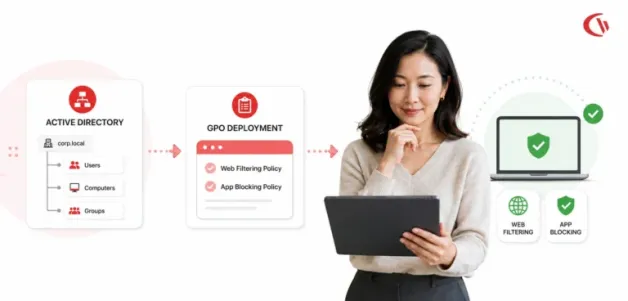

The control of web access and the execution of applications are fundamental components of cybersecurity, data loss prevention (DLP), and workforce productivity in today’s enterprise IT environments. In 2026, as businesses move towards hybrid working models, IT administrators need centralized control methods that integrate seamlessly with their existing Microsoft systems. Using software that directly synchronizes with Active Directory (AD) Organisational Units (OUs) and uses Group Policy Objects (GPOs) for automated deployment removes the need for manual configuration and ensures that no endpoint remains unprotected.
Remote or hybrid work is the norm, not the new temporary normal, now settled in, compared to what many thought of as a temporary work mode when it first started. According to Office for National Statistics data for March 4 to 29, 2026, about 13% of workers in Great Britain were entirely remote, and an additional 28% were hybrid, splitting time between home and work. Also, the U.S.
Bureau of Labour Statistics Current Population Survey reported a telework rate of 22.6% in March 2026. In light of these numbers and growing global concern, centralised control over endpoints can no longer be merely a desirable function; it must be a bedrock of security.
To understand why this has happened and why centralised endpoint control is important as part of the cybersecurity baseline, a look at data from the UK, the US, and Canada clearly demonstrates this. Cybersecurity remains a high priority for UK executive leaders, with 72% citing it as a top priority for senior management. The U.S.
FBI’s 2025 Internet Crime Report shows more than one million complaints (1,008,597) this year, which is the first time in the agency’s history that the report exceeded 1 million, and the estimated victim losses approached $21 billion.
Meanwhile, Statistics Canada’s Survey of Cyber Security and Cybercrime shows that 16% of businesses were affected by cyber security incidents in 2023, and that cyber security cleanup efforts cost organisations approximately double their 2023 recovery expenditures, amounting to $1.2 billion. Given this prevalence, AV-TEST registers about 450,000 new malicious programs and Potentially Unwanted Applications (PUAs) every day, making real-time filtering increasingly crucial for proactive endpoint protection.
Technical Evaluation Criteria for Active Directory and GPO Integration
When considering web filtering and application blocking for an Active Directory (AD) environment with Group Policy Object (GPO) setup, IT administrators need to look beyond simple blocking capabilities. Your next purchase needs to fit into your Windows environment, support easy, centralized policy configuration, and remain rock-solid when managing PCs that are in the domain, working remotely, connected to an RDS session, or on Citrix.
Key Technical Criteria include:
- Native Active Directory (AD) integration
Does the software authenticate users via AD, recognize security groups, OUs, and computers? Native AD integration further simplifies application of varying web/application policies to departments, users, or computers on the network. - GPO Compatibility
Does the proposed solution work in the environment as a stand-alone tool, or does it play well with existing Windows GPO settings? An ideal solution should work with existing GPO configurations, and administrators should be able to configure agents, apply settings changes, or enforce policies remotely through GPO. Client agents or SSL certificates should be simple to package up (.msi/.mst transforms) that can be silently pushed to the target workstation via GPO Startup Script or Software Installation policy. - Centralized Policy Management
Is there one point of control through which all web and application-blocking policies will be configured? Are these web/application policies? How assignable is the policy: to a user, group, computer, OU, or even to an entire department? - Granular User and Group Policies
Can varying rules be assigned for different groups on the network? (An example: it would be beneficial if every technician got the same open access as a network admin, but standard users got restrictive web/application policies.) - Granularity of Enforcement
Web filtering software should be able to do more than just blocking individual websites or domains. There must be options for administrators to precisely control what users may access, execute, download, and upload. This is now a more significant challenge in 2026 than in 2025.
Indeed, Verizon’s 2026 Data Breach Investigations report found that 45% of users routinely use AI tools on corporate devices, up from 15% last year, and that two out of every three instances of AI use involve accessing these systems through a non-corporate account. Shadow AI is also the 3rd-highest insider non-malicious threat in a DLP dataset, as code remains among the most downloaded data types.
Furthermore, in their report analyzing 22,000+ actual data breaches, the human threat remains the cause in 62% of incidents, with exploitation of a software vulnerability at 31% superseding credential compromise at 28% as the primary access method.
Since most of these tools leverage browser use, DNS-level blocking cannot prevent their use; it is application/executable-level blocking and file-type download blocking where these threats can be caught.
10 Best Web Content Filtering Software and Application Blocking Solutions Comparison
| Solution | Deployment Level | AD / Directory support | App control | Current pricing |
|---|---|---|---|---|
| CurrentWare BrowseControl | End-Point Agent | Active Directory OU & Security Group integration | Yes, application blocking | From $6/user/month;volume discounts available |
| WebTitan by TitanHQ | DNS/Proxy | AD Agent (WADA) | Limited compared with dedicated endpoint application-control tools | € 2.51 per user, per month, paid annually. |
| DNS Filter | DNS/Roaming Client | Directory user integration available | Limited/Indirect application control | Core:$1/license/month annually; Plus: $2.25/license/month annually; Enterprise pricing available upon request- |
| Cisco Umbrella | DNS / SWG / Client | Identity/Directory integration | Application/cloud-app control options depend on the package. | Talk to an Expert |
| ManageEngine App Control | Endpoint/application management | Active Directory integration | Yes-application allow/block | Get Price Quote |
| Fortinet FortiProxy | Gateway/Proxy | AD authentication/ integration options | Kerberos/NTLM SSO | Ordering Guide |
| Sophos Web Protection | Endpoint / Gateway | Directory/ identity integration depends on deployment | Yes | Submit a Quote Request |
| Diladele Web Proxy | Windows Proxy Server | Strong Microsoft AD environment support | Integrated EDR | Select the Subscription Plan |
| WithSecure Elements | Endpoint Agent | GPO MSI Push | Application control/security controls depend on the Elements product and license | Talk to Certified Partner |
| Admin By Request | Endpoint PAM/Agent | Entra / On-Premises AD | Yes, application blacklisting/whitelisting | Free Plan / Book a Demo |
Best Web-filtering Tool and Top Application Blocking Software
1. CurrentWare BrowseControl
Lightweight web filtering and app blocking software for the Windows environment. Manage web access & applications from one central location on office, hybrid & remote devices. BrowseControl supports Active Directory integration for OUs and Security Groups, and policies can be assigned to users or groups. A Group Policy-based MSI installation of the client is available.
- Website Blocking: Blocks content based on categories from an updated database of over 100 sites.
- URL and Domain Filtering: Allows for custom, application-specific allow/block rules for specified websites and domains.
- Application Blocking: A dedicated application blocker that restricts unauthorised software (games, shadow IT executables) by file name, process name, or path.
- Download Control: Allows blocking of files based on type to deter unauthorised or unwanted downloads. Granular file-type blocking to prevent unauthorised executable downloads from the internet.
2. WebTitan by Titan HQ
WebTitan is a cloud-based DNS web filtering tool designed to shield business or academic environments from web-based threats, phishing, and malicious sites. It is Active Directory-aware and uses the WebTitan Active Directory Agent (WADA), which runs on the Domain Controller and authenticates IP/DNS query requests to their corresponding AD users/groups using Kerberos and WMI.
It has excellent performance at blocking sites dynamically with AI driven by threat analysis and dynamic categories, and the tool only uses DNS/Domain-level blockage; there is no built-in local blocker against executables.
- Web & Category Filtering-Block websites by URL, domain, and web content category. Threat Protection- Assists in detection of malicious destinations such as phishing, malware sites, and more. Active Directory Integration- Link web activity to AD users and groups for policy enforcement.
- AI-Driven Filtering: Leverages threat intelligence data and automated site classification to enhance detection of risky destinations.
- Reporting & Policies: Offers centrally managed web activity policies and reporting. App Control – primarily based on DNS/domain levels and doesn’t support native filtering of any local applications that require local executable blocking.
3. DNSFilter
It is a cloud-based DNS security and web filtering solution that uses machine learning to categorise domains and enforce your company’s web-browsing policy. AD Sync Tool integrates your Active Directory users and groups into your DNSFilter dashboard, and a roaming client integrates well with GPO deployment and is natively supported on Windows machines.
- Machine-Learning Web Filtering: Uses machine learning to categorise domains and enforce company-wide web-browsing policies.
- Active Directory Integration: AD Sync Tool imports Active Directory users and groups into the DNSFilter dashboard for user-based policy management.
- Windows & GPO Support: Roaming Client is natively supported on Windows and can be deployed across devices using Group Policy.
- Centralised Management: Provides a cloud-based dashboard to manage filtering policies and monitor web activity.
4. Cisco Umbrella (formerly OpenDNS)
Cisco Umbrella is a cloud-delivered Secure Web Gateway (SWG) and DNS-layer security solution. It integrates with Active Directory through on-premises Virtual Appliances (VAs) and the Active Directory Connector, mapping internal user IP addresses and AD user logon events to Umbrella policies.
- DNS & Secure Web Gateway: Provides DNS-layer security and cloud-delivered Secure Web Gateway (SWG) protection against malicious and inappropriate websites.
- Active Directory Integration: Uses the Active Directory Connector and Virtual Appliances to associate users and IP addresses with Umbrella security policies.
- GPO Deployment: Cisco Secure Client and the required security certificates can be distributed to Windows endpoints via Group Policy.
- Advanced Threat Protection: Helps detect and block malware, phishing, ransomware, and other web-based threats.
- Inline CASB: Provides visibility and control over cloud applications and services.
- Enterprise Reporting: Offers centralized analytics, activity monitoring, and security reporting.
- Scalability: Designed for large and distributed organizations, although deployment and licensing can be more complex than simpler endpoint-based web filters.
5. ManageEngine Application Control Plus
ManageEngine Application Control Plus is an enterprise endpoint security suite specialising in application allowlisting, blocklisting, and endpoint privilege management. It communicates directly with Active Directory over LDAP/LDAPS to pull user groups and machine accounts.
- Application Allowlisting & Blocklisting helps organisations to allowlist permitted applications while prohibiting them for employees.
- Active Directory integration facilitates synchronization of users, groups, and computers from AD via LDAP or LDAPS, supporting effective security policy management.
- GPO Deployment: Group Policy is supported for silent agent deployment via a startup script.
- Endpoint Privilege Management: Enable just-in-time privilege elevation for employees who need to run necessary applications, without granting them administrator privileges.
6. Fortinet FortiProxy
FortiProxy is an enterprise Secure Web Gateway (SWG) appliance that integrates URL filtering, DLP, application control, and SSL decryption. It integrates with Active Directory via Single Sign-On (Kerberos/NTLM authentication) to inspect web sessions and map traffic directly to AD security groups.
- GPO-Based Configuration: Utilizes Microsoft Group Policy to restrict the web browser proxy settings of your managed Windows machines.
- SSL Inspection: Leverages Group Policy to distribute CA certificates to end-user browsers, enabling granular, detailed examination of encrypted SSL traffic.
- Web & Application Filtering: Enables you to filter internet traffic at the web site/category and application level.
- High Performance: Includes dedicated hardware to accelerate web filtering tasks at very high network volume without the added burden of slowing down end-user machines.
7. Sophos Web Protection
Sophos offers unified endpoint and gateway security, providing web content filtering, threat protection, and synchronised security across endpoints and gateways. Sophos syncs with Active Directory to establish custom Filter Profiles based on user groups and network subnets.
- GPO Deployment: Endpoint agents and Web Control modules are available in MSI format for streamlined deployment through Group Policy.
- Web Filtering: Supports standard and transparent proxy modes to control and filter web traffic.
- EDR/XDR Protection: Combines web control with integrated endpoint detection and response capabilities to identify and help prevent malware and other threats.
8. Diladele Web Filtering Proxy
Diladele Web Filtering Proxy is a Windows-based Secure Web Gateway designed specifically for medium-sized enterprises running Microsoft server environments. Running natively on Windows Server joined to Active Directory, it supports single-click Negotiate (Kerberos/NTLM) SSO authentication.
- Web & Category Filtering: Webpages and categories can be blocked via URLs, domains, or the user-defined policies.
- HTTPS/SSL Inspection: All encrypted traffic through the use of web-filtered rules and security policy enforcement
- Malware & Phishing Protection: Enables detection and blocking of malicious websites, files, or downloads that could damage or infect the network or system.
- Active Directory Integration: Assign users and groups with their own security and filtering policies from integrated Active Directory services.
- File Download Control: The restriction of download types (files) that end-users will be able to download
- SafeSearch & YouTube Filtering: Filters all search engine results and limits YouTube content to what is appropriate for use on the network.
- Group-Based Policies: Users or groups can be assigned different rules within Web Access policies.
- Reporting & Monitoring: Displays logs of Web access traffic, including what users are browsing.
- Flexible Deployment: Works as a Virtual Appliance ( VMware, Hyper-V, Proxmox) or could work in a Public/Private cloud (Azure, AWS).
Best suited for organizations seeking an on-premises or virtual web filtering proxy with HTTPS inspection, AD-based policies, and detailed web access controls.
9. WithSecure Elements Endpoint Protection
WithSecure Elements is a cloud-managed endpoint security platform combining endpoint protection, web browsing control, and vulnerability management. It supports full MSI deployment via Active Directory GPO Startup Scripts.
- Endpoint Protection: Protects Windows endpoints against malware, ransomware, and other security threats.
- Web Browsing Protection: Blocks malicious or unsafe websites and helps control web access.
- Application Control: Prevents untrusted or unauthorized applications and scripts from running.
- Active Directory & GPO Support: Supports MSI deployment through AD GPO Startup Scripts.
- AD-Based Policy Management: Policies can be assigned based on AD domain structures and user/device groups.
- Client Tags: Uses custom tags to apply different security policies to specific devices or groups.
- Vulnerability Management: Helps identify and manage endpoint vulnerabilities from a centralized cloud console.
- Cloud Management: Provides centralized policy and endpoint management through the WithSecure Elements platform.
10. Admin By Request (Web Access Management)
Admin By Request expands Endpoint Privilege Management (PAM) with Web Access Management (WAM) to secure downloads, restrict unsafe browsing, and regulate executable installations. It integrates with both Active Directory and Entra ID for identity verification and group syncing.
- Web Access Management (WAM): Controls web access, downloads, and executable installations to reduce unsafe browsing and shadow IT.
- Application Control: Restricts unauthorized executable installations and allows administrators to create custom application rules.
- Threat Scanning: Scans downloads before they reach the endpoint to help identify potentially unsafe files.
- Active Directory & Entra ID Integration: Supports identity verification and group-based policy management.
- GPO & Intune Deployment: Enables silent deployment across domain-joined Windows endpoints using Group Policy or Microsoft Intune.
- Custom Browsing Policies: Allows organizations to define browsing and download rules based on their security requirements.
Best suited for Organizations that need to combine web access control, download restrictions, application control, and endpoint privilege management in a centrally managed environment.
Best Practices for Deploying Web & App Filtering via Active Directory & GPO
To achieve effortless policy deployment and ensure consistent endpoint security, IT teams should follow a structured deployment methodology.
Step 1: Align Technical Controls with Your Acceptable Use Policy
Before you can deploy technical restrictions, you need to have an internet usage policy in place. How do you structure an acceptable use policy? An acceptable use policy clearly defines acceptable internet use for a company’s users and states the organization’s position on ethical monitoring to ensure compliance with security audit requirements.
The cost of skipping this step is measurable. IBM’s Cost of a Data Breach Report 2026 put the global average breach cost at a record $4.99 million, up 12% year over year, and found that shadow AI incidents affected 43% of breached organisations, up from 20% a year earlier. Mean time to identify and contain a breach rose to 247 days. A written policy gives your technical controls something defensible to enforce and an auditor something to check them against.
Step 2: Leverage GPO for Silent Agent Deployment
To install endpoint solutions, administrators can use GPO to silently deploy client agents to domain machines. Microsoft’s own guidance on using Group Policy to remotely install software documents the same procedure, including creating the distribution point and assigning the Windows Installer package.
Step 3: Mirror Active Directory OUs in the Management Console
“Native Active Directory OU integration allows IT teams to mirror organisational hierarchies instantly, ensuring that web filtering and application blocking policies automatically adapt whenever users or endpoints move across departments.”
It is more feasible to implement a software solution to automatically sync user groups than to create them manually. Simply add new employees’ accounts under the required OU (e.g., OU=Finance, DC=Domain, DC=Com); application and web access restrictions can be automatically applied.
Step 4: Combine Filtering with Activity Analytics
Web filtering establishes proactive boundaries, but ongoing visibility is necessary to detect evasion attempts such as proxy sites or unauthorised VPNs. Pairing web filtering with employee activity-tracking software enables IT managers to effectively monitor computer use, review bandwidth trends, and refine access rules based on actual workflow needs.
The stakes are set out plainly in the Canadian Centre for Cyber Security’s National Cyber Threat Assessment 2025-2026, which identifies ransomware as the top cybercrime threat to Canada’s critical infrastructure and forecasts that ransomware actors will escalate their extortion tactics and refine their evasion capabilities over the next two years.
Conclusion
Selecting the right web filtering and application blocking solution for Active Directory and GPO will depend on your need for monitoring and control. If you need only very basic web filtering and application blocking within GPOs, the built-in features might be sufficient, but for anything more granular, there are dedicated solutions.
For organisations with remote or hybrid workforces, the chosen filtering tool must integrate seamlessly with Active Directory and GPOs to avoid adding further complexity to the management system. Features such as URL filtering, customizable and user-based policies, reporting, and application blocking are common to look for.


