

Hybrid and remote work have forever changed the way organizations structure their approach to people, technology, and performance. In Gallup’s 2026 Workplace Indicators, 52% of U.S. employees who can work remotely are in a hybrid model, and 26% are fully remote. As distributed work is here to stay, organisations need a trusted way to understand how employees use business applications, access resources, and do their work, without turning the workplace into a surveillance operation.
The result has been a boom in workforce analytics and remote employee monitoring software. But monitoring through continuous screenshots, keystroke logging, webcam use, and invasive observation of workers’ behaviour may create a new problem while addressing the old one.
Employees may begin optimizing their behavior for the monitoring system rather than for meaningful business outcomes. A worker may keep a mouse moving to appear active, avoid taking legitimate breaks, or remain logged into an application simply because activity metrics are being measured. Instead of improving productivity, excessive surveillance can encourage what is sometimes called “productivity theatre.”
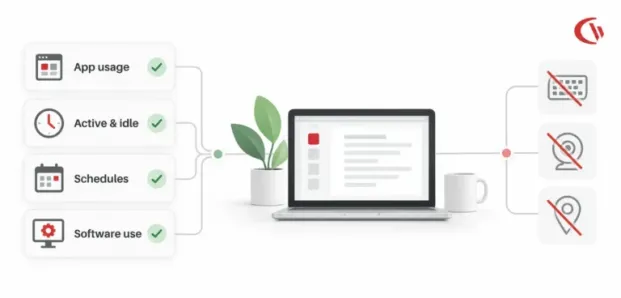
The more sustainable approach is non-invasive employee productivity tracking. Rather than recording everything an employee does, organizations can measure useful signals such as application usage, active and idle periods, website activity, work schedules, software utilization, and broad work-location patterns. It is not about monitoring each and every employee in real-time. It is about having sufficient operational insight to uncover bottlenecks, prevent software wastage, secure business data and assist distributed teams without invading employee privacy.
What is Remote Employee Productivity Tracking?
Productivity monitoring for remote employees involves tracking usage of applications, how actively employees are working in workflows, and activities related to output. Contemporary productivity monitoring should be about discovering the trends and operational signals from performance data rather than spying on individuals. For instance:
- Which business applications are being used most frequently?
- Which software licenses are underutilized?
- How much time is spent on work-related websites?
- Are employees available during required coverage periods?
- Are remote workers experiencing application or access bottlenecks?
- Are employees spending significant time on unauthorized applications?
- Are unusual activity patterns creating a potential security concern?
Research confirms when organizations deploy transparent telemetry that respects privacy, employee acceptance climbs from 30% to over 50%.
This method gives managers actionable insight without having to monitor an employee’s screen at all times or track every physical action on a computer. In the past, software used for employee monitoring had the reputation of being “bossware” tools that could rely on keyboard logging in real time, webcam footage, screenshots, and other invasively granular levels of surveillance. Non-invasive monitoring establishes a different boundary by concentrating on objective metadata and aggregate patterns.
The State of Remote Workforce Monitoring in 2026
In addition to overall productivity, privacy concerns are arising within cybersecurity, IT asset management, compliance, and other disciplines that overlap with employee privacy. Companies with hybrid teams have staff logging in from home offices, coworking spaces, hotels and other locations. Business applications may be available on multiple devices and networks.
This creates several challenges
1. Regulatory Scrutiny
Regulations around monitoring at work are changing. If you are using employee data and analytics, you have to be aware of privacy, employment, cybersecurity, and any sector-specific legislation.
The EU AI Act, Regulation (EU) 2024/1689, sets out obligations for some applications of AI in employment and worker-management systems. This means companies using AI-based employee scoring or performance-management systems should consider the extent to which automated systems are being used, the decisions being affected by the systems, and the level of human oversight.
In organizations that manage healthcare information, user activity monitoring will also need to be carefully isolated from protected health information. While auditability and security visibility are likely needed, the monitoring system shouldn’t turn into a channel for revealing sensitive information. This comes down to a practical rule of collecting the least amount of information necessary for a legitimate purpose.
2. The Cost of Inefficient Software
Tracking productivity can offer value beyond conventional employee-performance management. Many companies buy SaaS apps for groups and functions, without clarity on how that software is being utilized. In Flexera’s State of ITAM survey, under-utilized software spend is identified as a common cause of software wastage.
Application usage data can help IT teams identify:
- Unused licenses
- Underutilized applications
- Duplicate software
- Applications that have lost business relevance
- Unauthorized software
- Departments requiring additional licenses
This changes productivity monitoring from a narrow HR function into an IT optimization strategy.
3. Non-Work Website Usage
The use of the internet has the potential to affect bandwidth and productivity. According to a Spiceworks survey, employees waste the equivalent of 26 work days a year on websites that do not have anything to do with work. With more comprehensive website analytics in one place, IT can use cumulative browsing data to see what is happening and take a more measured approach, understanding whether employees are simply browsing without a work-related purpose.
4. Shadow IT and Security Risks
Remote working has broadened the security implications of employee application usage too. They also turn to unsanctioned cloud apps when a sanctioned tool is hard to work with, out of reach, or simply not up to the task. This “Shadow IT” is an understandable and often unavoidable side effect. Tracking application and website activity thus can become integrated into an overall endpoint security plan. The goal is not just to know whether someone is “working” but to understand whether there are any high-risk applications, inappropriate services, or data transfer routes.
The 5 Pillars of Non-Invasive Productivity Measurement
A sustainable productivity-monitoring strategy can be built around five core principles.
1. Active vs. Idle Discrimination With Meeting Exclusions:
The most significant flaw of in-productivity tracking is considering keyboard and mouse activity to be directly related to productivity. That is not how knowledge work is done today. An employee can be productive while:
- Reading a lengthy document
- Participating in a video meeting
- Reviewing a presentation
- Listening to a training session
- Speaking with a customer
- Reviewing data
This is why new employee productivity tracking tools should identify real idle time versus actual work activities. An idle exclusion list, customizable to allow you to exclude idle time that may be due to email, MS Teams, Zoom, or other work-related activity.
2. Defensible Productivity Baselines and Fraud Detection:
There is one more challenge with activity-based analytics is artificial activity. The use of mouse jigglers is a clear example of why you should not use a single activity indicator. An employee could move their mouse around without actually doing anything. 44% of remote workers admit to faking activity on work chat applications. Without resorting to invasive keystroke logging, organizations may analyze activity rhythms and rates of abnormal activity. Repetitive and extremely stereotyped activity may be a clue that an activity metric needs further scrutiny. Anomaly detection should simply be used as an indicator of potential investigation, not a trigger to label behaviour as underperformance.
3. Software Metering and SaaS Cost Optimization:
Cost control via employee productivity analytics. Employee productivity analytics can aid organizations in controlling technology spend. Application usage duration can be compared against license costs to determine whether software is delivering sufficient value.
For example, an IT department may discover that:
- A premium application has very few active users.
- Multiple departments are paying for overlapping applications.
- A legacy platform remains installed but is rarely accessed.
- Employees are relying heavily on an application that was not previously considered business-critical.
This information allows IT managers to recover unused licenses, optimize software, and purchase with a more strategic approach. Now, productivity tracking will be a tool for managing IT assets, instead of your workers.
4. Schedule Adherence Without Micromanagement:
Distributed teams can span multiple time zones and working hours. Managers might require an understanding of whether workers are accessible in the stipulated core hours.
Login and logout information can provide this visibility without monitoring every action performed during the day. Schedule analytics can help organizations:
- Confirm required coverage
- Identify recurring scheduling gaps
- Support distributed teams across time zones
- Reduce unnecessary after-hours work
- Identify potential workload imbalance
- Establish clearer expectations around availability
5. Location-Aware Telemetry Without Invasive GPS
Remote organizations may also need to distinguish between office-based and remote work sessions. This does not necessarily require invasive GPS tracking. Broad network information can be used to classify sessions such as:
- Office
- Remote
- Hybrid
This provides organizations with useful workforce location information while avoiding the unnecessary collection of precise personal location data. The principle of data minimization is important here: if broad location classification is sufficient for the business requirement, precise device-level GPS information may not be necessary.
Privacy-Compliant Employee Monitoring Software
A privacy-compliant employee monitoring platform should be designed around transparency, data minimization, purpose limitation, and appropriate access controls. Organizations should ask several questions before deploying employee monitoring software:
- What information is being collected?
- Why is it being collected?
- Who can access it?
- How long is the information retained?
- Can the same business objective be achieved using less intrusive data?
- Are employees clearly informed about the monitoring?
- Are monitoring periods limited to legitimate working requirements?
- Are sensitive personal activities excluded?
CurrentWare is an example of a solution that is built with these principles in mind. On-Premises and Private Cloud Deployment: CurrentWare offers a self-managed on-premises or private-cloud deployment to help companies determine the location of their monitoring data. It has a separate module, BrowseReporter, that tracks high-level application names, domain names, and active/idle time without keystroke logging.
Another aspect to consider is screenshot capture. Screenshots could reveal sensitive information that an employee is viewing – such as private messages or proprietary business documents. According to the source material, “CurrentWare screenshot capture is disabled by default and can be used as an event-triggered forensic tool instead of a continuous monitoring solution.” This design embodies a general principle that security controls should be triggered when there is a valid reason to investigate an event, as opposed to constantly recording what employees do by default.
Employee Monitoring Software for Remote Teams
Remote teams have different monitoring needs than on-site teams due to the fact that they work across different environments, different operating systems, different networks, different geographies, and different time zones. Consider an ideal remote workforce monitoring platform that offers dashboards while curbing the amount of data collected.
Important capabilities include:
1. Cross-Platform Multi-OS Oversight
Hybrid organizations frequently operate mixed-device environments. A monitoring solution should therefore provide consistent visibility across supported operating systems. The source material highlights CurrentWare Version 12.0.0 and its macOS compatibility alongside Windows. This allows organizations to bring website tracking, login-session information, and reporting into a more unified monitoring environment.
2. Meeting-Aware Telemetry
Remote employees spend substantial portions of their workday in collaborative meetings. The Idle Exclusion List helps ensure that employees participating in collaborative applications are not incorrectly classified as idle. Similarly, Mouse Jiggler Detection can help identify artificial activity patterns without requiring organizations to record every keystroke.
3. Endpoint Security Beyond Productivity Analytics
Productivity monitoring should not operate in isolation from endpoint security. Remote laptops can introduce risks involving removable media, unauthorized websites, cloud applications, and data transfers. For example, CurrentWare’s AccessPatrol can be used for USB-device control and auditing, while BrowseControl provides web and application-control capabilities.
Combining productivity analytics with endpoint controls creates a broader approach to managing distributed devices. Organizations can understand application usage while simultaneously reducing unnecessary security exposure.
Platform Comparison: Navigating the 2026 Market
When reviewing employee monitoring solutions, compare platforms based on factors like data collection techniques, deployment architecture, privacy features, and security functions in addition to functionality.
| Features | CurrentWare | ActivTrak | Teramind |
|---|---|---|---|
| Positioning | Balanced intelligence, endpoint DLP & zero-trust | Productivity analytics & coaching | Surveillance-oriented forensics & OCR |
| Deployment | On-premise / private cloud | Cloud-based SaaS | Cloud &/on-premise |
| Keystroke/ Webcam Monitoring | Excluded | Excluded | Available in certain configurations |
| Zero-Trust Allowlisting | Built-in application allowlisting | Not available | Add-on/complex configuration |
| Mouse Jiggler Detection | Behavioral pattern detection | Basic pattern flagging | Forensic detection |
| Pricing Model* | Modular | Bundled | Tiered |
Pricing* and features offered may vary across vendors, editions, contracts, and deployments. Confirm the specific commercial and technical aspects with each vendor. This is why buyers should not assess monitoring software entirely by the quantity of features available.
Conclusion: Moving Beyond Surveillance
Remote Workforce Management Is Not About Gathering More Data. It is about gathering better data for a specific purpose. Hybrid organizations require visibility into application usage, application costs, security risks, schedule penetration, and workflow efficiency. But you do not have to constantly monitor to get that visibility.
Alternative non-invasive employee productivity monitoring methods include application telemetry, application activity and idle time, meeting intelligence, software metering, schedule data, and general location signals. Such measures can deliver meaningful operational intelligence to IT and HR teams without further encroaching on the employee’s personal activity.
Workforce analytics can help you uncover software waste, enhance workflows, bolster endpoint security, and cater to remote teams without the need for constant keystroke-logging, webcam surveillance, and taking of unmanageable screenshots. As hybrid work evolves, the companies that will benefit most from tracking employee productivity will be those that look past “How much can we track?” to “What information do we need to enhance the way work is done?”


