
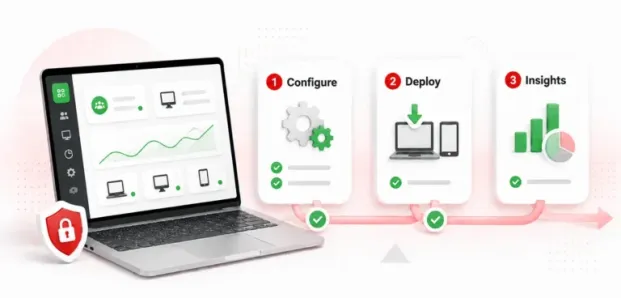

Visibility for smaller businesses can be complicated. A team manager might want to know how their employees spend the workday, which applications are most in use, whether remote workers actually adhere to the schedule they work under, or whether sensitive company data exists outside their corporate network. These are valid needs for any small business manager. Unfortunately, an overburdened small IT team likely does not have weeks to spend setting up a complex enterprise monitoring tool.
That is where employee monitoring software for small teams can help.
Current employee monitoring is also evolving beyond simple activity logging. Instead of simply noting whether an employee’s computer is on, contemporary systems can report application/web usage, work schedules, break times, idle times, endpoint activity, productivity, and any threats to data security.
This is especially relevant for small and medium-sized businesses (SMBs), where every employee, device, and hour can have a measurable impact on the business. Employee monitoring is also becoming more common. In 2025, 53% of U.S. employees said their organization used some form of employee tracking software, up from 46% in 2024.
This article covers the most relevant aspects of employee monitoring software, setting up an employee monitoring system, and transparent & effective implementation of monitoring for small teams.
What Is Employee Monitoring Software for Small Teams?
An employee monitoring system is a set of technologies designed to reveal the work performed on computers or other endpoint devices managed by a business. Depending on the platform and configuration, the employee monitoring software captures:
- Websites visited during working hours
- Applications being used
- Active and idle time
- Login and logout activity
- Work-schedule adherence
- Screenshots for specific audits or investigations
- Device and peripheral usage
- File-transfer activity
- Productivity trends
- Potentially suspicious or artificial activity
The best employee monitoring software for SMB businesses will deliver critical data in a comprehensible format with a minimum administrative burden. Many small businesses won’t have a specialized workforce-analytics department or large IT support staff, so it has to be extremely simple to install, configure, generate reports, and manage users.
A successful employee monitoring solution should provide answers to basic, practical questions like:
- Where is the time being utilized?
- Is the workforce being leveraged as effectively as possible?
- Are employees running into roadblocks in their workflows?
- Are company devices & company data being utilized in intended ways?
- Does the captured data hold the accuracy needed to guide management decision-making?
These kinds of questions transform employee monitoring from a surveillance function to a workforce management and security enabler. That shift also requires transparency. In Owl Labs’ 2024 research, 86% of workers said employers should be required to disclose when employee monitoring tools are being used. Clear communication about what is monitored, why it is collected, and who can access it can help small businesses build a monitoring program employees understand rather than one they perceive as surveillance.
Key Employee Monitoring Software Features for Small Teams
Ideally, small businesses should leverage features that provide actionable insights, rather than buy a package with features that are not usable for the business.
Here are some of the most useful features to consider:
1. Automated Productivity Tracking
Manually checking employee activity is not practical, especially when a single manager oversees multiple groups of staff. Modern employee monitoring solutions automatically categorize an employee’s website and application activity as productive, unproductive, or neutral, and provide a manager with a snapshot of how working hours are spent.
For example, if a team of customer support representatives is consistently looking at the business-critical CRM system, this will be seen as normal productive activity; however, significant use of websites irrelevant to work hours may be seen as potentially unproductive.
BrowseReporter provides monitoring of a user’s web and application activity, along with activity reports, screen captures, schedule compliance data, and more, from a central console. A sudden shift in application usage could highlight an employee needs more training. An increase in passive time may be linked to a technical issue, or long work hours consistently could signify burnout.
2. Mouse-Jiggler and Artificial Activity Detection
Another arising challenge faced in workplace monitoring is distinguishing artificial activity from genuine activity. Mouse jiggers and automation tools, when activated on a computer not in use, produce false activity signals; if each mouse click is registered as proof of productivity, the resulting report is inaccurate.
BrowseReporter’s mouse-jiggler detection works by analyzing motion patterns and distinguishing activity from typical human movements, which it categorizes as either repetitive or constant mouse movement. This form of tracking can be particularly helpful for SMBs, as it will prevent inaccurate reporting of employee activity.
3. Idle-Time Exclusions
Monitoring idle time is easy enough-until some portion of employees’ day includes meetings, training courses, or presentations, none of which normally require constant use of the mouse and keyboard. An employee in a 60-minute Microsoft Teams or Zoom meeting might falsely appear “inactive.”
It allows admins to keep authorized apps and web pages (such as Microsoft Teams, Zoom, Google Meet, webinars, training sessions, or anything else that meets approved engagement tests) from triggering idle detection.
4. Application and Website Monitoring
SMBs can gain visibility into how their employees are actually using business technology with application and website usage reporting. For instance, managers might notice that their teams are endlessly flipping between software, not using purchased software licenses at all, struggling to get the software, spending work hours browsing specific websites, and using applications that IT never sanctioned. Missing several obvious manual steps within existing workflows.
BrowseReporter lets companies report on application usage and websites visited to see what applications their employees depend on and for how long. All this data can be leveraged for more than just managing employee productivity. It can assist with software purchasing, improving workflow design, addressing issues identified by the IT department, and training staff.
Application visibility is becoming even more important as AI becomes part of everyday work. Owl Labs found that 67% of U.S. companies were using AI in the workplace in 2025, while 46% of employees said they were somewhat or heavily reliant on AI for their work. For SMBs, understanding which AI and other applications employees are using can help inform software decisions, security policies, and workflow improvements.
5. Endpoint Security and USB Device Control
The convergence between employee monitoring and data security continues to grow. Even if a company uses robust passwords, firewalls, and cloud security, its data could still be vulnerable to removable media. USB control allows companies to identify devices connected to business computers, prevent the use of non-sanctioned removable storage, and manage file transfers.
Among its features, AccessPatrol offers a wide range of granular permissions for removable devices, from no access to read-only access, full access, and allows companies to whitelist acceptable devices.
For small businesses that handle customers’ information, financial statements, intellectual property, and other highly sensitive data, employee monitoring can provide an extra layer of endpoint protection. The financial impact of a security incident can be significant. IBM’s 2025 Cost of a Data Breach Report found that the average cost of a data breach in India reached INR 220 million, or ₹22 crore, a 13% increase from the previous year. The report also found that shadow AI was among the top three cost drivers of breaches in India, adding an average of INR 17.9 million to breach costs.
How to Set Up Employee Monitoring Software: Step-by-Step
When deploying an employee monitoring tool, focus on defining your objectives and installing only the components that will help you track small and medium-sized teams.

Step 1: Define Why You Are Monitoring
- Before installing anything, write down the business purpose.
- Improving workload visibility
- Identifying workflow bottlenecks
- Protecting confidential information
- Managing remote-work schedules
- Supporting client billing
- Investigating security incidents
- Understanding application usage
- Reducing unnecessary software costs
For example, if the objective is software optimization, application usage data may be sufficient. There may be no reason to capture screenshots. If the objective is USB data loss prevention, device and file transfer information may be more relevant than detailed productivity metrics. This principle of collecting only what is necessary also supports a more ethical approach to employee monitoring.
Step 2: Choose a Centralized Management Console
Small businesses should prioritize a centralized web console. Rather than requiring administrators to configure every computer individually, a central dashboard can provide a single location for managing policies, users, devices, reports, and alerts.
For example, CurrentWare offers centralized management across its monitoring and security tools which becomes increasingly valuable for SMBs as they grow from a handful of employees to dozens or hundreds of endpoints.
Step 3: Deploy the Monitoring Client
Installing the monitored client on the managed devices will use the deployment method that best fits your organization and platforms. A small business team can install the monitored client using manual installation, a deployment script, an endpoint management tool, or a directory-based deployment.
Step 4: Synchronize Users and Groups
By synchronizing identities with an existing user directory, this approach can significantly reduce employee onboarding time by enabling automatic user and group imports. Microsoft Entra ID, enables automatic import and synchronization of users and groups from the selected organization in Microsoft Entra ID, allowing small and medium businesses to streamline their work and reduce repetitive onboarding tasks while already leveraging the benefits of Microsoft cloud identity.
Step 5: Configure Policies Before Collecting Data
Do not install monitoring software first and decide what to track later.
Create the policies in advance –
- Which employees should be monitored?
- During which hours?
- Which applications are considered productive?
- Which websites should be restricted?
- Which devices can connect through USB?
- Who can access monitoring reports?
- How long should data be retained?
- Which activities require alerts?
- What information should be excluded?
For example, an organization might decide that Microsoft Teams, Zoom, and approved training platforms should not be classified as idle. An Idle Exclusion List specifically supports this type of configuration.
Step 6: Decide Where Monitoring Data Will Be Stored
Data location is another important consideration. Organizations should evaluate whether they want a cloud-hosted, on-premises, or self-managed cloud deployment.
The right choice depends on:
- Regulatory obligations
- Data-residency requirements
- Internal IT resources
- Security policies
- Budget
- Existing infrastructure
- Retention requirements
The attached brief highlights self-managed storage as an important consideration for SMBs seeking greater control over monitoring data.
Step 7: Test the Configuration
Before rolling employee monitoring out across the organization, select a small group of devices and verify:
- Activity is being recorded correctly
- Meetings are not incorrectly classified as idle
- Policies are being applied to the correct users
- Reports contain useful information
- Alerts are not excessive
- Monitoring does not interfere with normal work
- Administrators can access only the information they need
Why CurrentWare Can Be Considered for SMB Monitoring
When a small business considers an employee monitoring solution, CurrentWare positions its technology as built on workforce visibility, app and web monitoring, and endpoint controls.
CurrentWare’s employee-monitoring tool BrowseReporter offers an employee browsing and app monitoring service that includes reports, website logs, and app usage history, screenshots, and scheduled reports. It also comes with an internet usage filter, bandwidth monitoring, timesheet reporting, and a mouse jiggler detection system.
The company’s 2026 version 12 updates improved features:
- Mouse-jiggler detection
- Microsoft Entra ID synchronization
- Application allowlisting
- Schedule-adherence reporting
- Improved installation and onboarding
- Offline-client alerts
- Dashboard improvements
For organizations that need both workforce visibility and endpoint controls, AccessPatrol adds USB and removable-device management. It can restrict devices, establish trusted device lists, control file transfers, and generate activity reports.
This combination can be particularly relevant for SMBs that want to address productivity and data security without maintaining separate systems for every operational requirement.
CurrentWare vs. Typical Enterprise Monitoring Platforms
The difference between SMB-focused and enterprise-oriented monitoring often comes down to complexity.
| Consideration | SMB-focused approach | Typical enterprise approach |
|---|---|---|
| Deployment | Fast and streamlined | May require extensive planning |
| IT requirements | Minimal to moderate | Often dedicated IT involvement |
| Administration | Centralized and simplified | More complex policy structures |
| Data control | Cloud, on-premises, or self-managed options depending on product | Often cloud-centric |
| Monitoring | Focused on actionable activity | Broad and highly configurable |
| Security | Integrated endpoint controls may be available | Often part of larger security suites |
| Best suited for | Small and mid-sized teams | Large, complex organizations |
CurrentWare employee monitoring solution is a relevant SMB-oriented option emphasizing setup measured in minutes or hours, reduced IT involvement, and self-managed data storage.
Actual deployment time and cost will depend on the organization’s environment, number of devices, selected products, and configuration requirements, so businesses should validate these details with the vendor before making a purchasing decision.
Conclusion
The best employee monitoring software for a small team doesn’t need to record the most data. Rather, it provides relevant data with minimal administrative burden. Monitoring for SMBs should strike a balance among productivity insights, robust activity data, endpoint security, ease of implementation, and transparency in employee communications.
The key components of an ideal monitoring program that offer an optimal mix of productivity and transparency, a small team can implement without overburdening their IT teams are outlined below:
- App and website monitoring can give managers insights into workflow.
- Idle exclusions are essential to keep training and meeting data from incorrectly identifying inactivity.
- Mouse-jiggler detection can make an activity log far more useful.
- USB access controls add a layer of endpoint security. But tools are only part of the equation.
A strong employee monitoring program requires a clear purpose, focused information collection, robust access controls, open employee communication, and the use of data for process improvement. The real goal for employee monitoring software heading into 2026 is to turn work activity data into intelligent, accountable information for the business while preserving employees’ rights, privacy, and overall security.


