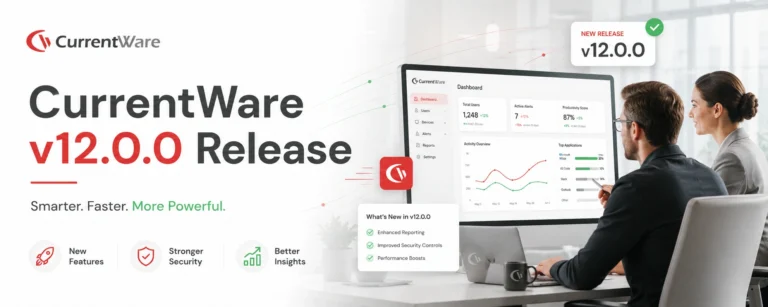
A New Era of Security, Intelligence & Multi-OS Visibility
Our most significant release in years, a major leap forward in helping IT, security, and operations leaders build a more secure, accountable, and high-performing digital workplace.
New in Version 12.0.0
Six powerful innovations designed to improve security posture, deliver fraud-proof productivity intelligence, simplify identity management, and support modern multi-OS environments.
macOS Compatibility
Support for macOS with website tracking, login sessions and full dashboard
Application Allowlisting
Zero-trust control over which applications are allowed to run, reducing the attack surface dramatically.
Mouse Jiggler Detection
Automatically detect mouse jigglers to ensure accurate data with timeline indicators and activity logs
Microsoft Entra ID Sync
Automatic cloud identity synchronization for seamless user and group imports from Entra ID.
Schedule Adherence
Real-time insights into employee schedule compliance with variance charts and trend analysis.
Why Version 12.0.0 Matters Now
Hybrid work, rising insider threats, compliance pressures, and the shift toward Apple first organizations have transformed the way IT and security teams operate.
This release strengthens every pillar of the CurrentWare platform — productivity intelligence, data protection, identity governance, and operational efficiency, so leaders can make better decisions with confidence.
Real-time Visibility
Complete oversight across all endpoints, Windows and macOS alike.
Zero-Trust Security
Only approved applications can run, reducing the attack surface dramatically.
Defensible Productivity Data
Fraud-proof metrics ensure accurate visibility into employee engagement.
Unified Oversight
Single platform for managing distributed teams across all operating systems.
macOS Compatibility
Capabilities
- Website tracking with comprehensive activity logging
- Login sessions & activity logging
- Dashboard & widget support
- Simplified installation process
- Full compliance with macOS privacy and OS-level requirements
These capabilities allow operators, employees, and customer success teams to deploy and monitor macOS endpoints with the same reliability and visibility as Windows, closing a major gap and unlocking new market segments.
Application Allowlisting
Zero-Trust Endpoint Control Made Simple
Traditional application blocking is no longer enough. Modern ransomware, shadow IT, and unauthorized tools can bypass reactive controls with ease.
Application Allowlisting flips the model, only approved applications can run, reducing the attack surface dramatically and creating a compliant, distraction-free environment.
Prevents unknown, malicious, or high-risk apps from executing
Ensures strict compliance for high-regulation industries
Improves productivity by limiting non-work applications
Provides monitoring, reporting, and auditing for full oversight
Advanced Mouse Jiggler Detection
Protecting the Integrity of Productivity Data
As remote and hybrid work models mature, artificial activity — through software or hardware mouse jigglers, creates false productivity signals that undermine trust and distort analytics.
What the System Detects
- Unnaturally consistent activity patterns
- Long periods of continuous activity inconsistent with human behavior
- Software-based automation tools
- High mouse vs. low keyboard movement anomalies
- Repetitive cursor movement timings
- Hardware-based jiggler signals
- Delayed response indicators in messaging apps
63,100 monthly searches — global search volume for “mouse jiggler”—a growing risk CurrentWare now addresses.
Microsoft Entra ID User Import & Sync
Identity governance has become central to modern IT management. Version 12.0.0 eliminates manual onboarding workflows by integrating Microsoft Entra ID (formerly Azure AD) for automated user and group synchronization.
Key Capabilities
- Automatically import users & groups from Entra ID
- Pre-assign policies before users ever log in
- Reduce administrative overhead and manual errors
- Ensure consistent policy enforcement from day one
- Extend the value of existing Active Directory integrations to cloud identity
This improves both security and operational efficiency, especially for distributed workforces.
Schedule Adherence Monitoring
Real-Time Compliance with Assigned Work Hours
Organizations need better visibility into how employees adhere to scheduled work hours, especially across remote and hybrid teams.
Detect late starts and early finishes instantly
Track patterns of attendance issues
Configure schedules per user or group
View automated variance charts
Integrate insights into Utilization dashboards
Daily, weekly, and monthly trend analysis
A Unified Platform for the Secure, Data-Driven Enterprise
With Version 12.0.0, CurrentWare advances its mission: to give organizations complete visibility and control over their digital environments, securely, ethically, and intelligently.
| Pillar | What's New |
|---|---|
| Security | Zero-trust application control + identity governance. |
| Productivity Intelligence | Fraud-proof activity data + macOS support + schedule adherence. |
| Compliance | Auditable logs, identity-driven enforcement, verifiable metrics. |
| Operational Efficiency | Automated user sync, reduced manual oversight, unified cross-OS monitoring. |
Onboarding & Installation UI Improvements
Faster Setup, Fewer Errors, Better First Impressions
First impressions matter, especially in enterprise software. Based on direct feedback from trial users and newly onboarded customers, we identified clear friction points in the existing installation experience.
Modern, Consistent UI
Clean, intuitive interface aligned with the CurrentWare design system. Reduced cognitive load for first-time users.
Clear Progress Visibility
Step-by-step progress indicators during installation. Transparent feedback at each stage.
Smarter Configuration Controls
Improved SQL connection configuration clarity. Clear guidance for selecting the correct installation file type.
Error Prevention & Security Safeguards
Countdown timers prevent launching the console too early. Minimizes security warning issues.
Trusted by teams across the United States, Canada & the United Kingdom
Join 100,000+ professionals across 55 countries.













What customers say about CurrentWare
Across the whole CurrentWare Suite.
90% of reviewers would recommend BrowseReporter (average likelihood to recommend: 9 out of 10).
90% of reviewers would recommend BrowseControl (average likelihood to recommend: 9 out of 10).
90% of reviewers would recommend AccessPatrol (average likelihood to recommend: 9 out of 10).
Experience the Power of CurrentWare 12.0.0
Frequently asked
Frequently Asked Questions:
-
CurrentWare Version 12.0.0 is a major product release introducing new security, productivity, and identity-management capabilities. It includes Schedule Adherence, Application Control, Advanced Mouse Jiggler Detection, Microsoft Entra ID User Import & Sync, and macOS Compatibility to support modern hybrid and multi OS workplaces.
-
Version 12.0.0 is designed for IT administrators, CISOs, HR leaders, compliance teams, and operations managers managing remote, hybrid, or regulated workforces who need accurate productivity data, stronger endpoint security, and centralized identity control.
-
Yes. All new features are designed to support remote, hybrid, and distributed work environments with accurate data and secure controls.
-
Schedule Adherence measures how closely employees follow assigned working schedules by comparing expected vs. actual start times, end times, and working hours, with automated variance calculations and visual charts.
-
Schedule Adherence is calculated by tracking login and logout times against predefined schedules and highlighting deviations such as late starts, early finishes, or insufficient hours using variance charts.
-
Yes. Schedule Adherence supports both individual users and groups, allowing managers to analyze attendance patterns at multiple levels.
-
Yes. Schedules can be configured per user or group, including flexible working hours, while still tracking adherence against defined expectations.
-
Application Allowlisting is a zero-trust security approach that allows only approved applications to run on company devices, blocking all unauthorized or unknown software by default.
-
Instead of reacting to threats by blocking known bad apps, allowlisting proactively permits only trusted applications, significantly reducing malware, ransomware, and zero-day attack risks.
-
Application Control is especially valuable for regulated industries, remote work environments, and organizations implementing zero-trust security frameworks.
-
Yes. The system supports user access requests and administrative approval workflows to prevent disruption while maintaining security.
-
Yes. It supports compliance with security and regulatory requirements by enforcing consistent software usage policies and simplifying audits.
-
A mouse jiggler is a software or hardware tool that simulates mouse movement to fake activity. It distorts productivity data and leads to inaccurate performance insights in remote or hybrid teams.
-
CurrentWare detects mouse jigglers using pattern analysis, input behavior monitoring, and activity duration analysis to identify unnatural, repetitive, or non-human interaction patterns.
-
Yes. The system is designed to detect both software-based and hardware-based mouse jigglers through behavior and signal analysis.
-
Yes. The system can trigger alerts, reports, and verification prompts to confirm whether activity is genuine.
-
Mouse jiggler detection focuses on activity patterns, not personal content, and supports transparent, policy-based monitoring aligned with workplace compliance standards.
-
This feature enables automatic import and synchronization of users and groups from Microsoft Entra ID (formerly Azure AD) into CurrentWare.
-
It allows administrators to pre-configure users and assign policies before they ever log in, ensuring consistent enforcement from day one.
-
No. Entra ID Sync extends CurrentWare’s existing Active Directory integration to support cloud-based identity management.
-
It eliminates manual user creation, reduces administrative workload, and prevents policy gaps caused by delayed configuration.
-
Yes. Version 12.0.0 introduces macOS Compatibility.
-
It includes login session tracking, website tracking, dashboards, widgets, and privacy-compliant monitoring, with feature parity expanding in later phases.
-
Yes. macOS requires manual permission grants for activity tracking to comply with Apple privacy and OS security standards.
Still have questions?
Talk to a CurrentWare specialist who has deployed monitoring at 200+ law firms.