






What Is Employee Productivity Monitoring Software?
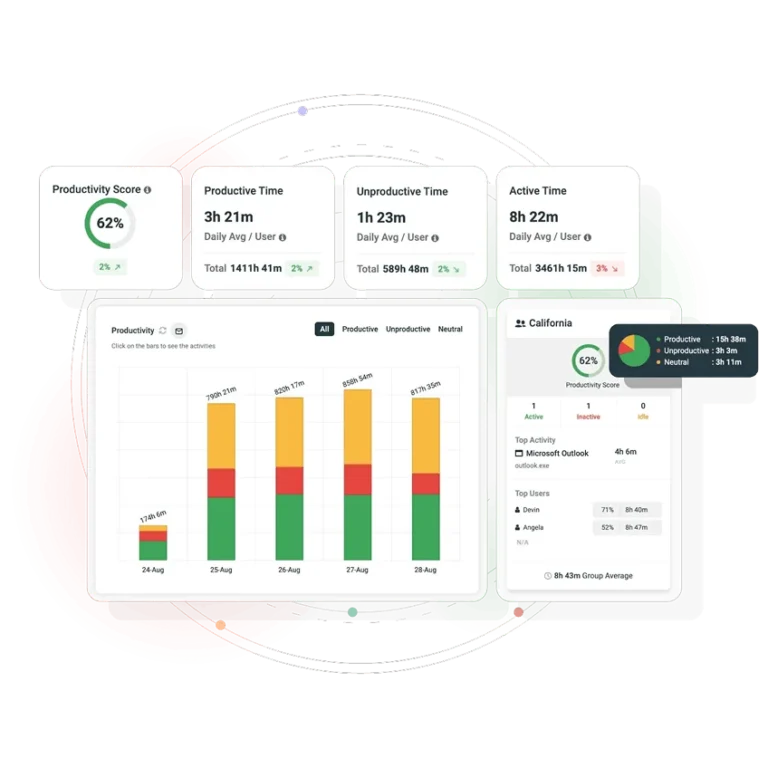
Employee productivity monitoring software, also called productivity tracking software or an employee productivity tracker, is a type of employee activity monitoring software installed on work computers to record activity such as active and idle time, applications used, websites visited, screen activity and logon sessions. It turns that data into productivity scores, utilization rates and reports. IT, HR and operations teams use these insights to understand how work gets done, balance workloads, support performance reviews and enforce acceptable-use policies across remote, hybrid and in-office teams.
Productivity tracker vs. time tracker vs. monitoring suite: What’s the Difference?
| Category | What it measures | Typical buyer | Where CurrentWare fits |
|---|---|---|---|
| Time tracking app | Clock-in / clock-out, manual timesheets, project hours | Finance, agencies billing hours | Not the use case — no manual timers |
| Employee productivity tracker software | Active vs idle time, app and website usage, productivity score, utilization rate | Operations and team leads | ✓ BrowseReporter core |
| Workforce analytics platform | Trend analysis, department comparisons, capacity and efficiency reporting | HR and executive teams | ✓ BrowseReporter reporting module |
| Employee monitoring & security suite | All of the above plus web filtering, USB and device control, insider threat alerts. Typical of full employee monitoring solutions | IT and security | ✓ Full CurrentWare Suite |
Real Results. Measurable ROI
Track Employee Productivity in 4 Steps
The question behind most searches for a productivity tracker is not just which product to buy. It is how to track productivity without damaging trust. The process matters as much as the software.
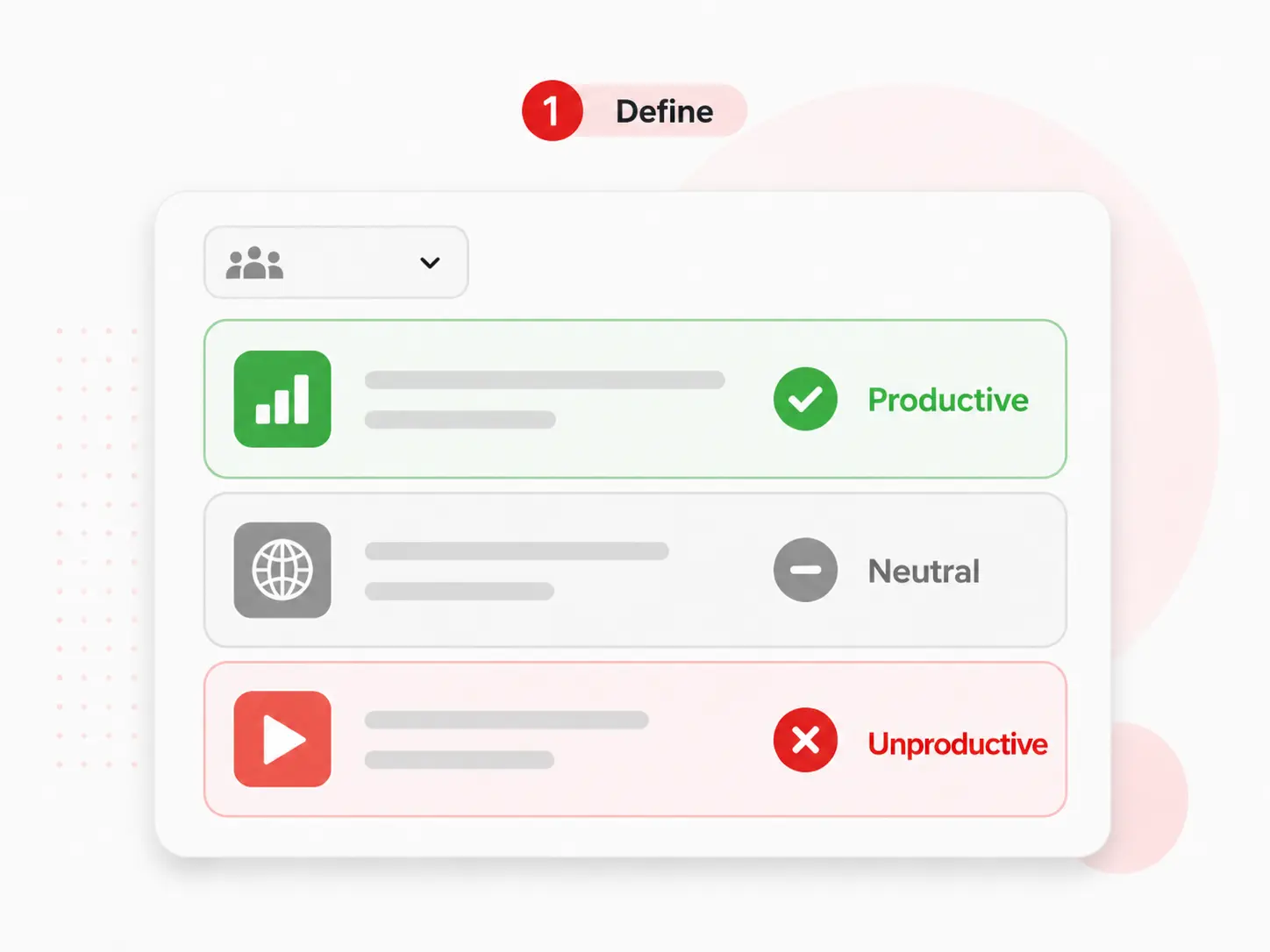
Classify the applications and websites each team uses as productive, unproductive or neutral. Job function matters. Social media may be a distraction for finance but an important tool for marketing. Set these categories by department before turning monitoring on.
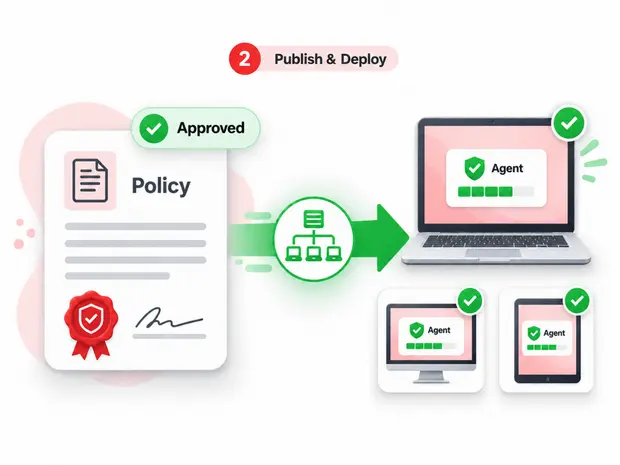
Share a written monitoring policy first. Then deploy the agent through Active Directory or GPO, using a transparent or stealth agent for each team based on your legal requirements.
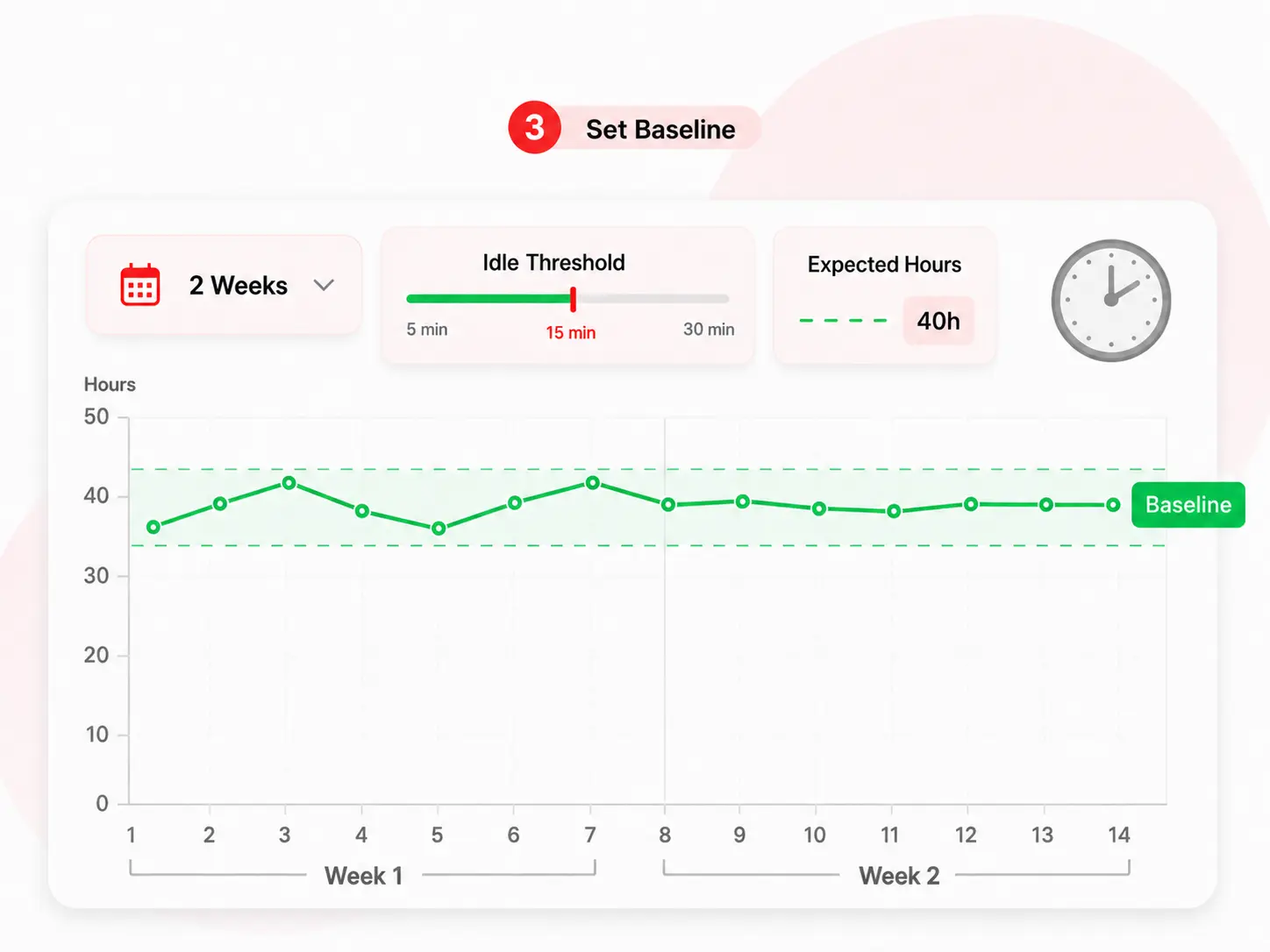
Set the idle threshold, expected work hours and utilization targets. Then collect two weeks of data without making changes. This gives you a baseline based on your own business rather than an industry benchmark that may not fit.
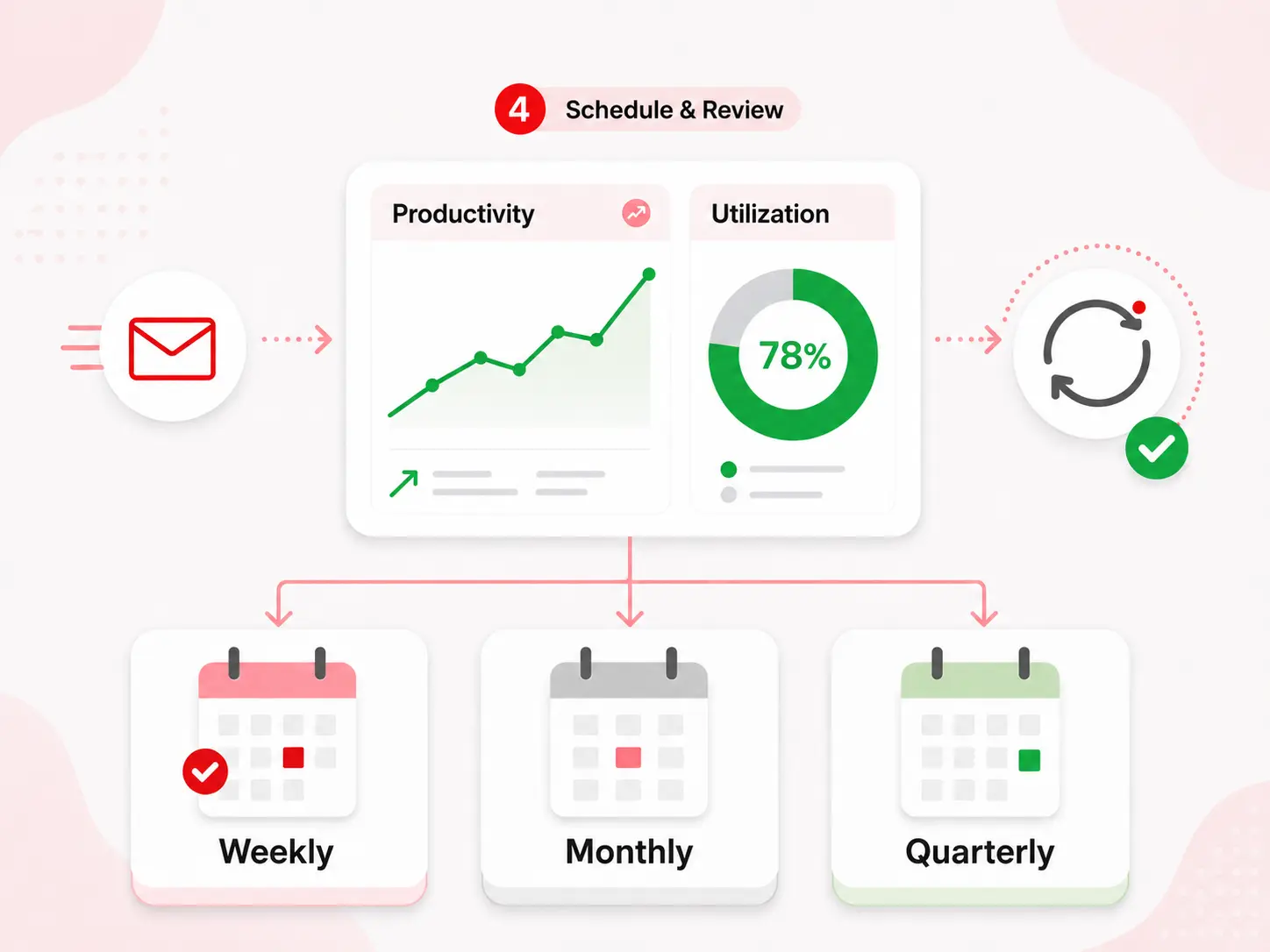
Email weekly productivity and utilization reports to team leads, review them monthly at the management level and revisit them quarterly during headcount planning. Data nobody reviews will not change anything.
The best way to track employee productivity is to look at patterns over several weeks, not activity on a single day. One quiet Tuesday means little. A four-week drop in utilization across a team is worth investigating.
Use One Agent for Employee Computer Tracking, Screen Monitoring and Activity Reporting
As employee activity monitoring software, BrowseReporter turns desktop activity into productivity insights without requiring managers to watch employees constantly. One Windows agent covers activity tracking, screen monitoring, idle time, utilization and logon auditing.
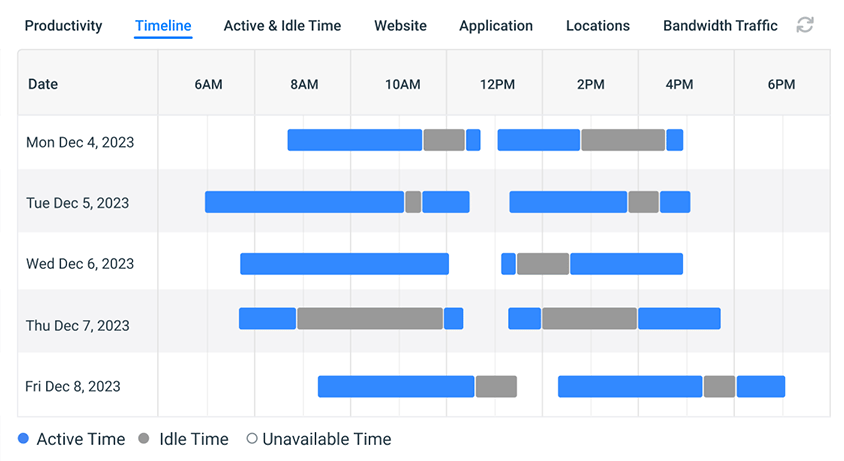
Active time tracking software: idle vs. active hours
See when an employee is actively using their computer and whether a website is being used or simply sitting open in a background tab.
- Report internet usage by active, idle and total time
- Track active and idle time using keyboard and mouse input
- Review idle time, work patterns and productivity trends in one report
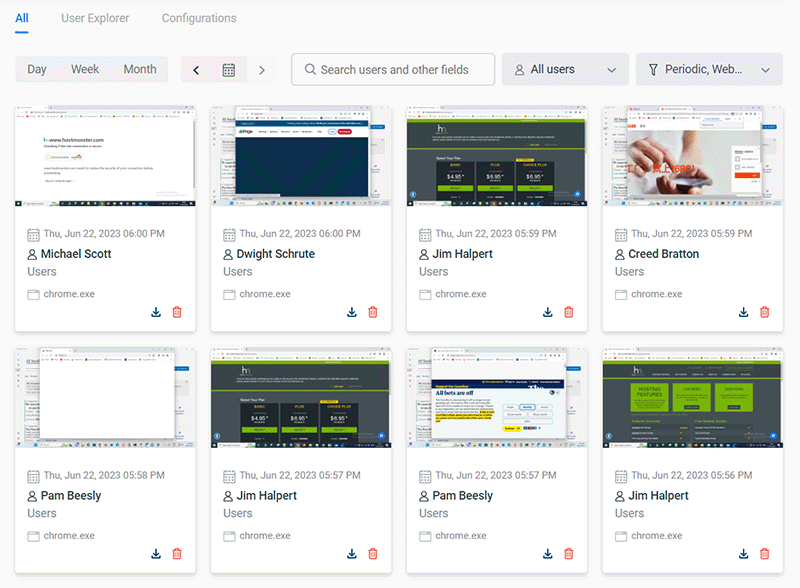
Employee screen monitoring software: live views and screenshots
See what is happening on screen when you need more context. Capture screenshots automatically when specific websites or applications are used, or view sessions as they happen.
- Capture high-resolution or compressed screenshots
- Automatically delete older captures to manage storage
- Tag each capture with the site or app, timestamp and computer name

Employee productivity analytics and reporting software
Give managers productivity reports without requiring a console login. Use scheduled reports to review trends, compare departments and share executive summaries.
- See time spent on social media, games and other distractions
- Track the full workforce, a department, team or individual
- Compare month-over-month productivity trends against your own baseline
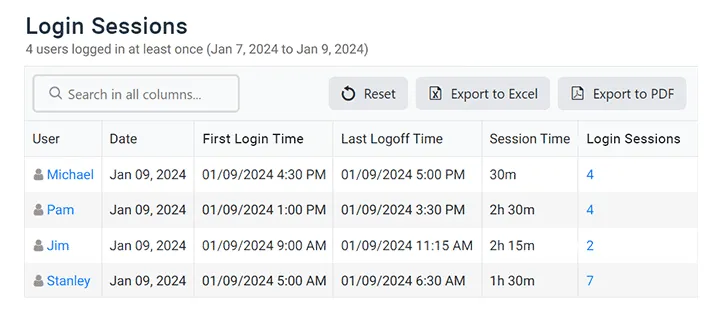
Employee tracking systems: logon and logoff auditing
Combine idle time with logon history to get a fuller picture of the workday. Use individual activity reports details on machine, IP address, time, logon type, and more.
- Audit logon and logoff times by computer
- Record startup, sleep and shutdown events
- Confirm remote staff are active during working hours
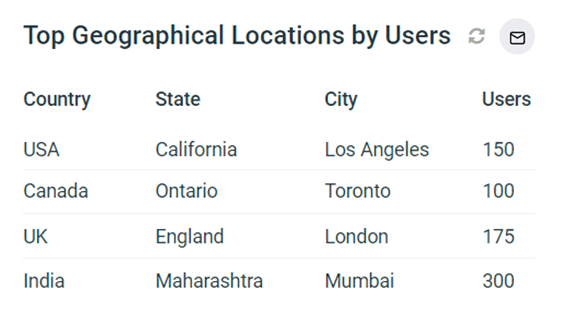
Workforce productivity software: location-based insights
The Location Insights dashboard helps leaders compare remote, in-office and hybrid work while maintaining accountability.
- Compare productivity scores across in-office, remote and hybrid groups
- See how much of the workforce falls into each work mode over time
- Limit repeat distractions with BrowseControl’s URL filter

Employee performance tracker software: utilization rate analysis
Compare workload against expected work hours to improve efficiency and spot signs of burnout early.
- Balance capacity so teams are not overloaded or sitting idle
- Find inefficiencies and reduce avoidable costs
- Spot disengagement before it turns into attrition
Workforce Productivity Software: Utilization, Efficiency and Capacity
Individual activity data answers, "What is this person doing?" Workforce analytics answers the bigger question: do we have the right number of people, in the right teams, doing the right work?
Employee utilization software
Utilization rate measures active time as a share of expected work hours. Track it by team to see which departments are running at 95% and which are closer to 55%, then move work before adding headcount.
Employee efficiency tracking
Efficiency looks at output compared with effort. Compare productivity scores with workload to find areas where the process, rather than the people, may be the problem
Staff productivity across departments
Department-level reporting lets you compare teams internally. The goal is not simply to find the highest-scoring team. It is to understand what that team is doing differently that others could learn from.
Team productivity tracking
Team dashboards show how work is distributed, not just the average. An overloaded employee can easily get hidden inside an otherwise average team until you look at the spread.
Labor productivity reporting
Connect activity data with costs. Looking at software license usage alongside utilization can highlight significant savings opportunities.
Capacity planning input
Before approving a new hire, check whether the current utilization data supports it. Several customers have used this data to delay additional headcount.
Productivity Tracking Software for Hybrid Employees
Hybrid work is where productivity debates often get loudest, but the evidence can be limited. Location Insights gives you a clearer way to compare in-office, remote and hybrid work.
Compare, don't assume
Compare productivity scores for in-office, remote and hybrid employees over the same period. The results may not match expectations.
Measure output, not presence
Active time and utilization follow the employee’s work activity. A badge swipe shows attendance. This shows computer activity.
Works off the network
Activity is cached locally when a laptop is offline and synced when it reconnects, so activity from traveling and home-based employees is not missing from reports.
Nine Metrics Behind Daily Productivity Tracking
Every number below is collected automatically by the agent and available as a daily, weekly or monthly report. No timers for employees to start and stop.
| Metric | What it tells you | Common use |
|---|---|---|
| Active time | Minutes of real keyboard and mouse engagement | Separate hours logged from hours worked |
| Idle time | Inactivity beyond your configured threshold | Spot under-allocation and scheduling gaps |
| Total logged time | Session length from logon to logoff | Attendance and shift adherence |
| Utilization rate | Active time as a share of expected work hours | Capacity planning and burnout risk |
| Productivity score | Weighted score from your productive / unproductive categories | Team-level benchmarking |
| Productivity trend | Movement in score and utilization against your own baseline | Early warning on burnout and disengagement |
| Application usage | Time per application, ranked | License optimization, tool adoption |
| Website and category usage | Time per domain and content category | Acceptable-use policy enforcement and employee browsing monitoring software reports |
| Location split | Productivity by in-office, remote and hybrid | Return-to-office decisions |
See your own numbers in about 15 minutes
Install the agent on a handful of machines and pull your first productivity report the same afternoon.
What Makes an Employee Productivity Tracker the Best
Most tools give you a dashboard. The real differences become clear after deployment, when your policies, auditors and legal requirements come into play. Here are eight things to check before you sign.
1. Deployment choice
Can you host it yourself? Ask whether the vendor offers true on-premises deployment or simply a private cloud hosted in its environment.
2. How idle time is measured
Keyboard and mouse input gives you a better measure than simply checking which window is open. Ask about the default idle threshold and whether background tabs count.
3. Transparency controls
Look for the option to use visible or stealth agents by team, so deployment can match your legal requirements
4. Published pricing
If you need a sales call just to get a price, budgeting becomes harder. Ask about renewal costs too.
5. Reports without a login
Scheduled email reports can be more useful to managers than a dashboard nobody remembers to open.
6. Breadth beyond tracking
Check whether web filtering, USB control and logon tracking are included with the same agent or require separate vendors.
7. Certifications
Ask for the current SOC 2 and ISO 27001 reports, not just the certification badge.
8. Agent footprint
Look for silent AD/GPO deployment, low CPU usage and offline caching. Pilot the software with 50 seats before rolling it out more widely.
Best Productivity Monitoring Tools for Employee Productivity Tracking
Shortlists of productivity monitoring tools come down to three questions: where the data lives, what the agent can see, and whether filtering and device control cost extra.
| Tool | Best for | Deployment | Screenshots / live screen | Web filtering | USB & device control |
|---|---|---|---|---|---|
| CurrentWare BrowseReporter | IT-led programmes needing on-prem control | On-prem, cloud or hybrid | ✓ Included | ✓ BrowseControl, same suite | ✓ AccessPatrol, same suite |
| ActivTrak | Cloud-first analytics and coaching | Cloud | Limited by design | Not core | No |
| Teramind | Deep behaviour rules and DLP | Cloud or on-prem | Extensive | Higher tiers | Higher tiers |
| Hubstaff | Timesheets, payroll and field teams | Cloud | Screenshots | No | No |
| Insightful | Lightweight workforce analytics | Cloud, on-prem option | Screenshots | No | No |
| Veriato | Insider risk and investigations | Cloud or on-prem | Extensive | Partial | Partial |
How CurrentWare's productivity monitoring fares against cloud-only tools
Deployment, pricing transparency and control are what separate the shortlist from the rest.
| Evaluation factor | CurrentWare | Typical cloud-only tools |
|---|---|---|
| On-premises deployment | ✓ Full on-prem, cloud or hybrid | Cloud only |
| Data residency control | ✓ Data stays in your infrastructure | Vendor-hosted |
| Published pricing | ✓ From $12/user/month* | Quote on request |
| Web filtering included | ✓ BrowseControl in the same suite | Separate product or add-on |
| USB and device control | ✓ AccessPatrol in the same suite | Rarely included |
| Stealth and transparent modes | ✓ Configurable per team | Varies |
| SOC 2 and ISO 27001 | ✓ Both certified | Varies |
| Offline activity caching for laptops | ✓ Syncs on reconnect | Varies |
| Silent deployment via Active Directory / GPO | ✓ Supported | Varies |
| Scheduled reports to line managers | ✓ No console login required | Usually dashboard-only |
| Productivity scoring and trend analysis | ✓ Configurable categories, historical baselines | Varies |
Employee Monitoring Rules in the US, UK and Canada
Productivity tracking is lawful in all three markets when it is proportionate and disclosed. What changes is the paperwork. General information, not legal advice; confirm current obligations with your own counsel.
United States
Monitoring company-owned devices is broadly permitted under the business-use exception to federal wiretap law, but several states add notice duties. New York requires written notice at hire; Connecticut and Delaware have their own rules. California’s privacy law gives employees data-access rights.
Do: written notice at hire, acknowledgement on file.
United Kingdom
UK GDPR applies. The ICO’s employment practices guidance expects a lawful basis, a transparency notice, and for systematic monitoring, a data protection impact assessment. Covert monitoring is reserved for suspected criminality.
Do: DPIA, legitimate interests assessment, employee privacy notice.
Canada
PIPEDA and provincial statutes in Alberta, British Columbia and Quebec govern personal data. Ontario employers with 25 or more employees must have a written electronic monitoring policy. Quebec’s Law 25 adds notice and governance duties.
Do: written monitoring policy, provincial check, data residency review.
On-premises deployment is often the shortest path through all three: employee activity data never leaves infrastructure you control, which removes the cross-border transfer question entirely. Start from the workplace monitoring policy and internet use policy templates.
One source of truth for remote, onsite, or hybrid teams
Remote & hybrid teams
See how work gets done across locations without being intrusive. Assess people on output, not presence.
Scaling companies
Scheduled reports land on their own, so nobody loses a Friday afternoon chasing numbers.
Performance reviews
Reviews get fairer when evidence replaces assumption. Pull a 90-day activity summary per employee in one click.
Regulated industries
Stay audit-ready with activity trails across healthcare, finance and legal.
Infrastructure that fits your existing stack
On-premises, cloud or hybrid
Host it yourself, on the CurrentWare cloud, or split the difference. Either way, managers use it as web based employee monitoring software through the browser console, and you keep control of data residency.
Stealth or transparent agent
Monitor only what is required, when it is required, configurable per team and department.
SIEM and security tooling
Feed activity data into your security stack via SIEM integration, alongside web filtering and device control from one console.
Scheduled reporting
Email productivity reports to the managers who need them, without anyone logging into a console.
Solutions That Work Across Industries
Tailored controls that help you meet industry standards, boost efficiency, and protect sensitive data across remote and in-office teams.
Healthcare
HIPAA-ready controls to protect PHI with USB management and insider-threat visibility.
Government
Cybersecurity and policy enforcement aligned to NIST 800-171 and CMMC.
Legal Services
Keep client data protected, billable hours productive, and software costs in check.
Manufacturing
Productivity monitoring and internet visibility for both the shop floor and back office.
Financial Services
Enforce access policies and protect sensitive financial data with audit-ready trails.
Schools & Libraries
CIPA-compliant web filtering to qualify for E-Rate and keep students safe online.
Small Business Employee Productivity
Track unproductive web browsing and idle time to detect time-wasting
Managed Service Providers
Deliver the monitoring, data-loss prevention, and web filtering your clients need, now with faster deployment, and easier management.
Built to Support Your Compliance Program
Discover how organizations use CurrentWare’s employee monitoring software to improve visibility, strengthen compliance efforts, and manage employee activity more effectively.
-
CMMC Compliance →
CMMC
Endpoint Restriction to Protect CUI & FCI
-
NIST 800-171 Compliance →
NIST 800-171/53
Protect Controlled Unclassified Information
-
ISO 27001 Compliance →

ISO 27001
Increase the Maturity of Your ISO27K ISMS
-
HIPAA Compliance →

HIPAA
HIPAA protects sensitive patient data
-
Cyber Essentials Compliance →
Cyber Essentials
Critical Security Controls For Your Assessment
-
GDPR Compliance →
GDPR
EU’s data protection and privacy law
-
NERC CIP Compliance →

NERC CIP
Protect TCAs & BCSI From Insider Threats
-
CIPA Compliance for Education →

CIPA for Education
Qualify for the FCC’s E-Rate Program
Pick & Plug Into Your Existing Stack
CurrentWare works alongside the identity, security, and directory tools you already use, including support for SAML, OIDC, and CEF standards. Cloud connectors are on the way.
- Tested & supported
- Generic standards (SAML, OIDC, CEF)
- On the roadmap (Cloud)


Keep reading
Articles
-
Employee Monitoring
Best Workforce Analytics Software
According to a workforce analytics industry report published by Fortune Business Insights, the global workforce analytics market was valued at…
-
Employee Monitoring
What Is Goldbricking
Companies are heavily reliant on the quality and volume of work that their employees produce. From that reliance comes a…
-
Employee Monitoring
Replacing Time Logs with Productivity Visibility
On paper, your professional services team appears to be running smoothly — billable hours are logged, tasks are checked off,…
-
Employee Management
Tips for Preventing Employee Burnout and Increase Productivity
Employee burnout has officially been recognized by the World Health Organization (WHO) and has become the responsibility of employers. The…
-
Workforce Productivity
Time Management Tips For Professionals
In this article I’ll give you my top 6 time management tips for professionals. These important tips will help you…
-
Employee Management
Tips for Improving Performance at Work
Looking for personal areas of improvement at work? The effective accomplishment of professional objectives requires continuous commitment, determination, and enthusiasm…



Trusted by teams across the United States, Canada & the United Kingdom
Join 100,000+ professionals across 55 countries.






What verified reviewers say
Across the whole CurrentWare Suite.
90% of reviewers would recommend BrowseReporter (average likelihood to recommend: 9 out of 10).
Read all BrowseReporter reviews on CapterraSee What Our Customers Have to Say
Frequently asked
Your Questions, Answered
-
Employee productivity tracking software works by collecting employee activity data from employee devices and transforming it into productivity insights and operational analytics. Organizations can analyze application usage, website activity, active working hours, idle time, and productivity patterns through centralized dashboards and reports.
-
Employee productivity monitoring software helps organizations analyze workforce activity, track operational efficiency, and improve productivity across remote, hybrid, and office teams. The software provides insights into application usage, active time, idle time, productivity trends, and workforce utilization to help businesses optimize performance and improve operational visibility.
-
Organizations commonly measure employee productivity using metrics such as active time, idle time, application usage, website activity, workforce utilization, productivity trends, task completion behavior, and operational efficiency reports.
-
Yes. Employee productivity software is commonly used to monitor remote employee activity, productivity trends, application usage, and operational performance across distributed teams. Organizations use remote workforce analytics to improve visibility, accountability, and workload management.
-
Employee productivity monitoring software is generally legal in many regions when organizations implement transparent policies and comply with workplace privacy regulations. Businesses should communicate monitoring practices clearly and ensure compliance with local labor laws and privacy requirements.
-
Productivity monitoring focuses on workforce analytics, operational visibility, and workflow optimization, while invasive surveillance focuses excessively on direct observation of employees. Modern productivity platforms like CurrentWare prioritize transparency, productivity insights, and ethical monitoring practices.
-
Industries including healthcare, financial services, education, government, legal services, technology, and call centers commonly use employee productivity software to improve operational visibility, compliance reporting, and workforce efficiency.
-
Yes. Productivity analytics helps organizations identify workflow bottlenecks, reduce time waste, optimize resource allocation, and improve workforce planning. Businesses use these insights to improve operational efficiency and support better decision-making.
-
Active time tracking measures periods of keyboard and mouse engagement while idle time tracking captures inactivity beyond a set threshold (typically 3–5 minutes). Together they reveal the gap between hours logged and hours actually worked, helping managers spot workload imbalances, burnout, or scheduling issues.
-
Yes. Most employee productivity platforms generate productivity reports, workforce analytics dashboards, utilization reports, application usage reports, productivity trend analysis, and executive summaries to support operational planning.
-
Yes. Productivity monitoring platforms help organizations manage hybrid work environments by improving visibility into remote and in-office productivity trends, workforce utilization, and operational performance.
-
Yes. Organizations often combine productivity monitoring with web filtering software, data loss prevention software, insider threat detection, and compliance monitoring tools to strengthen both productivity and security.
-
Modern employee productivity analytics platforms support configurable policies, transparency practices, role-based monitoring, and privacy-focused implementation strategies designed to balance operational visibility with employee privacy expectations.
-
It depends on what you’re solving for basic time tracking, detailed activity analytics, web filtering, or USB control. The best platforms combine accurate reporting with employee-visible policies, compliance features and role-based access. CurrentWare covers all four in one suite, which is why it’s a strong fit for IT-led monitoring programs.
-
Look for tools that measure active and idle time from real keyboard and mouse input, classify apps and websites by team, and email scheduled reports to managers. CurrentWare BrowseReporter does all three and runs on-premises or in the cloud. If you also need web filtering and USB control, the CurrentWare Suite covers them as one employee monitoring solution.
-
Employee productivity monitoring software is typically subscription-based and priced per user. Pricing typically runs $6–$25 per user per month, depending on team size, features, and whether you deploy in the cloud or on-premises. Basic time trackers sit at the low end; full activity-monitoring suites with reporting, web filtering, and USB control sit higher. CurrentWare offers $12/user/month* (For on-prem pricing, contact Sales) licensing with both deployment options.
-
Look for tools that keep activity data within your own infrastructure. CurrentWare’s BrowseReporter can be deployed fully on-premises, so employee activity logs stay on your servers and do not sit in a shared vendor database. Access is role-based, monitoring can be configured by team, and the deployment is SOC 2 and ISO 27001 certified.
-
BrowseReporter classifies applications and websites as productive, unproductive or neutral and uses those categories to calculate productivity scores. Categories can be set by department because the same tool may be essential for one team and distracting for another. Scores can be viewed for individuals, teams and the organization.
-
Trend analysis shows how activity changes over time against your own historical baseline. BrowseReporter tracks productivity score, utilization rate and active-versus-idle time, helping you spot signs of over-allocation or disengagement before they become bigger problems.
-
BrowseReporter’s dashboards update in real time and can be filtered by department, team, individual and work location. Scheduled reports can also be emailed to department heads, so they can see their numbers without logging into the console.
-
Professional services firms, including legal, accounting and consulting firms, usually need visibility into utilization, client-data protection and an audit trail. CurrentWare combines utilization analytics with USB device control and web filtering in one suite, running on infrastructure you control.
-
Ask for the current SOC 2 report, not just the badge. Confirm where data is stored and who can access it. Check how idle time is measured and whether it uses real keyboard and mouse input. Ask for clear per-user pricing, then pilot the software with 50 seats before committing.
Still have questions?
Talk to a CurrentWare specialist who has deployed monitoring at 200+ law firms.