We’ve updated our Subprocessor List, effective October 6, 2026. Please review the update to our Data Processing Addendum

PII/ PHI Redaction

Prevent sensitive data leaks without blocking a single app.
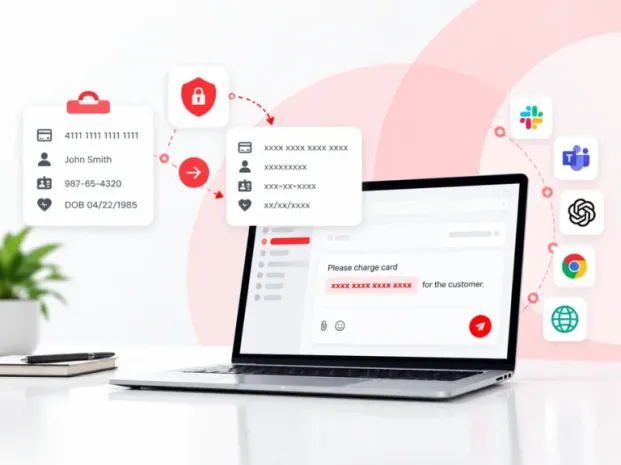
  • Catch card numbers, Social Security numbers, and health information on the clipboard.
  • Swap them for x’s before they reach a chat app, web form, or AI prompt
  • Keep your data protected while your team keeps working.
PII or PHI Redaction
700+ organizations trust CurrentWare's employee monitoring software for visibility & control
  • cushing
  • Mendota
  • nebf
  • idaho
  • viking
  • VES
  • Bristol-logo

Copied, pasted, leaked?

Every day, employees copy customer details, card numbers, and health information into chat apps, web forms, and AI prompts. Usually it’s an accident. Sometimes it isn’t. Either way, the data is gone before anyone can respond.

It happens in seconds. One paste into an unapproved tool and sensitive data has left your organization.

You can’t see it. Without visibility into copy activity, you won’t know where sharing attempts are happening.

AI tools raised the stakes. A prompt pasted into an AI assistant can carry customer records straight to a third party.

Set it up in 3 simple steps

Redaction is configured per group from the CurrentWare web console, in a few clicks.

Apply protection to the teams that handle sensitive data, such as finance, support, or HR.

Step 1. Select the group you want to protect

Turn on exactly what matters to you, from credit card numbers to passport numbers.

Step 2. Choose the data types to detect

From then on, matching data is redacted the moment it’s copied.

Step 3. Turn on redaction
Step 1. Select the group you want to protect Step 2. Choose the data types to detect Step 3. Turn on redaction

A clean copy, every time.

The sensitive value is swapped for x’s with the same character count. The message still makes sense, and the employee can finish the task without starting over.

Before Redact:
Please charge card 4111 1111 1111 1111 for the customer.

After Redact:
Please charge card xxxx xxxx xxxx xxxx for the customer.


Same sentence, same length, zero exposure.

What it catches, and where

Turn each data type on or off per group, and protect content wherever your team pastes it.

Data types it detects

Credit card numbers
Bank account numbers
Social Security numbers and SINs
NHS and other health numbers
Passports, driver’s licences, and other government IDs
Dates of birth
Names, contact details, addresses, and postal codes

Where it protects

Websites: web forms, chat widgets, and browser-based tools
Desktop apps: messaging and productivity applications
Cloud tools: SaaS platforms your team works in every day
AI assistants: prompts typed or pasted into supported AI/LLM tools

See where sensitive data travels, without storing it.

Log every redaction with the who, where, and when. The sensitive value itself is never saved, so your audit trail doesn’t become a new privacy risk.

Redaction dashboard

Total redactions, computers involved, and top apps and websites, by date.

Filterable activity log

Filter by data type, user, destination, device, and time.

Privacy by design

The original sensitive value and full copied content are never stored.

Excel & PDF exports

Activity records ready for audits, investigations, and offline review.

The right rules for every team.

Your billing team and your marketing team don’t handle the same data, so they shouldn’t share the same rules. Manage every PII/PHI policy centrally from the CurrentWare console.

Scope it precisely. Apply policies by user, group, computer, website, application, and data type.

Log, redact, or both. Choose whether matching content is simply logged or redacted before it can be shared.

Trust the sites you trust. Exclude approved websites, domains, URLs, and page patterns where redaction isn’t needed.

Off until you say so. Redaction is disabled by default, so nothing changes until you’re ready.

Less risk. More work done.

  • Lower risk of data leaks: Cut accidental and intentional sharing of sensitive data at the point of copy.
  • Stronger privacy compliance: Support your privacy, security, and data-protection obligations with real-time control and an exportable audit trail.
  • Visibility into sensitive copies: Know which users, devices, and destinations are involved before an incident becomes an investigation.
  • No blocked tools: Employees keep using the apps, websites, and AI assistants they need, with sensitive values removed.

Trusted by teams across the United States, Canada & the United Kingdom

Join 100,000+ professionals across 55 countries.

currentware-comes-with-citrix-compatibility Capterra awarded CurrentWare as Best Ease of Use software 2026 CurrentWare Named a top choice by Forbes Advisor for best employee monitoring software 2025 Top Rated Employee monitoring software by SoftwareWorld CurrentWare recognized as trusted vendor of epmloyee monitoring software by Crozdesk in 2026 GetApp recognized Currentware as software with best functionality & features 2025 G2 selected CurrentWare as High Performer (Fall 2024) in employee monitoring software category GetApp recognized Currentware as employee monitoring software Category Leaders in 2024 G2 selected CurrentWare as Easiest To Do Business With (Fall 2024) in user monitoring category CurrentWare recognized by Crozdesk as a Quality Choice Solution in 2026 SoftwareAdvice rated CurrentWare as Front Runners in 2024 CurrentWare recognized by SoftwareSuggest for Best Support in 2024 CurrentWare recognized as a FinancesOnline Rising Star CurrentWare recognized by Capterra for Best Value Award in 2022 CurrentWare recognized by SoftwareSuggest for Best Support in 2024 Crozdesk recognized CurrentWare as Leader in Employee Monitoring Software 2021

What customers say about CurrentWare

4.8 / 5 306 verified reviews on Capterra
  • Ease of use 4.7
  • Customer service 4.6
  • Features 4.6
  • Value for money 4.6

Across the whole CurrentWare Suite.

★★★★★ Capterra · Nov 2025

Productivity Monitoring Feedback

“Easy tracking of employee productivity. Seamless transition from person to person on the back end. Easy to update.”

Sean M Office Manager Marketing and advertising · 11-50 employees
★★★★★ Capterra · Nov 2023

BC is terrific.

“BC is fast and easy to deploy on different platforms. I also love the fact that it is open source and compatible with devices. The support team is incredible and responsive. The hardware is fast with up to date robust features.”

Pauline K Human Resources Manager Information technology and services · 11-50 employees
★★★★★ Capterra · Jan 2025

Making every files safe using AccessPatrol.

“It has been the most secure platform for me in keeping my files safe and secure from external threats and unauthorized storage devices. It is less costly. Its data protection feature has made me to confidently send or upload large data to others without having loosing any. Simple to set up for me and to use. Easy to block and track threats trying to gain access to my files since using this software. It also keep me up to date on various activities done on my files. It offers good customer care services.”

Folasola S Public Relation Specialist Management consulting · 51-200 employees
★★★★★ Capterra · Sep 2025

Self hosted Workforce insight software

“The agent is pretty efficient, and the reports provides are very helpful to the HR. We implemented this when most of our employees transition to work from home or hybrid. We compared few other softwares, and this was one which was cost efficient, and helped us implement without much overhead.”

Shibu B CTO Computer software · 51-200 employees
★★★★★ Capterra · Nov 2023

Enhancing Security and Productivity with BrowseControl

“BrowseControl has been a great tool for our organisation due to the enhanced security that it provides because of which we are protected from the phishing, the online threats by blocking access to potentially harmful websites. We can prioritise business-critical applications and control the bandwidth usage, which ensures that essential tasks are not affected by excessive non-work-related web traffic. The tool is very user-friendly and the filtering rules are highly customisable which is something that I really like.”

Verified Reviewer Not Displayed Insurance · 5001-10000 employees
★★★★★ Capterra · Jan 2025

Managing access to my files using AccessPatrol.

“I have been able to control the access to my files effectively since using this software which has made my files secure and safe from external threats and devices. I get notified of any external threats which allows me to easily block and track it down easily. Its very easy for me to use and made affordable for me. Its interface is so simple and it shows the detailed log activities on my files.”

Richard O Graphic Designer Marketing and advertising · 11-50 employees
★★★★☆ Capterra · Sep 2025

Great Tool for Remote Work Management

“I love having this available as most of our staff works remote. I typically only use it when there is an issue but having it available is great.”

Stormie P SVP – Director of Operations Insurance · 51-200 employees
★★★★☆ Capterra · Aug 2023

Threat free browsing environment facilitation tool

“The cyber attack response automated system safeguards our data from malware attacks. BrowseControl provides real-time insights on security situation from workloads. It has simple configuration procedure with other applications that saves time and resources for entire implementation process.”

James R Marketing Specialist Marketing and advertising · 11-50 employees
★★★★★ Capterra · Jan 2025

A secure platform for keeping my gaming files.

“I can effectively keep my game files safe and secure using this software without the fear of loosing it to hackers or other storage devices that i did not authorized. I can also get to manage the users i wish to gain access to my gaming files and also block or track suspicious threats or access to my files. Uploading and transfer of large files has also been made easy for me to do using this software when am developing various games. Simple to use and not costly to acquire.”

Chuks O Game Developer Computer games · 11-50 employees
★★★★☆ Capterra · Jul 2023

Reliable employee performance monitoring software

“This product has efficient database that collects data of all the organization employees. It enhances excellent management of time by sending alerts to the management on work processes.”

Gerald W Senior Backend Engineer Computer software · 51-200 employees
★★★★☆ Capterra · Aug 2023

Powerful network security control application

“It prevents members in the organization from visiting vulnerable areas in the internet. Browse control tests authenticity of browsers before operations. It provides alerts when there are data threats that can affect workflows.”

Bryson H Data Engineer Financial services · 5001-10000 employees
★★★★★ Capterra · Jan 2025

My Review On Accesspatrol

“It is a Unique Software that entails various features which helps to prevent Data breaches, it is able to protect our inventories from being copied from unauthorized users, attempt to access confidential Data it sends warning instantly to the admin, its customer service has been really supportive incase of any challenges, This software help protect our sensitive information and provide comprehensive activity log.”

Folarin A Sport Officer Sports · 11-50 employees

Solutions That Work Across Industries

Tailored controls that help you meet industry standards, boost efficiency, and protect sensitive data across remote and in-office teams.

Healthcare

HIPAA-ready controls to protect PHI with USB management and insider-threat visibility.

Government

Cybersecurity and policy enforcement aligned to NIST 800-171 and CMMC.

Legal Services

Keep client data protected, billable hours productive, and software costs in check.

Manufacturing

Productivity monitoring and internet visibility for both the shop floor and back office.

Financial Services

Enforce access policies and protect sensitive financial data with audit-ready trails.

Schools & Libraries

CIPA-compliant web filtering to qualify for E-Rate and keep students safe online.

Small Business Employee Productivity

Track unproductive web browsing and idle time to detect time-wasting

Built to Support Your Compliance Program

Discover how organizations use CurrentWare’s employee monitoring software to improve visibility, strengthen compliance efforts, and manage employee activity more effectively.

Pick & Plug Into Your Existing Stack

CurrentWare works alongside the identity, security, and directory tools you already use, including support for SAML, OIDC, and CEF standards. Cloud connectors are on the way.

  • Tested & supported
  • Generic standards (SAML, OIDC, CEF)
  • On the roadmap (Cloud)

  • Splunk
  • Ping Indentity.
  • Onelogin Logo
  • Microsoft-Active-Directory
  • Logrhythm
  • IBM-QRadar
  • Jumpcloud
  • Elastic
  • ManageEngine
  • Microsoft Entra ID
  • Okta
  • auth0
  • Unnamed

Keep reading

Articles

View All Blogs

See PII/PHI Redaction in action

Protect sensitive data the moment it’s copied, without slowing your team down. Book a demo or start your 14-day free trial of CurrentWare Cloud.
Start Free Trial Book a Demo
Watch Demos