What if the greatest security threat is not a virus, but an application an employee has been given permission to install without the IT team’s knowledge? From AI assistants and cloud storage to instant messaging, project management, and browser plug-ins, employees use and navigate across a dozen different applications each workday, from instantaneous communication and collaboration to preparing documents, completing projects, accessing business systems, and interacting with their data.
Though a blessing to workplace productivity in many respects, the digital ecosystem employees currently navigate also provides additional avenues for disruption, unsanctioned software, data leakage, and security risks.
With the explosive pace at which artificial intelligence is proliferating, the challenge in 2026 has multiplied further. Staff members are utilizing numerous AI-based applications and availing themselves of several AI-driven browser applications with minimal to no participation from the IT department. This phenomenon, which is gaining momentum and being referred to as Shadow AI, is the practice whereby a workforce leverages applications or services based on AI that have not been explicitly approved, reviewed, regulated or monitored in the organization.
A ‘harmless’ act such as simply uploading a document to an AI application, copying and pasting customer details into an AI chatbot, or downloading and installing an AI application onto a computer, could lead to sensitive business data being outside of its designated location and beyond organizational control.
For this reason, employee application blocking software has transformed from being merely a business tool to restrict employees from downloading games, websites, and/or entertainment applications, to form an essential component of a company’s comprehensive security, data protection, compliance regulation, Shadow IT, and productivity measure for an end-point device.
Using application blocking software allows an IT administrator to ensure that the users of the corporate computers are only able to run authorized programs. Further controls can be set to ensure users can only visit appropriate websites, prevent them from using distracting software while on the clock, and even implement distinct controls for different departments or employee types. Implementing controls on computer use can enable organizations to not overexpose their systems while allowing the IT administrator a clear view of what software is running.
This guide looks at what application blocking software is, the distinction between blacklisting and whitelisting applications, the rise in the importance of application control in 2026, the most common use cases and advantages and the key approaches an organisation can adopt to ensure employee productivity is not hampered and employees’ trust levels remain unaffected as we take this restrictive stance.
What Is Application Blocking Software?
Application blocking is a productivity and security tool which empowers IT administrators to control specific applications, executables, websites, or classifications of applications on the organizational controlled devices. Instead of running applications without restrictions, admins can implement policies that specify which applications are allowed or denied to end users.
For example, an organisation may restrict:
- Gaming applications during working hours
- Peer-to-peer and torrent applications
- Unauthorized messaging software
- Unapproved remote-access tools
- Consumer file-sharing applications
- High-risk browser extensions
- Unapproved AI applications
- Streaming applications that consume excessive bandwidth
- Applications that create unacceptable security or compliance risks
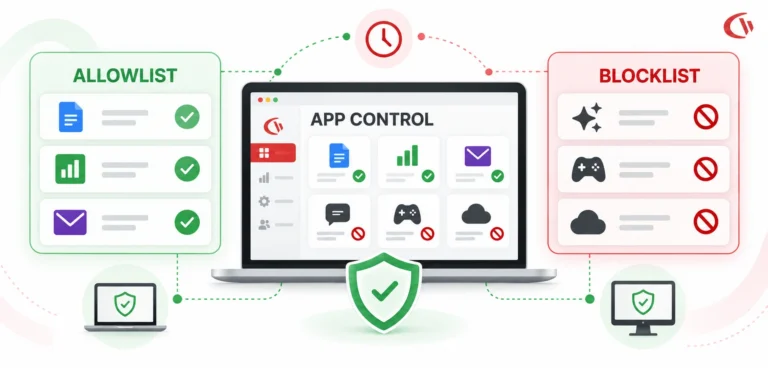
Modern application control follows two approaches: Blocklisting and Allowlisting
Blocklisting: The Default-Allow Model
Applications can run unless specifically included on a list of disallowed applications, in a model called blocklisting ( or blacklisting). IT personnel would compile a list of applications known to be harmful, unwanted, distracting, or generally not to be allowed in the IT environment of the organization, and compile this into a blocklist. Blocklisting could be set up for gaming applications, torrent applications and similar ones.
Ease of use is the biggest advantage. There is no need for the IT personnel to approve every application on every machine in the network, and regular business applications can run as usual. This method works well for organizations using a “standard business” software set. Its weakness is that it can only prevent the running of software which is already deemed too dangerous for use; any new applications will slip through the net.
Allowlisting: The Default-Deny Model
Application allowlisting, also known as application whitelisting, does the opposite. Instead of asking, “What applications should we block?” IT asks, “What applications should users be allowed to run?” Everything else is blocked by default.
The NIST Guide to Application Whitelisting (SP 800-167) describes whitelisting by using a list of approved applications, software and other executable code to control what can run on the host. It may help prevent the execution of malicious software and unapproved or unlicensed applications. In a default allowlisting system, a program may be allowed based on one of the following identifiers: its publisher, its digital signature, a file hash, the path to the executable, or another attribute used to identify a program.
The primary benefit of the technique is that it provides tighter security control than blacklisting. A new malicious executable cannot execute just because IT has not yet figured out that it exists and needs to be added to the deny list.
The downside to this is complexity: patches and upgrades can break the whitelist, or necessitate changes to the whitelist policy; the same is true when new programs need to be used. NIST also points out the overhead that the system imposes: you may need to update the whitelist based on patching your applications or installing new programs.
Application Blocking vs. Application Allowlisting: Quick Feature Comparison
| Feature | Blocklisting | Allowlisting |
|---|---|---|
| Security model | Default allow | Default deny |
| What is restricted? | Known prohibited applications | Everything not explicitly approved |
| Administration | Easier | More demanding |
| Employee flexibility | Higher | Lower |
| Protection against unknown applications | Limited | Stronger |
| Best suited for | General workforce | High-security environments |
| Risk of overblocking | Lower | Higher |
| Zero Trust alignment | Moderate | Strong |
The Recommended Approach: A Phased Hybrid Strategy
Most companies do not have to choose solely between blacklisting and allowlisting. A balanced, phased, and hybrid approach is a good way to proceed. When you audit application usage within an organization, you know which applications are a business imperative, which do not need to be added at this stage and can be put on an allowlist, and which pose unnecessary security risks and must be denied. You can then apply different levels of controls to different groups.
For example:
- Standard office users can operate under a broad blocklist.
- Finance users can receive stricter application and website restrictions.
- Developers can receive specialized policies that permit development tools and scripting environments.
- High-security systems can operate under strict allowlisting.
This approach reduces unnecessary disruption while allowing IT to apply stronger controls where the risk is highest.
Why Is Application Blocking Important in 2026?
The role of application control is now growing due to three major issues organizations are facing: cybersecurity, productivity, and compliance:
1. Mitigating Shadow IT and Shadow AI Risks
Shadow IT has always been an issue for the IT department. People download or access the software they want without the IT department’s knowledge, as they believe it helps them get their job done more efficiently. With the introduction of Cloud AI services, the scale has increased exponentially because people no longer have to download desktop applications, and can access them through their browser.
This problem has now extended to Shadow AI.
Employees may now use generative AI to summarize documents, draft text, analyze data, develop code, build presentations, or just about anything else imaginable. Though this is certainly helpful in the way people work, sending sensitive data to unauthorized AI service providers introduces a substantial amount of privacy risks.
Recent research demonstrates how quickly this risk is developing:
Research from 2026 on shadow AI by the Cloud Security Alliance states that 89% of company AI usage is outside the view of IT security teams, and they report that generative AI accounts for 32% of data traffic from company to private during their study. According to research, 80% of workers use unauthorized AI tools in the workplace.
According to IBM’s 2025 Cost of a Data Breach Report, data breach costs were ~$670,000 more for organizations with significant Shadow AI involvement compared to those with limited or no Shadow AI involvement. Further, IBM indicates that 63% of organizations surveyed had no AI governance policy in place or were developing one.
IBM’s 2026 report suggests that the overall threat landscape is growing more difficult. The average global cost of a data breach was $4.99 million, with AI-based attacks growing by 56 per cent year over year.
2. Boosting Employee Productivity
Not every application risk is directly related to cybersecurity. There will be an application which would not cause an issue; rather, it would waste your time, attention, network bandwidth and software budget without fulfilling any business needs. Those applications can be live-streaming services, games, social media applications, or consumer messaging apps, as well as other non-work-related applications that could be a distraction when accessed during working hours.
Application blocking would prevent the use of specific applications on the network that have a policy and could be allowed or disallowed at specific times, e.g., during breaks or outside working hours, but would not block the apps at all times.
The goal should not be to avoid every type of individual use. Instead organizations could lay down specific limitations; e.g., access to a particular website could be allowed on lunch break while being disallowed during working hours. Application usage audits can also show that the applications the company pays for are rarely used by employees.
A recent analysis of software asset management by CurrentWare estimated that a company could waste $34bn on rarely used software in a single year.
This represents another advantage derived from auditing application usage: IT teams may find ways to increase their software acquisition and licensing decisions-it’s based on true employee usage rather than speculation.
3. Supporting Regulatory Compliance
Application control can benefit any organization working within tight security or privacy requirements. Industries, which often fall within strict guidelines or have a large volume of personal and/or confidential data (e.g., healthcare, finance, government, defense), need stricter controls around how software is run, what data is accessible and to whom.
An organization that holds patient data may prohibit the use of consumer file transfers while storing confidential employee information on unsecured portable media or utilizing unauthorized programs to transfer personal and patient data.
Organizations that handle finances may be worried about sensitive financial information leaving with an employee with unauthorized sharing/file transferring software, or by simply leaving the organization’s network remotely via use of other insecure applications such as unauthorized or unsupported remote-access programs.
Regulations such as HIPAA, GDPR, CMMC cannot automatically meet organization specific requirements, even though the application controls in place may assist in the organization’s efforts to meet government requirements by providing access controls, auditable functions, and overall enhanced security.
Popular Application Blocking Use Cases for Organizations
Application blocking can be applied across a wide range of business scenarios, such as preventing unauthorized software. Employees may install applications that have not undergone IT or security review. Blocking unauthorized applications reduces the number of uncontrolled programs operating on corporate endpoints.
Controlling Workplace Distractions
Companies can restrict access to gaming, streaming services, social media applications, and other distracting apps during the workday.
Reducing Security Risks
Applications with known vulnerabilities or with origins that raise concerns can be restricted to avoid exposure.
Controlling Shadow AI
IT has the ability to block access of unauthorized applications such as a desktop AI application and restrict access to some specific AI services. A separate approval list of enterprise AI tools also needs to be maintained.
Protecting Sensitive Departments
Teams that handle sensitive data, such as finance, HR, legal, health, and executive teams, might need tighter controls.
Managing Bandwidth
Applications that are high on the network and consume significant bandwidth will impact business-critical applications. It may be necessary to stop unnecessary applications to conserve available network resources.
Supporting Software Asset Management
Knowing which programs are actively used allows the IT department to manage licenses more efficiently and reduce unnecessary costs based on usage patterns.
Best Practices for Implementing Application Control
Blocking applications is not just about having a list of apps and clicking block! Policies should be designed around risk, business, job roles and transparency.
1. Audit Before You Block
The first step should be understanding the existing application environment.
Before introducing restrictive policies, determine:
- Which applications employees currently use
- Which applications are business-critical
- Which applications are rarely used
- Which applications create security risks
- Which applications consume excessive bandwidth
- Which applications are unauthorized
- Which applications require special treatment
This baseline prevents IT teams from accidentally blocking legitimate tools. Application monitoring can therefore serve as the foundation for application control.
2. Use Allowlisting for High-Risk Environments
Allowlisting becomes a necessity when any cost associated with unauthorized software execution is sufficiently high. NIST guidance on application whitelisting defines it simply as “A software technology that enables an authorized list of applications to run and blocks unauthorized applications from execution,” and high-security environments would certainly want to use such default-deny behaviour. Allowlisting, however, requires planning.
Security operations need procedures for which applications to approve for the allowlist, how to handle updates, procedures for emergency access in a worst-case scenario, and how to address acceptable exceptions.
Without that process, tight security controls can be difficult to implement.
3. Implement Role-Based Access Control
A single application policy rarely works for an entire organization. Role-based policies allow organizations to protect sensitive departments without unnecessarily restricting everyone else.
Different employees have different responsibilities.
Marketing
Staff in marketing roles will have justified demands for social media facilities, advertising providers, image editors, video applications and content creation platforms.
Finance
Finance departments may need accounting platforms and financial systems; at the same time, they are facing stricter limitations on consumer file-sharing services.
IT and Developers
It might be appropriate to provide developers with command-line utilities, scripting applications, terminals, administrative application, development frameworks, package manager etc that are clearly unsuitable for use by the general user.
Human Resources
HR teams handle employee information and may therefore require additional restrictions around file transfer, external storage, and unauthorized cloud applications.
4. Avoid Overblocking
An employee can compromise a control if they view it as unreasonable. If employees can’t access the tools they need to complete required tasks, they can circumvent controls through device substitution or informal arrangements or develop novel security risks. Better practices include establishing clear policies, offering an exception process and educating employees. Control application blocking should be framed as part of creating secure and productive work-arounds-not as an opportunity to track every employee’s every movement.
5. Use Time-Based Policies
24-hour blocking may not be necessary for all applications. For example, you could apply policies to block media or social networking applications during core business hours, but allow the applications to be used during scheduled breaks. Time-based policies allow for more granular control, and can help ease employee concerns. Time-based policies are particularly helpful for productivity rather than security measures.
6. Communicate the Purpose Clearly
Transparency is essential when application control is combined with employee monitoring. The objective is to build a security culture rather than create an environment where employees feel constantly watched.
Employees should understand:
- What is being restricted
- Why it is being restricted
- When restrictions apply
- What information is being monitored
- How exceptions can be requested
- Who can access monitoring information
Application Blocking Software and Employee Trust
The mechanisms to block applications are only a component of the deployment success story. You will need a defined governance structure. A good application-control policy will: detail where applications are allowed/disallowed, and procedures for any exceptions; who is responsible for managing the policy, and how often the policy will be reviewed.
Policy should always be reviewed, because an application deemed unsuitable today might be critical tomorrow, and even once-approved applications become risky when: an security incident occurs, ownership of an application is transferred, or when application risk increase (due to newly discovered exploit, or a changing policy).
Therefore, application control is an ongoing process, not a fixed configuration.
Securing the Workforce with CurrentWare
For businesses that require a consolidated platform, IT admins can benefit from CurrentWare’s suite that gives IT professionals control over employees computer environment, internet, applications and devices.
BrowseControl for Application and Web Filtering
BrowseControl can be used to control applications and websites across managed endpoints. Administrators can use application controls to restrict specific programs and apply website filtering policies by category.
For organizations that need more granular application policies, BrowseControl provides application blocking capabilities based on application names or file hashes, helping administrators prevent an executable from simply bypassing a rule by being renamed.
Its category-based web filtering capabilities can also help organizations control access to groups of websites rather than manually maintaining individual URL lists.
BrowseReporter for Application Usage Auditing
Before blocking applications, organizations need visibility into what employees are actually using.
BrowseReporter provides reporting capabilities that can help IT teams understand application and web usage.
This creates a practical workflow:
Audit → Analyze → Classify → Create Policies → Monitor → Review
Instead of guessing which applications should be restricted, IT administrators can make decisions based on actual usage patterns.
AccessPatrol for Hardware Control
Application control addresses software, but sensitive data can also leave an organization through removable devices.
AccessPatrol extends endpoint control to removable storage and USB devices. This can help organizations control unauthorized USB devices and monitor file transfers, adding another layer to an organization’s data-loss prevention strategy.
Together, application filtering, web filtering, usage auditing, and hardware control can provide a more comprehensive approach than relying on application blocking alone.
Conclusion
The increasing dependence that organizations have on digital applications means that controlling what employees can access and execute has become a crucial aspect of modern IT security. In 2026, the problem has expanded beyond time-wasting distractions of games and social media. The proliferation of Shadow IT and the emergence of Shadow AI have expanded the application control challenge on a much grander scale.
IBM’s 2026 Cost of a Data Breach report documented $4.99m as the average global cost of a data breach, while the number of AI-fueled malicious data breaches rose 56% compared with the previous year. The average cost of a data breach in India in 2026 stands at 25.5 crore, compared to 22 crore in 2025. IBM research has also emphasized the monetary implications of Shadow AI; companies which had data breaches because of unsanctioned AI tools incurred $670,000 in data breach costs.
However, this control should not translate into simply blocking every single possibility. The best approach combines visibility into which applications are running, a risk-based policy implementation system, role-based access for employee and executive use, strategic allowing and blocking as appropriate, open communication, and regular policy assessment and tweaking.
When dealing with typical employee and non-technical positions, blocklisting applications may be the most practical way to eliminate predictable distractions and unwanted apps. However, for critical security systems, allowlisting applications is important in creating robust default-deny security. A blend of blocklisting for the common workplace and allowing for those in security-critical positions may prove best.
Most importantly, application blocking software should not get in the way of how people want to work in the modern workforce but rather reinforce it. Properly implemented, this software can help reduce Shadow IT and Shadow AI, and protect an organization’s critical data by mitigating malicious software, improving workforce efficiency, controlling software usage, and helping to create a more secure work environment without needlessly restricting employees.