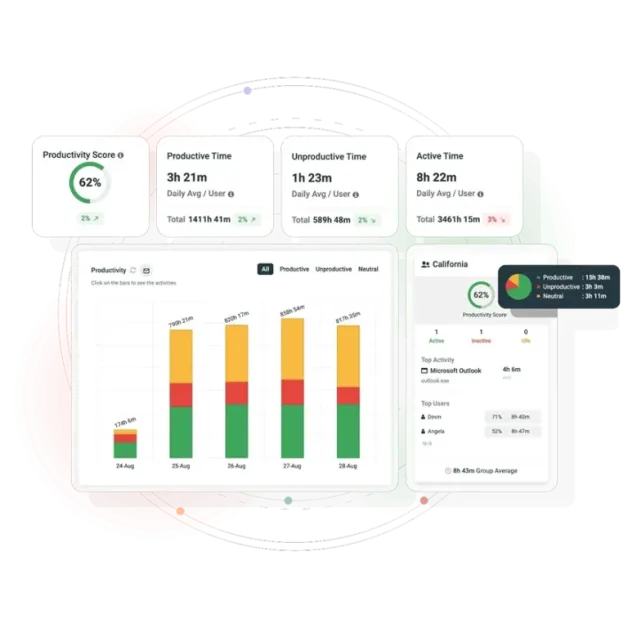
Employee Productivity Monitoring Software That Shows Where the Hours Actually Go
BrowseReporter is an employee productivity tracker for remote, hybrid and in-office teams. Track active versus idle time, application and web usage, and workforce utilization, then act on it. Deploy on-premises, in the cloud, or hybrid.
- Real-time productivity scoring across active, idle and focused time
- Compare productivity across teams, individuals and work locations
- Run monitoring in stealth or transparent mode to match your policy
- SOC 2 and ISO 27001 certified. From $12/user/month*
Trusted by 100,000+ professionals in 55 countries
No credit card required · 14-day free trial · For on-prem pricing, Contact Sales
Over 700 leading government agencies, healthcare organizations, and professional services firms already use CurrentWare.
Real Results. Measurable ROI
Solve Your Productivity Challenges with BrowseReporter
Full Workforce Visibility
See how employees spend their time across applications, websites, and work sessions whether they’re remote, hybrid, or in-office. Our tool gives you the visibility to understand productivity patterns, uncover inefficiencies, and manage performance with confidence.
Privacy-Focused Monitoring
Build accountability without compromising trust. BrowseReporter supports responsible monitoring with configurable settings and secure access controls, helping your organization align workforce visibility with privacy expectations and compliance needs.
Actionable Productivity Insights
Go beyond activity logs and uncover the trends behind team performance. BrowseReporter helps you identify distractions, compare productivity across teams and work environments, and make smarter decisions to improve efficiency.
Proactive Risk Reduction
Gain earlier visibility into suspicious behavior and policy violations before they become larger problems. BrowseReporter helps organizations reduce risk, strengthen oversight, and support a more secure, compliant workplace.
Behaviour Analytics
Identify Patterns, Not Just Numbers
Employee activity logs will tell you what the employees are doing but pattern analysis will tell you how often they do it, so you can figure out how to break the patterns. BrowseReporter helps you track how your team spends time online, so you can spot what’s wasting it.
- Find out how the highest performing teams work and use the insights to set benchmarks for other teams.
- Discover the workflow bottlenecks before they affect employee productivity
- Use utilization data to gauge over-allocation, employee burnout, and manage workload effectively
- Eliminate guesswork and benchmark your current performance against your own historical baselines.
Core Capabilities
Monitor Employee Computer Activity With Productivity Tracking Software
CurrentWare’s BrowseReporter is an employee productivity monitoring software built for businesses managing remote teams, hybrid workforces and in-office employees. Track productivity with real-time activity monitoring, automated productivity scoring and comprehensive reports, without micromanagement.
Employee Tracking software: Track Idle vs Active Time
CurrentWare’s computer activity reports let you see if an employee was actively using their computers. You can even see if a specific website was actively used or simply running in the background.
- Monitor employees’ internet usage based on active time, idle time, and total time to see how long they are away from their computers
- Track active and idle times of employees based on how long it has been since they have used their mouse or keyboard
- Start tracking employee idle time after their computer has been inactive for a set period of time
Employee PC Monitoring: Screenshot Capture
See exactly what your employees are doing on their computers. Automatically capture screenshots when specific websites or applications are used.
- Capture high-resolution and compressed screenshots of your employee’s desktops
- BrowseReporter can be configured to automatically delete older screenshots to reduce storage requirements
- Screenshots are tagged with the website or application that was being used, the time, and the name of the computer
Software for Tracking Employee Productivity with Detailed Reports
BrowseReporter’s detailed employee productivity reports make tracking productivity simple and intuitive.
Equip managers with the activity data they need to understand how in-house and remote team members are spending their time at work.
- Find out if employees are wasting work time on social media, computer games, and other distractions
- Track the productivity levels of your entire workforce, a specific team, and individual employees
- Compare productivity between time spent in-office vs working remotely to provide flexibility while maintaining accountability
Office Computer Monitoring: Track Login & Logout Sessions
Combine idle time tracking with logon history reports for a full picture of activity levels.
- Audit logon and logoff times to see how long your employee’s are working at their computers
- Get a record of each time your employees startup, sleep, and shutdown their computers
- Verify that employees working from home are active during work hours and see when they are taking breaks
Workforce Productivity Software: Location-Based Insights
The Location Insights dashboard helps leaders make data-driven decisions about remote, in-office, and hybrid work.
Promote flexibility without sacrificing accountability with insights into how location flexibility affects employee engagement and productivity.
- Compare productivity scores between groups of in-office, remote, and hybrid employees to gauge the impact that location flexibility has on employee engagement
- See how much of your workforce is working in-office, remotely, or hybrid in a given timeframe
- Review productivity trends to decide if frequently abused distractions need to be limited with BrowseControl’s URL filter
Employee Productivity Monitoring Software: Utilization Rate Analysis
Get visibility into workload distribution and productivity through expected work hours to improve efficiency, reduce costs, and foster a healthier workforce.
- Optimize Resource Utilization – Ensure teams are neither overworked nor underutilized for better capacity planning.
- Boost Productivity & Cut Costs – Identify inefficiencies, streamline projects, and improve operations.
- Enhance Employee Well-Being – Detect burnout or disengagement early and take proactive action.
Four Kinds of Team, One Source of Truth
Remote & Hybrid Teams
See how work gets done across teams without being too intrusive. Assess employees on their output, not their presence.
Scaling Companies
Your productivity programme should grow with your headcount, not buckle under it. Scheduled reports land on their own, so nobody loses a Friday afternoon chasing numbers.
Performance Reviews
Reviews become easier, fairer, and more just when you have data as evidence. Swap assumptions with clear, objective insights.
Regulated Industries
Stay audit & compliance- ready with activity trails, especially in regulated industries like healthcare, finance, and legal.
Fits the Stack and the Policy You Already Have
On-Premises, Cloud or Hybrid
Choose a deployment method that suits your existing infrastructure- host on-premise, host on the CurrentWare cloud, or go hybrid. Stay in complete control of your data residency, unlike a cloud-only infrastructure.
Stealth or Transparent Agent
Experience privacy-first monitoring controls: Monitor only what’s required and when required. CurrentWare is configurable per team and per department.
SIEM and Security Tooling
Enter activity data into your existing security stack through SIEM integration, and easily pair it with web filtering, device control and DLP from the same console.
Scheduled Reporting
Schedule productivity reports emails to team managers, so the right insight reaches the respective decision makers without anyone logging into a console.
Among organizations that don’t restrict internet activity, 58% of employees spend the equivalent of 26 workdays per year on websites unrelated to their job
With CurrentWare’s internet activity monitoring and restriction tools you can prevent the abuse of distracting websites.
How CurrentWare’s Productivity Monitoring Fares Against Cloud-Only Tools
When buyers compare productivity tools, three things make the shortlist: how it’s deployed, whether the pricing is upfront, and how much control they actually get. Ensure you verify all every cell against current competitor documentation before making the final call.
| Evaluation factor | CurrentWare | Typical cloud-only tools |
|---|---|---|
| On-premises deployment | ✓ Full on-prem, cloud or hybrid | Cloud only |
| Data residency control | ✓ Data stays in your infrastructure | Vendor-hosted |
| Published pricing | ✓ From $12/user/month* | Quote on request |
| Web filtering included | ✓ BrowseControl in the same suite | Separate product or add-on |
| USB and device control | ✓ AccessPatrol in the same suite | Rarely included |
| Stealth and transparent modes | ✓ Configurable per team | Varies |
| SOC 2 and ISO 27001 | ✓ Both certified | Varies |
Solutions That Work Across Industries
Tailored controls that help you meet industry standards, boost efficiency, and protect sensitive data across remote and in-office teams.
Healthcare
HIPAA-ready controls to protect PHI with USB management and insider-threat visibility.
Government
Cybersecurity and policy enforcement aligned to NIST 800-171 and CMMC.
Legal Services
Keep client data protected, billable hours productive, and software costs in check.
Manufacturing
Productivity monitoring and internet visibility for both the shop floor and back office.
Financial Services
Enforce access policies and protect sensitive financial data with audit-ready trails.
Schools & Libraries
CIPA-compliant web filtering to qualify for E-Rate and keep students safe online.
Small Business Employee Productivity
Track unproductive web browsing and idle time to detect time-wasting
Built to Support Your Compliance Program
Discover how organizations use CurrentWare to improve visibility, strengthen compliance efforts, and manage employee activity more effectively.
Pick & Plug Into Your Existing Stack
CurrentWare works alongside the identity, security, and directory tools you already use, including support for SAML, OIDC, and CEF standards. Cloud connectors are on the way.
- Tested & supported
- Generic standards (SAML, OIDC, CEF)
- On the roadmap (Cloud)
See What Our Customers Have to Say
Frequently asked
Your Questions, Answered
-
Employee productivity tracking software works by collecting employee activity data from employee devices and transforming it into productivity insights and operational analytics. Organizations can analyze application usage, website activity, active working hours, idle time, and productivity patterns through centralized dashboards and reports.
-
Employee productivity monitoring software helps organizations analyze workforce activity, track operational efficiency, and improve productivity across remote, hybrid, and office teams. The software provides insights into application usage, active time, idle time, productivity trends, and workforce utilization to help businesses optimize performance and improve operational visibility.
-
Organizations commonly measure employee productivity using metrics such as active time, idle time, application usage, website activity, workforce utilization, productivity trends, task completion behavior, and operational efficiency reports.Organizations commonly measure employee productivity using metrics such as active time, idle time, application usage, website activity, workforce utilization, productivity trends, task completion behavior, and operational efficiency reports.
-
Yes. Employee productivity software is commonly used to monitor remote employee activity, productivity trends, application usage, and operational performance across distributed teams. Organizations use remote workforce analytics to improve visibility, accountability, and workload management.
-
Employee productivity monitoring software is generally legal in many regions when organizations implement transparent policies and comply with workplace privacy regulations. Businesses should communicate monitoring practices clearly and ensure compliance with local labor laws and privacy requirements.
-
Productivity monitoring focuses on workforce analytics, operational visibility, and workflow optimization, while invasive surveillance focuses excessively on direct observation of employees. Modern productivity platforms like CurrentWare prioritize transparency, productivity insights, and ethical monitoring practices.
-
Industries including healthcare, financial services, education, government, legal services, technology, and call centers commonly use employee productivity software to improve operational visibility, compliance reporting, and workforce efficiency.
-
Yes. Productivity analytics helps organizations identify workflow bottlenecks, reduce time waste, optimize resource allocation, and improve workforce planning. Businesses use these insights to improve operational efficiency and support better decision-making.
-
Active time tracking measures periods of keyboard and mouse engagement while idle time tracking captures inactivity beyond a set threshold (typically 3–5 minutes). Together they reveal the gap between hours logged and hours actually worked, helping managers spot workload imbalances, burnout, or scheduling issues.
-
Yes. Most employee productivity platforms generate productivity reports, workforce analytics dashboards, utilization reports, application usage reports, productivity trend analysis, and executive summaries to support operational planning.
-
Yes. Productivity monitoring platforms help organizations manage hybrid work environments by improving visibility into remote and in-office productivity trends, workforce utilization, and operational performance.
-
Yes. Organizations often combine productivity monitoring with web filtering software, data loss prevention software, insider threat detection, and compliance monitoring tools to strengthen both productivity and security.
-
Modern employee productivity analytics platforms support configurable policies, transparency practices, role-based monitoring, and privacy-focused implementation strategies designed to balance operational visibility with employee privacy expectations.
-
It depends on what you’re solving for basic time tracking, detailed activity analytics, web filtering, or USB control. The best platforms combine accurate reporting with employee-visible policies, compliance features and role-based access. CurrentWare covers all four in one suite, which is why it’s a strong fit for IT-led monitoring programs.
-
Employee productivity monitoring software is typically subscription-based and priced per user. Pricing typically runs $6–$25 per user per month, depending on team size, features, and whether you deploy in the cloud or on-premises. Basic time trackers sit at the low end; full activity-monitoring suites with reporting, web filtering, and USB control sit higher. CurrentWare offers $12/user/month* (For on-prem pricing, contact Sales) licensing with both deployment options.
Still have questions?
Talk to a CurrentWare specialist who has deployed monitoring at 200+ law firms.