CurrentWare version 6.0.2 is here! Here are the most exciting features that we'd love to highlight.
- Data Dashboards for BrowseReporter—Review your organization’s user activity data straight from the web console. Easily see aggregated data of your entire workforce or drill down to individual activity metrics in just a few clicks.
- Reclassify Categories Locally for BrowseControl—Reclassify website content categories for BrowseControl’s Category Filtering feature. Assign websites to categories that best reflect their use in your business.
- Quality of Life Improvements—Duplicate operator accounts and various bug fixes and optimizations.
- Windows 11 Compatibility—The CurrentWare development team has been hard at work to provide you with our endpoint security and user activity monitoring software for Windows 11.
Learn more about the changes in version 6.0.2 in the release notes
Learn More About CurrentWare | Click Here for Upgrade Instructions
Data Dashboards for BrowseReporter
BrowseReporter’s user activity dashboards give you the insights you need to identify productivity leaks, detect excessive bandwidth usage, and improve business intelligence.
- Review your organization’s user activity data straight from the web console; no need to generate reports!
- Easily see aggregated data of your entire workforce or select specific groups/users to populate the dashboard with their data
- Use the activity log to review, sort, and export raw user activity data as PDF or CSV files. Customize the columns that appear in the activity log to focus on the metrics that matter most.
Reclassify Categories Locally for BrowseControl
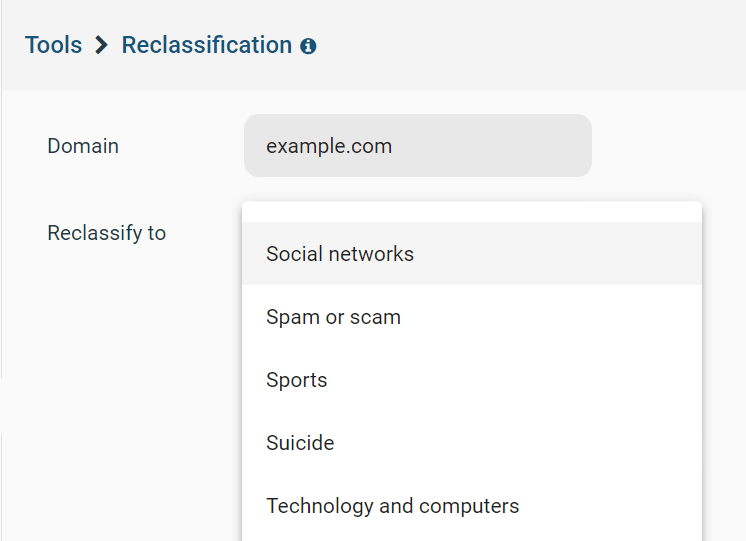
In version 6.0.1 we introduced a reclassification tool that allowed you to locally change the default category displayed for a given website in BrowseReporter’s reports.
With the version 6.0.2 update, the new website content category classification will be reflected in both BrowseControl’s category filtering feature and BrowseReporter’s website content category reports.
For example, the default category for Discord.com is Chats. If you would prefer that it be classified as Computer Games in BrowseControl and BrowseReporter, you can make that change for your deployment with this feature.
In addition to providing more granular customization options for your environment, this feature provides a fallback in the event that a website is misclassified by BrowseControl’s category filter.
NOTE: If you find a website that is incorrectly classified you can submit it here to help correct the misclassification in future releases.
Quality of Life Updates

- Added the ability to copy/clone/duplicate Operator accounts for easier management when creating accounts
- CurrentWare version 6.0.2 has been tested and verified to work with Windows 11. For full details, see our system requirements page.
- 25+ bug fixes and optimizations
Conclusion
CurrentWare version 6.0.2 is available now. To get access to the latest features, you will need to update your CurrentWare deployment. If you’re new to CurrentWare you can get started today with a free 14-day trial for CurrentWare version 6.0.2.
Learn More About CurrentWare | Click Here for Upgrade Instructions
See More CurrentWare Product Updates:
- Improved Reporting, AD Security Groups, Category Descriptions, and More! (v10.0.2)
- UI/UX Updates, Performance Enhancements, QoL Improvements (v10)
- Live Screen Monitoring, Audit Logins, DLP Upgrades, and More! (v9.0.2)
- USB Access Codes, Security Enhancements, and More! (v9.0.1)
- Full Historical Release Notes