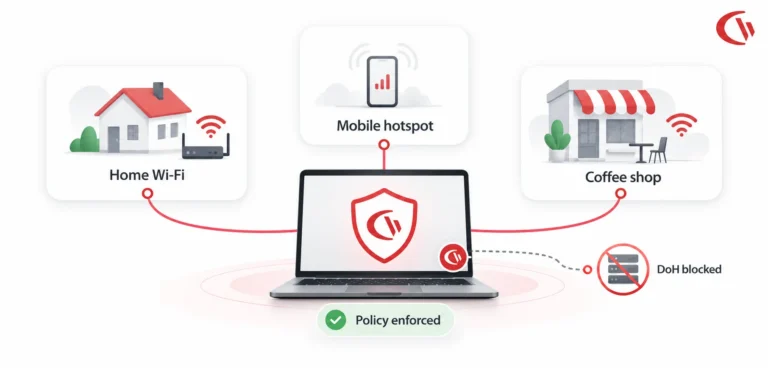
Today, laptops are rarely connected to the corporate network – more often they’re connected to wifi at home, mobile wifi on the road, and a coffee shop hotspot the IT team never set up. Office perimeter firewalls have nothing to analyze when the device leaves the building, and cloud DNS filtering doesn’t work unless the DNS traffic actually reaches the cloud. That’s why more IT teams are moving web filtering to the device itself.
The stakes are high. So among organizations with no filtering, 58% of employees use unproductive websites for four or more hours a week-26 days a year according to a survey of more than 700 IT professionals conducted in North America and Europe. And when Spiceworks asked IT teams why they filter the web in the first place, security, not productivity, topped the list – 90% cited malware protection, 84% cited blocking inappropriate sites, and 83% cited preventing unacceptable user behavior, well ahead of the 45% who filtered purely to boost output.
What is Next-Gen Web Filtering?
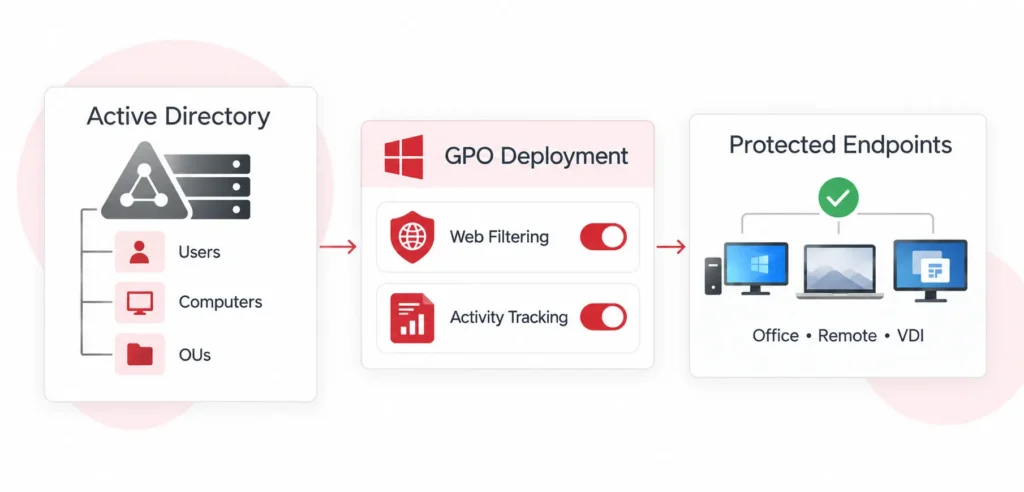
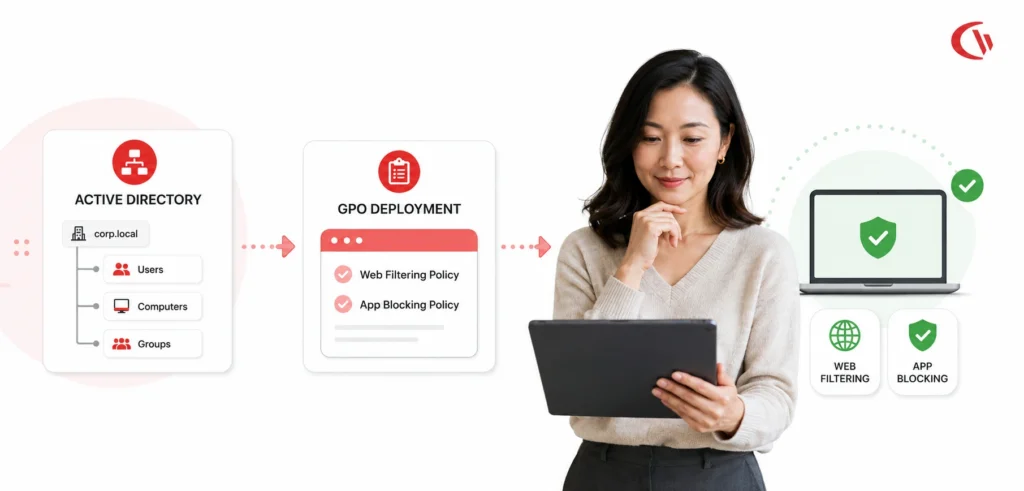
Next-generation web filtering applies policies at the device level via an endpoint agent, not a network firewall or a DNS server that the laptop might not even ever visit. Since the policy lives on the endpoint, restrictions go wherever that device goes- home Wi-Fi, airport Wi-Fi, mobile hotspot; it is irrelevant.
Traditional filtering is based on a static perimeter: traffic goes through an IT-managed corporate firewall or DNS resolver, so blocking a category or an individual site comes down to blocking that one point of control. Remote and hybrid work challenged that model.
Remote and hybrid work crushed this idea. Laptops that may spend a week at a client’s guest network, then another at a hotspot on a phone network, rarely flow through a network that’s predictable and in which you can impose rules, so a perimeter filter has no fixed place to sit. Enforcing in the device itself, however, is a fixed point. This is becoming increasingly important with browsers adopting encrypted DNS by default, and that brings us to the biggest blind spot of legacy filtering.
The Threat of DNS-over-HTTPS (DoH) Bypass
DNS-over-HTTPS (DoH) encrypts a DNS query with standard HTTPS on port 443 – just as you would normally surf the web. You can already use it in Chrome, Edge and Firefox (and some browsers enable the feature by default). To the DNS filtering service at your network level, encrypted DoH requests look just like any other HTTPS request, nothing to block here.
Carnegie Mellon’s own Software Engineering Institute has shown this isn’t just an academic concern; people have used DoH to get around DNS monitoring, to run command-and-control traffic, and to exfiltrate data exactly because it’s indistinguishable from normal encrypted browsing on the network.
The SEI’s own proposed solutions start by disabling DoH on managed endpoints and blocking known DoH resolvers, both of which rely on control of the endpoint’s network (a fair bet for a company office LAN, but tricky once the laptop is elsewhere) An agent-based solution, by contrast, avoids that reliance altogether by blocking the request before it even leaves the machine, meaning an employee can’t just flip on “Secure DNS” in their browser and get around it.
Dynamic Category Enforcement vs. Static Lists
Static blocklists can’t keep up with an internet where thousands of new domains appear daily. Category-based filtering solves this by classifying sites such as social media, streaming, gambling, and generative AI against a continuously updated database, so a brand-new domain still gets sorted correctly the first time an employee tries to visit it.
Malware and adult content remain the two categories nearly every organization blocks outright: NordLayer’s research puts that figure at 72%, with gambling sites a distant second at 43%. Shadow AI has become one of the fastest-growing categories to watch alongside them. DNSFilter’s 2025 traffic analysis found organizations increasingly blocking specific generative AI domains as they try to rein in unsanctioned tool use, and Netskope’s Cloud and Threat Report: 2026 reports that 9 in 10 organizations now block at least one GenAI application outright, after the average company recorded 223 GenAI-related data policy violations a month over the past year.
Software to Block Social Media on Work Laptops During Business Hours
The most effective method is endpoint category enforcement combined with time-based scheduling, which enforces the policy during work hours and is automatically lifted when outside of business hours. CurrentWare’s BrowseControl, for example, enables administrators to restrict access to social media platforms such as Instagram, TikTok, and Reddit between specified hours and allow access during lunch breaks and evenings.
Implementing time-based internet access requires a clear deployment structure:
- Define the Policy: Spell out, in an acceptable use policy, exactly when personal browsing is and is not permitted.
- Configure Category Blocks: Enable the “Social Networking” category block within the central management console.
- Set the Internet Scheduler: Map the restriction windows to match corporate operating hours.
- Enable Custom Redirects: When an employee attempts to access a blocked site during working hours, the system should display a customized block screen reminding them of the company policy.
How to Stop Employees from Watching YouTube All Day on Company Computers
WorkTime’s 2026 computer-usage research, based on data from thousands of monitored companies, found YouTube is the single most common unproductive website worldwide, ranking #1 in five of the six countries. This fact alone makes YouTube a primary candidate for bandwidth and productivity management.
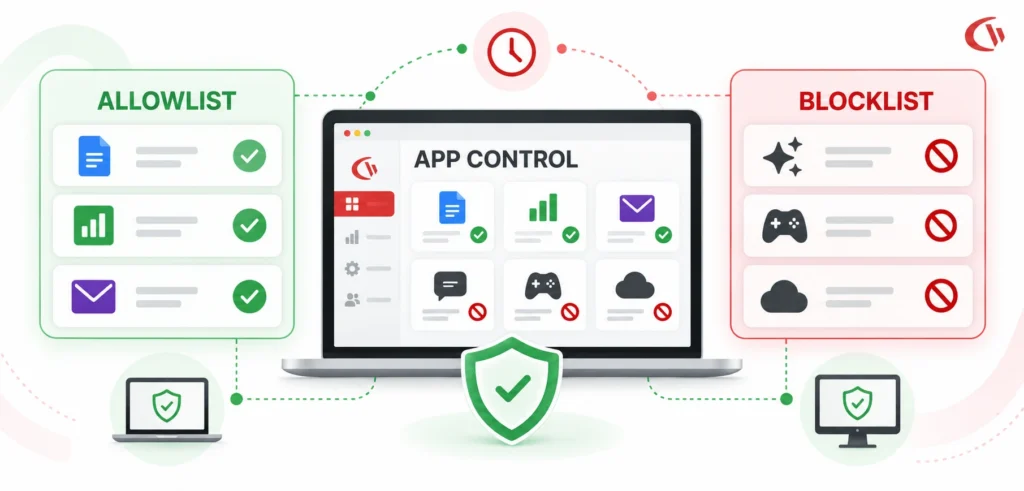
Organizations must mitigate this risk by using endpoint URL filtering to block this category, along with robust allowlisting for those channels which are required to deliver corporate training.
However, a blanket ban on youtube.com often breaks legitimate business workflows, such as marketing webinars or troubleshooting tutorials. The technical solution involves layered enforcement:
- Prioritize Allowlists: First, add links to the vendor documentation and the corporate training channel to the allowlist, since an allowlist entry overrides a broad category block.
- Audit Bandwidth Consumptions: A quick look up and an hour of HD streaming both count as “a visit” – bandwidth reporting differentiates.
- Differentiate Active vs. Idle Time: A bland, no mouse-movement training video should not be considered idle time; use an idle-exclusion setting to prevent the activity from having an impact on productivity metrics.
How to Block Distracting Websites on Company Laptops When Staff Work from Home
This is exactly where a network-based approach falls apart. The local agent stores the filtering policy on the laptop itself, so the productivity guardrails against adult content, gambling, and gaming sites remain enabled even when the device is disconnected or the employee disconnects from the VPN (which a network-side DNS proxy cannot do.) Activity logs buffer locally during any disconnection and sync back to the console after reconnect.
This is where a network-centric solution begins to crumble. For an on-premises DNS proxy, it’s only effective if the traffic is flowing through it – if an employee winds down their VPN tunnel, or if they log onto the LAN from home and are not even connected to it, the controls are gone. There’s nothing to enforce them.
That’s another issue the on-laptop agent eliminates. After installing on Windows or Mac OSX, the device has a local copy of the filtering policy. Even if not connected to headquarters, no websites will open (adult, gambling, gaming: you name it). It is like having a router that won’t get in the way of a ten-minute video call, even if the Internet drops during. Activity data will be saved locally and resent the next time an active Internet connection is available.
Employee Internet Usage Monitoring
Monitoring, this includes the use of workforce analytics tools to see active domain visits, application usage, and bandwidth consumption without the use of potentially invasive employee monitoring solutions such as keystroke monitoring or continuous webcam recording. Dedicated employee monitoring software enables you to understand your remote workforce’s behaviour while ensuring the main privacy needs are met (GDPR, HIPAA, etc.).
For enterprise IT considering a monitoring solution, the emphasis should be on monitoring solutions like Browse Reporter that can filter out ad background traffic and CDN noise and measure real web traffic.
Deployments should at minimum take into consideration:
- Active vs. Idle Tracking: The software must distinguish between a tab left open in the background (idle time) and a window the user is actively clicking or typing in (active engagement).
- Software Waste Identification: Monitoring application execution helps identify shadow IT and underutilized SaaS licenses. According to Flexera’s State of ITAM, up to 32% of SaaS spend is wasted; visibility into usage cuts this overhead dramatically.
- Transparent Deployment Models: Utilizing “Transparent Mode” displays a system tray icon notifying the employee of active monitoring, fostering trust and supporting a transparent corporate culture.
- Modular Cost Efficiency: Instead of bloated, expensive platforms, modular suites like CurrentWare start at just $6 USD per user/month, allowing companies to adopt only the analytics and filtering modules they require.
On cost CurrentWare modules – Browse Control begins at $6 per user, per month, the currentWare Suite for filtering, reporting and DLP is priced higher for anyone wanting filtering, reporting and DLP.
Conclusion
An office door firewall can’t analyze a device on someone’s home Wi-Fi, and a DNS filter can’t see a query encapsulated by HTTPS. Neither gap is a niche use case anymore – for a hybrid workforce, they’re the baseline state of the network. Nearly all traffic that IT must control is coming from somewhere IT does not own.
Endpoint filtering solves both of those challenges by applying policy directly on the device, regardless of where it’s located-whether that’s a hotel room, a shared workspace, or their kitchen table-not before the device enters a company-controlled network. When combined with activity analytics, that same visibility on the endpoint enables IT teams to identify spikes in bandwidth, identify policy violations, and enforce acceptable use policy uniformly across locations and time zones. It’s becoming the only place hybrid IT teams can actually reliably apply policy.