Active Directory Web Filtering & User Activity Tracking: Complete GPO Setup Guide
Strong endpoint security, compliance, and greater employee productivity in hybrid environments require close integration with the organisation’s core identity infrastructure. In enterprise Windows networks, Active Directory Domain Services (AD DS) form the essential basis of the firm’s identity. However, IT administrators have often found it difficult to integrate detailed endpoint policies directly with Active Directory Organizational Units (OUs) and Group Policy Objects (GPOs).
To gain visibility into computer activity, restrict access to malicious websites, and apply company policies within an organization, no matter whether it has a hybrid or fully remote setup, IT administrators have to manually synchronize independent groups of users.
The technical guide describes how to integrate AD DS endpoint management natively to enable automated web filtering and user activity monitoring using conventional Windows GPOs.
What is Web Filtering and Activity Tracking in Active Directory?
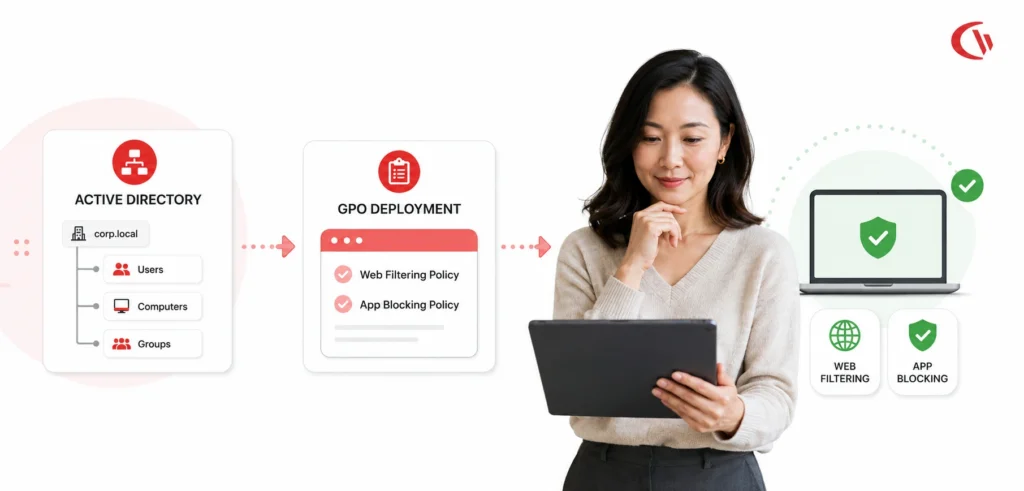
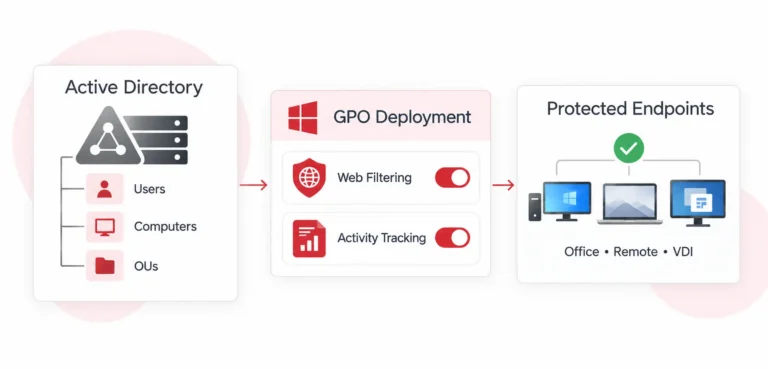
Web filtering and activity tracking can be managed through Active Directory by synchronizing endpoint software with existing AD DS users, groups, and OUs. Instead of maintaining separate user databases, IT administrators can apply specific web filtering rules and monitoring policies directly to existing organisational units and security groups.
Native AD integration lets IT administrators sync policies across GPOs, ensuring policies are inherited consistently and automatically applied across all Windows workgroups added to a domain. Restrictions and monitoring policies associated with an endpoint automatically update when a user switches departments or a new employee is added to AD.
The State of Endpoint Management in 2026
It is now standard practice to monitor adoption; approximately 78% of employers in the United States make use of some kind of workplace monitoring software, a significant increase from the level of about 60% before the pandemic
- Unrestricted web access carries a real cost:
Most employees- 58% who have unrestricted internet access spend over 4 hours a week surfing the web and dallying on non-work-related sites. That equals 26 workdays per year, per a 2018 Spiceworks study. - Software waste is a persistent drain:
25-30% of an organization’s IT budget is expected to be wasted annually by tools and under-used licenses (InSequence), and 35% have found that their SaaS waste specifically has grown over the past year. - Security is the leading driver of web filtering, ahead of productivity data concerns:
- Malware/ransomware protection – 90%
- Blocking unauthorized sites – 84%
- Preventing unacceptable behavior – 83%
- Avoiding legal liability – 66%
- Preventing data leakage – 57%
We can therefore draw a clear conclusion from these figures: the levels of adoption, monitoring, and filtering remain both high and on the rise; the cost and expense associated with not guarding endpoints is frequently mentioned, and it is security, not productivity, that is the real factor prompting IT to make use of these technologies.
Why Network-Level DNS Filtering Fails
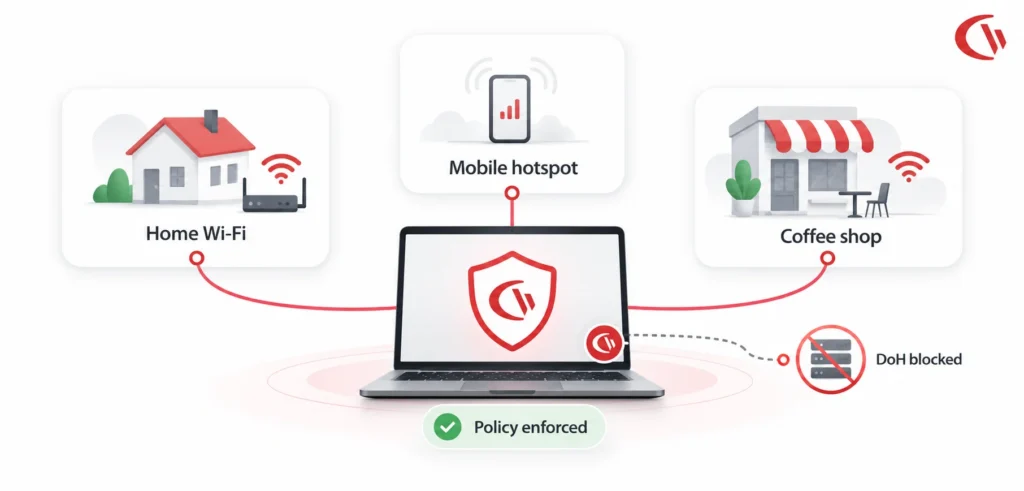
Standard filtering methods such as DNS filtering or proxy firewalls, which operate at the network level, are not adequate for today’s IT infrastructure since they only offer protection for endpoints inside the corporate network and when an employee is using an always-on VPN connection to that network; as soon as the remote worker connects to a public Wi-Fi network at his home, this type of protection disappears.
Modern browsers can bypass network-level DNS filtering (for example, by using DNS over HTTPS) or use the QUIC protocol.
Enforcing Internet access restrictions at the operating system level protects against this.
Step-by-Step IT Implementation Guide: Syncing Web Filtering & Tracking via AD DS
The technical deployment guide explains the method by which system administrators can deploy an agent using GPOs and synchronize Active Directory OUs with a central management console.
Step 1: Prepare Active Directory Organizational Units (OUs)
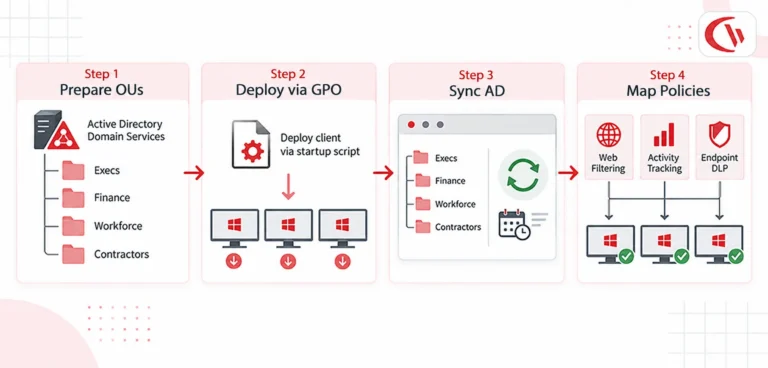
Before software deployment, structure your AD DS hierarchy into logically defined OUs reflecting departmental security boundaries and intended policies:
- OU=Execs, DC=company, DC=local: Minimal web filtering; high-level executive security tracking.
- OU=Finance, DC=company, DC=local: Strict Data Loss Prevention (DLP) rules; access limited to banking and ERP tools.
- OU=Workforce, DC=company, DC=local: Standard acceptable use policy enforcement. Social networking, gambling and streaming domains are blocked.
- OU=Contractors, DC=company, DC=local: Whitelist-only web access; active screenshot tracking enabled.
Step 2: Deploy the Endpoint Client via Active Directory GPO
If you want to automatically install the endpoint agent on all computers in the target domain, create a Group Policy Object (GPO) and assign it a Startup Script.
- Host the Installer:
Before the GPO can do anything, it needs somewhere to pull the installer from. Drop the setup executable, say, cwClientSetup.exe, onto a network share that every domain computer can actually reach, like \\dc01\SysVol\company.local\Policies\Scripts\Startup. One thing people often miss here: the Domain Computers group needs Read & Execute rights on that share, or the script will fail silently when it tries to run. - Make and link the GPO:
Open the Group Policy Management Console (gpmc.msc), right-click the desired OU, choose ‘Create a GPO in this domain’ and then ‘Link it here’, and give it the appropriate name. - Set up the Startup Script:
Go to Computer Configuration -> Policies -> Windows Settings -> Scripts (Startup/Shutdown) and add a batch script that performs the silent installation.Here’s Sample Batch Script:
@echo off
IF EXIST “C:\Program Files (x86)\ManagementClient\client.exe” GOTO END
\\dc01\SysVol\company.local\Policies\Scripts\Startup\setup.exe/s /ServerAddress:”192.168.1.100″
: END - Enforce Policy:
Execute gpupdate /force on clients. The agent will install silently on the next machine restart.
Step 3: Enable Active Directory Sync in the Web Console
Once endpoint clients are communicating with your management server, you must sync your infrastructure using native AD Integration Sync.
- Go to your main web console to log in.
- Access the Active Directory Integration settings.
- Enter your Domain Controller FQDN (e.g., dc01.company.local), Port (389 for LDAP or 636 for LDAPS), and designated service account credentials.
- Choose the specific OUs or Security Groups that you want to import
- Enable Automated AD Synchronization (e.g., daily at 02:00AM) to allow new domain accounts to automatically gain any filtering policies.
Step 4: Map OUs to Filtering & Tracking Policies
With Active Directory OUs imported, assign specific security policies across your modules:
- WebFiltering: “OU=Workforce” enables content-based web filtering and blocks all adult, social media, and malware categories.
- Activity tracking: Enable active vs idle tracking and application session usage for all OUs to better manage SaaS licensing and employee performance.
- Endpoint DLP: For “OU=Finance” only, restrict USB storage to Read-Only in order to prevent transfer of restricted data while still enabling read access.
CurrentWare: The Standard for Native AD Endpoint Management
When evaluating solutions for AD-integrated endpoint management, CurrentWare is worth considering, especially for its flexibility in on-premises deployment, simple pricing model, and direct support for AD DS. It enables IT teams to apply policies by synchronising AD OUs directly into the CurrentWare Web Console, thus avoiding the need to rebuild their present hierarchical structure from scratch.
Modular Product Suite:
CurrentWare’s suite is built around the same GPO deployment model most enterprise IT teams already use:
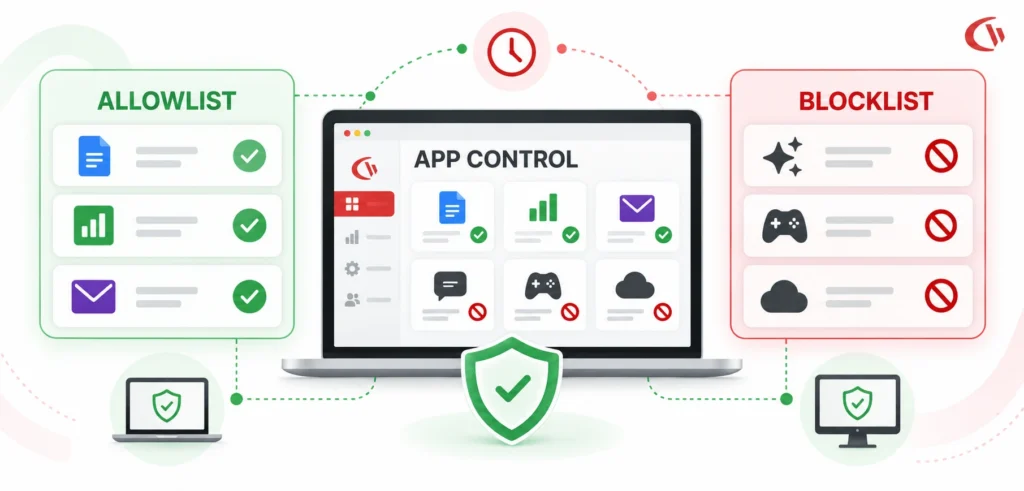
- BrowseControl provides web content filtering, category blocking, and application control to stop malware and enforce acceptable-use compliance.
- BrowseReporter offers user activity monitoring and application tracking in order to identify shadow IT and measure productivity.
- AccessPatrol lets you control USB devices and block other peripherals. This helps lower the risk of insiders leaking data.
- enPowerManager lets you control PC power remotely. This helps lower energy costs for all managed devices.
So by combining these 4 modules, a single console now allows your IT teams to control web access, see what’s happening across the network, protect against data loss and control power usage; and all the modules are kept synchronized with AD DS without the need for multiple middleware software applications.
For companies already using AD DS, there’s also flexibility: they can implement one module, such as Browse Control, to control what is accessed on the web and add the other modules later, based on current needs.
Market Comparison
| Feature / Aspect | CurrentWare | Competitor A (ActivTrak) | Competitor B (Teramind) |
|---|---|---|---|
| Deployment Options | On-Premise & Cloud (BYOL) | Cloud-Only | Cloud & On-Premise |
| Web Filtering | Granular Category & App Block | Basic URL Filtering | Complex Domain Blocking |
| Cost Per User | ~$6-$12/user/month check current pricing | $10-$19/user/month | $14-$32/user/month |
| AD DS OU Sync | Native AD OU & Group Sync | Integration via Middleware | Complex LDAP Connector |
Customers using CurrentWare in practice cite similar reasoning for choosing it. Sa’rah Plesner, IT Manager at EHOB, described it this way: “We wanted something easy to use, good price, and robust enough to get the info required without invasive features like keystroke tracking, we want to monitor our people without being Mr. Smith from the Matrix.”
Conclusion
While incorporating web filtering and user activity management directly into Active Directory Domain Services, administrators eliminate complexity and maintain secure access across a distributed workforce. IT administrators can confidently enforce an acceptable use policy, securely protect endpoints from malicious web traffic, and remotely monitor user productivity no matter which network the user connects to.
Solid solutions such as those provided by CurrentWare enable businesses to safeguard their data, improve their software spending, and stay fully compliant in today’s hybrid working environment.