
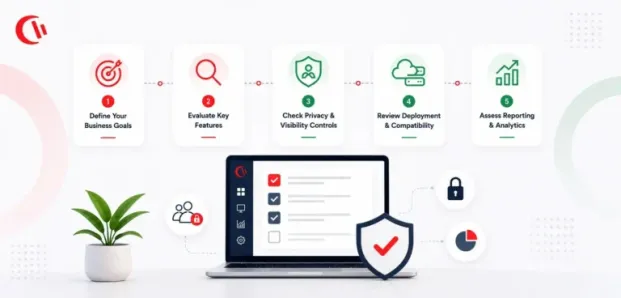

Choosing the right employee monitoring software can become challenging because there’s a lot of options that may seem like the right one. But, it is less about finding the tool with the longest feature list and more about finding one that fits how your organization works.
The right solution should give you useful visibility into employee activity, support productivity and security goals, and meet your requirements for privacy, deployment, reporting, and control. It should also be practical for IT teams to manage and easy enough for managers to use without creating unnecessary complexity.
Unlike other guides that only hand you a feature checklist, in this guide, we’ll walk you through a 9-step decision criteria to choose an employee monitoring software that fits your needs.
Key Takeaways:
- Start with your business goals and define what you actually need to monitor before comparing vendors.
- Focus on the employee monitoring software features that support your specific use cases, rather than choosing the platform with the longest feature list.
- Evaluate privacy controls carefully, including what data is collected, who can access it, and how long it is retained.
- Check whether the deployment model, infrastructure requirements, and supported environments fit your IT setup.
- Look beyond activity tracking to reporting, analytics, alerts, and security controls that turn monitoring data into useful action.
- Consider scalability and ongoing administration, not just how well the software works during a demo.
- Ask vendors specific questions about data storage, retention, security, pricing, support, and implementation.
- Use an employee monitoring software requirement checklist and weighted scorecard to compare vendors consistently.
- Test shortlisted solutions in a real environment before committing to a purchase.
- The right solution is the one that fits your business, privacy, security, and IT requirements, not necessarily the one with the most features.
Here’s a 9-Step Decision Criteria to Choose the Right Employee Monitoring Solution
Step 1. Start With Your Business Requirements
The first most-step is listing down your business requirements that you want to buy employee monitoring software for. Doing this is important because employee monitoring can meet different goals like understanding productivity and workload to analyzing data-security incidents and enforcing acceptable-use policies.
The list of your requirements will help you determine which features matter the most to your use case. To make this step easier, you can answer these questions:
- What problem are we trying to solve?
- Who will use the monitoring data?
- Which employees, teams, or devices need to be monitored?
- What information do managers actually need to see?
- Do we need monitoring for remote, hybrid, office, or terminal-server users?
- Are security, compliance, productivity, or all three priorities?
- What privacy restrictions or internal policies apply?
- How much administrative effort can IT support?
Separate must-have requirements from nice-to-have features. This prevents a flashy feature list from driving the buying decision.
Step 2. Look at the Right Employee Monitoring Software Features
Not every organization needs the same level of visibility. Focus on the signals that help you answer your specific business questions. Depending on your requirements, useful capabilities may include:
- Application and website tracking: See which applications and websites are being used and how much time is spent on them.
- Active and idle time tracking: Distinguish meaningful computer activity from simply being logged in.
- Web activity reporting: Review websites visited, time spent, search activity, and browsing patterns.
- Productivity classification: Categorize applications and websites based on their relevance to different roles or teams.
- Screenshots: Capture visual evidence when there is a legitimate business need for it, with controls over when and where screenshots are collected.
- Alerts: Get notified about specific websites, applications, activity patterns, or policy violations.
- Reporting: Turn activity data into reports that managers, HR, IT, security, or compliance teams can actually use.
- Data controls: Depending on your use case, look for capabilities such as USB and removable-media controls, application restrictions, or web filtering.
The key question is not simply, “Does the platform have this feature?” Ask instead: “What decision will this feature help us make?” That keeps your evaluation focused on outcomes rather than feature count.
Step 3. Evaluate Privacy and Employee Visibility Controls
Monitoring technology can provide valuable visibility, but collecting more data is not automatically better. Look for controls that allow you to decide what is monitored, who can see it, and when data is collected. Ask vendors:
- Can monitoring be configured by user, group, department, or role?
- Can sensitive websites, applications, or activity be excluded?
- Can screenshot collection be disabled?
- Can keystroke logging be disabled or avoided entirely?
- Can administrators control who can access monitoring reports?
- Can monitoring policies be adjusted for different teams?
- Can data retention be configured?
- Can the system support your organization’s privacy policies?
The goal is to collect enough information to answer legitimate business questions without creating unnecessary employee surveillance. A vendor should be able to explain exactly what its software collects, where that data goes, how long it is retained, and who can access it.
Step 4. Check Deployment Options and IT Requirements
Deployment can have a major impact on the total cost and effort of a monitoring solution. Some organizations want a fully managed cloud platform. Others need greater control over infrastructure and data, making an on-premises or private-cloud deployment a better fit. Consider:
- Cloud, on-premises, or private-cloud deployment
- Windows and other supported operating systems
- Server requirements
- Network architecture
- VPN and remote-worker support
- Citrix and Microsoft RDS/Terminal Server compatibility
- Agent installation and management
- Software updates
- Authentication and access controls
- Backup and disaster recovery requirements
Ask the vendor: “Where does our monitoring data live, and what infrastructure do we need to run the platform?” You should also understand whether the deployment model changes the available features, administrative workload, or pricing.
Step 5. Assess Reporting and Analytics
Collecting activity data is only useful if you can turn it into information people can act on. Look at how easily the software can answer questions such as:
- Which applications are consuming the most time?
- Which websites are being accessed?
- How much active versus idle time are employees recording?
- Are certain teams seeing unusual activity patterns?
- Which websites or applications require attention?
- Can managers view individual and team-level activity?
- Can reports be scheduled and exported?
- Can administrators drill down from a high-level summary into specific activity?
Good reporting should make patterns easier to understand, not force managers to interpret a mountain of raw data. Pay particular attention to report customization, filtering, historical data, dashboards, scheduled reports, and export options.
Step 6. Consider Security and Policy Controls
If monitoring is part of a broader security strategy, activity visibility may not be enough. Consider whether you also need controls that can prevent risky behavior rather than simply record it. Depending on your environment, these may include:
- Website filtering and blocking
- Application restrictions
- USB and removable-media controls
- File and data transfer monitoring
- Bandwidth monitoring
- Policy-based alerts
- User and group-based policies
- Time-based restrictions
This is an important trade-off to consider when you select employee monitoring software. A platform designed mainly for productivity analytics may be sufficient if your only goal is understanding work patterns. If your requirements also include security or acceptable-use enforcement, you may need a broader set of controls.
Step 7. Review Scalability and Administration
A solution that works for 50 employees may become difficult to manage across 500 or 5,000. Think beyond your current headcount. Ask:
- How are users and devices organized?
- Can policies be applied to groups?
- Can administrators manage multiple departments centrally?
- How easy is it to add or remove users?
- Can different administrators have different permissions?
- How much manual configuration is required?
- How are agents updated?
- What happens when employees work remotely?
- Does performance remain reliable as the number of monitored endpoints grows?
The best fit is not necessarily the platform with the most features. It is the one your IT team can realistically manage as your organization changes.
Step 8. Understand Data Retention, Storage, and Ownership
Monitoring data can include sensitive information about employee activity, so data handling deserves its own place in your evaluation. Ask vendors:
- What data is collected?
- Where is it stored?
- Who owns the data?
- Can you choose the hosting or storage environment?
- How long is data retained?
- Can retention periods be configured?
- Can data be deleted when it is no longer required?
- How is data protected in transit and at rest?
- What administrative controls are available?
- What happens to your data if you stop using the platform?
Do not treat data storage as a technical detail to resolve after purchase. It can affect your security, compliance, legal, and procurement requirements.
Step 9. Compare Pricing, Support, and Total Cost
License price is only one part of the cost of an employee monitoring solution. Your evaluation should also account for:
- Implementation effort
- Server or hosting costs
- Agent deployment
- IT administration
- Training
- Support
- Upgrades
- Additional modules
- Storage
- Professional services
- Contract and renewal terms
Ask vendors to explain exactly what is included in the quoted price. Also evaluate the support experience. Find out what support channels are available, what response times you can expect, and whether technical help is included or sold separately. A lower license price does not necessarily mean lower total cost.
Questions to Ask Employee Monitoring Software Vendors
Once you have defined your requirements, take the same questions to every employee monitoring vendors. Consistent questions make it easier to spot differences that are not obvious in product demos.
Product and monitoring capabilities
- What activity does the software collect?
- Which monitoring features can administrators turn off?
- Can monitoring policies be customized by user or group?
- Can we track application and website activity?
- Does the platform distinguish active and idle time?
- What reporting and alerting options are available?
- Can we export raw or summarized activity data?
Privacy and compliance
- What employee data is collected by default?
- Can sensitive activity be excluded?
- Can screenshots or keystroke logging be disabled?
- What access controls are available?
- How is monitoring data protected?
- How can we configure retention?
- Where is monitoring data stored?
Deployment and IT
- Is the platform cloud, on-premises, or both?
- What infrastructure is required?
- Does it support remote users?
- Does it support Citrix, RDS, or terminal-server environments?
- How are agents deployed and updated?
- How much ongoing administration is required?
Security and controls
- Does the platform only report activity, or can it enforce policies?
- Can websites and applications be blocked?
- Can policies be applied by department or user group?
- Does it include removable-media controls?
- Can administrators create alerts for specific activity?
Commercial and support
- How is pricing calculated?
- Which features or modules cost extra?
- What implementation services are included?
- What support is included?
- Are there minimum license commitments?
- What happens to our data when we end the contract?
Build an Employee Monitoring Software Evaluation Scorecard
Once you have gathered your requirements and vendor answers, turn them into a simple scorecard. Give each criterion a weight based on its importance to your organization. For example:
| Evaluation area | Suggested priority |
|---|---|
| Business Requirements | Must-have |
| Monitoring and reporting capabilities | High |
| Privacy controls | High |
| Deployment options | High |
| Security and policy controls | High |
| Data storage and retention | High |
| Administration and scalability | Medium |
| Integrations | Medium |
| Support | Medium |
| Price & total cost | High |
Test Before You Commit
A product demo is useful, but it should not be the final step. Ask shortlisted vendors for a trial or proof of concept and test the software in a realistic environment. During the trial, check:
- How quickly agents can be deployed
- How much administrative work is required
- Whether reports answer your real business questions
- How easy it is for managers to find useful information
- Whether policies work as expected
- How alerts perform
- How the software handles remote or terminal-server users
- Whether the platform creates unnecessary data
- How easy it is to configure privacy controls
- Whether performance changes on monitored endpoints
Include the people who will actually use the software. IT may care most about deployment and administration, while managers may care about reporting and usability. Security and compliance teams may focus on data controls and retention. A successful demo proves that a product can perform. A successful trial proves that your organization can use it effectively.
The Final Decision: Fit Matters More Than Feature Count
The best employee monitoring solution for your organization is not necessarily the one with the most features. It is the one that gives you the visibility you need, fits your privacy and security requirements, works with your infrastructure, and can be managed without creating unnecessary work. Before signing a contract, make sure you can answer three questions:
- Does it solve the business problem we started with?
- Can we use it in a way that meets our privacy, security, and compliance requirements?
- Can our IT and management teams realistically operate it long term?
If the answer to all three is yes, you are evaluating the right kind of fit, not simply choosing the software with the longest feature list.
Frequently asked
Frequently Asked Questions:
-
Start with your business goals, then define your must-have features, privacy requirements, deployment needs, reporting expectations, and budget. Shortlist suitable vendors, compare them using the same criteria, and test your top choices before making a decision.
-
Look for features that support your goals, such as application and website tracking, active and idle time reporting, alerts, reporting, productivity insights, security controls, privacy settings, flexible deployment, and manageable administration.
-
Not by themselves. A long feature list does not tell you how useful, flexible, or easy to manage a capability is. Compare features against your specific requirements, then validate them through demos and trials.
-
Privacy should be a core consideration. Check what data is collected, who can access it, where it is stored, how long it is retained, and whether administrators can limit unnecessary monitoring.
-
Choose based on your infrastructure, security, data-control, compliance, and IT requirements. Cloud can simplify management, while on-premises deployment can provide greater control over infrastructure and monitoring data.
-
Costs vary based on users, features, deployment, licensing, and support. Look beyond the advertised license price and consider implementation, infrastructure, storage, administration, upgrades, and additional modules when calculating total cost.
-
Ask each vendor to quote the same number of users, features, deployment model, contract length, and support level. Compare total cost of ownership rather than relying only on the advertised per-user price.
-
It can be, but requirements vary by monitoring method and jurisdiction. Federal, state, and local laws may apply. Consult your legal or compliance team before deploying monitoring software.
-
Requirements vary by jurisdiction and monitoring method. Even where notice may not be legally required, transparent communication is generally recommended. Have your legal team review your monitoring policy before deployment.
-
A two-to-four-week pilot is usually a practical starting point. Test deployment, reporting, alerts, policies, performance, and administration across representative users before deciding whether the software meets your requirements.
-
Ask what data is collected, where it is stored, what can be disabled, how policies and reports work, what deployment options are available, how much administration is required, and what is included in the price.
-
Include IT, security, HR, legal or compliance, and relevant managers. Each team evaluates different risks and requirements, helping ensure the solution works technically, operationally, and within your organization’s policies.
-
Employee monitoring broadly tracks workplace activity, while user activity monitoring often focuses more on user actions for security, auditing, and risk detection. The terms overlap significantly depending on the product and use case.
-
Common mistakes include choosing based on feature count, ignoring privacy requirements, comparing license prices instead of total costs, skipping a real-world trial, overlooking administration, and failing to involve IT, security, HR, or compliance.
-
IT teams choose CurrentWare for flexible deployment, granular monitoring and policy controls, and support for environments such as Citrix and Microsoft RDS. It combines activity visibility with security and management capabilities.