

Introduction
Using an employee monitoring software to get visibility into real employee productivity can be useful, but it is not a decision to make lightly.
Today, the need for better workforce visibility is real. Microsoft’s Work Trend Index Annual Report 2026 found that 68% of employees lack enough uninterrupted focus time during the workday, while the average Microsoft 365 user spends 57% of their time communicating through meetings, email, and chat rather than creating.
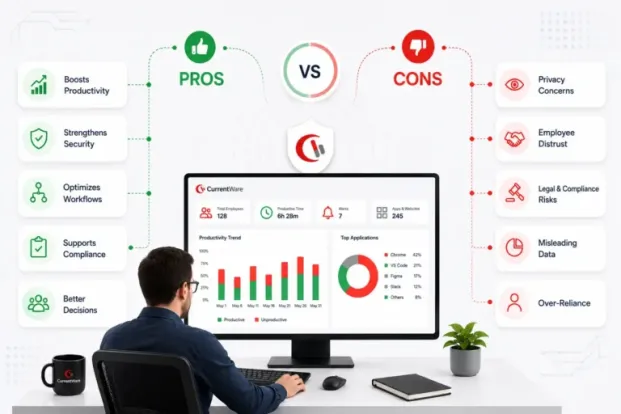
Sure, the right employee monitoring approach can help businesses identify such patterns, understand where their employees’ time is going, protect sensitive data, and spot problems before they become bigger issues. But, the wrong approach can create privacy concerns, damage employee trust, and turn useful activity data into a tool for micromanagement. That is why it is important to look at both sides.
A meta-analysis of 70 independent studies found that electronic monitoring was associated with slightly lower job satisfaction and higher stress, while finding no meaningful relationship between monitoring and employee performance. That is why the pros and cons of employee monitoring depend less on whether you monitor and more on what you monitor, why you monitor it, and how you use the data.
A practical approach focuses on implementing privacy-first controls. It gives managers the visibility they need to spot productivity gaps, security risks, and unusual activity while giving employees clear boundaries around what is collected, who can access it, and how it will be used.
Key Takeaways:
- Employee monitoring is neither good, when exercised ethically.
- It can improve productivity, support security and compliance, identify workflow problems, and give managers better information for decision-making.
- At the same time, employee monitoring limitations include privacy concerns, employee distrust, legal requirements, and the risk of relying too heavily on activity metrics.
- The difference usually comes down to implementation.
- Monitor what matters. Be clear about what you collect. Limit data collection to legitimate business needs. And use monitoring data to improve work, not to watch every move.
Employee Monitoring in 2026: Where the Debate Actually Stands
The conversation around employee monitoring has changed.
For years, workplace monitoring was mostly associated with tracking hours, websites, applications, screenshots, or keystrokes. Today, businesses are also trying to understand how employees use AI tools, SaaS applications, cloud services, and other technologies that can create productivity and security risks. That makes visibility more useful, but it also makes responsible monitoring more important.
AI usage is a good example. Your employees may be using ChatGPT, Gemini, Copilot, and other AI tools without IT knowing which tools are being used, who is using them, or whether sensitive company information is being entered. CurrentWare’s recent guidance on AI usage monitoring focuses on understanding who is using AI, what tools they use, how they use them, and what that activity means for the business.
The same applies to Shadow AI. Unauthorized AI use can create data security and compliance risks that a written AI policy alone cannot address. Businesses need visibility into actual usage if they want to enforce those policies. This does not mean businesses need to monitor everything. It means employee monitoring needs a clearer purpose.
Instead of asking, “How can we track employees?”, ask:
❓What business problem are we trying to solve?
❓What activity data do we actually need?
❓ What should never be collected?
❓ Who should have access to the data?
❓ How long should monitoring data be retained?
❓ How will employees know what is being monitored?
Those questions help separate useful employee monitoring from unnecessary surveillance.
Employee Monitoring Pros and Cons at a Glance
| Business Outcome | The Advantages | Disadvantages it Creates | Driving method | Net outcome |
|---|---|---|---|---|
| Workforce visibility | Replaces theory with concrete evidence. | Monitoring anxiety & productivity activity theatrics. | Application & website usage, active vs. idle time reports. | It becomes negative the moment scorekeeping happens. |
| Insider risk & data loss | Detects insider like bulk downloads, USB copies, personal cloud uploads, data transfers, early. | Any false positive can make good employees feel suspicious. | DLP policy. UEBA behavioral baseline on endpoints. | Strongly positive. |
| Compliance evidence | Evidence-proof audit trail for SOC2, ISO 27001, HIPAA, GDPR. | The trail can become a liability, showing up in litigation, breach, etc. | The audit trails, access records, retention rules remain unchanged. | Positive, but self-limiting. |
| Fairer performance conversions | Productive employees get recognition for their output, which reduces proximity bias. | Goodheart’s law- When a system tracks only clear numbers, workers stop doing tasks that are hard to count. | Productivity metrics, work trends over time. | Positive as a productivity indicator. Negative as an automated rating. |
| Workload balance & burnout signals | Highlights excessive workload, making it easier to break patterns and balance the workload equally. | Wellbeing data may some time be used as a performance stick, so people can hide overwork | Configured limits to detect anomalies or behavioral trends without exposing raw identifiable data | Positive if used to extend support. |
| Policy enforcement | Rules are applied equally to everyone; prevents blame shifting later. | Over-blocking may push real-work to personal devices, leading to the rise of shadow AI. | Configurations with real-time alerts. | Positive when used to warn & educate. |
| Shadow AI governance | Reveals if any unauthorized AI tools are used. | Prompt-level capture can expose sensitive information and make employees hesitant to use AI, even when AI could help them work better. | AI tools and inspect file uploads, authorized tool- allowlisting. | Positive for discovery and enablement. |
| Software cost recovery | Helpful in identifying underused, duplicate, or unused software licenses. | Basic usage counts can penalize people who only use certain tools when they really need them, and the productivity lost can outweigh the savings. | Match licenses to actual usage, flag inactive licenses, and let employees request access again when needed | Extremely positive. |
An important thing to note here is that most disadvantages of employee monitoring are not caused by visibility itself. They are often caused by excessive data collection, unclear policies, poor communication, or using monitoring data in ways employees did not expect.
What Are the Pros of Employee Monitoring?
Used responsibly, advantages of employee monitoring can give businesses information they would otherwise have to guess about.
1. Get a Clearer Picture of How Work Gets Done
Managers cannot improve workflows they cannot see.
Employee monitoring can show which applications and websites employees use, how much time is spent on different activities, and where work may be getting delayed. This gives managers a better starting point for improving processes.
It is especially useful for remote and hybrid teams where managers do not have the same visibility they would have in a traditional office.
2. Identify Productivity Gaps
Monitoring data can reveal patterns that are difficult to spot through observation alone.
For example, a team may spend a significant amount of time switching between applications, visiting non-work-related websites, or using inefficient processes. Managers can use these insights to investigate the cause and make changes.
The goal should not be to turn every minute into a productivity score. It should be to understand where time and resources are being lost.
3. Protect Company Data
Employee activity can also have security implications.
Monitoring websites, applications, file activity, USB usage, and other endpoint behavior can help organizations identify risky activity and investigate potential data loss. This becomes increasingly important as employees use cloud applications, personal accounts, and AI tools during the workday.
Monitoring can provide the visibility needed to identify activity that may otherwise go unnoticed.
4. Support Better Workload Decisions
Activity data can help managers identify teams that are consistently overloaded or underutilized.
If one department is regularly working excessive hours while another has spare capacity, managers have better information for redistributing work, adjusting processes, or planning additional resources.
The benefit here is not simply knowing who is busy. It is understanding whether workloads and processes are sustainable.
5. Improve Software and Resource Utilization
Employee monitoring can show which applications employees actually use.
This can help IT teams identify unused software licenses, redundant applications, and tools that are no longer needed. The result can be better software purchasing decisions and lower unnecessary costs.
6. Support Remote and Hybrid Teams
Remote work makes visibility more difficult, especially when employees work across different locations and schedules.
Monitoring provides a consistent way to understand work activity without requiring managers to rely on constant check-ins. When configured around work hours and relevant business activity, it can give remote teams more autonomy while still providing managers with useful information.
7. Create Better Evidence for Investigations and Compliance
Activity records can provide useful evidence when an organization needs to investigate a security incident, policy violation, or other workplace issue.
Depending on the monitoring tools and configuration, organizations can maintain records of website activity, application usage, file activity, and other events. This can support internal investigations and certain compliance requirements.
What Are the Cons of Employee Monitoring?
The disadvantage of employee monitoring is not simply that employees are being monitored. The bigger concern is what happens when monitoring is excessive, unclear, or poorly managed.
1. Employee Privacy Concerns
Employees may reasonably want to know what information is being collected about them.
Monitoring can become invasive when companies collect more data than they need, monitor outside working hours, or capture personal activity without clear boundaries.
A responsible approach limits monitoring to information that serves a legitimate business purpose.
2. Lack of Trust
Secret or unexplained monitoring can quickly create the impression that employees are not trusted.
Even a tool designed for productivity can have the opposite effect if employees believe management is watching their every move.
Transparency matters. Employees should understand what is being monitored, why it is being monitored, and how the information will be used.
3. Risk of Micromanagement
More data does not automatically mean better management.
A manager who constantly checks activity dashboards, idle time, or individual website visits can end up managing numbers instead of people.
Activity data should be used to identify patterns and questions worth investigating. It should not replace conversations, context, judgment, or performance outcomes.
4. Metrics Do Not Tell the Whole Story
One of the biggest employee monitoring limitations is that activity does not always equal productivity.
Someone may appear inactive while reading a document, speaking with a customer on the phone, attending a meeting, planning a project, or solving a complex problem away from their keyboard.
For this reason, raw activity data should never be treated as a complete measure of employee performance.
5. Legal and Compliance Responsibilities
Employee Monitoring laws vary by country, state, industry, and the type of information being collected.
Organizations may need to consider privacy requirements, employee notification, data minimization, retention, access controls, and other obligations.
Legal compliance should be reviewed before deployment, particularly when monitoring sensitive information, remote employees, personal devices, or employees in multiple jurisdictions.
6. Monitoring Data Becomes Data You Must Protect
The more information an organization collects, the more responsibility it has to protect that information.
Monitoring data may contain detailed records of employee activity. Poor access controls, excessive retention, or weak security around that data can create another privacy or security risk.
How to Implement Employee Monitoring Without Triggering the Cons
The best way to reduce the downsides of monitoring is to build boundaries into the program from the start.
1. Start With a Business Need
Do not begin with the question, “What can this software track?”
Start with:
“What do we need to understand or protect?”
If the goal is productivity, you may need application and website activity. If the goal is security, you may need visibility into file transfers, removable media, or risky websites.
Collect only what supports that objective.
2. Tell Employees What You Are Monitoring
Create a clear employee monitoring policy that explains:
- What information is collected
- Why it is collected
- When monitoring takes place
- Who can access the information
- How long data is retained
- How monitoring data can and cannot be used
Transparency helps employees understand that monitoring has a defined purpose rather than being an open-ended surveillance program.
3. Set Privacy Boundaries
Monitoring should have limits.
For example, organizations can schedule monitoring around working hours and restrict monitoring to specific teams or groups. Privacy-focused configurations can also reduce unnecessary data collection.
CurrentWare’s BrowseReporter includes scheduling controls, team-level monitoring restrictions, and optional privacy features. Screenshots are also optional and off by default.
4. Focus on Patterns, Not Individual Actions
A single website visit or period of inactivity rarely tells the full story.
Look for trends across teams, departments, applications, websites, and time periods. Use unusual activity as a reason to investigate, not as automatic proof of poor performance.
5. Give Employees Context and a Voice
Monitoring works better when employees understand the reason behind it.
Explain how the data will be used and give employees a way to raise concerns or ask questions. Where appropriate, consider giving employees visibility into their own activity data.
6. Protect the Data You Collect
Monitoring data should be treated as sensitive business information.
Use appropriate access controls, authentication, retention policies, and security measures. Limit access to people who actually need the information.
7. Review the Program Regularly
Your monitoring needs should change over time.
Review what you are collecting, whether it is still necessary, who has access to it, and whether the data is actually helping you solve the original business problem.
Is Employee Monitoring Worth It? A Decision Framework
There is no right or wrong answer to this question. But, the better question is if the business value of the visibility outweighs the privacy, cultural, legal, and operational risks for your organization. So, to make the case better, use these questions to make the decision:
1. What problem are we trying to solve?
Be specific. Are you trying to improve productivity, investigate security incidents, manage software usage, support remote teams, or meet compliance requirements? A clear goal helps you avoid collecting data you do not need.
2. What information do we actually need?
Do not start with everything the software can track. Start with the minimum data needed to address your business problem. You may need application and website activity without needing screenshots or keystrokes.
3. When should monitoring happen?
Define when employees should be monitored and when they should have privacy. Working-hour schedules can help create a clear boundary between business activity and personal time.
4. Who should have access to monitoring data?
Monitoring data should not be available to everyone. Decide which teams or managers need access and limit permissions accordingly.
5. How will employees be informed?
Employees should understand what is being monitored, why it is being collected, and how the information will be used. Clear communication can prevent monitoring from becoming a source of unnecessary concern or distrust.
6. How will the data be used?
Decide this before deployment. Monitoring data should help solve business problems, improve processes, or investigate legitimate concerns. It should not become a way to micromanage employees or judge performance based on a single activity metric.
7. How long do we need to keep the data?
Set a reasonable retention period based on your business and compliance requirements. Keeping monitoring data indefinitely creates unnecessary privacy and security risks.
8. Can the software give us the right level of control?
Look for configurable monitoring, role-based policies, scheduling, privacy controls, and reporting options. You should be able to decide what gets monitored rather than accepting an all-or-nothing approach.
The bottom line is that employee monitoring is more likely to be worth it when there is a clear business purpose, limited data collection, transparent policies, and appropriate controls. If you cannot explain why you need a particular type of monitoring, you probably do not need it.
How CurrentWare Employee Monitoring Software Helps Businesses
CurrentWare takes a practical approach to employee monitoring. The goal is to give organizations visibility into employee activity while giving IT teams control over what is collected and how monitoring is configured.
BrowseReporter provides visibility into websites visited, applications used, active and idle time, and other computer activity. Reports can be viewed by individual, team, department, device, or organization.
Monitor the Activity That Matters
See which websites and applications employees use and identify patterns that may affect productivity, security, or software spending.
Track Active vs. Idle Time
Understand the difference between simply being logged in and actively using a computer. Use activity data as context for productivity conversations rather than treating it as a standalone performance score.
Set Monitoring Schedules
Limit activity tracking to defined schedules, such as employee working hours. This helps create a clearer boundary between work activity and personal time.
Keep Screenshots Optional
Screenshots are optional and off by default in BrowseReporter, giving organizations another way to balance visibility with employee privacy.
Monitor AI and Shadow AI Activity
As AI becomes part of everyday work, businesses need to know which AI tools employees are accessing. CurrentWare can monitor access to AI websites and applications, helping organizations understand AI adoption and identify potential Shadow AI activity.
Apply Different Controls to Different Teams
Not every department has the same risks or monitoring requirements. Configure monitoring around specific teams and business needs instead of applying the same approach across the entire organization.
Choose How You Deploy
BrowseReporter can be deployed in the cloud or on-premises, giving organizations flexibility around infrastructure, data residency, and operational requirements.
Conclusion
The pros and cons of employee monitoring are closely tied to how the technology is used. Used well, monitoring can help businesses understand workflows, improve productivity, protect sensitive information, manage software resources, and support remote teams. Used poorly, it can create privacy concerns, damage trust, encourage micromanagement, and turn incomplete metrics into unfair judgments. There is no need to choose between visibility and trust.
A better approach is to monitor with a clear purpose, collect only what you need, set reasonable boundaries, communicate openly, and use the resulting data to improve the way people work. The goal is not to watch employees more closely. It is to give your organization better information while respecting the people behind the data.
Frequently asked
Frequently Asked Questions:
-
The main pros of employee monitoring include better visibility into work activity, improved productivity, stronger security, better workload planning, and more informed business decisions. The main cons include privacy concerns, reduced trust, micromanagement, misleading metrics, legal requirements, and the responsibility of protecting monitoring data.
-
The biggest disadvantage depends on how monitoring is implemented. For many organizations, the main concern is employee trust. If employees feel they are being watched rather than supported, monitoring can reduce morale and create resistance.
-
It can. Monitoring gives managers data that can help identify inefficient workflows, distracting applications, bottlenecks, and workload issues. However, activity data should be used alongside performance outcomes and human judgment. More monitoring does not automatically mean more productivity.
-
Yes. Monitoring can become invasive when organizations collect unnecessary information, monitor outside working hours, or fail to explain what is being collected. Privacy-conscious monitoring focuses on legitimate business needs and gives organizations controls to limit data collection.
-
Employee monitoring can be legal, but the rules vary depending on the jurisdiction, type of monitoring, workplace, and data being collected. Organizations should review applicable privacy and employment laws and obtain appropriate legal advice before deploying monitoring software.
-
Start with transparency. Tell employees what is being monitored and why. Set clear working-hour and privacy boundaries, collect only necessary data, limit access to monitoring information, and use activity data to improve workflows rather than micromanage individuals.
-
Depending on the software, organizations can track website activity, application usage, active and idle time, email activity, file transfers, removable media usage, and other computer activity. Some solutions also offer screenshots, keystroke logging, or other more invasive features. The right choice depends on the organization’s specific business and security requirements.
-
Not necessarily. Different teams have different workflows, responsibilities, and security risks. Role-based monitoring can provide stronger controls for departments handling sensitive information while allowing less intrusive monitoring for other teams.
-
AI tools have added another layer to workplace monitoring. Employees may use ChatGPT, Gemini, Copilot, and other AI services without IT approval. Monitoring AI access can help organizations understand adoption, identify Shadow AI, enforce an AI usage policy, and investigate potential data security risks.
-
Look for clear reporting, configurable monitoring schedules, role-based controls, privacy settings, secure data handling, useful activity reports, and the ability to monitor the specific activity that matters to your organization. A good solution should give you visibility without forcing you to collect everything.
-
Employee monitoring is a broader category that can include productivity tracking, application and website monitoring, security monitoring, and other forms of workplace activity tracking. Track employee productivity is one use case for monitoring, but it is not the only one. Security, compliance, software utilization, and workforce planning can also benefit from activity visibility.
-
Different types of employee monitoring software focus on different forms of visibility. Some primarily track time and productivity, while others monitor websites and applications, email, data movement, screenshots, or endpoint activity. The best option depends on whether your priority is productivity, security, compliance, or a combination of these needs.
-
Yes. Privacy-friendly monitoring is based on necessity, transparency, and clear boundaries. Features such as scheduled monitoring, team-level controls, optional screenshots, and limited data collection can help organizations gain useful visibility without collecting more employee information than they need. CurrentWare includes several of these controls in BrowseReporter.