
We’ve updated our Subprocessor List, effective October 6, 2026. Please review the update to our Data Processing Addendum

Webinars and live demos for IT and security teams

Watch the CurrentWare team configure real policies on real endpoints: cloud and on-premises deployment, web filtering, USB and DLP controls, productivity reporting, and the audit trails your compliance team asks for. Every session is free, and the handouts are here without a form.

4.6/5 average rating Trusted by 100,000+ professionals in 55 countries
Missed the Cloud Suite session? Recorded August 20, 2026 — watch it on demand and grab the three handouts. Watch the recording

Session library

Filter by what you’re trying to solve. On-demand sessions open straight away.

Topic
Format
Search

Showing 3 of 3 sessions

Want a session on your setup?

Tell us what you’re evaluating and we’ll run a private walkthrough for your team, or cover the topic in a future session.

Request a private walkthrough
Attendee handouts

Downloads from the Cloud Suite session

The three documents shared with attendees. Open or save them directly — no form, no waiting for an email.

Checklist · PDF, 2 pages

Cloud migration readiness checklist

Work out whether a move makes sense, then capture what the team needs to scope it:

  • Eight readiness statements to tick against your environment
  • Products in use, user and endpoint counts, retention period
  • Whether existing policies come across, preferred date, project owner, approvals

Brief · PDF, 1 page

Cloud upgrade brief

The business case on a single page, useful if you need to forward something upward:

  • Four reasons the team recommends Cloud, including priority access to new features
  • The roadmap: screenshot OCR live now, HRIS, calendar, and AI Insights through November 2026
  • The hidden cost of an on-premises server, where licences are only about half the true annual cost

Q&A · PDF, 3 pages

Cloud webinar questions & answers

Twelve questions raised live, answered in writing, grouped by theme:

  • On-premises support and roadmap, and whether migration is ever forced
  • What the move looks like, historical data, and on-site requirements
  • Roaming clients, client installs, location accuracy, and retention options

What a CurrentWare session actually gives you

No slide-only product pitches. Sessions are built for the person who has to deploy, defend, and report on the tool.

Live console, not a slide deck

Watch servers, policies, filters, and reports configured in a working console so you know what setup takes before you commit.

Answers on privacy and compliance

Bring the hard questions: what gets collected, who can see it, how transparent monitoring is communicated, and what evidence auditors accept.

Documents you can forward internally

Checklists, cost breakdowns, and written Q&A, so whoever approves the project can read it without watching 30 minutes of video.

Want this walked through on your environment?

Get a 1:1 session covering your deployment, user counts, retention needs, and internal approvals.

Get the next session in your inbox

One email when a live session is scheduled, plus the recording and handouts afterwards. No drip sequence, unsubscribe in one click.

By subscribing you agree to our Privacy Policy.

Pair a session with these

The resources attendees ask for most often, ready to download now.

Starter kit

Employee monitoring starter kit

Policy language, rollout steps, and employee communication templates for a transparent deployment.

Calculator

Software cost savings ROI calculator

Model licence reclamation and infrastructure savings before you take the business case to finance.

Templates

Acceptable use & removable media policies

Editable policy templates covering internet use, monitoring disclosure, and USB device handling.

What people ask before watching, and the questions raised live in the Cloud Suite session.

Webinar and cloud migration FAQs

Yes. Every live session and on-demand recording is free, and the attendee handouts can be downloaded here without filling in a form.

No. Everyone who registers receives the recording and handouts by email. Live attendance only matters if you want to ask questions during the Q&A.

Product demos run about 30 minutes plus live Q&A. Deep dives such as the data loss prevention session run up to 60 minutes.

Yes. On-premises deployments remain fully supported and there is no end-of-support date. Cloud is an option, not a forced replacement, and an existing on-premises configuration keeps running exactly as it does today. New capabilities such as OCR, HRIS integration, and AI Insights ship to Cloud first, so there can be a feature delay between the two.

No. There is no forced migration timeline. Customers move when it suits their environment, their internal approvals, and their preferred date.

Historical activity stays in the on-premises database, and the cloud tenant starts collecting from the day your clients connect. If you need continued access to historical reporting, CurrentWare can arrange bridge licences so the on-premises console data stays available while cloud history builds up.

Clients are pointed at your cloud tenant once, then check in over the internet from wherever they are. Machines that travel or sit outside the corporate network keep reporting without a VPN connection back to a head office.

Retention is set per tenant, with standard periods of 3, 6, and 9 months, 1 year, and 2 years. If your policy or regulator requires something different, that can be reviewed as part of the migration scope. Full details are in the Q&A download.

Yes. Book a personalized demo and a solutions engineer will walk your team through your own deployment scenario, whether that is on-premises, self-hosted, or cloud.

Yes. MSP sessions cover multi-tenant deployment, licensing, and partner program updates. Partners can also request a dedicated session with the partner team.

Continue exploring employee monitoring

The pages people read alongside these sessions.

Employee monitoring software

What it does, what it collects, and how to deploy it transparently.

User activity monitoring

Session, app, and web activity records for investigations and audits.

Data loss prevention

USB control, file activity tracking, and upload restrictions.

Internet filtering & monitoring

Category and URL filtering with reporting for acceptable use.

AI usage insights

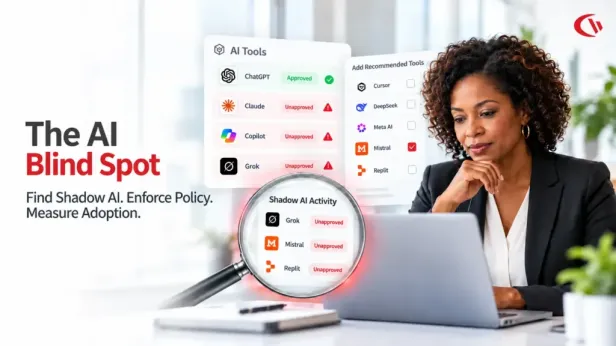
Shadow AI discovery, policy control, and the OCR reporting shown in the demo.

CurrentWare blog

Practical guides on monitoring, filtering, DLP, and AI usage.

See it on your own endpoints in under 15 minutes

Deploy on-premises, self-hosted, or in the cloud. Per-user pricing with volume discounts, in USD, CAD, and GBP.

No credit card required · 14-day trial · Setup help included

Start Free Trial Book a Demo