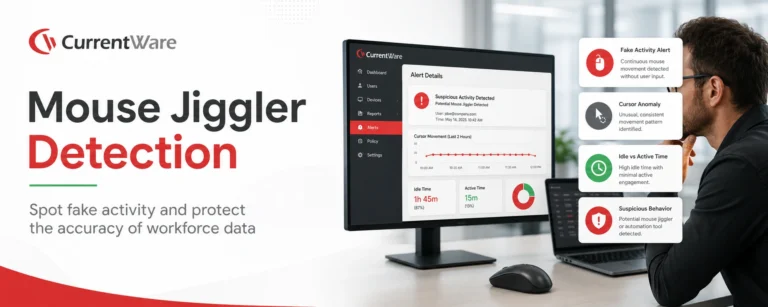
This article explains how mouse jigglers work and the dangers they can pose for businesses. According to Gallup, just 20 percent of the workforce globally was engaged with work in 2025, causing productivity losses that cost $10 trillion globally. Mouse jigglers create a false sense of activity even when workers are not using the computer. Thus, mouse jiggler detectors are needed in companies. These detectors ensure that there is no risk of data leakage, and false activity doesn’t get perceived as productivity.
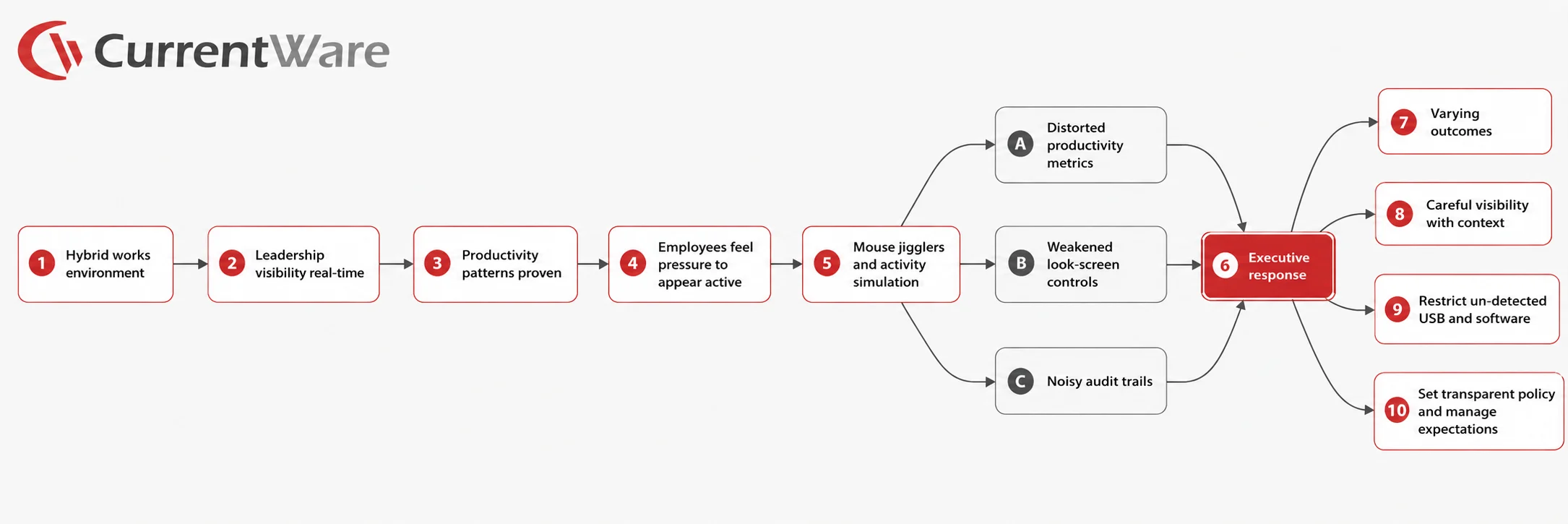
About 25% of paid full workdays in the U.S. were work-from-home days in April 2026. Microsoft found that 85% of leaders say hybrid work makes it harder to feel confident employees are productive, even though 87% of employees say they are productive and only 12% of leaders report full confidence in team productivity. That is exactly why mouse jiggler detection matters now. When leaders can no longer rely on physical visibility, digital activity becomes a tempting proxy for performance. But proxies are easy to game. Mouse jiggler detection is no longer a niche HR concern. It is a business issue that sits at the intersection of performance management, cybersecurity, and governance.
Reuters reported that Wells Fargo terminated more than a dozen employees in 2024 over allegations involving simulated keyboard activity that created the impression of active work.
Key Takeaways
- The level of engagement for employees and managers fell to 20% and 22%, respectively, by 2025. According to Gallup the estimated cost to the global economy from reduced productivity due to poor engagement levels is around $10 trillion. False activity is a key reason behind this problem. The workstation shows the employee as active, while the reality is otherwise. In most cases, such activity is usually produced with the help of technology, which simulates the use of the mouse or keyboard.
- Mouse jigglers can be in the form of physical devices, USB devices, hardware jigs or software. It is a piece of software or hardware that mimics mouse movements to avoid a computer going into an idle mode.
- Mouse jigglers can be hard to detect, but mouse jiggler detection software may still leave traces. These can include installed apps, running processes, scripts, startup activity, or automated actions.
- Mouse jigglers are a threat because they distort the reality of the work being done, may weaken organizational policies, and increase the risk of internal threat and data leaks.
- Organizations should employ the use of detection technology together with sound policies and performance measurement systems.
- CurrentWare can help detect mouse jigglers by supporting teams in determining whether active time matches applications usage, browsing activities, screenshots, idle time and restricting USB device activities.
What is mouse jiggler detection?
A mouse jiggler, in practical terms, is any hardware or software used to keep a device from appearing idle. This includes USB devices that mimic human-interface peripherals, physical mouse movers that never plug into the computer, software utilities that simulate input through the operating system, and scripts, macros, or browser automation that accomplish the same objective. Some are marketed as undetectable, but that is mostly marketing language. A device may be harder to detect directly but one can infer behaviorally when the machine shows movement without typing, application changes, file activity, or real work output.
Mouse jiggler detection is about identifying whether mouse use on a computer system is real or artificial activity caused by using any tool. The goal is to detect artificial activity aimed at keeping the computer active and preventing it from being idle or causing a screen lock or conveying the impression that the person is productive.
It is important as many employee tracking tools collect data related to user actions, such as mouse clicks and movements, keyboard activity, time spent idle, application used, websites visited, screenshots taken, etc. There have been studies on employee surveillance in which it was noted that such activity was very common among workers who were either working remotely or in hybrid work settings. Possible criteria for detecting a mouse jiggler include:
- Repeated pattern of cursor movement
- Consistent activity without use of a keyboard
- Mouse activity at unusual hours
- Connection of a USB Human Interface Device
- Installation of mouse jiggler software
- Automation or use of scripts and
- Screenshot evidence of fake activity while maintaining the ‘active’ status.
- Extended periods of activity without application switch, typing, file activity, or work accomplished
See CurrentWare flag fake activity across your workforce in real-time.
There are several types of mouse jigglers, and each leaves different clues.
1. USB Mouse Jigglers
The USB computer mouse jiggler is connected to the laptop or computer system and acts like a Human Interface Device (HID), just like a mouse. It sends little signals for movements to the computer’s operating system on a recurring basis.
2. Physical Mouse Movers
The conventional mouse moving system is usually composed of either a small platform or rotating pad for moving the mouse sensor. It cannot connect to the computer directly, making it somewhat challenging to identify via USB loggers. However, even this type of system can create unusual behavior by moving continuously without typing, clicking, changing applications, browsing websites, or producing work related results.
3. Mouse Jiggler Software
Mouse jiggler applications rely on simulating mouse activity through the use of the operating system itself.
4. Browser Based or Script Based Jigglers
Some employees use scripts, macros, browser extensions, or automation tools to simulate activity. These may not be branded as mouse jiggler tools, but they serve the same purpose.
5. Undetectable Mouse Jigglers
The phrase undetectable mouse jiggler means that the item is usually a hardware tool without the need for software installation, or a mechanical movement without connecting the equipment via USB. But the notion of being undetectable does not imply that. In many cases, while the hardware cannot be detected by the computer, its actions can be.
Why are Mouse Jigglers a Security Threat?
Mouse jigglers are often framed as productivity workarounds, but they can also create real security risks.
1. They Weaken Automatic Lock Policies
Several companies rely on automatic screen lock mechanisms for securing their unattended systems. Mouse jiggling helps keep the system running actively, thus posing a higher risk of compromise of security. This problem becomes increasingly critical in industries where there is handling of sensitive information such as finance, medicine, insurance, law, education, and federal contracts.
2. They Distort Audit Trails
Security teams depend on logs to understand who was active, when they were active, and what they did. Fake activity makes endpoint activity less reliable.
If a workstation appears active all day but there is no meaningful app usage, website activity, typing, or work output, the audit trail becomes less useful. CurrentWare helps reduce this uncertainty by adding context to activity data.
3. They Hide Unattended Devices
Log analysis helps security experts ascertain who logged on, at what time, and what actions they took. False activities make endpoint activities unreliable. Where a computer is continuously on during the whole day but without any activities that are being undertaken, the log is rendered irrelevant. CurrentWare helps address this problem by providing context to the activities.
4. They Undermine Insider Threat Detection
Insider threat research emphasizes the importance of behavioral signals, policy enforcement, and anomaly detection. If artificial activity affects the baseline, it becomes harder to identify risky behavior.
5. They Encourage a Culture of Evasion
The presence of mouse jiggler programs could imply that employees are trying to circumvent any kind of surveillance software. This may sometimes be a sign of misconduct, or it could simply mean that the productivity goals set were not realistic.
Therefore, it is important that mouse jiggler detection be combined with proper performance management techniques to prevent fraud while at the same time not creating conditions for it.
See how CurrentWare blocks unauthorized jigglers and flags activity that doesn't match real work
Mouse Jiggler Detection & Prevention Tips: How to Detect Mouse Jiggler Use
The best way to answer how to detect mouse jiggler use is to combine endpoint evidence, behavior analytics, and workplace policy.
1. Monitor USB Device Connections
Observe the connection status of new USB HID devices. The USB jiggle mouse can identify itself as a standard USB HID mouse, keyboard, or composite device.
Security teams must investigate:
- Unexpected USB vendors and product IDs
- New HID connections made during working hours
- Several mouse type devices attached to one endpoint
- Devices that are connected immediately prior to an active working session
- Frequent use of unauthorized peripheral devices
Device control capabilities of CurrentWare will enable organizations to limit or monitor unauthorized USB devices and prevent employees from using unauthorized jigglers.
2. Compare Mouse Movement with Keyboard Activity
Human activity usually involves a variety of actions such as moving the mouse, clicking, typing, scrolling, task switching, and occasional resting. Jigglers often move mice without providing varied input.
Suspected behavior includes:
- Moving the mouse at frequent short intervals without any typing activity
- Active periods lasting for prolonged durations without clicking
- Moving the mouse during lunchtime or outside normal working hours
- Moving the mouse repeatedly over identical time intervals for long durations
3. Review Software Inventory
Software jigglers may appear as installed applications or portable executables. Look for known mouse mover tools, automation apps, macro tools, suspicious scripts, and unauthorized utilities.
4. Analyze Screenshots Carefully
Screenshots can help to ascertain that any observed activity actually qualifies as work. As an example, a worker may look busy when the screen is not changing for long periods of time.
Screenshotting feature of CurrentWare software helps to determine whether any active time qualifies as working time. It must be used openly, along with a clearly formulated company policy on monitoring.
5. Detect Impossible or Unlikely Behavior
Consistency of input from an individual cannot usually be achieved by oneself for a prolonged period. Look for activity that seems productive but lacks the usual rhythm of working. This may involve:
- Lack of breaks for unusually lengthy periods
- Moving cursor without any activity as indicated on the calendar
- Performing activity at times when one is officially on leave
- Performing activity without any productive outcome
6. Use Endpoint Security Controls
Block unauthorized software, restrict unknown USB devices, and apply controls. Device control is especially useful for preventing unauthorized peripherals.
7. Avoid Relying Only on Idle Time
Idleness holds value but is not productivity per se. Staff can read books, reflect, examine documentation, and attend to phone calls without direct oversight from their supervisors. Monitoring must be based on trends and patterns rather than individual instances of idleness.
CurrentWare allows the monitoring of idle time along with application and website use, as well as taking screenshots and producing reports.
How To Detect Mouse Jigglers Using CurrentWare
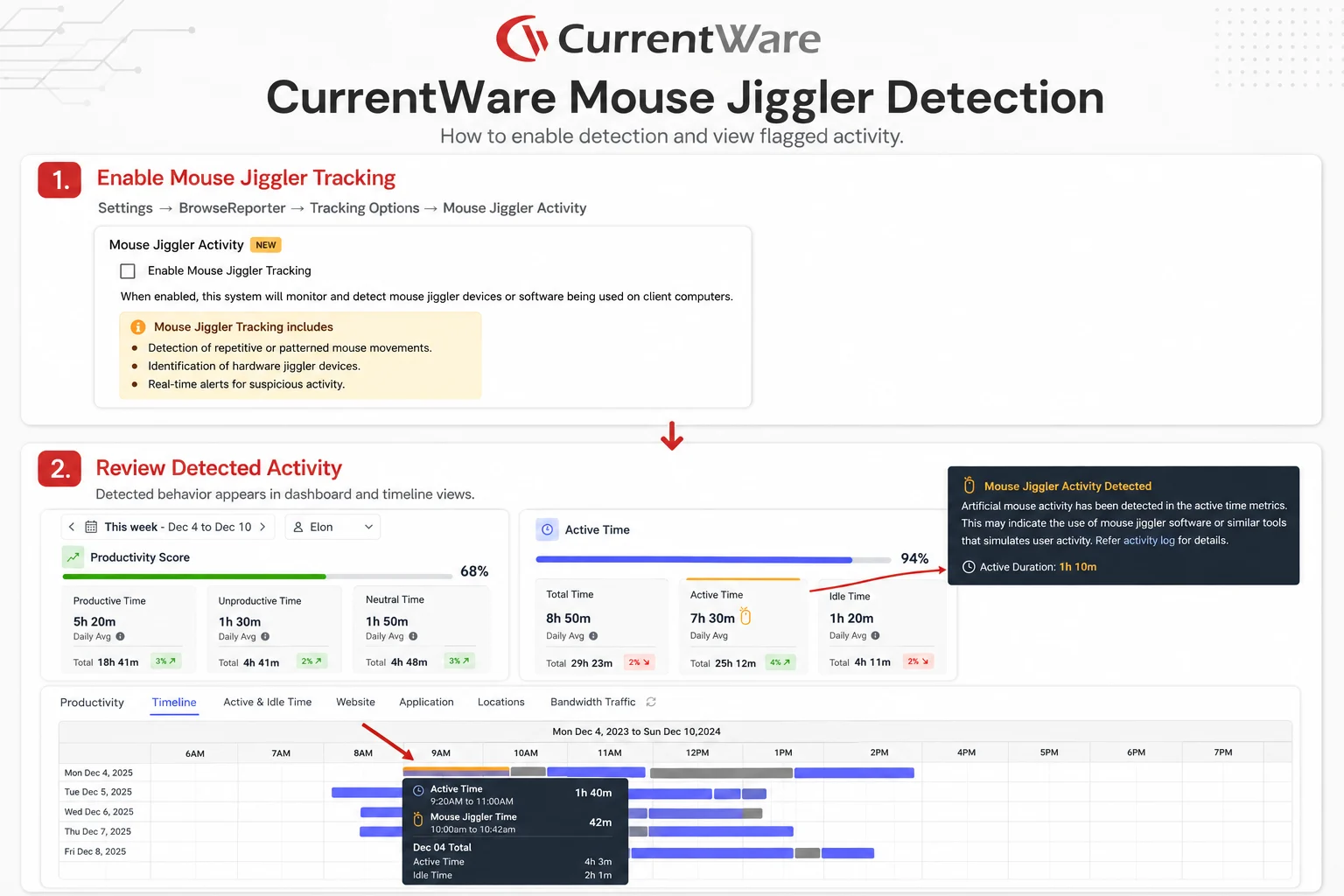
CurrentWare’s BrowseReporter (part of the CurrentWare Suite) has built-in capabilities for detecting mouse jiggler activities. Here are some simple procedures involved in activating the software to perform such function:
- Go to the CurrentWare console >> click on Settings >> BrowseReporter >> Tracking Options. Click on “Detect mouse jiggler activity”.
- (Optional) Click on Settings >> BrowseReporter >> Client Settings >> Mouse Jiggler Warning Messages to set up an alert on screen. Customise your message (maximum 255 characters), and set the frequency.
After activation, the mouse movement will be flagged automatically by the software. The manager may view the flag either in the BrowseReporter console or through an email alert whenever a jiggler is detected.
Conclusion
Mouse jigger detection is essential due to the potential impacts of fake activity, which include inaccurate measurements of productivity, ineffective security measures, and concealed computers left unattended. While some hardware tools might prove harder to identify than others, any mouse jigger becomes apparent once an organization implements a strategy based on monitoring endpoints, controlling USB ports, analyzing software usage, taking screenshots, detecting suspicious activity, and adopting appropriate office policies.
Software like CurrentWare detects mouse jigglers as a part of a larger program, which includes application tracking, web browsing, screenshotting, idle times, reporting, and controlling hardware.
Detect mouse jigglers inside one platform that also covers app tracking, web monitoring, and device control.
Frequently asked
Frequently Asked Questions
-
Indeed, USB based mouse movers and software mouse jigglers can easily be detected through the examination of device logs, software inventory, process, scripts, and even USB detection. On the other hand, physical mouse movement is more challenging to detect, but it creates unusual patterns where mouse movements happen continuously without keyboard input or work being done.
-
Common signs include continued mouse movements without keyboard use, repeated intervals of movement, active status with no changes to the screen, prolonged periods of activity without using any applications, and inexplicable USB Human Interface Devices.
-
While a mouse jiggler will keep the computer activity going, it won’t be able to make screen shots that show signs of meaningful work. This is because there could be screen shots or video captures that reveal the lack of changes in the display screen despite showing signs of activity by the user.
-
Look for mismatches between active time and actual work signals. Compare mouse activity with keyboard input, app usage, website usage, screenshots, file activity, login patterns, and USB device history.
-
USB jiggler tracks might show up as Human Interface Devices. Tracks made by software jiggerers can be seen in software installations, process listings, startup programs, scheduled tasks, scripts, or endpoint security logs. Physical mouse jiggerers might not have any track in Windows device logs.
-
These mouse jigglers might be used by workers to keep themselves from being marked as idle, lock their screens, seem busy on collaboration platforms, beat time-tracking software, or resist any form of monitoring that seems to be unfair to them. Some people might use them for more innocent reasons, too.
-
It can be, depending on company policy, employment contract terms, local labor law, and whether the employee used it to falsify work activity. Employers should document evidence, follow HR procedures, and apply policies consistently.
-
Detection plays an important role in ensuring proper productivity information, preventing unauthorized access, following security policies, maintaining trust in audit logs, and reducing any insider threat risks. In light of the increasing trend of remote/hybrid working becoming permanent in workplaces, organizations need techniques to identify real work vs. fake work.
-
Of course, even though indirectly. While a hardware device such as an undetectable mouse jiggler is not similar to any software program or device connected through a USB port, it can still cause abnormal patterns of activity, like motion without keyboard input, clicking, application use, or work being done.
-
The use of the mouse jiggler itself is not necessarily illegal under all conditions, but it could be in violation of workplace policy, employment contract, or acceptable use policy. If used in an environment where there are regulations, the use of this type of device could result in serious legal repercussions.
-
They’re much harder to get away with. Since v12.0.0, CurrentWare analyzes mouse movement for patterns that don’t look human, such as repetitive or continuous motion over long periods, and flags them in the Timeline view. Admins can get email alerts and show on-screen prompts asking users to confirm they’re present.
You can also block known mouse-mover apps with the App Blocker. Browser auto-refresh scripts don’t generate keyboard or mouse input, so they don’t count as active time in the first place.
-
Mechanical movers physically move a real mouse, so there’s no extra device to detect. Instead, CurrentWare looks at behavior. It flags long stretches of continuous or repetitive cursor motion, especially with little or no keyboard input or application switching. Admins can review flagged periods in the Timeline view and use on-screen prompts to confirm the user is actually present.
-
No, if it’s configured correctly. Watching a video without touching the mouse or keyboard would normally count as idle time, not as jiggler activity. CurrentWare’s Idle Exclusion setting lets you name specific apps and websites, such as your webinar platform or training portal, that should never be counted as idle. Admins can also set up on-screen prompts to confirm real activity before anything gets flagged.
Still have questions?
Talk to a CurrentWare specialist who has deployed monitoring at 200+ law firms.