


Product Comparisons
Web Activity Monitoring Software for Employee Internet Use
BrowseReporter is easy-to-use web activity monitoring software for tracking the web pages visited throughout an entire network—even on Terminal Server and Remote Desktop Services!
- Track Employee Productivity
Detailed productivity reports show time spent on productive and distracting activities - Insider Threat Detection
Track employee behavior to detect insider threats before they cause irreparable damage - Enhance Remote Workforce Visibility
Track employee activity and boost productivity no matter where they work
*No credit card required · 14-day free trial · Easy setup
700+ organizations trust CurrentWare's employee monitoring software for visibility & control
How BrowseReporter Monitors Employee Web Activity
BrowseReporter is powerful web activity monitoring software that tracks employee internet usage in the workplace. For a step-by-step guide, see how to monitor staff internet usage. Our employee monitoring software gives you detailed evidence of web activity in your company, making it the perfect complement to existing internet use policies.
BrowseReporter’s detailed employee internet usage reports provide managers with the activity data they need to understand how in-house and remote teams are spending their time at work.
Try BrowseReporter for Free
Fully functional. Easy to use. $12 USD user/month*. For on-prem pricing, contact Sales
The Benefits of Employee Internet Monitoring Software
Enforce Computer Use Policies
An employee computer use policy helps ensure that your team members are aware of their responsibilities, but it’s not enough.
To make your policies truly effective you need visibility into which employees are visiting high-risk, inappropriate, or unproductive websites.
Learn more →
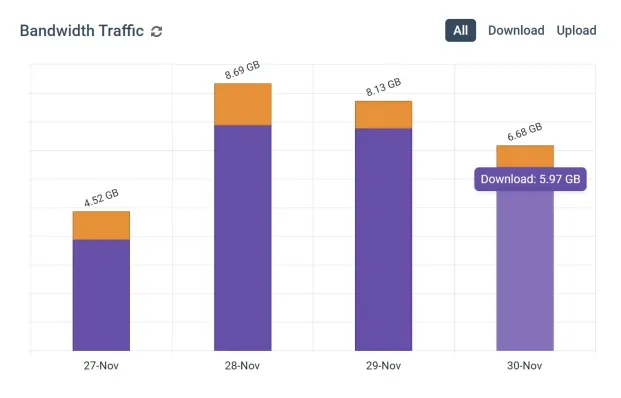
Find Bandwidth Hogs On Your Network
Are bandwidth upgrades necessary, or is an employee’s misuse of the internet what’s causing bottlenecks?
With CurrentWare’s bandwidth monitoring features you can identify bandwidth hogs in your network, then block them to reduce unnecessary strain on your network’s bandwidth.
Learn more →
Manage Employee Productivity
While occasional web surfing might be okay so long as employees are getting their work done, workplace internet abuse can be a serious detriment to employee productivity.
The productivity insights provided by employee computer monitoring software allows you to identify inefficiencies so you can optimize work processes.
Learn more →
Protect Your Business From Liability Risks
Detect Software Piracy
Ensure only legitimately licensed software is being used on company computers.
Stop Workplace Harassment
Collect evidence of employees accessing pornographic, hateful, or crude websites at work.

Improve Visibility of Remote Workers
Identify poor performers, improve visibility into employee productivity, and provide high-performers an opportunity to demonstrate their efforts.
Using BrowseReporter’s productivity by location reports you can analyze employee productivity trends to see where they thrive and verify attendance.
Save Money on Unused Software
36% of desktop software & 29% of SaaS spend is underutilized or wasted!
Track SaaS and desktop software usage to uncover insights into what applications can be decommissioned, consolidated, or reduced


Real-Time Employee Computer Activity Dashboards & Reports
Improve business intelligence with advanced insights into web browsing, app usage, bandwidth consumption, productivity, and more!
- Identify productivity leaks
- Enforce company policies
- Detect software waste
Ready to Start Web Activity Monitoring?
Analyze your employees’ work habits and productivity with BrowseReporter
Flexible Deployment Options
With CurrentWare’s cybersecurity, web filtering, data loss prevention, and user activity monitoring solutions you’re in complete control of how your data is stored, secured, and retained. Your employees’ data cannot be accessed by CurrentWare.
On Premises
Keep Control of Your Data
Install the management software on a standard computer, then deploy the client software to your users’ computers
Remote Workers
Monitor & Manage on Any Network
Connect your remote employees’ computers to the management software with simple port forwarding rules
Self-Managed Cloud & VDI
Citrix, Azure, AWS, GCP, and More!
Enjoy the scalability and availability of the cloud alongside the security, control, and flexibility of our on-premises solution
Go Beyond Employee Internet Use Monitoring
With the full capabilities of the CurrentWare Suite you can go beyond monitoring internet activity with advanced visibility and control over internet, application, and removable media usage. Get granular insights into file uploads/downloads, file transfers to removable media, logon/logoff times, and more!

Monitor Employee Productivity
CurrentWare’s detailed employee productivity reports provide managers with the productivity metrics they need to better understand how employees spend their time at work.
- Track the use of apps and websites to find out who is wasting work time on social media, computer games, and other distractions
- Track employee engagement across your entire workforce, a specific team, and individual employees
- Review the websites that were open during inactive periods to verify that idle time was spent on work-related tasks
- Get insights into productivity trends based on time spent in-office vs working remotely
Keep a Pulse on Real-Time Team Activity
Today’s Insights displays the real-time productivity and availability status of individuals and teams via an at-a-glance dashboard.
Easily view the most recent productivity metrics to understand who is actively working and what application/website they last used.
- Get high-level views of the activity of individual users and teams
- Easily see who is online now and who hasn’t logged in today
- Filter cards by activity, productivity, name, and average activity time

Protect Company Data From Insider Threats
CurrentWare’s user activity monitoring and data loss prevention features give you the activity logs you need to protect against a data breach to insider threats.
- Prevent data breaches with proactive alerts of high-risk activities like using unauthorized portable storage devices
- Audit employee activity for suspicious activity and anomalous behaviors
- Track and restrict file movements across portable storage devices, cloud storage services, and network share drives

Take Screenshots of Employees’ Screens
Our employee monitoring software lets you capture screenshots of your employees’ screens to see exactly what they are doing on their computers.
- Capture high-resolution and compressed screenshots
- Monitor desktops in real-time to watch for unsafe data handling and inappropriate behavior
- Screenshots are tagged with the website or application that was being used, the time, and the name of the computer

Save Money With Genuine Software Usage Data
Underutilized software costs businesses a staggering $34 billion per year! With genuine insights into employee application usage you can make informed software asset management decisions.
- Find the utilization rate of specific pieces of software
- Discover what SaaS tools have fallen out of use
- Ensure you have enough licenses to meet genuine demand

Monitor File Transfers for Suspicious & High-risk Behaviour
Improve data security with increased visibility into high-risk data transfers and USB activity.
- Receive real time email alerts when employees violate your endpoint security policies
- USB file tracing reports show files that have been copied, created, deleted, or renamed on removable media devices, cloud storage services, and network share drives
- Review file transfer activity logs to trace data breaches back to their source

Track Login & Logout Times
Combine idle time tracking with logon history reports to get a full picture of your employee’s activity levels.
- Audit logon and logoff times to see how long your employee’s are working at their computers
- Get a record of each time your employees startup, restart, and shutdown their computers
- Verify that employees working from home are active during work hours and see when they are taking breaks

Get Insights Based on Employee Location
BrowseReporter’s Location Insights dashboard helps leaders make data-driven decisions about remote, in-office, and hybrid work.
Promote flexibility without sacrificing accountability with insights into how location flexibility affects employee performance and engagement.
- Compare productivity scores between groups of in-office, remote, and hybrid employees to gauge the impact that location has on employee performance
- See how much of your workforce is working in-office, remotely, or hybrid in a given timeframe
- Review productivity trends to decide if frequently abused distractions need to be limited with BrowseControl’s URL filter

CASE STUDY
Shady Maple Transforms Their Productivity With Internet Filtering and Monitoring Software
Being able to identify negative browsing trends and put a stop to them within a couple of hours has meant that our employees are focused on the job almost all of the time. We have become an extremely efficient workforce.
How to Address Objections to Internet Monitoring Software?
The world of employee monitoring is a bit of a double-edged sword. As an employer you want to use software to monitor internet activity to gain critical insights and prevent time theft by ensuring employees work as expected, but your high-performing employees might feel like they aren’t trusted to handle their task management independently.
The key to a successful employee monitoring strategy is to foster employee buy-in. Your employees need to know that their privacy is respected, that they are trusted, and that productivity tracking software isn’t the sole method for evaluating employee performance.
Try BrowseReporter for Free
Fully functional. Easy to use. $12 USD user/month*. For on-prem pricing, contact Sales
FREE DOWNLOAD
Best Practices for Monitoring Employees
Follow these best practices to increase buy-in for employee monitoring. Learn how to create a monitoring strategy that is transparent, fair, and respectful of employee privacy.
Real-Time Employee and Computer Monitoring Features
Monitor Computer Activity
Get real-time insights into your users’ technology use
Screenshot Monitoring
Take automatic screenshots or remotely view desktops
Track App Use
Get insights into software usage trends in your organization
Idle Time Tracking
Track mouse and keyboard movement to monitor inactivity
Email Reports & Alerts
Automatically send reports to designated inboxes based on events or schedules
Tracking Scheduler
Limit activity tracking to specific days and schedules such as employee work hours
Employee Privacy
Optional privacy-enhancing features improve transparency and minimize data collection
Stealth Mode Option
The software can run silently in the background or be configured to alert users
Central Web Console
Save time with a central admin console; optionally integrate Active Directory OUs or security groups
Platform Security
Protect your CurrentWare console with 2FA, passwords, privilege management, and more
Software License Optimization
Optimise your organisation’s software spending with insights about associated costs and usage.
SQL Server Supported
Database scaled for enterprise and large business operations using Microsoft SQL Server
The Benefits of the Best Employee Monitoring Software
Why is computer monitoring software so popular? This video shows the key reasons why employers use computer monitoring software to track activity on employee computers.
How to Choose the Best Employee Monitoring Software
Deciding on what the best employee monitoring software is for an organization can be a daunting process as individual requirements will change depending on the organization’s current infrastructure, the types of monitoring they would like to conduct, their data privacy and security compliance requirements, as well as several other factors.
This employee monitoring software buyer’s guide covers the essential considerations your organization must evaluate when determining the best employee monitoring software for its needs.
FREE DOWNLOAD
Employee Monitoring Starter Kit
This kit provides your organization with the tools it needs to implement a successful employee monitoring strategy.
- Templates for policies and disclosures
- Presentations for key stakeholders
- Best practices for monitoring employees
BrowseReporter
Compare BrowseReporter with Other Employee Monitoring Tools
See how BrowseReporter compares on features, deployment options, privacy controls and price against the monitoring tools buyers shortlist most often.
- Product Comparisons
Zscaler Alternative
- Product Comparisons
WebTitan Alternatives
- Product Comparisons
Veriato Alternatives
- Product Comparisons
Teramind Alternatives
- Product Comparisons
SafeConsole Alternative
- Product Comparisons
ManageEngine Alternative
- Product Comparisons
InterGuard Alternative
Trusted by teams across the United States, Canada & the United Kingdom
Join 100,000+ professionals across 55 countries.


What customers say about CurrentWare
4.7 / 5
90% of reviewers would recommend BrowseReporter (average likelihood to recommend: 9 out of 10).
Solutions That Work Across Industries
Tailored controls that help you meet industry standards, boost efficiency, and protect sensitive data across remote and in-office teams.
Healthcare
HIPAA-ready controls to protect PHI with USB management and insider-threat visibility.
Government
Cybersecurity and policy enforcement aligned to NIST 800-171 and CMMC.
Legal Services
Keep client data protected, billable hours productive, and software costs in check.
Manufacturing
Productivity monitoring and internet visibility for both the shop floor and back office.
Financial Services
Enforce access policies and protect sensitive financial data with audit-ready trails.
Schools & Libraries
CIPA-compliant web filtering to qualify for E-Rate and keep students safe online.
Small Business Employee Productivity
Track unproductive web browsing and idle time to detect time-wasting
Built to Support Your Compliance Program
Discover how organizations use CurrentWare’s employee monitoring software to improve visibility, strengthen compliance efforts, and manage employee activity more effectively.
- CMMC Compliance →

CMMC
Endpoint Restriction to Protect CUI & FCI
- NIST 800-171 Compliance →

NIST 800-171/53
Protect Controlled Unclassified Information
- ISO 27001 Compliance →

ISO 27001
Increase the Maturity of Your ISO27K ISMS
- HIPAA Compliance →

HIPAA
HIPAA protects sensitive patient data
- Cyber Essentials Compliance →

Cyber Essentials
Critical Security Controls For Your Assessment
- GDPR Compliance →

GDPR
EU’s data protection and privacy law
- NERC CIP Compliance →

NERC CIP
Protect TCAs & BCSI From Insider Threats
- CIPA Compliance for Education →

CIPA for Education
Qualify for the FCC’s E-Rate Program
Pick & Plug Into Your Existing Stack
CurrentWare works alongside the identity, security, and directory tools you already use, including support for SAML, OIDC, and CEF standards. Cloud connectors are on the way.
- Tested & supported
- Generic standards (SAML, OIDC, CEF)
- On the roadmap (Cloud)


Keep reading
Articles
- Employee Monitoring
Screenshot Monitoring in Healthcare
Healthcare organizations in 2026 will be increasingly challenged to monitor employee computer activity without risking showing sensitive patient information. In…
- Employee Monitoring
Citrix & AVD Multi-Session User Tracking Guide
Learn why Session-ID mapping matters in Citrix, Azure Virtual Desktop, and RDS separating user activity, idle time, policies, and audit…
- Employee Monitoring
Scalable Employee Monitoring for Growing Teams
The fast-growing company does not have a large IT team, resources dedicated to security, or weeks to deploy an enterprise…
- Compliance
GDPR Compliance Employee Monitoring and DPIA Guide
When using employee computer monitoring software across the European Union (EU), companies have to find a balance between two legitimate,…
- Compliance
US Employee Monitoring Laws by State
The location from which employees log in remained the same with the introduction of hybrid working; instead, it was the…
- Employee Monitoring
Keystroke Logging vs. Application Tracking
As hybrid and distributed work matures into 2026, enterprises' visibility challenges become more nuanced than whether an employee is logged…

Frequently asked
Employee Monitoring Software FAQ
-
No, CurrentWare cannot access your employee’s computer activity tracking data. CurrentWare’s software does not send your user’s computer usage data to CurrentWare. They are installed and managed by your organization.
All of the data collected by CurrentWare’s employee tracking software is stored on a database that is installed in your organization’s data center or cloud service provider.
With CurrentWare’s on-premises & self-managed cloud deployment options, you’re in complete control of your data.
- Sensitive employee data stays secured to your standards rather than being sent to a third party.
- Maintain data localization and residency compliance requirements by keeping employee data exactly where it needs to be.
- Retain auditable records of user activity for as long as you need
For more information please refer to our Terms of Service.
-
Employee monitoring software is a powerful monitoring tool that is used to see what users are doing on a remote computer.
This data provides valuable information for improving the performance and security of monitored devices.
By tracking the online behavior of employees you can ensure that their internet access is being used appropriately.
The best employee monitoring software records a variety of computer activities, including:
- Internet history (Websites visited, idle/active time, etc)
- Applications used
- Bandwidth usage
- File operations (files that are copied/created/deleted)
- Startup/shutdown events
- Logon/logoff events
Employee monitoring tools can also send email notifications to alert a manager when undesirable or suspicious activities happen on monitored computers.
These activity reports serve as valuable evidence of unproductive or high-risk computer activity.
-
Employee monitoring software typically works by installing a monitoring agent on the employee’s computer. The software then captures and logs data related to the employee’s computer and internet activities. From there the monitoring software agent sends the activity data to a central server where it is stored and made available to the administrator of the software.
-
There are numerous productivity, security, and cost-optimization benefits of using employee monitoring software, such as:
- Deterring counterproductive work behaviors (CWB) such as tardiness, time theft, bullying, and absenteeism.
- Improving employee productivity by deterring excessive personal internet usage and gaining deeper insights into employee workflows.
- Monitoring software utilization and adoption rates to determine what software should be consolidated or decommissioned
- Protecting sensitive information against high-risk computer activities such as visiting potentially dangerous websites or uploading files to personal cloud storage accounts.
According to a 2017 Spiceworks survey of IT professionals, the most common reasons that their employers monitor employees is to protect against malware and phishing scams, to prevent unacceptable user behavior, to prevent users from visiting inappropriate websites, for liability management/compliance purposes, and to protect sensitive information.
Learn More: The Benefits of Employee Productivity Tracking Software
-
When determining how employee monitoring software will be used with the teams in your organization it is important to understand the potential privacy implications for your employees and what factors influence your right to monitor employee activity.
Depending on your jurisdiction and the jurisdiction of your employees you may have legal obligations to fulfill before monitoring employees in the workplace. The best practice is to consult with a legal professional first.
Most workplace privacy and employee monitoring laws require you to be transparent about data collection. This includes informing employees about what is being monitored, how their data will be protected, and how it will be used.
Typically this disclosure is provided in an employee manual, workplace monitoring policy, or acceptable use policy.
The best computer monitoring software helps you meet your privacy requirements with privacy-enhancing features such as alerting your users that their computer activity is being monitored.
-
Employee computer monitoring software is used by a wide variety of industries. It is most commonly found in industries that are required to monitor employee activity for data security compliance purposes.
Examples of industries that use employee monitoring software include financial services, manufacturing, government, and healthcare.
-
Implementing an employee monitoring solution is not without its risks. Before monitoring your employees with employee monitoring software you must first evaluate the pros and cons of employee monitoring to see if it’s the right choice for your company.
Some common challenges of monitoring employees include:
- Potentially sensitive personal information may be captured. If employees doubt whether or not their personal information is adequately protected from misuse there is a legitimate concern that their web browsing history can be unfairly used against them.
- If employees use their work computer for personal tasks the monitoring software may capture personal details such as racial identity, personal web browsing habits, religious beliefs, and health concerns
- Automated screenshot capturing software will capture everything on their screens including banking details, personal messages they may be writing, and any classified information they may be working with
- Employees could be concerned that the insights will be used unfairly or that their activity data will create a bias that will impact their professional career
- An invasive employee monitoring solution may lead to legal issues if the company does not adequately comply with employee privacy legislation. Privacy laws typically require advanced disclosure of the intent to monitor and only monitoring what is required to meet the business’ legitimate interests without disproportionately harming employee privacy.
Learn More: The Negative Effects of Employee Monitoring (& What You Can Do)
-
While at first glance it may appear that the advertised list price of employee monitoring software is the best price you will get, the majority of vendors will negotiate for more advantageous pricing based on a variety of factors.
How to Get the Best Price for Employee Monitoring Software
- Prepayment & Bulk Licensing: Pricing breaks are typically available for businesses that sign up for multi-year plans or can commit to bulk orders. The starting volume of license discounts varies by vendor, with some vendors offering discounts at as low as 100 users. Volume discounts often increase depending on the number of licenses and the length of the contract term.
- Managed Service Providers & Resellers: Vendors with partner programs for MSPs and VARs will provide licenses for their software at a cost below MSRP so that their partners can earn money based on their resale margins and ability to provide employee monitoring capabilities to their clients.
- Industry Discounts: Some vendors will provide exclusive discounts to particular industries such as nonprofits and education institutions.
- Prepayment & Bulk Licensing: Pricing breaks are typically available for businesses that sign up for multi-year plans or can commit to bulk orders. The starting volume of license discounts varies by vendor, with some vendors offering discounts at as low as 100 users. Volume discounts often increase depending on the number of licenses and the length of the contract term.
-
While being transparent about employee monitoring is the recommended best practice, giving notice to employees is not always required.
The majority of jurisdictions require each worker to be made aware of their employer’s intent to monitor. Some jurisdictions with greater rules and laws will further dictate that employees must be made explicitly aware of what data is captured, how it will be used (such as productivity management), and who will have access to it.
The best employee monitoring software will allow your organization to be in control of how visible the data loss prevention software is.
CurrentWare’s employee monitoring software solutions operate in stealth mode by default.
In stealth mode, the CurrentWare software client is not visible in the system tray or control panel of the user’s computer. Your users will not be able to uninstall the program or stop it without administrator privileges.
If you would like your users to be aware that they are being monitored, you can choose to show the CurrentWare software client in their system tray by enabling it in the client software settings.
CurrentWare provides a variety of privacy-enhancing features such as
- The ability to choose what computer activities are monitored, such as not monitoring idle vs active time or disabling tracking for specific users
- A tracking scheduler that allows you to stop monitoring your users at designated off-hours times such as breaks
- The ability to make the CurrentWare client visible in the system tray
- An end-user reports dashboard that provides your users with access to their data
- The ability to display a custom message to notify your users that they are being monitored
Learn More: CurrentWare’s privacy features
-
It depends. If an employer allows employees to use personal devices for work purposes the employer may have legitimate business reasons to require the use of employee tracking software such as:
- Protecting sensitive data against data breaches/data leaks
- Automated time tracking
- To track employee productivity
- Insider threat detection
- App tracking to reduce costs
- Deter access to certain websites that may pose cybersecurity risks to sensitive data and related systems
That said, from a legal perspective employers are seldom justified in monitoring the computer activity of employee-owned devices.
Furthermore, under the vast majority of circumstances, an employer will not be justified in secretly monitoring an employee’s personal computer. They will be required to notify them through a workplace monitoring policy, acceptable use policy, or similar company policy.
From both a security and privacy perspective, employers with a BYOD program should have their employees connect to a virtual machine that allows them to keep their computer activity, company software, and files separate from their personal activity.
Try BrowseReporter for Free
Fully functional. Easy to use. $12 USD user/month*. For on-prem pricing, contact Sales