
How to Check Bandwidth Usage on Computers
Learn how to check bandwidth usage with BrowseReporter, a powerful internet monitoring software for tracking the bandwidth consumption and web browsing habits of employees.

 4.8/5 avg.
Trusted by 100,000+ professionals in 55 countries.
*No credit card required · 14-day free trial · Easy setup




Trusted by enterprises, healthcare organizations, financial and professional services firms, and government agencies at every level.







Internet Bandwidth Usage Reports
Streaming videos from Netflix can consume up to 7GB of data per hour. Users that misuse the internet in their workplace aren’t only harming their own productivity, they also strain the available bandwidth and increase network latency.
Reduce Latency
Slow internet speeds caused by bandwidth abuse reduce the effectiveness of your workforce through dropped VoIP/video conferencing connections, longer wait times to access critical resources, and internet connection loss from excessive overload on network hardware.
Save Money
Bandwidth consumption history reports allow you to strategically plan investments in upgrades to networking hardware. With bandwidth consumption insights you have the data you need to determine if upgrades are truly necessary.
Detect Malware
Monitor for bandwidth spikes that are caused by dangerous torrenting websites and malware that turns endpoint devices into botnets or rigs for unauthorized cryptocurrency mining (‘cryptojacking’).
Bandwidth Usage Summaries
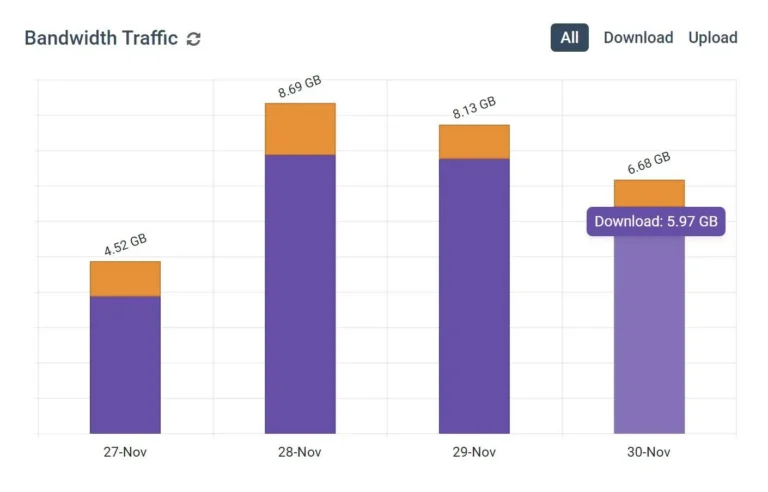
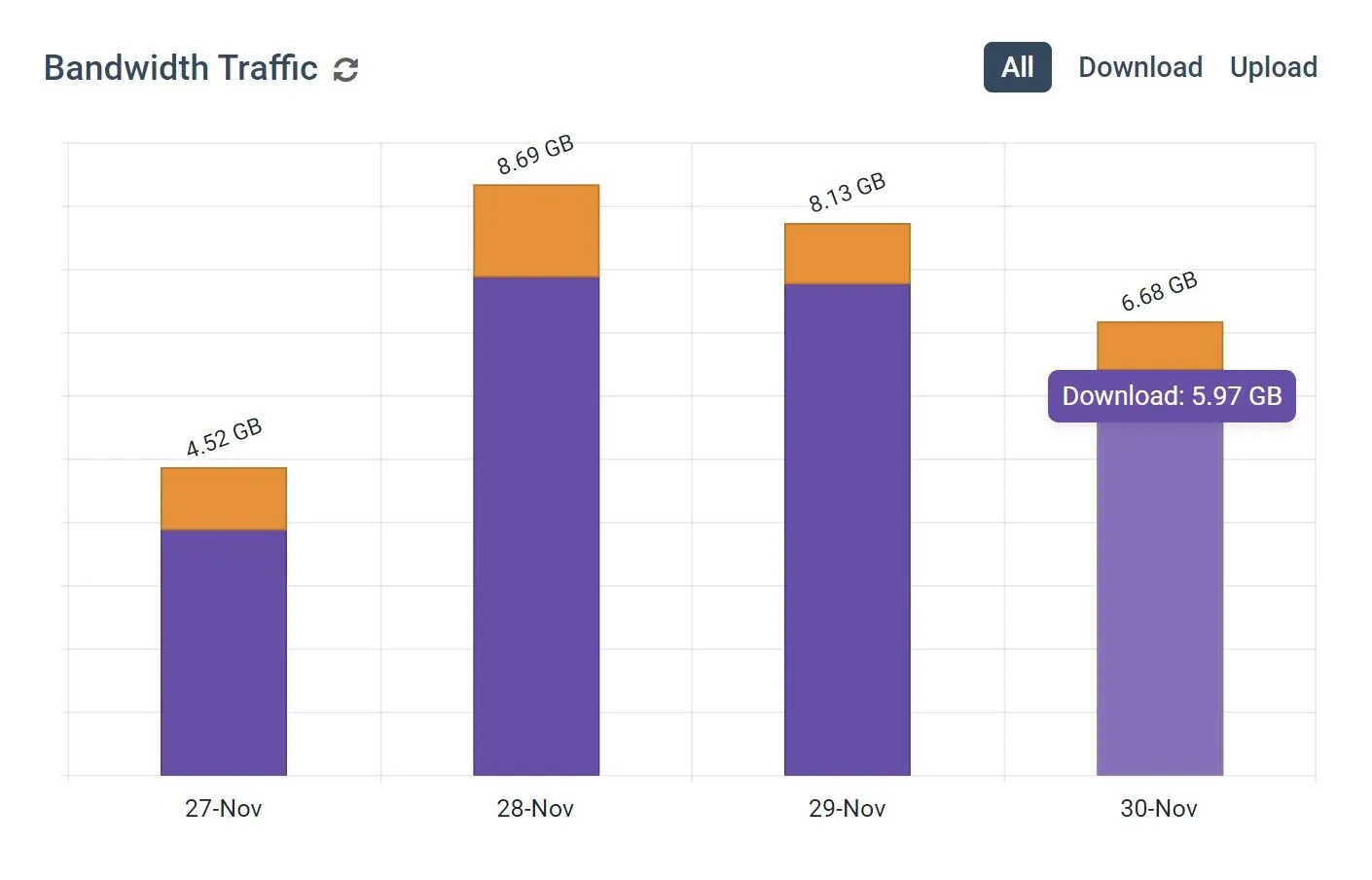
- Review data sent and received each day for groups & individuals
- Identify abnormal spikes or dips in expected bandwidth usage
- Discover who is responsible for the greatest bandwidth usage
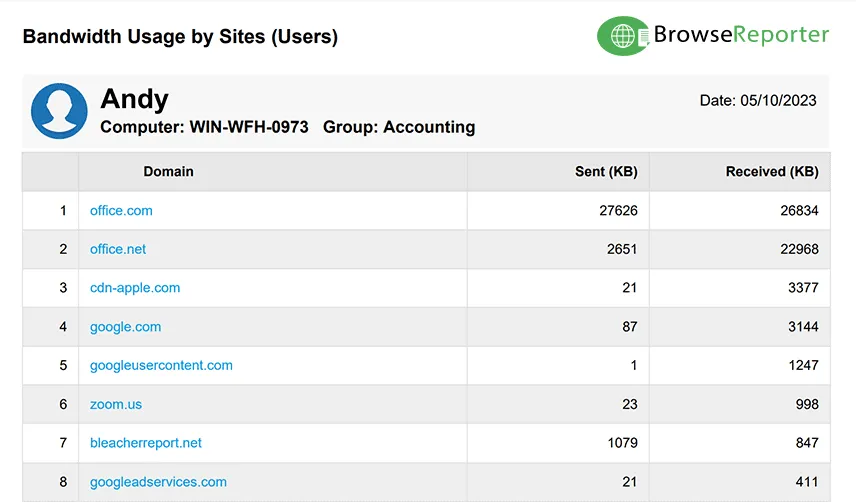
Monitor Bandwidth Usage by Website
- Track websites that may need to be blocked to reduce latency
- Identify the websites that demand the most bandwidth
- Track websites that may need to be blocked to reduce latency
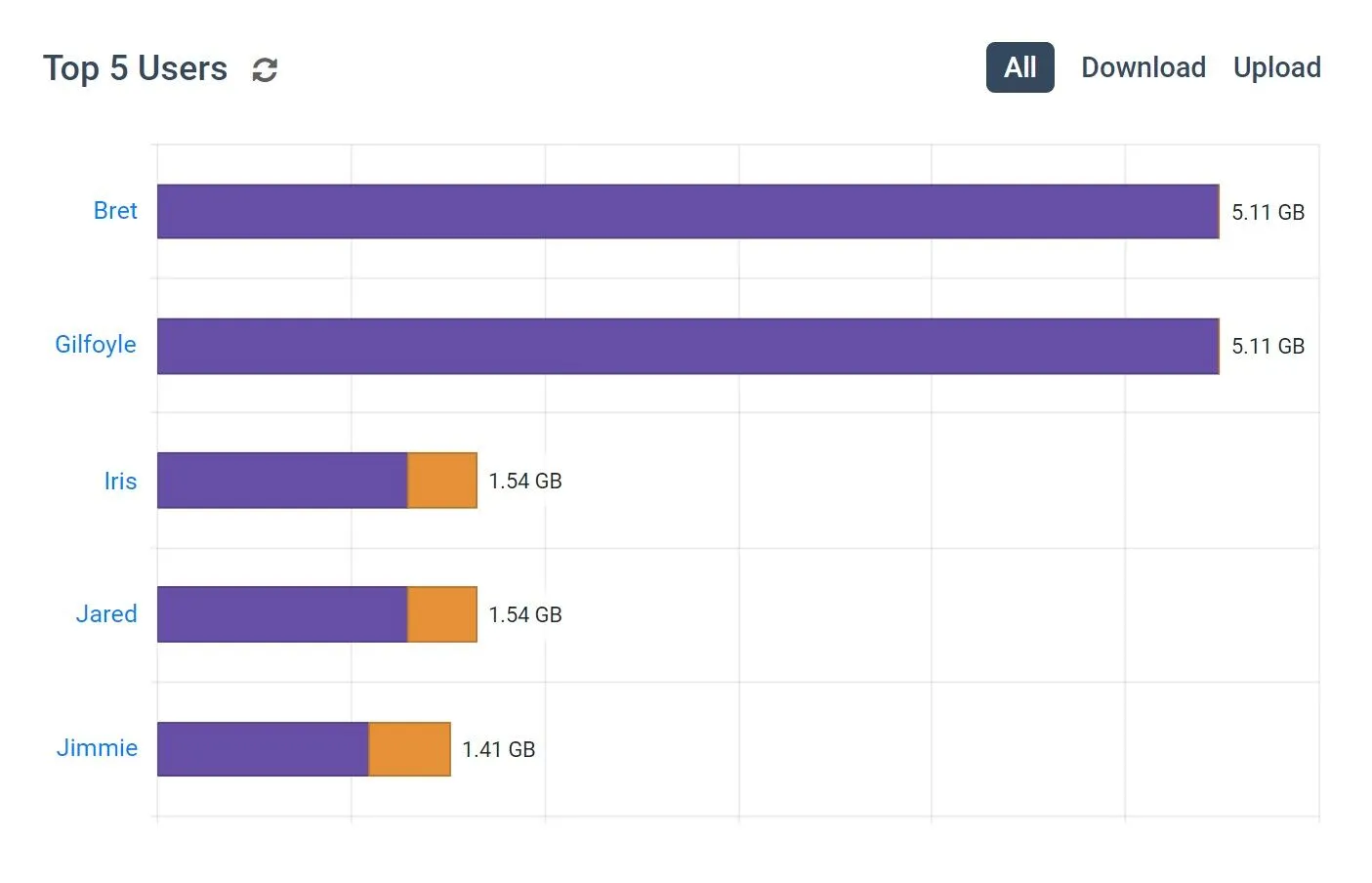
Top Users & Groups by Bandwidth Usage
- Discover which users and departments require the most bandwidth
- Get early warning signs of anomalous bandwidth usage
- Easily discover who is responsible for bandwidth abuse in your network
Try BrowseReporter for Free
Fully functional. Easy to use. $12 USD user/month*. For on-prem pricing, contact Sales
Why Use Bandwidth Monitoring Software?
Bandwidth monitoring tools are critical for diagnosing network latency, identifying employees that are hogging bandwidth, and determining whether or not costly network upgrades are necessary.
Problems Caused by Bandwidth Abuse:
- Lost VoIP/video conferencing connections
- Lost productivity from high network latency
- Reduced reliability of internet connectivity
- Network crashes from excessive overloading
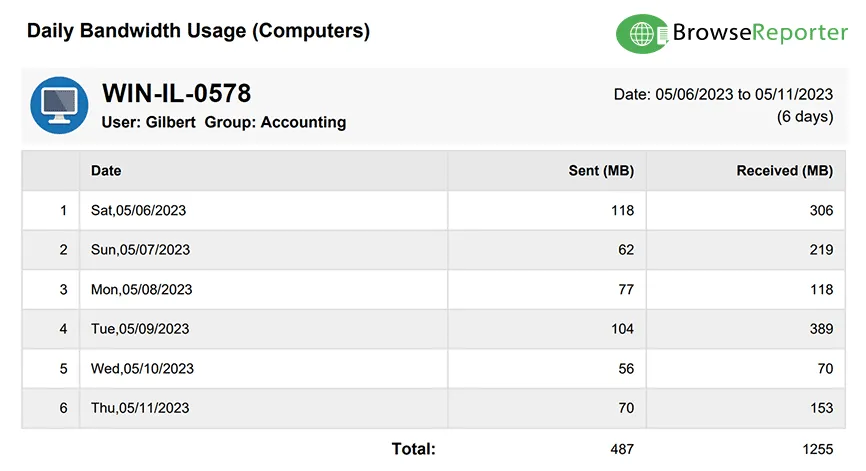
How To Check Bandwidth Usage Per Computer
With BrowseReporter’s client installed on each endpoint, network administrators can easily check bandwidth usage for each user, device, and workgroup in the organization.
- By User: Track the amount of bandwidth sent and received by each user to discover who is using the most bandwidth.
- By Computer: BrowseReporter allows you to check bandwidth usage per computer, allowing you to identify computers that may be infected with viruses.
- By Group: Users can be sorted into groups such as departments, workgroups, and other organizational units. CurrentWare supports Active Directory for easy group management.
BrowseReporter provide insights into both the upstream and downstream data usage within the network.
The bandwidth reports indicate data consumption from specific websites, providing the insights needed for discovering which commonly abused websites can be blocked to improve internet speeds.

CASE STUDY
Shady Maple Transforms Their Productivity With Internet Filtering and Monitoring Software
Being able to identify negative browsing trends and put a stop to them within a couple of hours has meant that our employees are focused on the job almost all of the time. We have become an extremely efficient workforce.
See What Our Customers Have to Say
Expand your capabilities with CurrentWare's award-winning productivity and security software




Real-Time Employee and Computer Monitoring Features
Email Reports & Alerts
Automatically send reports to designated inboxes based on events or schedules
Tracking Scheduler
Limit activity tracking to specific days and schedules such as employee work hours
Employee Privacy
Optional privacy-enhancing features improve transparency and minimize data collection
Stealth Mode Option
The software can run silently in the background or be configured to alert users
Central Web Console
Save time with a central admin console; optionally integrate Active
Directory OUs or security groups
Platform Security
Protect your CurrentWare console with 2FA, passwords, privilege management, and more
Internet Off Offsite Management
Extend onsite security policies to computers running outside the corporate network
SQL Server Supported
Database scaled for enterprise and large business operations using
Microsoft SQL Server
Keep reading
Articles

Web Filtering & Internet Control
How To Block EXE Files In Group Policy (& Other Methods!)
In today’s digital landscape, safeguarding your organization’s network from unauthorized applications is paramount. One effective strategy is blocking executable (.exe)…

Web Filtering & Internet Control
The State of the Web Browser in 2020
They say millennials are the first generation born with information in the palm of their hands. If they need to…

Employee Monitoring
AI Employee Monitoring Software: How to Track AI Usage – A Complete Guide
Why AI Usage Monitoring Is Now Mission-Critical AI adoption is exploding but most businesses are flying blind. According to Deloitte’s…
Employee Monitoring
How to Block Websites Using the Hosts File on Windows 10/11
Editing the Hosts file to block a website on multiple devices is a time-consuming, inflexible, and labor-intensive process. For just…

Employee Monitoring
Mouse Jiggler Detection: How Businesses Can Identify Fake Activity and Protect Workforce Productivity
This article explains how mouse jigglers work and the dangers they can pose for businesses. According to Gallup, just 20…
Try BrowseControl for Free
Fully functional. Easy to use. $12 USD user/month*. For on-prem pricing, contact Sales