
Mac Employee Monitoring Software
Get Apple Silicon-native monitoring with privacy-first, OS-compliant visibility.
- Track websites, applications, login sessions, and active time on macOS.
- Manage all monitoring data from one centralized admin console.
- Support Apple’s security and privacy model without compromising visibility.
Plans start at $12 per user/ month.
*No credit card required · 14-day free trial · For on-prem pricing, contact Sales
700+ organizations trust CurrentWare for workforce visibility & control

Close the macOS Visibility Gap
Most devices employee monitoring stacks are built for Windows first, and it shows because they aren’t compatible with MacOS. The result- your IT department has no way to gain insight into what is going on across the entire fleet of endpoints. That gap creates real, measurable risks like:
No session-level accountability
Without login and session data, you can’t confirm who was active on a device, when, or for how long, which weakens both HR recordkeeping and forensic investigations.
No visibility into web activity
Unmonitored browsing on Mac endpoints hides shadow IT usage and productivity issues that are already tracked on Windows.
Compliance reporting gaps
Auditors expect consistent evidence across every endpoint; a fleet with monitored PCs and unmonitored Macs is an inconsistent compliance posture waiting to be flagged.
Unmonitored devices
Many high-risk workflows finance, legal, and healthcare teams increasingly issue Macs, putting sensitive workflows on the one platform without oversight.
Audit inconsistency
When monitoring standards differ by operating system, you can’t produce a single, defensible activity record for the whole organization.
Features of Mac Monitoring in BrowseReporter
BrowseReporter for macOS provides foundational Mac monitoring capabilities to help IT teams see Mac activity.
Login & Session Logging
Get insights into when your employees log in and log out of their Mac devices. With BrowseReporter, you can get the data on login activity, session duration, and authentication events.
Website & Web Activity Tracking
With BrowseReporter, you will be able to see risky sites, unapproved web tools, distracting browsing habits, and possibly some shadow IT. This will allow you to prevent any potential threats or non-work related activities.
Dashboards & Widgets
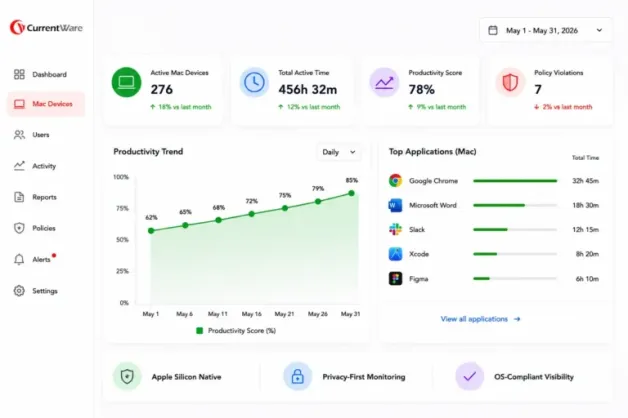
Dashboards and widgets will allow you to review activity trends, policy compliance, and user behavior without analyzing raw logs. Mixed fleets mean that you should not need to switch between monitoring tools to compare the activity of Mac and Windows. This gives visibility into:
- Who was active?
- Which devices are reporting?
- Are Macs being used at the expected hours?
- Is there anything in the web activity that requires a closer look?
Apple Silicon Native Support
BrowseReporter for Mac supports Apple Silicon so you can monitor newer Macs without any compatibility hacks. As more and more organizations are switching to M1, M2, M3, and M4 Macs, native support of these devices becomes critical to ensure the performance, stability, and manageability of the monitoring solution.
Streamlined Installation & Onboarding
BrowseReporter is designed with a streamlined Mac installation experience and permission prompts that comply with the security and privacy framework of macOS. This allows you to reduce the onboarding process and make deployment easier across all macOS versions supported.
Centralized Reporting for Mixed Fleets
With CurrentWare, you will be able to review the activity of your employees across all Mac and Windows in a central console. This will reduce reporting silos and simplify workforce visibility management.
Privacy Focused Mac Monitoring
Why did Apple create such a permission based structure? The employees expect transparency. IT departments need visibility. Legal and HR teams need monitoring to be fair, documented and business related. BrowseReporter for Mac is designed around this idea.
Legal, Ethical, and HR Compatible Monitoring
With BrowseReporter, you will be able to focus on work relevant activities. You will be able to set up what will be monitored, for how long, and who will have access to those reports.
Transparency Builds Trust
Mac users are often creative, technical or executive employees where trust matters a lot. CurrentWare supports clear and policy driven monitoring. You will be able to combine BrowseReporter with the employee monitoring policy, acceptable use policy, and internal communication strategy so that your employees would know everything from the beginning.
Get Started with BrowseReporter
Fully functional. Easy to use. $12 USD user/month*. For on-prem pricing, contact Sales
No Credit Card Required
All subscriptions include ongoing updates and direct support from our team.
Why IT Departments Choose BrowseReporter for Mac Monitoring
One Console for Mac and Windows
With BrowseReporter, you will be able to bring Mac and Windows monitoring into one console. This way, your IT department and leadership have a more consistent view of the workforce activity.
On Premise Deployment Available
CurrentWare allows you to deploy on premise so that you can monitor endpoint activity locally. This is particularly important for compliance driven organizations, regulated industries, government teams, legal teams, healthcare organizations, and companies with strict internal data policies.
Designed for Compliance Driven Organizations
BrowseReporter helps organizations to create a more reliable audit trail of their endpoints. If your organization has to prove that its policies are enforced across Mac and Windows devices, CurrentWare helps to reduce the reporting gap.
Who Uses Mac Monitoring and Why
IT & Security Teams
IT and security teams use Mac monitoring to eliminate endpoint visibility gaps. BrowseReporter helps them monitor user sessions, analyze web activity, detect any risky behavior, and include Macs into the same reporting process as Windows devices. This supports insider threat investigations, shadow IT reviews, acceptable use enforcement, and day-to-day endpoint visibility.
HR & Operations Teams
HR and operations teams need clear data when productivity, attendance, or policy issues arise. With BrowseReporter, they are able to get the data on sessions. This helps HR and operations teams to have facts instead of only relying on the opinion of managers. This is helpful in remote worker accountability, attendance reviews, and productivity discussions that require data.
Compliance & Legal
Compliance and legal teams use Mac monitoring to support audit readiness and acceptable use policies. With BrowseReporter, you can document the activity of your employees across all endpoints to prove that your policies are applied consistently.
BYOD & Multi OS Environments
More and more organizations are supporting multiple operating systems and remote devices. BrowseReporter helps to create consistent visibility across multi endpoint environments. It is helpful for organizations that want to manage flexible work, contractors, distributed teams, and departments that prefer different OS.
Deployment Options for macOS
CurrentWare provides both deployment options for Mac monitoring.
Cloud
Fastest to launch · fully managed
- No servers or database to maintain
- Automatic updates & backups
- Up and running in hours
- Scales effortlessly as your team grows
On-Premise
Your network · your data residency
- Data never leaves your infrastructure
- Meets strict compliance & air-gap needs
- Connect to your own SQL Server
- Full control over data retention & access
Mac Monitoring for Compliance & Acceptable Use
Your Mac users have access to customer records, financial documents, legal documents, product designs, source code, creative content, internal business systems and a lot of other sensitive information. That is why acceptable use and compliance monitoring is important.
Acceptable Use Policy Enforcement
BrowseReporter helps to monitor website activity and sessions of Mac users so that you are able to check if the AUP is being followed or not.
Regulatory and Internal Audit Support
Organizations that implement HIPAA, GLBA, ISO 27001, SOC 2, and other frameworks need consistent evidence of policy enforcement. BrowseReporter supports compliance by helping you document activity of Macs and Windows endpoints.
Audit Ready Reporting
Reports help when an issue occurs and IT, compliance, HR, or legal teams are able to review the data instead of relying only on their memory, and manual updates. This makes investigations fast, clean, and easy to justify.
What is CurrentWare Used For
Government organizations use CurrentWare to help them support policy enforcement, endpoint accountability, and audit readiness across distributed departments.
Healthcare organizations use CurrentWare to strengthen endpoint management in the environment where privacy, compliance, and access control are essential daily.
Professional services use CurrentWare to protect billable time, review web activity, and reduce risky behavior of their employees.
Solutions That Work Across Industries
Tailored controls that help you meet industry standards, boost efficiency, and protect sensitive data across remote and in-office teams.
Healthcare
HIPAA-ready controls to protect PHI with USB management and insider-threat visibility.
Government
Cybersecurity and policy enforcement aligned to NIST 800-171 and CMMC.
Legal Services
Keep client data protected, billable hours productive, and software costs in check.
Manufacturing
Productivity monitoring and internet visibility for both the shop floor and back office.
Financial Services
Enforce access policies and protect sensitive financial data with audit-ready trails.
Schools & Libraries
CIPA-compliant web filtering to qualify for E-Rate and keep students safe online.
Small Business Employee Productivity
Track unproductive web browsing and idle time to detect time-wasting
Built to Support Your Compliance Program
Discover how organizations use CurrentWare to improve visibility, strengthen compliance efforts, and manage employee activity more effectively.
- Learn More

CMMC
Endpoint Restriction to Protect CUI & FCI
- Learn More

NIST 800-171/53
Protect Controlled Unclassified Information
- Learn More

ISO 27001
Increase the Maturity of Your ISO27K ISMS
- Learn More

HIPAA
HIPAA protects sensitive patient data
- Learn More

Cyber Essentials
Critical Security Controls For Your Assessment
- Learn More

GDPR
EU’s data protection and privacy law
- Learn More

NERC CIP
Protect TCAs & BCSI From Insider Threats
- Learn More

CIPA for Education
Qualify for the FCC’s E-Rate Program
Pick & Plug Into Your Existing Stack
CurrentWare works alongside the identity, security, and directory tools you already use, including support for SAML, OIDC, and CEF standards. Cloud connectors are on the way.
- Tested & supported
- Generic standards (SAML, OIDC, CEF)
- On the roadmap (Cloud)


Keep reading
Articles
- Employee Monitoring
how To Track AI Usage With Employee Monitoring Software
Why AI Usage Monitoring Is Now Mission-Critical AI tools are now part of daily work for most teams. People use…
- Cyber security
Shadow AI Security Risks Governance
You locked down USB ports. You deployed web filtering. You trained your users on phishing. Then someone on the finance…
- Employee Monitoring
Best User Activity Monitoring Tools
Quick Answer: What Are the Best User Activity Monitoring Tools in 2026? The best User Activity Monitoring tools in 2026…
- Employee Monitoring
Best Workforce Analytics Software
According to a workforce analytics industry report published by Fortune Business Insights, the global workforce analytics market was valued at…
- Employee Monitoring
Currentware Infographic Featured On Betanews
Our infographic on the Internet Of Things was featured in a BetaNews article! BetaNews.com is one of the most influential…
- Employee Monitoring
Whats New With Currentware-9-0
CurrentWare version 9.0 is here! This update introduces Advanced HTTPS transparent packet filtering technology, allowing for significant enhancements to the tracking and…


Get Started Today with a Free Trial
Fully functional. Easy to use. $12 USD user/month*. For on-prem pricing, contact Sales