
Employee idle time tracking & work monitoring software
Track idle time and real-time productivity of your employees in remote, hybrid, or on-site offices.
- Monitor browsing habits
- Track when employees are away from their computers.
- Discover the apps they use, even on Terminal Server and Remote Desktop Services!
- Plans starting $12 USD user/month*
*No credit card required · 14-day free trial · For on-prem pricing, contact Sales
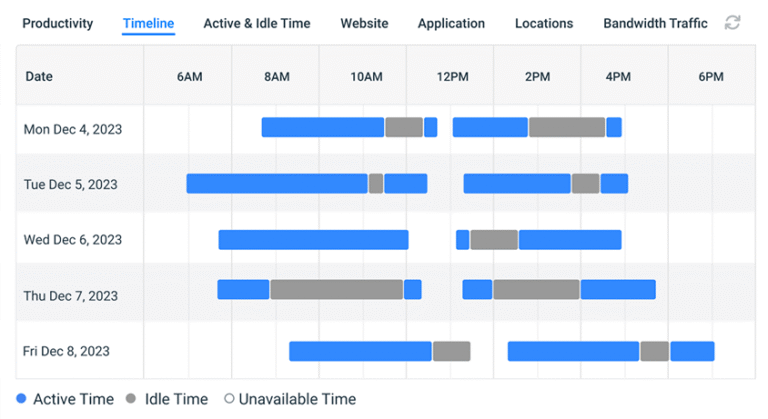







Turn Raw Time-Data Into Clear Productivity Insights
Understand how work hours are spent with real-time visibility into employee activity, idle time, and application usage.
Get Productivity Insights
BrowseReporter turns employee activity data into useful productivity insights. You get a concise breakdown of active, idle, and inactive time for every employee without digging into lengthy logs. With the easy-to-read reports, managers can identify productivity trends, recognize consistently engaged employees, and discover opportunities for coaching, workload balancing, or process improvements.
View Detailed App & Website Reports
See how your employees spend their work hours across applications and websites used by them. BrowseReporter accurately tracks the time spent in each app, including periods of inactivity, which give you an all comprehensive picture of software usage. The ‘Interactive Charts’ feature makes it easy for you to visualize activity patterns, compare usage across teams, and identify the apps that drive productivity or contribute to idle time.
Idle Time Tracker for Improving Employee Productivity
Not all idle time is unproductive. Some time is spent for lunches, calls, or short breaks. BrowseReporter helps you accurately track idle time using the keyboard & mouse activity.
Active vs. Idle Time Reporting
BrowseReporter distinguishes between active work and inactive periods, which gives you a complete view of your employees’ work patterns. You can compare active and idle time across employees, teams, or departments to identify productivity trends, balance workloads, and find opportunities to improve operational efficiency. What’s more, with historical reports, you can easily monitor changes over time and measure the impact of process improvements.
Application & Website Activity Tracking
Go beyond idle time with detailed employee activity tracking. BrowseReporter carefully records the apps your employees use and the websites they visit during the workday, along with the time spent actively using them. Thus, with a combination of app and website activity with idle time data, team managers can gain the confidence to distinguish productive work from unproductive time, optimize software usage, and generate more accurate productivity reporting.
Monitor Inactive Time Across Teams
No more guessing where your teams’ work hours go. With CurrentWare, get a clear, real-time overview of active vs. idle time across every employee, team, and location.
Customizable Inactivity Thresholds
Set the rules that match your workplace, not someone else’s.
- Define exactly how many consecutive minutes of inactivity should be flagged as idle.
- Apply thresholds at the individual user level, by group, or via Active Directory.
- Set shorter thresholds for high-volume roles (e.g. 5 min for data entry) and longer ones for analytical or creative work (e.g. 15 min for developers).
- Adjust thresholds at any time- no rigid, one-size-fits-all rules.
Automated Alerts for Excessive Inactivity
Know when inactivity becomes a problem before it compounds.
- Automatically notify administrators the moment an employee exceeds a defined idle time limit no manual report review needed
- Configure alerts by threshold duration, time of day, department, or individual user
- Get alerted to one-off absences (e.g. an employee who stepped away mid-shift) and recurring disengagement patterns alike
- Spend less time combing through logs and more time acting on signals that matter
How to Set up Idle Time Monitoring Software
Getting started with Idle Time Monitoring Software only takes a moment, and you don’t need to be an IT expert to do it. Here is a detailed step-by-step process:
Step 1: Install Computer Monitoring Software on the Employee's Computer
Deploy CurrentWare’s lightweight endpoint agent on employee workstations remotely via Group Policy (GPO), Microsoft Endpoint Manager, or manual installation. The agent runs silently in the background with no impact on computer performance.
It’s compatible with Windows environments and can be rolled out across an entire organization in a single batch. For distributed or remote teams, deployment packages can be distributed securely without requiring on-site visits.
Step 2: Configure the Idle Time Tracking Threshold
Once the agent is installed, log into the CurrentWare management console and define your inactivity thresholds. Apply settings globally across all users, by department, or at the individual employee level. If your organization utilizes Active Directory, thresholds can be inherited from existing group configurations with no duplicate configuration needed. This step typically takes under an hour even for large deployments.
Step 3: Monitor Employee Computer Activity
With the agent running and thresholds configured, idle time tracking begins automatically. The management console provides a live view of which users are currently active, which are inactive, and how long each state has persisted. Activity data is logged continuously and stored for reporting giving you both real-time awareness and a historical record for trend analysis, audits, or performance reviews.
Step 4: Include Idle Time in Your Employee Computer Monitoring Reports
Pull idle time data into CurrentWare’s built-in reporting suite to understand productivity patterns throughout your organization. Reports can be filtered by user, team, date range, or department, and scheduled for automatic delivery to managers or HR.
Combine idle time data with application usage, web activity, and login/logout times to build a complete picture of how work hours are actually being spent. Reports can be exported in CSV or PDF format for payroll integration, compliance documentation, or workforce planning.
What Makes CurrentWare Different Than Other Time Tracking Solutions
There’s no shortage of employee monitoring tools. But organizations that care about data control, privacy, and flexibility choose CurrentWare. Here’s why:
1. On-Premise Deployment- Your Data Stays Inside Your Environment
Most cloud-based monitoring tools send employee activity data to third-party servers. CurrentWare offers true on-premise deployment: all tracking data is collected, stored, and managed within your own infrastructure. For organizations in regulated industries, including healthcare, financial services, government, this isn’t a nice-to-have. It’s a requirement.
2. Modular Suite- Pay for What You Need
CurrentWare is built as a modular platform. BrowseReporter handles employee activity monitoring. idle time tracking, and even manages website and application blocking. AccessPatrol governs endpoint data security and device control. Organizations can deploy one module independently or combine all three- mixing and matching based on their specific compliance, productivity, and security requirements.
3. Transparent, Employee-Respectful Monitoring
CurrentWare is designed to support monitoring programs that employees understand and accept. The platform allows visible notification that monitoring is active, and administrators can configure what data is collected and who can access it. Monitoring policies can be communicated clearly to staff, lessening their anxiety and resistance.
4. Customizable Thresholds at the User and Group Level via Active Directory
Most tools apply a single idle time threshold across the entire organization. CurrentWare lets you set different thresholds for different roles, teams, or individuals, and syncs directly with Active Directory so your existing organizational structure drives the configuration. No manual re-entry. No duplicate setup.
Time Tracking Solution That Works Across Teams
Idle time data isn’t just for one department. It surfaces insights that each team in your organization can act on. Different teams draw very different values from employee idle time tracking. The raw data is the same; what changes is how each function interprets and applies it to each specific workflow and goals.
HR & People Operations
- The HR team uses idle time data to support workforce planning and attendance analysis. When absenteeism patterns are opaque, managers commonly rely on anecdotes.
- Idle time tracking gives HR an objective baseline, showing when employees are clocked in but not engaged, flagging potential burnout or disengagement before it affects retention, and providing concrete data to support performance conversations. During workforce planning cycles, aggregate idle time trends help identify whether teams are overstaffed, under-resourced, or not aligned with workload demands.
IT & Security teams
- They use activity and idle time data for infrastructure utilization and software license optimization.
- Machines that sit idle for long periods may represent underutilized assets, or indicate that certain software licenses are purchased but rarely used. Through a correlation between idle time and application usage data, IT teams can make evidence-based decisions about hardware refresh cycles, remote access configurations, and license renewals.
Operations & Workforce Management teams
- Ops & management teams rely on idle time tracking to identify productivity bottlenecks and support capacity planning.
- If a team consistently shows high idle time during specific hours or days, that’s a signal worth investigating; it may indicate scheduling gaps, process inefficiencies, or task assignment problems that managers can address. For contact centers and BPO environments, where productivity metrics directly tie to SLA performance, idle time monitoring is an operational necessity.
Finance & Payroll teams
- Finance teams use idle time data to improve billable hour accuracy and reduce time theft exposure.
- In organizations that bill clients by the hour or allocate costs to projects, unaccounted idle time can erode margins and damage client trust. CurrentWare gives finance teams the data they need to validate timesheet entries, note discrepancies, and build a defensible record of actual work activity, whether for internal audits or client-facing reporting.
Industry Use Cases
CurrentWare’s idle time tracking software delivers measurable value across every industry where computer-based work is the norm.
BPO & Call Centers
- Distinguish between legitimate breaks and excessive unproductive time across large agent pools.
- Monitor utilization against strict handle-time and SLA metrics in real time.
- Produce activity reports that satisfy enterprise client audit requirements.
IT & Software Development Teams
- Customize thresholds to accommodate deep work patterns without penalizing focused thinking time.
- Identify when developers may be blocked, underloaded, or disengaged.
- Support sprint capacity planning with objective activity data.
Financial Services
- Support compliance teams in demonstrating staff are working within defined hours and procedures.
- Provide an audit trail for investigations and regulatory reviews.
- With on-premise deployment, ensure sensitive activity data never leaves the firm’s controlled environment.
Healthcare Administration
- Identify when workstations are left unattended with patient data potentially visible.
- Support enforcement of session timeout policies in line with HIPAA requirements.
- Track productivity throughout administrative functions without intruding on clinical staff workflows.
Marketing & Creative Agencies
- Verify that hours billed to clients indicate genuine computer activity.
- Identify excessive context-switching between client accounts.
- Provide the accountability layer that replaces natural office visibility for remote and hybrid teams.
Outsourcing & Distributed Teams
- Deliver consistent activity oversight regardless of employee location or time zone
- Activity data is logged in real time and accessible from a central console
- Provide the same operational visibility for distributed teams that managers have in a physical office
Education & Training
- Monitor whether students or trainees are engaged during computer-based learning sessions
- Flags low engagement or extended idle periods for instructor follow-up
- Produce activity and completion reports for compliance or accreditation purposes
Privacy, Ethics & Legal Monitoring
Effective employee monitoring doesn’t require sacrificing employee trust, but it does require intentional, legally compliant practices.
Transparent Monitoring Practices
- Employees who know they are being monitored are less likely to feel surveilled and more likely to view monitoring as a fair productivity tool
- CurrentWare supports transparent deployment by enabling visible notifications that monitoring is active on managed devices
Employee Consent and Notification Best Practices
- Provide a written monitoring policy communicated at onboarding and acknowledged in writing
- Use clear language in employment agreements about what activity may be tracked
- Define a process for employees to raise questions or concerns about monitoring data
US State Notification Laws
- Connecticut (Conn. Gen. Stat. Section 31-48d), Delaware (19 Del. C. Section 705), and New York (New York Labor Law Section 740) all have specific electronic monitoring notification requirements
- New York’s law (effective May 2022) requires prior written notice to all new hires, a signed acknowledgment, and a conspicuous workplace notice
- Consult legal counsel to guarantee compliance with the specific statutory language in each applicable state
GDPR Considerations for International Teams
- Monitoring must have a lawful basis, such as legitimate interest or contractual necessity
- Data must be collected only to the extent necessary, with defined and limited retention periods
- Employees must be informed through a transparent privacy notice
- Data Protection Impact Assessments (DPIAs) may be required for systematic monitoring programs
- Organizations with international teams should consult a data protection officer or legal counsel
Monitoring During Work Hours Only
- CurrentWare tracks activity only during designated work sessions, not during personal time, evenings, or weekends
- Restricting monitoring to work hours limits legal exposure, respects employee privacy, and keeps data collection focused on relevant activity patterns
Deployment Options
CurrentWare is built to fit your infrastructure, not the other way around.
On-Premise vs. Cloud: At a Glance
| On-Premise | Cloud | |
|---|---|---|
| Data location | Your servers, your environment | Vendor-managed- cloud infrastructure |
| Ideal for | Regulated industries, high-security environments | Teams prioritizing ease of setup and minimal IT overhead |
| IT requirements | Windows server environment | Browser-based; minimal IT infrastructure required |
| Data sovereignty | Full control meaning data never leaves your environment | Data is processed & stored by vendor |
| Customization | Full control over configuration, updates, and retention | Update cycles are managed by vendor |
| Integration | Native AD sync for group level policy management | Available with directory sync |
| Best for | Financial services, healthcare, government, BPO | SMBs, distributed teams, rapid deployments |
Implementation Timeline
Most organizations are fully operational within 1 to 2 weeks of initiating deployment. A typical rollout looks like this:
Days 1-3:
Scoping and configuration planning that includes defining user groups, threshold settings, and report requirements with your IT and HR stakeholders.
Days 4-7:
Agent deployment across endpoints via GPO, Endpoint Manager, or manual installation. For large organizations (500+ seats), phased rollout by department is common.
Days 8-10:
Policy configuration, threshold tuning, and administrator training on the management console and reporting suite.
Days 11-14:
Parallel monitoring period where organizations review initial data, adjust thresholds based on real-world activity patterns, and finalize report schedules.
Solutions That Work Across Industries
Tailored controls that help you meet industry standards, boost efficiency, and protect sensitive data across remote and in-office teams.
Healthcare
HIPAA-ready controls to protect PHI with USB management and insider-threat visibility.
Government
Cybersecurity and policy enforcement aligned to NIST 800-171 and CMMC.
Legal Services
Keep client data protected, billable hours productive, and software costs in check.
Manufacturing
Productivity monitoring and internet visibility for both the shop floor and back office.
Financial Services
Enforce access policies and protect sensitive financial data with audit-ready trails.
Schools & Libraries
CIPA-compliant web filtering to qualify for E-Rate and keep students safe online.
Small Business Employee Productivity
Track unproductive web browsing and idle time to detect time-wasting
Built to Support Your Compliance Program
Discover how organizations use CurrentWare to improve visibility, strengthen compliance efforts, and manage employee activity more effectively.
-
CMMC Compliance →

CMMC
Endpoint Restriction to Protect CUI & FCI
-
NIST 800-171 Compliance →
NIST 800-171/53
Protect Controlled Unclassified Information
-
ISO 27001 Compliance →

ISO 27001
Increase the Maturity of Your ISO27K ISMS
-
HIPAA Compliance →

HIPAA
HIPAA protects sensitive patient data
-
Cyber Essentials Compliance →

Cyber Essentials
Critical Security Controls For Your Assessment
-
GDPR Compliance →

GDPR
EU’s data protection and privacy law
-
NERC CIP Compliance →

NERC CIP
Protect TCAs & BCSI From Insider Threats
-
CIPA Compliance for Education →

CIPA for Education
Qualify for the FCC’s E-Rate Program
Pick & Plug Into Your Existing Stack
CurrentWare works alongside the identity, security, and directory tools you already use, including support for SAML, OIDC, and CEF standards. Cloud connectors are on the way.
- Tested & supported
- Generic standards (SAML, OIDC, CEF)
- On the roadmap (Cloud)






See What Our Customers Have to Say
Keep reading
Articles
-
Employee Monitoring
Best Workforce Analytics Software
According to a workforce analytics industry report published by Fortune Business Insights, the global workforce analytics market was valued at…
-
Employee Monitoring
What Is Goldbricking
Companies are heavily reliant on the quality and volume of work that their employees produce. From that reliance comes a…
-
Employee Monitoring
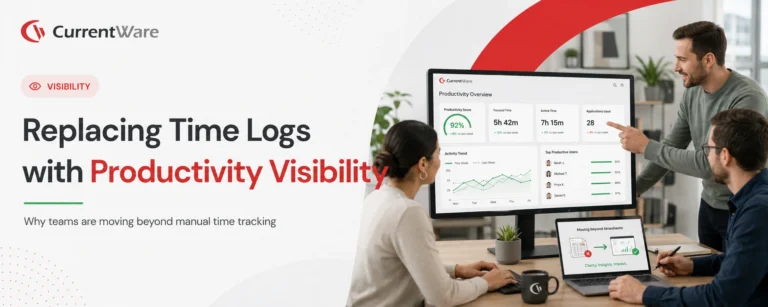
Replacing Time Logs with Productivity Visibility
On paper, your professional services team appears to be running smoothly — billable hours are logged, tasks are checked off,…
-
Employee Management
Tips for Preventing Employee Burnout and Increase Productivity
Employee burnout has officially been recognized by the World Health Organization (WHO) and has become the responsibility of employers. The…
-
Workforce Productivity
Time Management Tips For Professionals
In this article I’ll give you my top 6 time management tips for professionals. These important tips will help you…
-
Employee Management
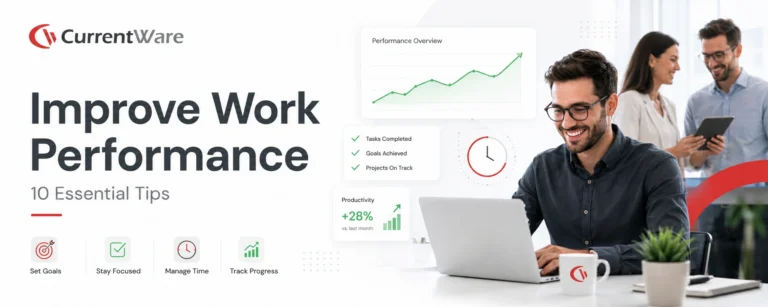
Tips for Improving Performance at Work
Looking for personal areas of improvement at work? The effective accomplishment of professional objectives requires continuous commitment, determination, and enthusiasm…




Frequently asked
We Get These Asked, A Lot (FAQs)
-
Idle time tracking software monitors employee computer activity to detect periods when a workstation is in use, i.e., the employee is clocked in, but no active input (mouse movement, keystrokes, scrolling) is detected. It gives employers an objective record of when employees are actively working versus when their computers are sitting unused.
-
An endpoint agent runs on the employee’s computer and monitors for keyboard, mouse, and scroll activity in real time. Each minute is recorded as either active or inactive. Periods that exceed a defined threshold without any detected input are flagged as idle time. That data is sent to a central management console where administrators can review it by user, team, date range, or department.
-
Inactivity is defined as any period during a tracked work session where no keyboard input, mouse movement, or scroll activity is detected. The specific duration required to trigger an “idle” flag depends on the inactivity threshold configured by the administrator, typically between 5 and 15 minutes, depending on the role and organization.
-
Active time is any period during which an employee’s computer is registering user input, typing, clicking, or scrolling. Idle time is any period during a tracked session where no such input is detected for longer than the configured threshold. The ratio of active to idle time within a given work session is a key productivity metric.
-
Idle time detection is highly accurate for measuring computer-based inactivity. It captures the absence of user input precisely. It does not, however, detect non-computer work, phone calls, meetings, whiteboarding, or thinking. Organizations should account for this when interpreting idle time data, which is why customizable thresholds and contextual reporting (paired with application and web usage data) produce more handy insights than idle time data in isolation.
-
Yes. CurrentWare allows administrators to configure different inactivity thresholds at the individual user, group, or organization level. Groups can be synced directly from Active Directory, so existing team structures automatically inherit appropriate monitoring policies without manual configuration.
-
In most jurisdictions, yes, provided employees are notified, and business policies comply with applicable laws. In the US, employer monitoring of company-owned devices is broadly permitted, though several states (Connecticut, Delaware, New York) require specific advance notification. In the EU, GDPR requires a lawful basis for processing, a transparent privacy notice, and data limitation. CurrentWare customers are urged to consult legal counsel and review our Employee Monitoring Laws resource before deployment.
-
Idle time tracking records when a computer is in use versus idle; it does not capture screenshots, record screen content, or log personal activity. When deployed transparently with a clear policy and restricted to work hours only, idle time tracking is a minimal-intrusion monitoring method. CurrentWare is designed to support privacy-respecting monitoring programs that employees understand and acknowledge.
-
Yes. CurrentWare supports configurable employee-facing reporting, allowing staff to view their own activity and idle time data through a self-service dashboard. This supports transparency, helps employees self-correct without requiring manager intervention, and is consistent with employee-respectful monitoring practices.
-
Remote and hybrid work removes the natural visibility managers have in an office environment. Idle time tracking provides a consistent, objective activity baseline regardless of where employees are located, giving distributed team managers the same operational awareness they’d have in a physical workspace, without requiring intrusive oversight methods.
-
Yes. Time theft, whether deliberate or habitual, typically appears as time logged but not worked. Idle time tracking creates an objective record of when computer activity is actually occurring during paid hours, making it substantially harder for inflated timesheet entries to go undetected. Organizations that deploy idle time tracking typically see a measurable reduction in unaccounted idle periods as employees become aware that activity is being monitored.
-
CurrentWare’s activity reports can be exported in CSV and PDF formats compatible with most payroll and time tracking platforms. For organizations with specific integration requirements, the CurrentWare team can advise on data export formats and API-based integration options during the onboarding process.
-
Idle time tracking is used across any industry where computer-based work is the primary work mode. Common deployments include BPO and contact centers, IT and software development firms, financial services, healthcare administration, marketing and creative agencies, distributed outsourcing teams, and educational organizations.
-
Most organizations complete deployment within 1 to 2 weeks, including agent installation, policy configuration, and administrator training. Large enterprise rollouts or complex Active Directory environments may require additional time. CurrentWare’s onboarding team provides dedicated implementation support.
-
CurrentWare is priced on a per-seat basis with volume discounts available. Pricing varies depending on the modules selected (BrowseReporter, BrowseControl, AccessPatrol) and deployment size. Contact the CurrentWare team for a tailored quote based on your organization’s requirements.
Still have questions?
Talk to a CurrentWare specialist who has deployed monitoring at 200+ law firms.