
How to Monitor Employee Internet Usage
BrowseReporter is a powerful employee internet usage monitoring software to monitor internet activity in the workplace—even on Terminal Server and Remote Desktop Services!
- Improve Employee Productivity
- Intuitive User Activity Reports
- Enhance Visibility of WFH Teams

 4.8/5 avg.
Trusted by 100,000+ professionals in 55 countries.
*No credit card required · 14-day free trial · Easy setup




Trusted by enterprises, healthcare organizations, financial and professional services firms, and government agencies at every level.







Go Beyond Employee Internet Employee Internet Use Monitoring
With the full capabilities of the CurrentWare Suite you can go beyond monitoring internet activity with advanced visibility and control over internet, application, and removable media usage. Get granular insights into file uploads/downloads, file transfers to removable media, logon/logoff times, and more!
Monitor Employee Productivity
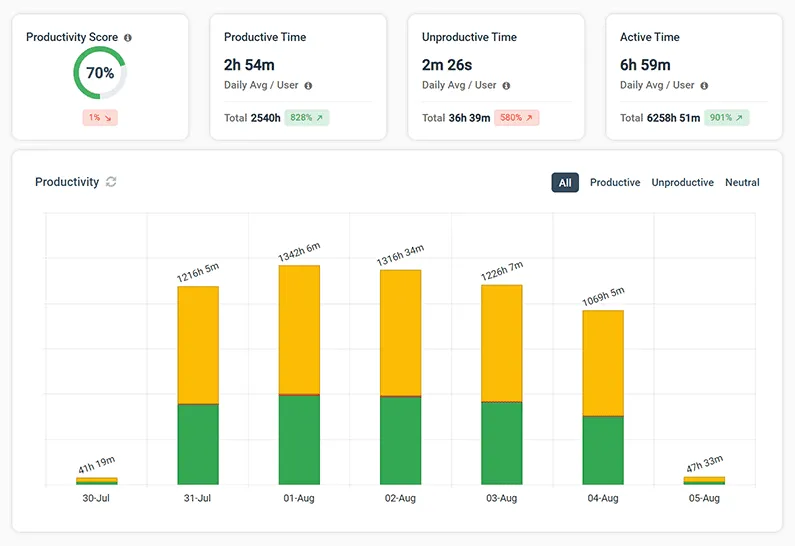
CurrentWare’s detailed employee productivity reports provide managers with the productivity metrics they need to better understand how employees spend their time at work.
- Track the use of apps and websites to find out who is wasting work time on social media, computer games, and other distractions
- Track employee engagement across your entire workforce, a specific team, and individual employees
- Review the websites that were open during inactive periods to verify that idle time was spent on work-related tasks
Keep a Pulse on Real-Time Team Activity
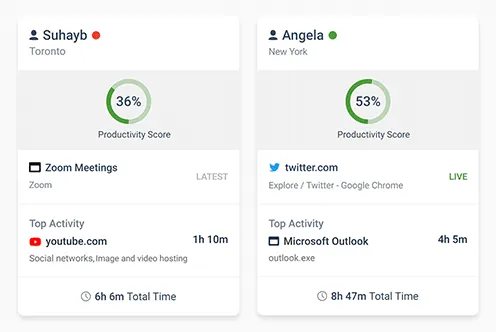
Today’s Insights displays the real-time productivity and availability status of individuals and teams via an at-a-glance dashboard.
Easily view the most recent productivity metrics to understand who is actively working and what application/website they last used.
- Get high-level views of the activity and productivity of individual users and teams
- Easily see who is online now, who has gone idle, and who hasn’t logged in today
- Filter cards by activity, productivity, name, and average activity time

Save Money With Genuine Software Usage Data
Underutilized software costs businesses a staggering $34 billion per year! With genuine insights into employee application usage you can make informed software asset management decisions.
- Find the utilization rate of specific pieces of software
- Discover what SaaS tools have fallen out of use
- Ensure you have enough licenses to meet genuine demand
Take Screenshots of Employees’ Screens
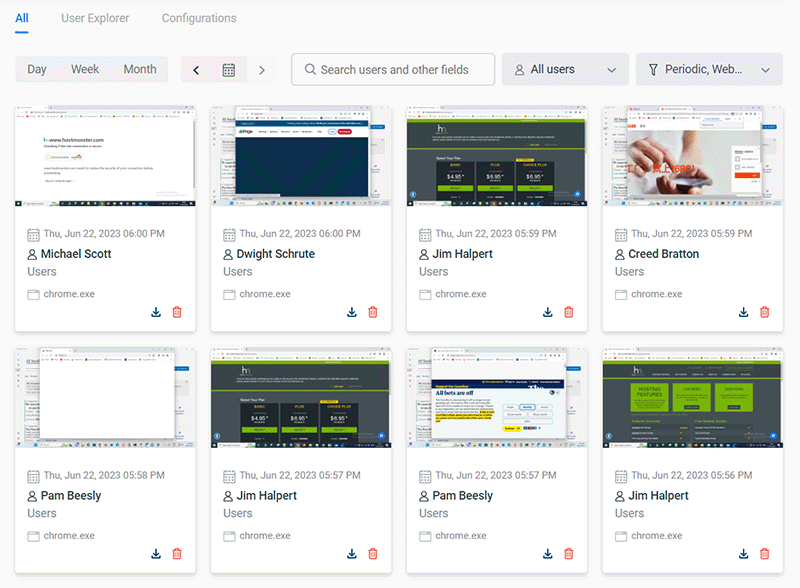
Our employee monitoring software lets you capture screenshots of your employees’ screens to see exactly what they are doing on their computers.
- Capture high-resolution and compressed screenshots
- Monitor desktops in real-time to watch for unsafe data handling and inappropriate behavior
- Screenshots are tagged with the website or application that was being used, the time, and the name of the computer
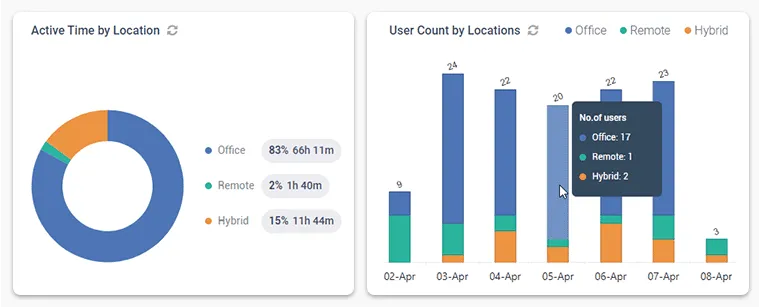
Get Insights Based on Employee Location
BrowseReporter’s Location Insights dashboard helps leaders make data-driven decisions about remote, in-office, and hybrid work.
Promote flexibility without sacrificing accountability with insights into how location flexibility affects employee performance and engagement.
- Compare productivity scores between groups of in-office, remote, and hybrid employees to gauge the impact that location has on employee performance
- See how much of your workforce is working in-office, remotely, or hybrid in a given timeframe
- Review productivity trends to decide if frequently abused distractions need to be limited with BrowseControl’s URL filter

CASE STUDY
Shady Maple Transforms Their Productivity With Internet Filtering and Monitoring Software
Being able to identify negative browsing trends and put a stop to them within a couple of hours has meant that our employees are focused on the job almost all of the time. We have become an extremely efficient workforce.

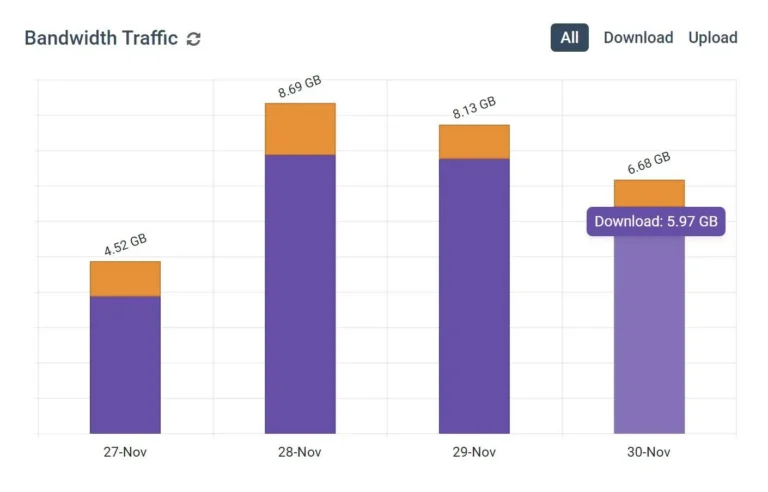
Real-Time Employee Computer Activity Dashboards & Reports
Improve business intelligence with advanced insights into web browsing, app usage, bandwidth consumption, productivity, and more!
- Identify productivity leaks
- Enforce company policies
- Detect software waste
Ready to Monitor Employee Internet Use?
Analyze your employees’ work habits and productivity with BrowseReporter
See What Our Customers Have to Say

FREE DOWNLOAD
Internet Use Policy Template
Download this FREE internet use policy to set standards for acceptable internet usage in your organization.
- Disclose the organization’s intent to monitor internet use
- Communicate acceptable standards for technology use
- Describe your users’ rights and responsibilities
Real-Time Employee and Computer Monitoring Features
Email Reports & Alerts
Automatically send reports to designated inboxes based on events or schedules
Tracking Scheduler
Limit activity tracking to specific days and schedules such as employee work hours
Employee Privacy
Optional privacy-enhancing features improve transparency and minimize data collection
Stealth Mode Option
The software can run silently in the background or be configured to alert users
Central Web Console
Save time with a central admin console; optionally integrate Active
Directory OUs or security groups
Platform Security
Protect your CurrentWare console with 2FA, passwords, privilege management, and more
Internet Off Offsite Management
Extend onsite security policies to computers running outside the corporate network
SQL Server Supported
Database scaled for enterprise and large business operations using
Microsoft SQL Server
Keep reading
Articles

Web Filtering & Internet Control
How To Block EXE Files In Group Policy (& Other Methods!)
In today’s digital landscape, safeguarding your organization’s network from unauthorized applications is paramount. One effective strategy is blocking executable (.exe)…

Web Filtering & Internet Control
The State of the Web Browser in 2020
They say millennials are the first generation born with information in the palm of their hands. If they need to…
Employee Monitoring
AI Employee Monitoring Software: How to Track AI Usage – A Complete Guide
Why AI Usage Monitoring Is Now Mission-Critical AI adoption is exploding but most businesses are flying blind. According to Deloitte’s…
Employee Monitoring
How to Block Websites Using the Hosts File on Windows 10/11
Editing the Hosts file to block a website on multiple devices is a time-consuming, inflexible, and labor-intensive process. For just…
Employee Monitoring
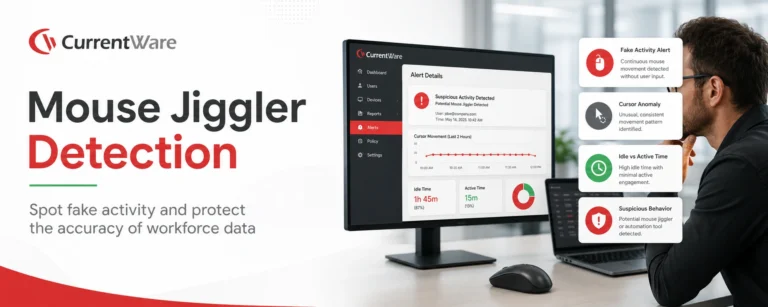
Mouse Jiggler Detection: How Businesses Can Identify Fake Activity and Protect Workforce Productivity
This article explains how mouse jigglers work and the dangers they can pose for businesses. According to Gallup, just 20…
Try BrowseControl for Free
Fully functional. Easy to use. $6 user/month.