

What Is CMMC, and Who Needs It?
Definition
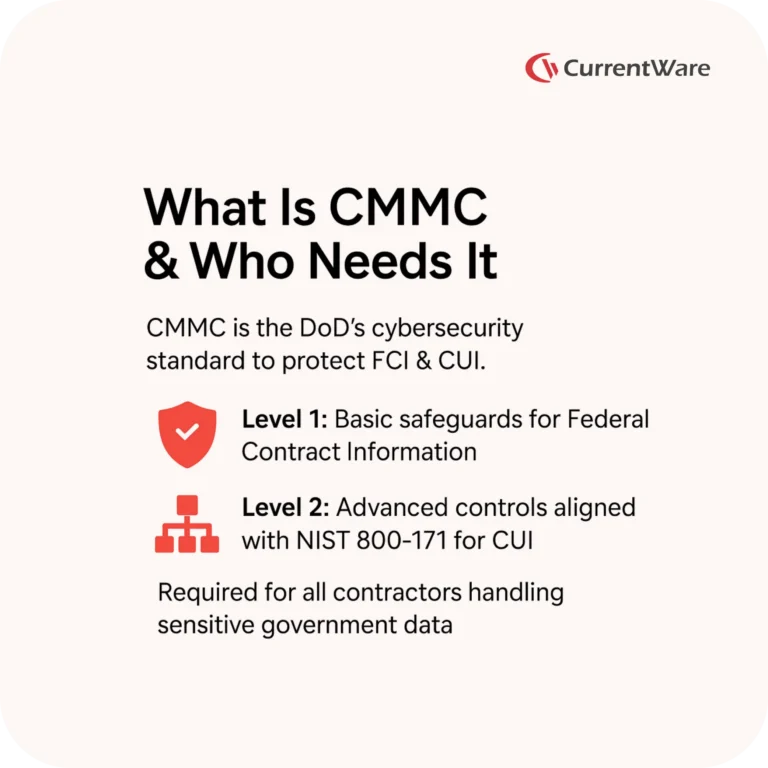
The Cybersecurity Maturity Model Certification (CMMC) is the DoD’s cybersecurity standard designed to ensure that contractors safeguard sensitive government data.
Why It Matters
CMMC protects two categories of sensitive information:
- Federal Contract Information (FCI): Basic contract data not meant for public release
- Controlled Unclassified Information (CUI): Sensitive information that requires stricter protection
Who Must Comply?
| Role | Requirement Level | Data Handled |
|---|---|---|
| DoD contractors handling FCI | CMMC Level 1 | Federal Contract Information |
| DoD contractors handling CUI | CMMC Level 2 | Controlled Unclassified Information |
Level 1 focuses on foundational safeguards, while Level 2 aligns with the NIST 800-171 standard and requires advanced monitoring, access control enforcement, and evidence-ready auditing.
Also Read: IT Security Compliance Solutions – Ensure Regulatory Readiness
Get Audit-Ready Today
Learn exactly how CurrentWare products map to AC, MP, AU, CM, and SI controls to provide necessary evidence and logs
How to Meet CMMC Level 1 & Level 2 Requirements
CMMC Level 1
Focus: Protecting FCI
Controls Require:
- Basic access control
- Device restrictions
- Minimal logging and evidence retention
This level ensures only authorized users and devices can access FCI.
CMMC Level 2 (Advanced Safeguards – NIST 800-171 Alignment)
Focus: Protecting CUI with robust security
Controls Require:
- Comprehensive auditing
- Endpoint and device monitoring
- File transfer visibility
- Advanced access control
- Evidence retention for assessments
Level 2 typically applies to prime contractors and higher risk subcontractors handling sensitive CUI.
Also Read: Insider Threat Detection Software for Monitoring & Prevention | CurrentWare
Key CMMC Controls That Impact Endpoints

1) Access Control (AC)
Definition: Limit who can access systems and define what actions they can perform.
Risks: Unauthorized access, insider misuse, data exfiltration.
Required Actions
- Enforce least privilege
- Limit external system connections
- Restrict mobile and removable devices
- Control uploads and data movement
CurrentWare Mapping for Access Control
| Control | Requirement | CurrentWare Solution |
|---|---|---|
| AC.L2-3.1.2 | Limit functions per user | BrowseControl blocks sites, apps, ports |
| AC.L2-3.1.5 | Enforce least privilege | AccessPatrol sets per-user USB/device permissions |
| AC.L2-3.1.18 | Control mobile devices | Block USB phones & Bluetooth devices |
| AC.L2-3.1.20 | Limit external systems | Create device/site allowlists |
| AC.L2-3.1.22 | Control uploads | Block risky storage & cloud apps |
2) Media Protection (MP)
Definition: Control removable media use (USBs, external drives).
Risks: CUI leakage, unauthorized file transfers, untracked device use.
Required Actions
- Whitelist authorized USB devices
- Track file transfers
- Maintain device accountability logs
CurrentWare Mapping for Media Protection
| Control | Requirement | CurrentWare Solution |
|---|---|---|
| MP.L2-3.8.3 | Media disposal & traceability | USB usage logs for investigators |
| MP.L2-3.8.5 | Media accountability | Track files copied to USB |
| MP.L2-3.8.7 | Prevent unauthorized media | Device control + hardware allowlisting |
3) Audit & Accountability (AU)
Definition: Generate and retain logs that provide visibility into user actions.
Risks: No evidence during audits, inability to investigate incidents, compliance failure.
Required Actions
- Create audit logs
- Retain logs for investigations
- Tie actions to specific users
CurrentWare Mapping for Auditing
| Control | Requirement | CurrentWare Solution |
|---|---|---|
| AU.L2-3.3.1 | Create / retain logs | BrowseReporter + AccessPatrol logs |
| AU.L2-3.3.2 | User-level accountability | Unique user activity tracking & reporting |
4) Configuration Management (CM)
Definition: Limit systems to essential applications, ports, and services.
Risks: Attack surface expansion, malware, shadow IT.
Required Actions
- Disable unnecessary applications
- Block unused ports/services
CurrentWare Mapping for CM
| Control | Requirement | Solution |
|---|---|---|
| CM.L2-3.4.6 | Enforce least functionality | Block apps, sites & categories |
| CM.L2-3.4.7 | Disable nonessential services | Block TCP/UDP ports via BrowseControl |
5) System Integrity (SI)
Definition: Detect and prevent unauthorized usage or security violations.
Risks: Insider threats, policy violations, unauthorized tool use.
Required Actions
- Monitor user activity
- Flag anomalies
- Provide evidence during assessments
CurrentWare Mapping for System Integrity
| Control | Required Action | Solution |
|---|---|---|
| SI.L2-3.14.7 | Identify unauthorized use | Monitor web, application, and file activity |
Also Read: BrowseControl | Web Filtering & Application Blocking Software
How CurrentWare Simplifies CMMC Compliance
CurrentWare provides essential endpoint controls, monitoring, and evidence logs required for both CMMC Level 1 and Level 2, without complex deployments or heavy infrastructure.
Plug-and-Play Deployment
Fast installation for on-premise, hybrid, or air-gapped environments.
Endpoint Security + Monitoring + DLP in One Suite
Protect endpoints handling FCI and CUI with unified controls.
Audit Ready Logs Mapped to CMMC Controls
All user activity logs are mapped to AC, AU, MP, CM, and SI requirements.
USB Whitelisting + File Transfer Tracking
Meet media accountability and prevent unauthorized removable storage.
Products Used for CMMC Compliance
- AccessPatrol: USB & removable media control
- BrowseControl: Web filtering, port blocking, application control
- BrowseReporter: User activity monitoring, log retention, anomaly visibility
CMMC Compliance Checklist for DoD Contractors
Access Control
- Enforce least privilege
- Restrict ports, sites & apps
- Block mobile phones and removable devices
- Allowlist trusted systems only
Media Protection
- Whitelist approved USB devices
- Track file transfers
- Store logs for audit investigations
Audit Logs
- Record user activity across endpoints
- Retain evidence for assessments
Configuration Management
- Block nonessential apps and services
- Limit endpoint functionality
System Integrity
- Detect unauthorized use
- Monitor applications, browsing, and file actions
Also Read: AccessPatrol | USB Device Control Software & Endpoint DLP
Monitor with Confidence and Trust
See how you can build a more secure and transparent workplace
Frequently asked
Frequently Asked Questions
-
The Cybersecurity Maturity Model Certification (CMMC) is a DoD-mandated framework that ensures defense contractors protect Federal Contract Information (FCI) and Controlled Unclassified Information (CUI). Organizations handling FCI must meet Level 1 baseline controls, while those handling CUI must meet Level 2 requirements.
-
Level 1 focuses on foundational cyber hygiene controls—primarily access control, basic system protection, and physical safeguards. Level 2 includes all Level 1 practices plus more advanced controls aligned to NIST 800-171, emphasizing audit logging, continuous monitoring, endpoint security, and stronger access control measures.
-
CMMC Level 1 applies to any contractor that processes or stores Federal Contract Information (FCI), regardless of company size. It includes 15 practices that must be demonstrated and documented for DoD eligibility.
-
Level 2 adds 93 practices from NIST 800-171, including audit logging, monitoring, device control, access management, system hardening, and incident response documentation. These apply to organizations handling Controlled Unclassified Information (CUI).
-
Endpoint security reduces unauthorized access, data leakage, malware damage, and insider threats. CMMC Level 1 & 2 explicitly require contractors to manage unauthorized connections, restrict removable media, enforce access control, and monitor system activities—all of which depend on securing endpoints.
-
CurrentWare provides endpoint security, web filtering, data loss prevention, and user activity monitoring that support core CMMC practices, including removable media control (AccessPatrol), web filtering and content restriction (BrowseControl), user activity monitoring and auditing (BrowseReporter), and endpoint power management and device visibility (enPowerManager). These tools help enforce access control, restrict unauthorized devices, maintain logs, and demonstrate compliance.
-
AccessPatrol reinforces multiple controls related to removable media and device access, including AC.L1-3.1.20 (control connections of removable media and external devices), MP.L2-3.8.x (media protection and usage restrictions), and SC.L2-3.13.x (system/control boundary protections). It prevents unauthorized USB storage use, limits file transfers, and provides activity logs.
-
BrowseControl helps meet requirements around limiting access to unsafe or unauthorized websites and cloud applications. It contributes to AC.L1-3.1.5 (limit access to authorized users, processes, and devices), SC.L1-3.13.5 (restrict external system connections), and CM.L2-3.4.x (system configuration and enforcement). It ensures users cannot access risky domains or unapproved cloud storage.
-
BrowseReporter provides detailed activity logs for endpoints, including websites, applications, bandwidth usage, and user activity timelines. This supports AU.L2-3.3.x audit logging requirements, CM.L2 configuration and activity monitoring, and IR.L2 incident response detection. Log retention helps demonstrate continuous monitoring during assessments.
-
Yes. AccessPatrol enforces granular policies to block USB storage, monitor device usage, allow approved devices only, and maintain logs of all device connections. This directly supports CMMC Level 1 & 2 media protection practices.
-
CMMC does not mandate employee surveillance, but it requires contractors to maintain audit logs, detect unauthorized activity, verify access control adherence, and monitor system usage. Tools like BrowseReporter help satisfy these logging and auditing requirements while supporting least-privilege principles.
-
CurrentWare’s reporting features provide historical logs, device usage reports, endpoint activity audits, and policy configuration details. These artifacts help demonstrate how access control, media restrictions, and monitoring practices are enforced across your environment.
-
Yes. Many small and mid-size contractors can meet Levels 1 and 2 using commercially available endpoint security, access control, and monitoring solutions. CurrentWare’s lightweight deployment and central console simplify compliance for small teams with limited IT resources.
-
Not necessarily. CMMC requires controlling device access, not universally banning it. Contractors must limit removable media to authorized devices and maintain oversight. AccessPatrol enables policy-based control so organizations can allow approved media while blocking risky devices.
-
Implement centralized device control, enforce consistent access policies, maintain detailed audit logs, and continuously monitor endpoint activity. CurrentWare’s platform automates much of this work and generates the documentation auditors request during evaluations.
Still have questions?
Talk to a CurrentWare specialist who has deployed monitoring at 200+ law firms.


