




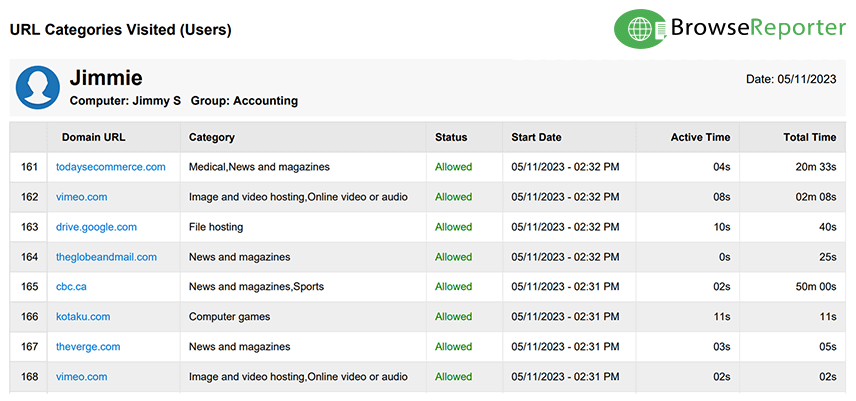
Websites are automatically tracked and categorized by BrowseReporter using the categories database.
Website categories are regularly updated to include new websites, domains, and URLs so you’ll always have a high-level overview of the types of websites visited by the people you are monitoring.
BrowseReporter has dozens of reports to choose from. Use this powerful employee monitoring software to review web history based on productive vs unproductive time, track search engine queries, bandwidth usage, and more!
Check out the web activity reports page for the full list.
- Save time reviewing reports by previewing the nature of the websites tracked without visiting them manually.
- Discover users that are visiting websites related to porn, hacking, drugs, social media, and more.
- See which categories of websites your employees spend the most time on.
Website Categories Checker
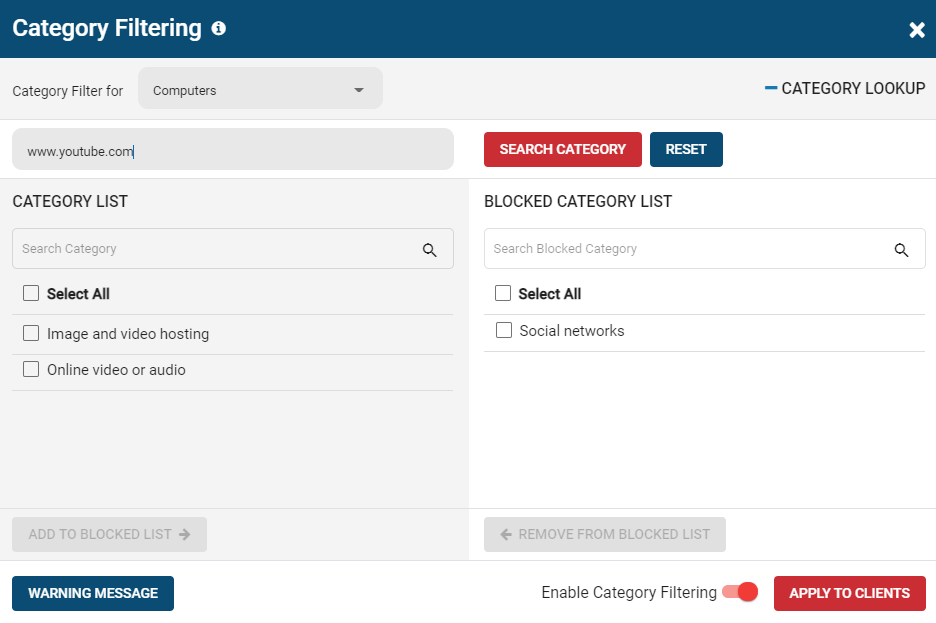
Combine BrowseReporter’s URL category tracking with BrowseControl’s web category lookup tool to find out what URL categories a given website belongs to.
The Benefits of a URL Categorization Tool
Monitoring the categories of websites visited by employees is important for contextualizing their web browsing habits.
BrowseReporter’s URL category tracking makes employee monitoring simple by providing a high-level overview of the types of websites visited during the work day.
- Improve Efficiency: Save time reviewing employee monitoring reports. Quickly identify the nature of unfamiliar websites without manually visiting each one.
- Inappropriate Surfing: Filter internet monitoring data to display categories of websites that go against your acceptable use policies such as porn, gambling, and hate.
- Employee Productivity: Discover employees that are browsing social media and games sites on company time.
Combine With BrowseControl’s Category Filtering Feature
BrowseReporter and BrowseControl operate from the same central console, giving you full visibility and control over employee web browsing.
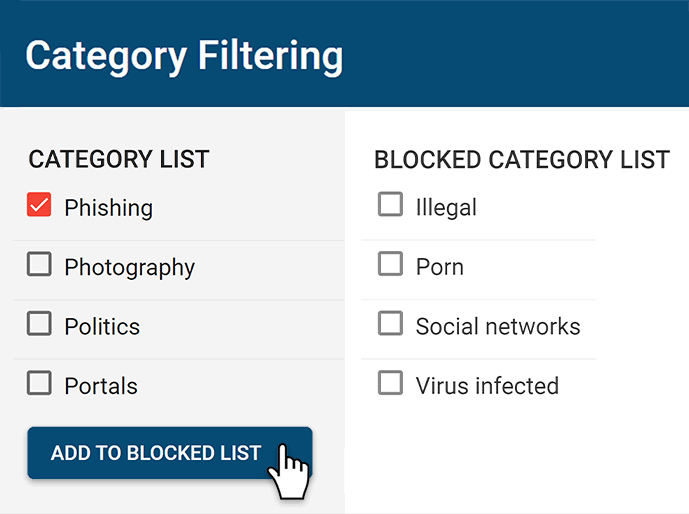
- Meet CIPA compliance by blocking categories of websites that are not age-appropriate such as porn
- Effortlessly block millions of websites across 100+ URL categories
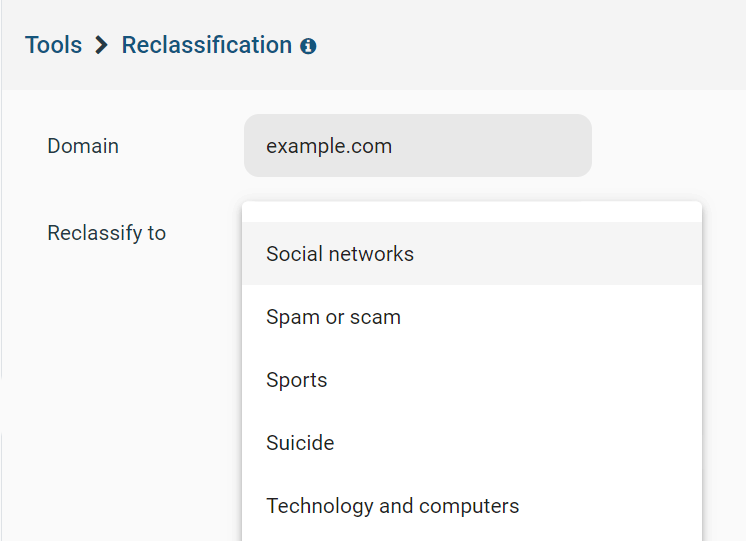
- Customize the website category database locally to suit the needs of your environment
Learn More: Web Category Filtering With BrowseControl

Try BrowseReporter for Free
Fully functional. Easy to use. $12 USD user/month*. For on-prem pricing, contact Sales
List of Website Categories Available
for Blocking & Monitoring
The URL categorization database is used by BrowseControl’s category filtering feature and BrowseReporter’s internet activity reports, giving you full control and insights into the types of web content being accessed by students, employees, and patrons.
| URL Category | Category Description | Safe for Kids? | Contains Nudity? |
|---|---|---|---|
| Abortion and pregnancy | Sites that talk about: Pregnancy, Abortion, Pregnancy termination, Pro life and Pro choice | No | No |
| Actors and models | This category appears only when filtering search results it will appear when the search result is an actor/model. | Maybe | Maybe |
| Ads | Sites that serve ads, or are an ads agency (ads agency are preferably marketing or marketing/ads, but sometimes it's impossible to distinguish) | Depends | Maybe |
| Adult | Sites that contain adult content, either graphically or in text, but is not Pornographic in nature. | No | Maybe |
| Adult dating | Sites that deal with adult dating (contains sexual content). | No | Maybe |
| AI | Sites that are about AI (artificial intelligence) or offer such services | Yes | No |
| Alcohol | Sites that deal with alcohol, this includes: Wine, Brewing, Winemaking, Vineyards, Beer and bars. | No | No |
| Alternative medicine | Sites that are about alternative medicine | Yes | No |
| Annoyances | Sites that are annoying, mostly popups, this category is provided for PerPageSDK only. | Maybe | Maybe |
| Anorexy | Sites that are about: Anorexy, Bulemia, and eating disorders. | No | No |
| API | Hosts that are use as an API for software/browser, which don't have visible data. | Yes | No |
| Arts | Sites about: Arts, Arts museums, Plays, Paintings, Poems, and Artists. | Yes | No |
| Astrology | Sites that deal with divination: Astrology, Palmistry, Cold reading methods, Card reading, Tarot and seeing the future. | Yes | No |
| Banks | Banking sites | Yes | No |
| Beauty and Fashion | Sites that talk about: Life style, Beauty, Personal care, Wrist watches, Jewelry, Cosmetics, Perfumes, Personal grooming, Hair/Nail salons and Weddings. | Depends | Light |
| Bitcoin | Bitcoin and other crypto currency related sites | Yes | No |
| Blogs | Sites that are blogs, if the content of the site is not safe, it will be in another or extra category. | Yes | No |
| Bookmarks | Sites that are a repository of bookmarks, can be a social bookmarking service as well. | Yes | No |
| Books or comics | Sites that are about: Books, Libraries, Book shops and Author's pages. There are new category for comics, the name in the category is for backward compatibility only. | Yes | No |
| Business and services | Sites belonging to a business or a service provider that doesn't fall under any of the other categories. | Yes | No |
| Bypass protection | Sites that are used to bypass parental controls software and components, VPN and Proxies fall under the Proxy category. | No | Maybe |
| CDN | CDN Sites, they serve content of others, some CDNs can server both safe and unsafe sites. | Depends | Maybe |
| Celebrity gossip | Sites that are about celebrity gossip, if contains nudity, it will come with an additional category that indicates it. | Maybe | Maybe |
| Chats | Sites that are mostly online chats, or chat/messaging applications. | Depends | No |
| Classifieds | Classifieds sites, second hand sales/services, yelp. | Yes | No |
| Clothing and fashion | Sites that are about: Clothing/shoes, Fashion, Clothing/shoes shop, Hand bags, clothing/shoes manufacturer. | Yes | No |
| Community and society | Sites that are about: Charity, Community (helping other), Fundraising. | Yes | No |
| Computer games | Sites that are about computer games or online games (some games can be violent like GTA). | Depends | No |
| Consumer reviews | Consumer and products review sites | Yes | No |
| Contact sport | Sites that are about contact sports, like: Martial arts, WWE, UFC and MMA. | Yes | No |
| Cooking and food | Sites that are about: Cooking, Food, Non alcoholic beverages, Recipes, Food shopping - excluding restaurants. | Yes | No |
| Crime | Sites that are about crime (either covering it, or giving crime instructions) | No | Maybe |
| Dancing | Sites that are about dancing | Yes | No |
| Dating | Dating sites. | No | No |
| Depress domain | Sites that are about sad topics such as : Obituaries, Cemeteries, Crematorium, Funerals, Jail, Prison, Disasters and more. | Maybe | No |
| Depress page | Will only appear at page level classification, it indicates the same as Depress domain, only at a page level (for example an article about a disaster in CNN). | Maybe | No |
| Desktop themes | Sites that offer: Screensavers, Desktop themes, E cards, Greeting cards, and Social sites covers. | Yes | No |
| Diet | Sites that are about: Diet, Weight loss and Weight gain. | Yes | No |
| Directories | Sites that are: Directories with many sites, Scraped statistics about uptime/downtime. | Maybe | Maybe |
| DNS error site can't be resolved | Site can't be resolved. | No | Maybe |
| Drugs | Sites that are about: Illegal drugs, Dispensaries - although some countries legalized CBD/THC products, it's still classified as drugs. | No | Maybe |
| Education | Sites that belong to: Schools, Kinder gardens, Colleges, Universities and Educational software/guides. | Yes | No |
| Empty site | While scanning the site it didn't return any result, which means site can't be verified. | No | Maybe |
| Entertainment | Sites about: Movie reviews, Entertainment, Magazines about entertainment, Events, Night life, may contain streaming media, does not contain downloadable media. | Yes | No |
| Error site can't be accessed | While scanning the site there was an error, which means site can't be verified. | No | Maybe |
| File hosting | Sites that allow users to host their files for internal use or public sharing, files content isn't verified (may contain nudity or warez). | Depends | Maybe |
| Finance | Sites that are about: Financial information, Investing, Stock exchange, Credit, Accounting, Payment gateways, business plans and models. | Yes | No |
| Fitness | Sites that are about fitness, like: Yoga, Bodybuilding, Weightlifting, Diet in context of fitness and Fitness. | Yes | No |
| Forex | Sites that talk about or offer: Forex or Binary options services | Yes | No |
| Forums | Forums or groups site. | Yes | No |
| Gambling | Sites that have: Gambling games, Sports betting, Betting statistics, Lottery, or gambling information (gambling addictions will be under health). | No | Maybe |
| Gender specific | Sites that have content aimed for a specific gender, for example, men's magazine, or women's portal. | Yes | No |
| General - not porn | Sites that our classifier could not find any suitable category for them. It means that they couldn't be classified as unsafe as well. | Depends | Maybe |
| General (safe) | No known category, but considered safe (no pornography, drugs, gambling, adult, alcohol, tobacco), it is used mostly for sites that can confuse URL Classification algorithms because of words like Essex and similar variations. | Yes | No |
| Government | Sites that belong to the government or governmental agencies. | Yes | No |
| Grief | Sites that are about: Grief, Loss and Grief/Loss support. | No | No |
| Hacking | Sites that are about: Hacking, Cracking, Stolen data and mobile jailbreak. | No | No |
| Hate | Sites that are about hate toward: Genders, Race, Religion. Also: Holocaust denial, Pro Nazi. | No | Maybe |
| History | Sites about: Historical events, Historical figures and past wars. | Yes | No |
| Hobbies | Sites that are about various type of: Hobbies, Crafts, RC Cars, Collectables and also gardening. | Yes | No |
| Home improvement | Sites about: Home improvements, Decorating, Home items and DIY sites. | Yes | No |
| HostExt white list | This category exists only inside the SDK, it means the URL request extension will not be checked, or the site is white listed. | Yes | No |
| How to | Sites that are user generated content with How to guides. If contains adult content it will come with an additional category that indicates it. | Yes | No |
| Humor | Sites with: Jokes, Humor related content, and Standup comedy. | Yes | No |
| Hunting and fishing | Sites that are about: Hunting and Fishing information or equipment, Taxidermy and Game (hunting related). | Depends | No |
| Illegal | Sites that offer illegal products like fake IDs, diplomas, etc (sites for drugs, warez, weapons are under their own category). | No | Maybe |
| Image and video hosting | Sites that give the ability go host images, videos and image/video search engine. | Mixed | Maybe |
| Image block | Used for search results only, the sites may host bad images, usually an image hosting site, not relevant if software is not processing each image inside the search engine image search. | Maybe | Maybe |
| Images CDN | CDN that contains safe images, but are not user generated (this is a manually controlled list) | Yes | No |
| Images CDN Unknown | CDN that contains images, but there's no way to tell which kind, only in the context of the web page | Maybe | Maybe |
| Insurance | Sites that offer insurance | Yes | No |
| Internal category | Internal category | Depends | Maybe |
| ISP | ISP sites or ISP related (such as ADSL news), sites that offer Internet connection and phone/mobile falls under the Telecommunications category. | Yes | No |
| Jobs | Sites that are about: Job offers, Job search, HR software, Job/Resume tips and Freelancing job sites. | Yes | No |
| Kids safe | Sites that are just for kids and are safe (sites added to this category is only after human review) | Yes | No |
| Kids Entertainment | Sites that are entertainment for kids | Yes | No |
| Knowledge | Sites that: Provide general paid knowledge, Online courses, Frontal training. | Yes | No |
| Legal | Sites that belong to: Lawyers, Law firms, Courts, Legal documents repository, Identity verification, and sites that give legal advice or tips. | Yes | No |
| Legal movies | Sites that legally host/stream full length movies and series, this list is a manual list. | Yes | No |
| Legal songs | Sites that legally host/stream music, this list is a manual list. | Yes | No |
| Lifestyle and culture | Sites that contain material related to an individual’s personal, community or cultural identity, or organizational/club affiliations. | Maybe | Maybe |
| Link farm | Sites that has no value and contain various links that will generate the owner money, or parked domains. May contain pornography. | Danger | Maybe |
| Loans | Sites that offer: Loans, Mortgages and Debt consolidation | Yes | No |
| Local | Sites about local information: City information, State information, Law enforcement and Fire fighters. If the second category is news, then it's local news. | Yes | No |
| Local IP | Local IPs can't be classified. | Maybe | Maybe |
| Login page | This page or site is part of a login or user management. It's not always possible to deduce the site's actual classification. | Maybe | Maybe |
| Lookup | Sites that offer various lookup and reverse lookup of: Emails, Domains, IPs, Phone numbers and People. | Yes | No |
| Magazines | Magazines sites (could be online magazines or a site for offline magazines), may contain another category if possible to denote the magazine category. | Yes | No |
| Marketing or ads | Sites that ad agencies, and it's possible that the domain name also serves ads. | Yes | No |
| Medical | Sites that talk about medical and health information. | Yes | No |
| Military | Sites with .mil or military related | Depends | No |
| Mixed adult | Sites that have mixed content, some safe and some not, but is not outright adult content so it can't be categorized as such. | No | Yes |
| Mobile | Sites that are about: Mobile devices, Cater only to mobile, Cellular phone sellers and manufacturers. | Yes | No |
| Models | Sites that contains images and information about: Models, Modelling and Models agency. | Depends | Light |
| Money spam | Sites that deal with making money online, or aggressive sales pitch with a squeeze page, this niche is highly abused and sites in this category should be treated as possible spam/scam. | No | No |
| Movies download | Sites that offer movies/series download or online streaming (can be pirate site, if contains other pirated content it will marked as Warez instead) | Yes | No |
| Music | Sites that are about: Music, Music magazines, Lyrics, Bands, Musical instruments and free music download (free songs, samples, effects). | Yes | No |
| Nature | Sites that are about: Nature or the Environment. | Yes | No |
| News and magazines | Sites that are about: News, Newspaper sites. Some news site can contain many themes in their main page beside news. | Depends | No |
| Nonsense and time waste | Sites that have many articles about: Memes, Movies and pictures that are mostly time waste, Viral jokes or a site with many articles in the form of "10 ways to ", "do this to become" even if it's on a subject as health. Some sites will have a secondary category of Semi nude or Mixed nude because of their content. | Maybe | Maybe |
| Not HTML | Content inspected is not HTML | Maybe | Maybe |
| Not safe | No category found for site, but site was found to be not safe, usually because it uses "shady" advertisement that has unsafe content. | No | Maybe |
| Online drugs | Sites that offer to sell drugs like: Viagra, Pain killers, Narcotics, Anabolic Steroids. | No | Maybe |
| Online marketing | Sites that are related to: Online marketing, Email marketing services, Web analytics, Ads providers (but is not an ad serving domain). | Yes | No |
| Online security | Sites that belong to security product like: Anti Virus or firewall, or are about online security | Yes | No |
| Online video or audio | Sites that has streaming audio and video (for example tv/radio sites, movie clips sites, podcasts), will not contain porn sites, but some content may still be inappropriate, for example youtube.com. Pirated content will be in its own categories. | Depends | Maybe |
| Other drugs | Sites that are about drugs that are not part of the Drugs Online drugs category, these are drugs that are legal. (because legality is different between countries, the decision is based on the views of the classifier, if you need an exact list of the drugs, contact us) | No | No |
| Paranormal | Sites that talk about paranormal topics like: UFO, Ghosts, Clairvoyance and conspiracy theory. | No | No |
| Parenting and family | Sites that talk about: Parenting, Baby showers. | Maybe | No |
| Person | Sites that are about a specific person (not applies to music, sports, entertainment related people) | Yes | No |
| Pets and animals | Sites that talk about Pets and animals | Yes | No |
| Pharmacy | Online pharmacy sites. | No | No |
| Philosophy and psychology | Sites about: Philosophy, Psychology, Psychological/Cognitive tests and Psychological issues. | Yes | No |
| Phishing | Sites that contain phishing and other content that is scam based. | Danger | Maybe |
| Photography | Sites belong to photographers or about photography | Yes | No |
| Politics | Sites that are about: Political opinion, Politics, Politics news, Politicians, Parliament parties, and protests. | Depends | No |
| Porn | Sites that contain pornographic content. | No | Yes |
| Portals | Sites that are portals or magazines that may contain number of categories (some may be related to fashion or intimate apparel) | Depends | Maybe |
| PPC | Sites that are about PPC or offer such services | Yes | No |
| Profanity | Sites that contain profanity | Depends | Maybe |
| Programming | Sites that about: Programming, Development languages or Development frameworks | Yes | No |
| Proxy | Sites that provide information or service to tunnel web traffic and cause webfilter bypass: Tor, Proxy lists, Proxy/VPN providers. | No | No |
| Real estate | Sites that are about: Real estate, Realtors or House rentals | Yes | No |
| Recreation | Sites that are about: Recreation and Outdoors and which are not sports related. | Yes | No |
| Reference | Sites that are: Dictionary, Maps, Translation, Calculators, Thesaurus, Wiki, Wikipedia and General information sites. | Yes | No |
| Registry cleaner | Sites that belong to registry cleaners or uninstallers | Yes | No |
| Relationships | Sites that talk about: Romantic relationships, Dating advice, Marriage advice and Pickup but do not offer dating services sites. | No | No |
| Religion | Sites that about: Religion, Spirituality and Religion practices. | Yes | No |
| Restaurant | Sites that belong to: Restaurant, Food ordering, Cafe or similar food selling establishments | Yes | No |
| Retirement | Sites that are about: Retirement, and Retirements homes. | Yes | No |
| Rewards | Sites that offer reward/loyalty programs | Yes | No |
| Safe | No category found for site, but site was found to be safe (it's a reserved category, it's not used for now, but it can be activated at any time) | Yes | No |
| School cheats | Sites that offer ready made works for students, or custom work. | Maybe | No |
| Science | Sites that are about: Science, Mathematics, Research papers and companies/organizations that are involved in Science research. | Yes | No |
| Search block | Used for search phrases only, this indicates the search should be blocked. Unlike phrases that fall under a known category, some keyword could be both "good" and "bad", so they are classified as Search block. | Maybe | Maybe |
| Search engines | Search engines sites, search result may contain unsafe content, our engine is able to classify the search based on the search keywords (contact us for help on the matter) | Depends | Maybe |
| Sects | Sites that are about: Sects, Occult, Cults, Cult leaders, Scientology, Church of Satan, Demons, and Secret Societies. | No | Maybe |
| SelfHelp | Sites that are about: Self help, Motivational speakers, Meditation and Relaxation. | Yes | No |
| Semi nude and pin up | Site that are about intimate fashion and apparel but in context of the images rather then shopping for them, also celebrity gossip with high percent of underwear and swimwear, this category can be treated for age 16+. | No | Maybe |
| SEO | Sites that are about SEO/SEM or offer such services | Yes | No |
| Sex education and sexuality | Sites that talk about: Sex educations, Sexuality, Sexual procedures, Reproduction tract related issues. | Depends | Maybe |
| Shopping | Shopping, Coupons and online auctions sites. | Yes | No |
| Site under construction or not available | Sites that are under construction or returned an error response when checked. | No | Maybe |
| Site_Graphic design | Sites that about: Sites/Graphic creation, Templates, Fonts, Icons, Vectors, Stock images/Videos, Themes and design, this may include graphic services. | Yes | No |
| Social networks | Sites that offer social networks services. | Depends | Maybe |
| Software | Site that offers: Software download, SAAS. (Legal sites only) | Yes | No |
| Software (Others) | Sites that belong to a software or software as a service, but not software repository which has its own category | Yes | No |
| Songs download | Sites that offer songs/mp3 download (can be pirate site, if contains other pirated content it will marked as Warez instead) | Yes | No |
| Spam or scam | Sites that has no value, trying to con the user, money from home schemes. | Danger | Maybe |
| Sports | Sites that are about: Sports, Car/Motorcycle racing, Sports streaming (will also be tagged with streaming) and Horse racing. | Yes | No |
| Suicide | Sites that talk about suicide, suicide prevention or pro suicide. | No | No |
| Supplements | Sites that are about or selling: Nutritional supplements, protein powders | Yes | No |
| Surveys and polls | Website that offer surveys and polls services. Nonsense polls and are in the Nonsense category. | Yes | No |
| Swimsuits and underwear | Sites that sell, show or talk about swimsuits, Lingerie and Underwear, these sites contain images of people wearing them. Shopping sites with underwear and swimsuit will fall under this category. | Maybe | Maybe |
| Tactical equipment | Sites that sell: Tactical gear, Body armor, Survival gear, Security gear. Also Preping and Survival information sites | Maybe | No |
| Tattoo | Sites that are about: Tattoos, Body modification, Body painting, Piercing, Service providers that provide all of those, and Image galleries of all of those. | No | Yes |
| Technology and computers | Sites that about: Technology, Computers, Software information (but not the software vendor site), Hardware. | Yes | No |
| Tele Communications | Home site of Tele Communications companies, which provide number of services such as: ISP, Cellular, Cable, Satellite, TV. | Yes | No |
| Tobacco | Sites that are about: Tobacco, Smoking (not drugs), Cigarettes, Cigars, Vaping and E Cigarettes. | No | Maybe |
| Toys | Sites that are about: Children toys, Dolls, and Board games. | Yes | No |
| Tracker | Sites that are tracking user behavior (web analytics). | Yes | No |
| Unknown | This domain is not yet categorized | Depends | Maybe |
| Upper level content | Host classification could not be decided because either there's not enough data, host is under constructions or other reasons and received the classification of one of the next levels of the host. | Per host | Per host |
| URL Classification | Sites that are about URL Classification or offer such services | Yes | No |
| URL shortener | URL redirection or shortners service sites. When the user browses them they will redirect. Make sure to request classification for the redirection. There are some URL Shorteners that also display ads. | Depends | You need to verify target URL |
| User generated content | Sites that contain user generated content which are not blogs or forums. | Yes | No |
| Vacation and travel | Sites that talk about: Travel, Vacations, Holidays, Holidays' bookings, Hotels, Air lines, Attractions and Museums. | Yes | No |
| Vehicles | Sites that talk about: Cars, Boats, Planes, Bikes, Trucks, Trains, Space shuttles, Motorcycles and all other forms of vehicles. | Yes | No |
| Victim help | Sites that offer help/support to victims of: Rape, Violence, Abuse, Crime, etc. | Maybe | No |
| Violence | Sites that contain violent content or extreme profanity. | No | Yes |
| Virus infected | Sites that are known to be infected with viruses | Danger | Maybe |
| Warez | Sites that contain: Torrents, Warez, Software cracks. It may or may not also contain adult content. | Depends | Maybe |
| Weapons | Sites that talk and/or sell: Weapons, Guns, Knives, and Army memorabilia. It may overlap with Tactical category for sites that are selling both weapons and tactical equipment. | No | No |
| Weather | Sites that talk about the weather | Yes | No |
| Web hosting | Sites that offer: Web hosting, Domain registration, Domain Whois, Web Hosting reviews, VPS Hosting, Colocation, Dedicated server hosting, LAAS, PAAS. | Yes | No |
| Web mail | Sites that offer web mail as a service. | Depends | Content isn't checked |
Try BrowseReporter for Free
Fully functional. Easy to use. $12 USD user/month*. For on-prem pricing, contact Sales
Real-Time Employee and Computer Monitoring Features

Monitor Computer Activity
Get real-time insights into your users' technology use

Screenshot Monitoring
Take automatic screenshots or remotely view desktops

Track App Use
Get insights into software usage trends in your organization

Idle Time Tracking
Track mouse and keyboard movement to monitor inactivity

Email Reports & Alerts
Automatically send reports to designated inboxes based on events or schedules

Tracking Scheduler
Limit activity tracking to specific days and schedules such as employee work hours

Employee Privacy
Optional privacy-enhancing features improve transparency and minimize data collection

Stealth Mode Option
The software can run silently in the background or be configured to alert users

Central Web Console
Save time with a central admin console; optionally integrate Active
Directory OUs or security groups

Platform Security
Protect your CurrentWare console
with 2FA, passwords, privilege
management, and more

Software License Optimization
Optimise your organisation’s software spending with insights about associated costs and usage.

SQL Server Supported
Use the included Microsoft SQL Express database or connect your own SQL server

Try BrowseReporter for Free
Fully functional. Easy to use. $12 USD user/month*. For on-prem pricing, contact Sales